вступ
Thank you for choosing the arVin D8 Pro Wireless Gamepad Controller. This manual provides detailed instructions for setting up, operating, and maintaining your controller to ensure an optimal gaming experience across various platforms including iOS, Android, PC, and Xbox consoles. Please read this manual thoroughly before use.
Налаштування
1. Заряджання контролера
Before first use, fully charge the controller using the provided USB-C cable. Connect the cable to the controller's charging port and a compatible USB power source. The indicator lights will show charging status.
2. Увімкнення/вимкнення живлення
To power on, press and hold the 'HOME' button for 2 seconds until the indicator lights flash. To power off, press and hold the 'HOME' button for 5 seconds until the lights turn off.
3. Монтаж пристрою
The arVin D8 Pro features a stretched design that supports tablets and phones from 128-289mm in length and up to 13mm thick. This allows for use with various devices, including iPad Pro (M4) 13 inch, without needing to remove most phone cases.

Image: The arVin D8 Pro controller demonstrating its compatibility with various devices, including a Nintendo Switch, an iPhone, and an iPad, highlighting its adjustable length from 128-289mm.
4. Bluetooth Connection (iOS/iPad)
Follow these steps to connect your controller to an iOS device or iPad:
- Ensure the controller is off.
- Hold down the 'RB' key, then press the 'HOME' key for 2 seconds. The indicator lights will flash quickly.
- On your iOS/iPad device, go to Налаштування > Bluetooth.
- шукати and select 'Xbox Wireless Controller' from the available devices.
- Once connected, the indicator light on the controller will remain solid.
Video: Instructions for connecting the arVin D8 Pro controller to an iPad or iPhone via Bluetooth, demonstrating the button presses and device pairing process.
5. Bluetooth Connection (Android Phone/Tablet)
There are two modes for Android connection:
Mode 1: Standard Android Connection
- Ensure the controller is off.
- Hold down the 'RB' key, then press the 'HOME' key for 2 seconds. The indicator lights will flash quickly.
- На своєму пристрої Android перейдіть до Налаштування > Bluetooth.
- шукати and select 'Xbox Wireless Controller' from the available devices.
- Once connected, the indicator light on the controller will remain solid.
Mode 2: Direct Play Android Connection (for specific games)
- Ensure the controller is off.
- Hold down the 'X' key, then press the 'HOME' key for 2 seconds. The indicator lights will flash quickly.
- На своєму пристрої Android перейдіть до Налаштування > Bluetooth.
- шукати and select 'BSP-D8Pro' from the available devices.
- Once connected, the indicator light on the controller will remain solid.
Video: A guide on how to connect the arVin D8 Pro controller to an Android phone or tablet, detailing the pairing process for different connection modes.
6. З’єднання Bluetooth (ПК)
To connect your controller to a PC via Bluetooth:
- Ensure the controller is off.
- Hold down the 'RB' key, then press the 'HOME' key for 2 seconds. The indicator lights will flash quickly.
- On your PC, enable Bluetooth and go to Налаштування > Пристрої > Bluetooth та інші пристрої.
- Виберіть «Додати Bluetooth або інший пристрій» і виберіть «Bluetooth».
- шукати and select 'Xbox Wireless Controller'.
- Once connected, the indicator light on the controller will remain solid.
- For Steam games, ensure 'Xbox Configuration Support' is enabled in Steam's controller settings.
Video: Demonstrates how to connect the arVin D8 Pro controller to a PC via Bluetooth and set it up for Steam streaming, including enabling Xbox Configuration Support.
Керування контролером
1. Ключові характеристики
- Джойстики та тригери на ефекті Холла: Designed for precise control with accuracy up to 0.1mm, minimizing drift and dead zones.
- Macro Programming (M1/M2): Two programmable buttons (M1/M2) support single or multiple programming modes to customize your gameplay.
- Турбофункція: Three adjustable turbo speeds (8, 15, 25 shoots/s) can be set for A/B/X/Y/LT/LB/RT/RB/cross keys.
- Adjustable RGB Lights: Customize the controller's lighting with various modes (Breathing, Fixed 7 colors, Off) by pressing the 'Programming key + L3 key'.
- Three Joystick Modes: Switch between FPS Mode, Normal Mode, and Racing Mode for optimized control in different game genres.
- ABXY Key-value Interchange: Allows swapping the functions of the ABXY buttons.
- Axis Calibration Function: For maintaining joystick accuracy.
- Controller Sleep/Wake Up/Off Function: For power management.
- Dual Vibration Function: Provides haptic feedback (Note: Not supported on iOS and Android devices).
- 6-Axis Gyroscope Function: Enhances motion control (Note: Not supported on iOS and Android devices).

Зображення: Оверview of the arVin D8 Pro controller's key features, including six-axis gyro, dual vibration, macro buttons, and turbo function.

Зображення: Детальне view of the Hall Effect Joysticks and Triggers, emphasizing their precision and durability.
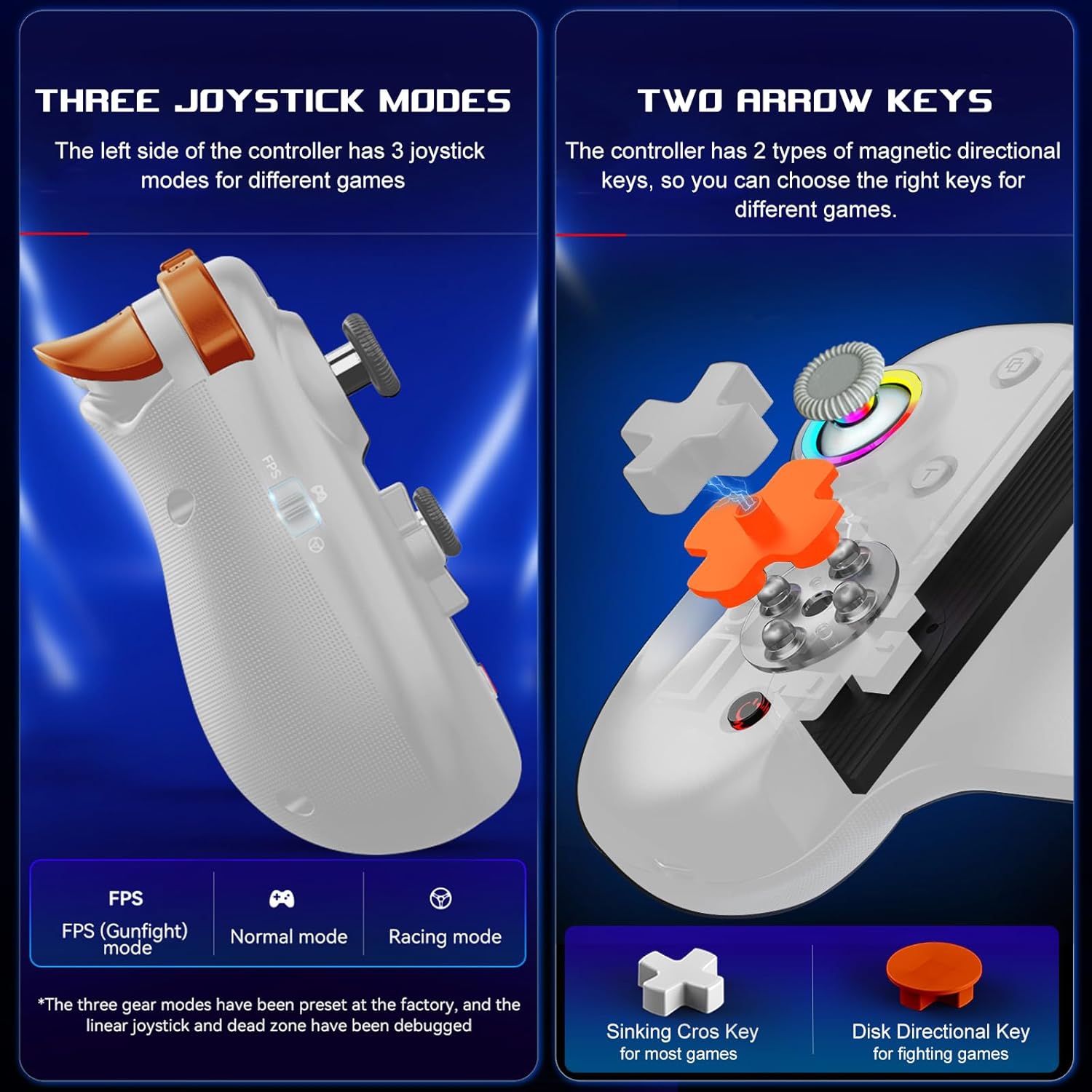
Image: Illustration of the three distinct joystick modes and the interchangeable magnetic arrow keys for varied gameplay.
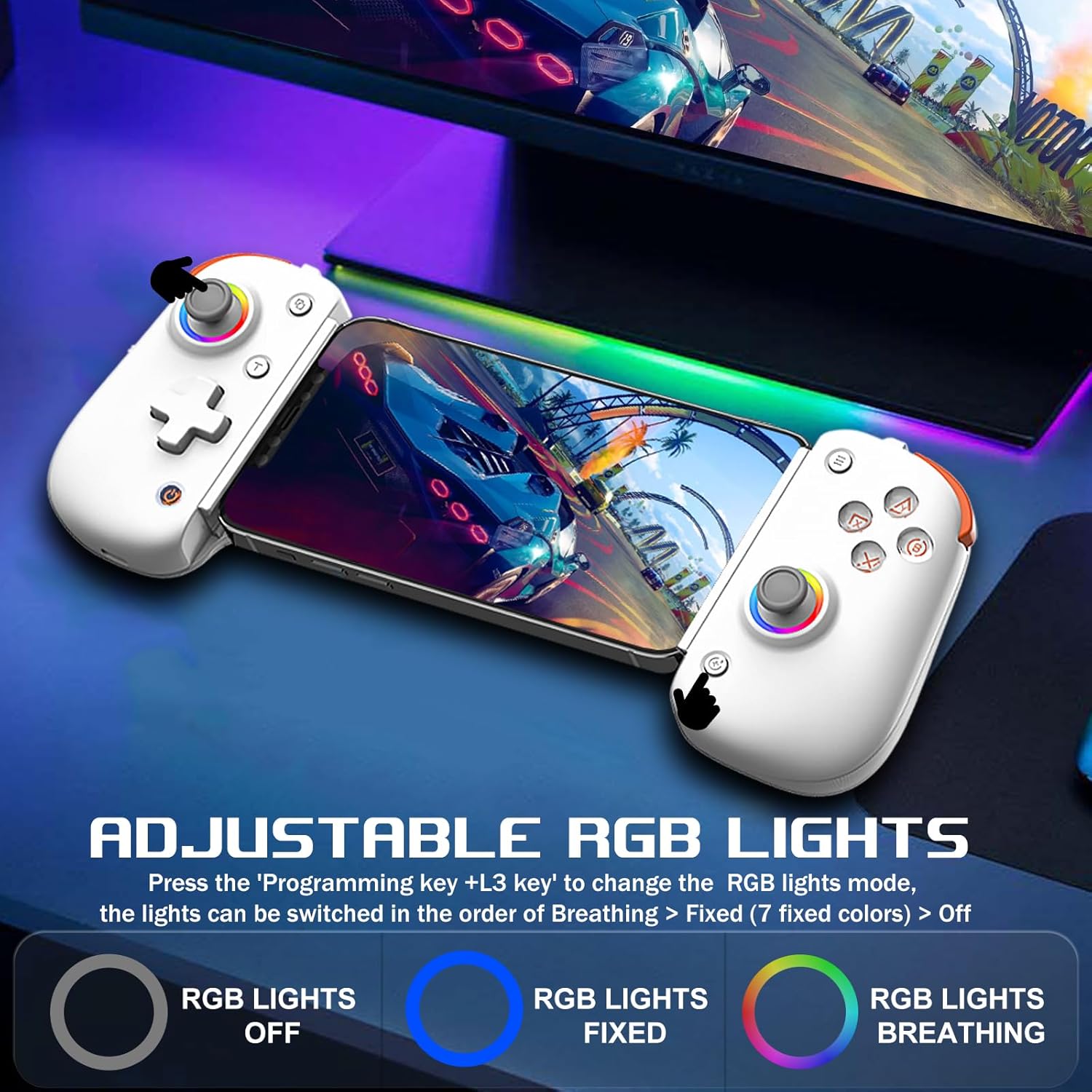
Image: Demonstrates the adjustable RGB lighting features of the controller, including different light modes.
Сумісність
The arVin D8 Pro Wireless Gamepad Controller offers broad compatibility:
- Операційні системи: iOS 13.0+, Android 6.0+, Windows 7/8/10/11.
- Пристрої: iPad/iPad mini/Air/Pro/iPhone/Macbook, Android phones/tablets (Galaxy Tab, Lenovo Tab, HUAWEI MatePad, Yoga Tab), PC/Laptop/Desktop, Nintendo Switch/Switch Lite/Switch OLED, PS3/PS4.
- Note on PS5: Compatible with PS5 for playing PS4 games only; does not support PS5 games.
- Винятки: Not compatible with Apple TV, iPod, Fire TV/TV Box.
1. Cloud Gaming Support
The controller is compatible with most cloud gaming services and platforms:
- Xbox Game Pass
- Nvidia GeForce зараз
- Амазон Луна
- Google Stadia
- Rainway
- Apple Arcade and MFi games
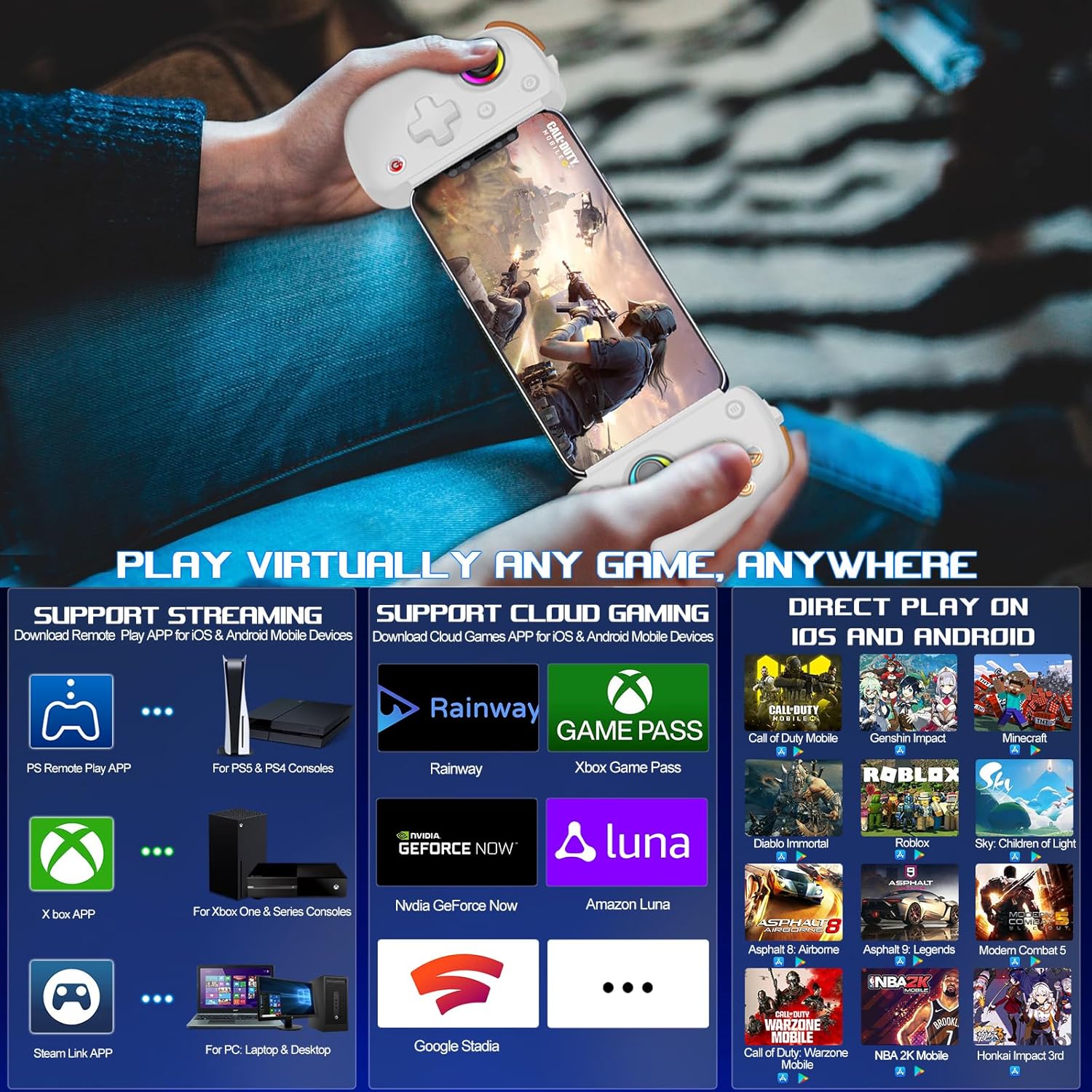
Image: Visual representation of the controller's support for popular cloud gaming platforms and direct play mobile titles.
2. Remote Play Support
Stream console games to your mobile device or tablet:
- PS Remote Play App: For PS5 and PS4 consoles.
- Xbox App: For Xbox One, Xbox Series S, and Xbox Series X consoles.
- Steam Link App: For PC/Laptop/Desktop.
Video: A demonstration of connecting the arVin D8 Pro controller for Xbox Remote Play, showing the setup process and gameplay.
3. Direct Play Games
The controller supports direct play for many popular mobile games, including:
- Call of Duty Mobile (CODM)
- Call of Duty: Warzone Mobile
- Genshin Impact
- Sky: Children of Light
- Minecraft
- Безсмертний Діабло
- Combat Modern 5
- Asphalt 9: Legends
- Asphalt 8: Airborne
- And many more controller-supported titles.
Технічне обслуговування
To ensure the longevity and optimal performance of your arVin D8 Pro controller, follow these maintenance guidelines:
- Прибирання: Use a soft, dry cloth to wipe the controller. Avoid using harsh chemicals, solvents, or abrasive cleaners.
- Зберігання: Зберігайте контролер у прохолодному, сухому місці, подалі від прямих сонячних променів та екстремальних температур.
- Догляд за акумулятором: Не піддавайте акумулятор впливу високих температур і не намагайтеся розібрати його. Регулярно заряджайте контролер, навіть якщо він не використовується, щоб підтримувати його в робочому стані.
- Обробка: Уникайте падіння контролера та сильних ударів.
Усунення несправностей
If you encounter issues with your arVin D8 Pro controller, please refer to the following common solutions:
- Контролер не вмикається: Ensure the controller is fully charged. Connect it to a power source and try again.
- Неможливо підключитися через Bluetooth:
- Ensure the controller is in the correct pairing mode for your device (e.g., 'RB' + 'HOME' for iOS/PC, 'X' + 'HOME' for Android Mode 2).
- Переконайтеся, що на вашому пристрої ввімкнено Bluetooth.
- Forget the device from your device's Bluetooth settings and attempt to pair again.
- Перезавантажте і контролер, і пристрій.
- Кнопки/джойстики не реагують:
- Переконайтеся, що контролер правильно підключено.
- Try calibrating the joysticks (refer to the full manual for specific calibration steps if needed).
- Test the controller with a different game or application to determine if the issue is game-specific.
- Затримки або відключення:
- Ensure your device is within range of the controller.
- Мінімізуйте перешкоди від інших бездротових пристроїв.
- For streaming, ensure a stable and strong Wi-Fi connection for both your device and the host PC/console.
- Vibration/Gyro Not Working on iOS/Android: These functions are not supported on iOS and Android devices due to system limitations.
Технічні характеристики
| Особливість | Деталь |
|---|---|
| Модель | D8 Pro |
| Підключення | Бездротовий (Bluetooth) |
| Сумісна ОС | iOS 13.0+, Android 6.0+, Windows 7/8/10/11 |
| Supported Device Length | 128-289 мм |
| Supported Device Thickness | До 13 мм |
| Ємність акумулятора | 600 мАг |
| Playtime (Full Charge) | До 15 годин |
| Тип джойстика | Джойстик із датчиком ефекту Холла |
| Тип тригера | Hall Linear Trigger |
| Кнопки макросів | M1/M2 (Programmable) |
| Турбо-швидкості | 8, 15, 25 shoots/s |
| Особливості | RGB Light, Dual Vibration (not iOS/Android), 6-Axis Gyroscope (not iOS/Android), ABXY Key-value Interchange, Axis Calibration |
| Вага товару | 12.8 унції |
| Розміри упаковки | 10.43 x 5.12 x 2.44 дюймів |
Гарантія та підтримка
arVin products are designed and manufactured to the highest quality standards. This product is covered by a limited warranty from the date of purchase. Please retain your proof of purchase for warranty claims.
For technical support, troubleshooting assistance, or warranty inquiries, please contact arVin customer service through the retailer's platform or visit the official arVin webсайт для контактної інформації.


