1. Вступ
Thank you for choosing the ATTACK SHARK Ajazz AK820 Mechanical Keyboard. This 75% TKL keyboard is designed for gaming and productivity, featuring hot-swappable switches, customizable RGB backlighting, and a convenient multi-function knob. This manual provides detailed instructions for setup, operation, maintenance, and troubleshooting to ensure optimal performance and longevity of your keyboard.
2. Ключові характеристики
- 75% розкладка (82 клавіші): Compact design retaining essential arrow and function keys, optimizing desk space. Features N-key rollover for simultaneous key presses.
- Multi-Function Metal Knob: Allows independent control of volume level and mute function. Compatible with Mac and Windows operating systems.
- Gasket Mounted Design: Coupled with a Flex-cut PC plate and 5 layers of sound insulation (Poron sandwich cotton, IXPE under-axis pad, PET premium sound pad, bottom cotton, bottom silicone) to maximally reduce noise and provide a softer, more elastic typing feel.
- Hot-Swappable Mechanical Sea Salt Switches: High-quality PCB supports 3/5-pin hot-swap, allowing easy switch replacement without soldering. Pre-lubed Sea Salt Linear switches offer a smooth and pleasing typing experience with a 50 million keystroke lifespan.
- RGB-підсвічування: South-facing LEDs with 1.6M RGB. Offers 20 lighting effects changeable via "FN+|" and customizable via driver software. Double-shot PBT keycaps provide superior shine-through.
3. Вміст упаковки
- ATTACK SHARK Ajazz AK820 Mechanical Keyboard
- Кабель USB-C
- 2-in-1 Keycap/Switch Puller

Image 1: The ATTACK SHARK Ajazz AK820 Mechanical Keyboard and its included USB-C cable.

Зображення 2: Оверview highlighting the 82-key layout and key features like Knob Design, Gasket Mount, PBT Keycaps, RGB, 75% Layout, and Hot Swap capability.
4. Посібник із налаштування
4.1 Підключення клавіатури
- Locate the USB-C port on the back or side of the keyboard.
- Підключіть один кінець наданого кабелю USB-C до клавіатури.
- Connect the other end of the USB-C cable to an available USB port on your computer (Laptop or PC).
- The keyboard is plug-and-play and should be automatically recognized by your operating system (Windows/Mac).

Image 3: The keyboard displaying its RGB backlighting, illustrating the 16.8 million colors and FN key combinations for controlling lighting modes.
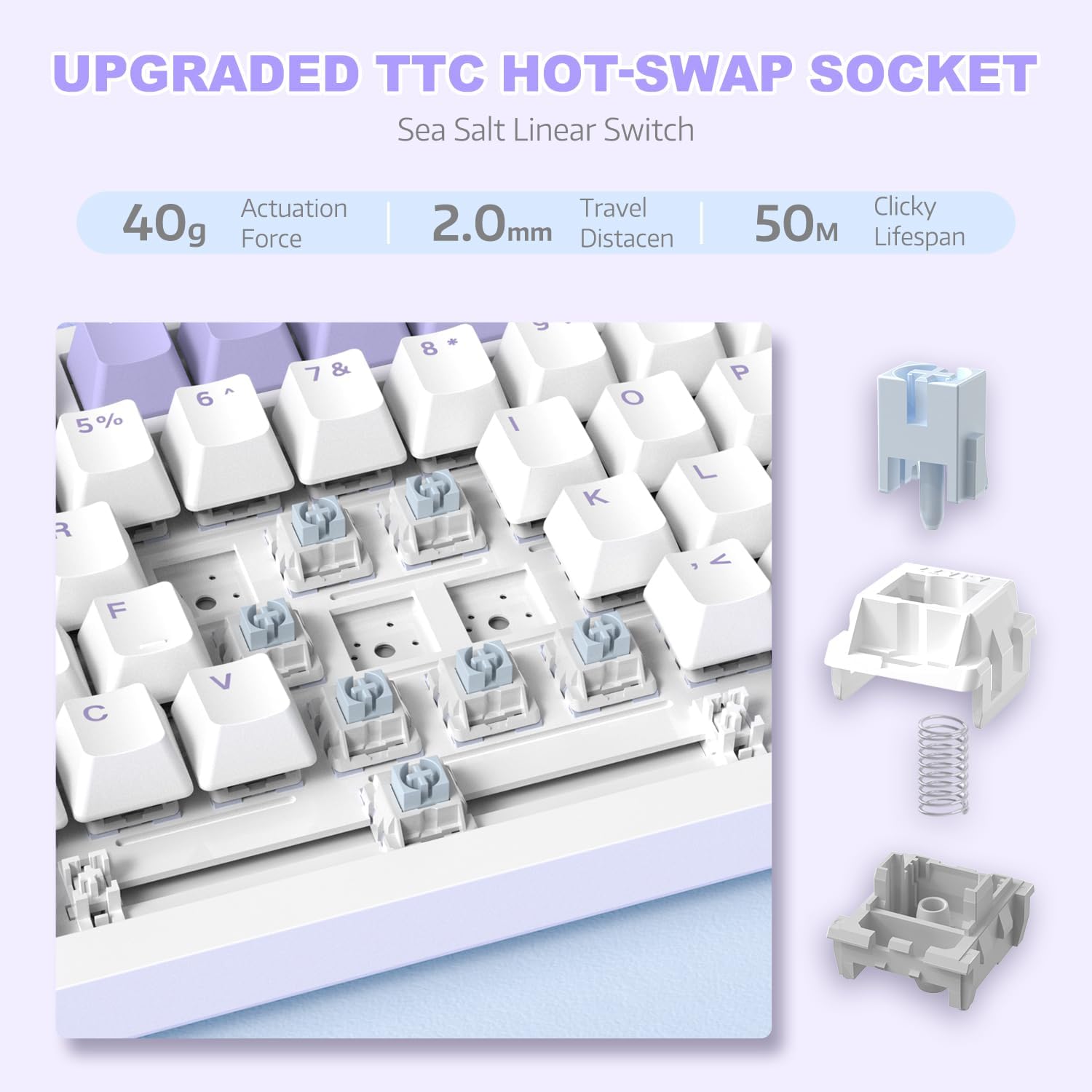
Зображення 4: Детальний view of the hot-swappable switch socket, demonstrating how switches can be easily removed and replaced.
5. Інструкція з експлуатації
5.1 Multi-Function Knob Control
The metal knob located on the top right of the keyboard provides convenient multimedia control:
- Turn Clockwise: Збільшити гучність.
- Turn Counter-clockwise: Зменшити гучність.
- Натиснути: Вимкнути/увімкнути звук.

Image 5: The multimedia knob, illustrating its functions for adjusting volume and muting audio.
5.2 Керування RGB-підсвічуванням
The keyboard features vibrant RGB backlighting with multiple effects. Use the following key combinations to control the lighting:
- FN + | (Backslash): Перемикайтеся між 20 різними світловими ефектами.
- FN + X: Turn RGB backlighting ON/OFF.
- Refer to the included quick guide for additional lighting customization options or download the dedicated driver software for advanced control.
5.3 Гаряча заміна перемикачів та ковпачків клавіш
The AK820 supports hot-swapping, allowing you to change mechanical switches and keycaps without soldering.
- Зняття ковпачків клавіш: Use the keycap puller tool to gently grip the keycap and pull upwards until it detaches from the switch.
- Видалення перемикачів: Use the switch puller (the other end of the 2-in-1 tool) to grip the top and bottom clips of the switch. Gently pull upwards until the switch detaches from the PCB.
- Встановлення вимикачів: Align the pins of the new 3-pin or 5-pin mechanical switch with the holes on the PCB. Press down firmly until the switch clicks into place. Ensure pins are not bent.
- Встановлення ковпачків клавіш: Align the cross-stem of the keycap with the stem of the switch and press down firmly until it is seated.

Image 6: Highlighting the durable PBT keycaps, known for their oil and wear resistance.
5.4 Сумісність з операційними системами
The keyboard is compatible with both Windows and Mac operating systems. No special drivers are typically required for basic functionality.

Image 7: Visual representation of the keyboard's compatibility with both Mac and Windows operating systems.
6. Технічне обслуговування
6.1 Очищення клавіатури
- Від’єднайте клавіатуру від комп’ютера перед чищенням.
- Використовуйте балончик зі стисненим повітрям, щоб здути пил та сміття між клавішами.
- Для очищення поверхні використовуйте м’яку тканину без ворсу, злегка промокнутуampводою або м’яким миючим розчином. Уникайте надмірної вологості.
- Не розпилюйте мийні розчини безпосередньо на клавіатуру.
6.2 Догляд за клавішами та перемикачами
- When removing keycaps or switches, do so gently to avoid damaging the components.
- Store spare keycaps and switches in a clean, dry place.

Image 8: An exploded diagram illustrating the multi-layer noise reduction installation, including PORON sandwich cotton, IXPE switch pads, PET voice actor pdd, bottom cotton, and bottom silicone.
7. Вирішення проблем
7.1 Клавіатура не реагує
- Переконайтеся, що кабель USB-C надійно підключено як до клавіатури, так і до комп’ютера.
- Спробуйте підключити клавіатуру до іншого USB-порту на комп'ютері.
- Перевірте клавіатуру на іншому комп'ютері, щоб виключити проблему, пов'язану з певним комп'ютером.
- Перезавантажте комп'ютер.
7.2 RGB Backlighting Not Working/Incorrect
- Прес FN + X to ensure the RGB is turned on.
- Прес FN + | (Backslash) to cycle through different lighting modes.
- If using custom settings, ensure the driver software is installed and configured correctly.
7.3 Keys Not Registering (Anti-Ghosting)
The AK820 features N-key rollover (NKRO) to prevent ghosting. If specific keys are not registering:
- Ensure the keycap and switch are properly seated. Gently press down on the keycap to ensure it's fully attached.
- If a specific switch is faulty, use the hot-swap feature to replace it with a new one.

Image 9: Illustration of the 82-key anti-ghosting feature, demonstrating the ability to register multiple simultaneous key presses.
7.4 Video Demonstration: AK820 Keyboard Overview
Відео 1: Посадовець надview of the AK820 75% Wired RGB Gasket Mechanical Keyboard, demonstrating its features including the volume knob, hot-swappable switches, and RGB lighting effects.
8. Технічні характеристики
| Особливість | Деталь |
|---|---|
| Номер моделі | AK820 |
| Розміри продукту | 12.87 x 5.35 x 1.57 дюймів |
| Вага товару | 2.05 фунта |
| Виробник | АТАКА АКУЛИ |
| Технологія підключення | Дротовий (USB-C) |
| Опис клавіатури | Ігри |
| Кількість клавіш | 82 |
| Тип перемикача | Sea Salt Linear Switch (Hot-Swappable) |
| Матеріал кепки | PBT |
| Підсвічування | RGB (South-facing LEDs) |
| Особливості | 5 Layers of sound insulation cotton, CNC Metal Knob, Hot-Swappable |
| Сумісні пристрої | Laptop, PC (Windows, Mac) |
9. Гарантія та підтримка
For warranty information and technical support, please refer to the official ATTACK SHARK webсайт або зверніться безпосередньо до служби підтримки клієнтів. Зберігайте чек про покупку як підтвердження покупки для будь-яких гарантійних претензій.
Виробник: АТАКА АКУЛИ
Дата першої доступності: 15 грудня 2023 р


