1. Продукт закінчивсяview
The VTech ES2050 is a DECT cordless phone designed for home and office use, featuring an integrated digital answering machine, call blocking capabilities, and enhanced audio functions. This manual provides detailed instructions for setting up, operating, and maintaining your phone.

The VTech ES2050 DECT Cordless Phone with its base unit, showcasing the handset's backlit display and keypad, and the base unit's answering machine controls.

The VTech ES2050 DECT Cordless Phone positioned in a contemporary living space, highlighting its sleek design and integration into a home environment.

Illustration of the VTech ES2050's Nuisance Call Blocker feature, showing how it helps prevent unwanted calls from ringing through. Up to 100 numbers can be blacklisted.

The VTech ES2050's Digital Answering System, capable of recording up to 30 minutes of messages, with a digital message counter on the base unit.

Depiction of the VTech ES2050's easy one-touch features, including Mute/Alarm, adjustable ring volume and melodies, and a high-quality handsfree speakerphone.

Visual representation of the VTech ES2050's Volume Booster function, which amplifies incoming sounds for enhanced clarity and loudness, beneficial for hearing-impaired users.

The VTech ES2050 handset with its backlit display and keypad illuminated, demonstrating improved visibility in low-light conditions.

A composite image illustrating key features: 100 name and number phonebook, calling numbers displayed with 20 call list records, 10 last number redial, and up to 18 hours talk time / 250 hours standby time.
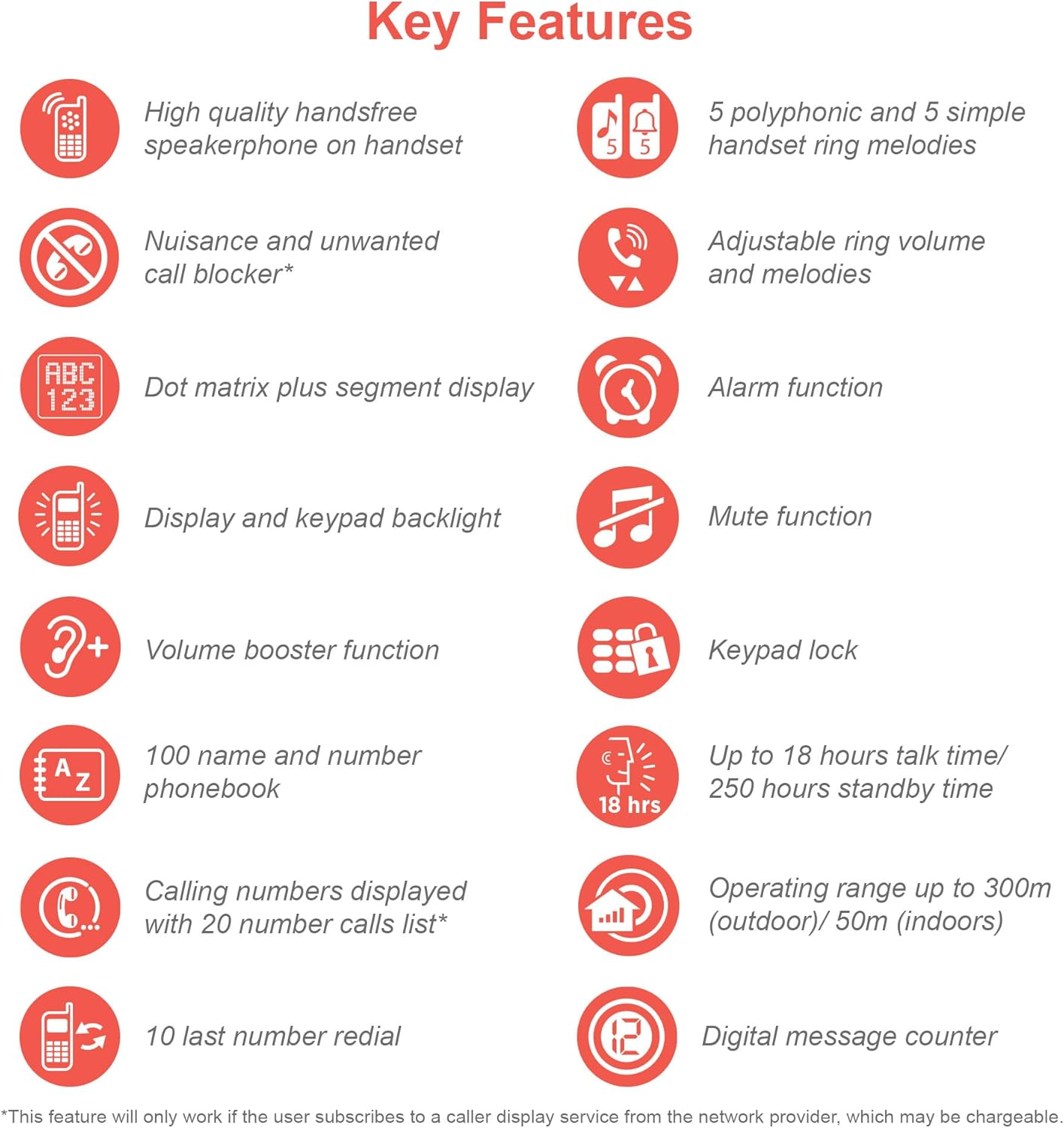
An infographic summarizing the VTech ES2050's key features, including speakerphone, call blocker, polyphonic ringtones, alarm, mute, keypad lock, volume booster, phonebook, call list, redial, talk time, operating range, and digital message counter.
Ключові характеристики:
- Цифровий автовідповідач: 30 minutes recording time.
- Nuisance Call Blocker: Block up to 100 blacklisted numbers.
- Volume Booster: Amplifies incoming sounds for enhanced clarity.
- Тривалий термін служби батареї: Up to 18 hours talk time / 250 hours standby time.
- Дисплей і клавіатура з підсвічуванням: легко viewпри тьмяному освітленні.
- Handsfree Speakerphone: High-quality speakerphone on handset.
- Телефонна книга: 100 name and number capacity.
- Швидкий набір: 3 speed dial numbers.
- Режим ECO: For reduced power consumption.
- Ідентифікатор абонента / Очікування виклику: Stores 20 records.
- Повторний набір: 10 last number redial.
- Функція сигналізації: Integrated alarm.
- Функція відключення звуку: For privacy during calls.
- Блокування клавіатури: Prevents accidental dialing.
2. Що в коробці
Перш ніж почати, переконайтеся, що всі компоненти присутні:
- 1 базова одиниця
- 1 бездротова трубка
- 1 Charger (for handset)
- 1 Battery Pack (2 AAA batteries included)
- Шнур телефонної лінії
- Короткий посібник з початку роботи (докладнішу інформацію див. у цьому посібнику)
3. Посібник із налаштування
3.1. Встановлення та зарядка акумулятора
- Locate the battery compartment cover on the back of the handset. Slide it open.
- Надійно підключіть штекер акумуляторного блоку до гнізда всередині відсіку.
- Place the 2 AAA batteries (included) into the compartment, ensuring correct polarity (+ and -).
- Замініть кришку батарейного відсіку.
- Place the handset on the base unit or charger. The charging indicator light on the handset should illuminate.
- Перед першим використанням дайте телефону зарядитися щонайменше 16 годин, щоб забезпечити повну ємність акумулятора.
3.2. Підключення базового блоку
- Connect one end of the telephone line cord to the TEL LINE jack on the back of the base unit.
- Підключіть інший кінець телефонного шнура до телефонної розетки.
- Підключіть менший кінець адаптера живлення до роз'єму POWER на задній панелі базового пристрою.
- Підключіть більший кінець адаптера живлення до стандартної електричної розетки.
- Ensure all cables are securely connected and routed to prevent tripping hazards.
3.3. Початкове налаштування (дата та час)
After the handset is charged, you will need to set the date and time. Follow the on-screen prompts on the handset display. If prompted multiple times, ensure each step is confirmed before proceeding.
- Натисніть МЕНЮ / Добре кнопку.
- Перейдіть до Дата й час за допомогою клавіш зі стрілками.
- Прес МЕНЮ / Добре вибрати.
- Введіть поточну дату та час за допомогою клавіатури.
- Прес МЕНЮ / Добре зберегти.
4. Інструкція з експлуатації
4.1. Здійснення та отримання дзвінків
- Щоб зателефонувати: Візьміть слухавку або натисніть ПОГОВОРИТИ button. Dial the number.
- Щоб прийняти дзвінок: Коли дзвонить телефон, підніміть слухавку або натисніть ПОГОВОРИТИ кнопку.
- Щоб завершити дзвінок: Поставте трубку назад на базу/зарядний пристрій або натисніть КІНЕЦЬ кнопку.
4.2. Використання гучного зв'язку
Під час дзвінка натисніть СПІКЕР button to activate the handsfree speakerphone. Press it again to switch back to the handset earpiece.
4.3. Цифровий автовідповідач
- Відтворення повідомлень: На базі натисніть ГРАТИ/СТОП.
- Видалення повідомлень: Під час відтворення повідомлення натисніть ВИДАЛИТИ на базовому блоці.
- Запис вихідного повідомлення (OGM): Refer to the handset menu for OGM recording options.
4.4. Nuisance Call Blocker
This feature allows you to block unwanted calls. You can add numbers to a blacklist.
- To Block a Number from Call History: Access the Call History, select the number, and choose the "Block" option.
- To Manually Add a Number to Blacklist: Navigate to the Call Blocker menu in the handset settings and add the number.
- The phone can store up to 100 blacklisted numbers.
4.5. Volume Booster
до amplify the incoming sound during a call, press the BOOST button (often marked with a speaker icon or "+") on the handset. Press it again to deactivate.
4.6. Телефонна книга та швидкий набір
- Додавання контактів: Access the Phonebook menu, select "Add New Entry", and enter the name and number.
- Набір номера з телефонної книги: Натисніть ТЕЛЕФОННА КНИГА button, scroll to the desired contact, and press ПОГОВОРИТИ.
- Швидкий набір: Assign frequently called numbers to speed dial keys (e.g., 1, 2, 3). Refer to the handset menu for speed dial setup.
4.7. Режим ECO
The phone automatically enters ECO mode when the handset is close to the base unit, reducing power consumption and transmission power. This mode is indicated by an ECO icon on the display.
5. Технічне обслуговування
- Прибирання: Протріть телефон і базу м’якою губкоюamp тканина. Не використовуйте абразивні засоби чи розчинники.
- Догляд за акумулятором: For optimal battery life, avoid overcharging by leaving the handset off the charger for extended periods once fully charged. If the phone will not be used for a long time, remove the batteries.
- Розташування: Розмістіть базовий блок у центральному місці, подалі від інших електронних пристроїв, які можуть створювати перешкоди.
6. Вирішення проблем
If you experience issues with your VTech ES2050 phone, try the following solutions:
| проблема | Можливе рішення |
|---|---|
| Немає гудка / Неможливо здійснювати або приймати дзвінки. |
|
| Погана якість звуку / Статичний шум. |
|
| Автовідповідач не записує повідомлення. |
|
| Handset display is blank or unresponsive. |
|
| Difficulty with menu navigation or settings. |
|
7. Технічні характеристики
| Особливість | Деталь |
|---|---|
| Номер моделі | ES2050 |
| Тип телефону | Бездротовий DECT |
| Тип автовідповідача | цифровий |
| Ємність запису | 30 хвилин |
| Час розмови по телефону | До 18 годин |
| Час очікування телефону | До 250 годин |
| Акумулятори | 2 батарейки AAA (входять в комплект) |
| Джерело живлення | Працює від батареї |
| Dialler Type | Одна клавіатура |
| Сумісні пристрої | Standard Landline Telephone Networks |
| колір | чорний |
| Виробник | VTech |
| Країна походження | Китай |
8. Гарантія та підтримка
Щоб отримати інформацію про гарантію та технічну підтримку, зверніться до офіційного представника VTech. website or contact VTech customer service. Keep your purchase receipt as proof of purchase.
Виробник: VTech
For the most up-to-date support resources, visit the VTech support page or refer to the contact information provided with your product packaging.


