1. Вступ
This manual provides essential information for the safe and efficient operation of your DOUGH Spectrum One 27-Inch Gaming Monitor. Please read this manual thoroughly before using the product and retain it for future reference.
2. Інформація про безпеку
- Переконайтеся, що монітор встановлено на стійкій рівній поверхні, щоб запобігти випадковому падінню.
- Не піддавайте монітор впливу дощу, вологи або екстремальних температур.
- Використовуйте лише адаптер живлення, що постачається з монітором.
- Уникайте блокування вентиляційних отворів, щоб запобігти перегріву.
- Не намагайтеся обслуговувати монітор самостійно. Зверніться до кваліфікованого персоналу для проведення будь-яких робіт з обслуговування.
- Від’єднуйте кабель живлення від розетки під час грози або якщо пристрій не використовується протягом тривалого часу.
3. Вміст упаковки
Перевірте наявність усіх компонентів у вашій упаковці:
- DOUGH Spectrum One 27-Inch Gaming Monitor
- Адаптер живлення та кабель
- Кабель DisplayPort
- Кабель USB-C
- Короткий посібник (не входить до цього посібника)

Зображення 3.1: спереду view of the DOUGH Spectrum One monitor.
4. Налаштування
4.1 Фізичне налаштування
The DOUGH Spectrum One monitor can be used with its optional stand (if purchased) or a VESA-compatible mount (100x100mm). This manual focuses on the monitor unit itself.
- Розпакування: Обережно вийміть монітор та всі аксесуари з упаковки.
- Розміщення: Position the monitor on a stable, flat surface. Ensure adequate space for ventilation around the monitor.
- З’єднувальні кабелі:
- Підключіть кабель живлення до монітора, а потім до розетки.
- Connect your computer or gaming console to the monitor using either an HDMI 2.1 cable, DisplayPort 1.4 cable, or USB-C cable.
- For USB hub functionality, connect a USB-B to USB-A cable from your computer to the monitor's upstream USB-B port.
- For USB-C docking, connect a compatible laptop to the monitor's USB-C port. This single connection can provide video, data, and up to 100W of power delivery.
- Optional: Connect headphones to the 3.5mm audio jack.

Зображення 4.1: Ззаду view of the monitor showing available ports including HDMI 2.1, DisplayPort 1.4, USB Type-C (100W), USB Type-B, USB Type-A, and 3.5mm AUX.
4.2 Початкове ввімкнення
- Ensure all necessary cables are securely connected.
- Натисніть кнопку живлення на моніторі. Індикатор живлення засвітиться.
- If no image appears, ensure your input source (computer/console) is powered on and correctly configured to output to the monitor.
5. Інструкція з експлуатації
5.1 Навігація по екранному меню (OSD)
The monitor features an On-Screen Display (OSD) menu for adjusting various settings. Use the physical buttons or joystick (if present) on the monitor to navigate the OSD. Typically, a central button or joystick allows for menu access and selection, while directional movements adjust values or navigate options.
5.2 Налаштування зображення
The DOUGH Spectrum One monitor offers advanced picture settings for optimal visual experience:
- роздільна здатність: Supports 4K UHD (3840 x 2160 pixels).
- Частота оновлення: Up to 144Hz for smooth motion.
- Точність кольору: Factory calibrated for Delta E 0.6 average accuracy, covering 98% DCI-P3 and 100% sRGB color gamuts.
- HDR: HDR10 support with a 10 million:1 dynamic contrast ratio for enhanced highlights and deep shadows.
- Яскравість: 450 nits (sustained), 750 nits (peak).

Зображення 5.1: закінченоview of the monitor's core display technologies and features.
5.3 Ігрові функції
The monitor includes several features designed to enhance your gaming experience:
- Технологія адаптивної синхронізації: Supports AMD FreeSync Premium Pro, NVIDIA G-Sync, and VESA Adaptive-Sync compatibility to reduce screen tearing and stuttering by synchronizing the monitor's refresh rate with the graphics card's frame rate.
- Pixel-Perfect Upscaling: Uses integer-ratio pixel duplication for low-resolution input signals, preserving the look of pixel art and keeping retro games crisp.
- Crosshair Overlay: An on-screen crosshair can be enabled to assist aim in games.
- Frame Rate Counter: Displays the current frame rate on screen to monitor system performance.
- Blur Busters Presets: Pre-tuned settings for optimal motion clarity.

Image 5.2: The monitor displaying a high-performance gaming scene.
5.4 Підключення
Монітор пропонує різноманітні варіанти підключення:
- HDMI 2.1 (2 шт.): For high-bandwidth connections to compatible devices, supporting 4K 144Hz.
- DisplayPort 1.4 (x1): Another high-bandwidth option for video input.
- USB-C 3.2 Gen 2 (x1): Supports video, data transfer (up to 10 Gb/s), and up to 100W power delivery over a single cable for compatible laptops.
- USB-A (x2 side-facing, x1 rear): Для підключення периферійних пристроїв.
- 3.5 мм аудіороз’єм: Для підключення навушників або зовнішніх динаміків.
- Режим розділеного екрана: The display can show video from two separate sources simultaneously.
6. Технічне обслуговування
6.1 Очищення екрана
Щоб очистити екран монітора:
- Вимкніть монітор і від'єднайте кабель живлення.
- Обережно протріть екран м’якою тканиною без ворсу.
- Для стійких плям злегка протрітьampen the cloth with water or a screen-cleaning solution specifically designed for monitors. Do not spray liquid directly onto the screen.
- Уникайте використання абразивних засобів для чищення, спирту або розчинів на основі аміаку, оскільки вони можуть пошкодити поверхню екрана.
6.2 Очищення Casing
Протріть монітор casinм’якою сухою тканиною. За потреби використовуйте злегкаamp тканина. Не використовуйте агресивні хімікати.
7. Вирішення проблем
This section addresses common issues you might encounter with your DOUGH Spectrum One monitor.
| проблема | Можлива причина / рішення |
|---|---|
| Немає зображення на екрані / Світлодіод живлення не горить | Ensure the power cable is securely connected to both the monitor and the power outlet. Check if the power outlet is functional. Press the monitor's power button. |
| Немає зображення / повідомлення «Немає сигналу» | Verify the video cable (HDMI, DisplayPort, USB-C) is securely connected to both the monitor and your computer/console. Ensure the correct input source is selected in the monitor's OSD. Check if the computer/console is powered on and outputting video. |
| Monitor takes long to wake from sleep / Occasional black screen when changing resolution | This can sometimes be resolved by updating the monitor's firmware. Firmware updates typically require a Windows machine. Refer to the manufacturer's support webсайт для отримання інструкцій та останньої версії прошивки. |
| Тьмяний дисплей | Adjust brightness and contrast settings in the OSD menu. Ensure HDR settings are correctly configured for your content and operating system. |
| Розриви або заїкання екрана | Ensure Adaptive Sync (FreeSync Premium Pro, G-Sync compatible) is enabled on both the monitor and your graphics card settings. Verify your graphics drivers are up to date. |
| Power supply not compatible with region | Ensure you have received the correct power supply for your region. Contact customer support if the provided power supply is incorrect. |
8. Технічні характеристики
| Особливість | Специфікація |
|---|---|
| Номер моделі | ES07D03 |
| Розмір екрана | 27 дюймів |
| Тип панелі | IPS |
| роздільна здатність | 3840 x 2160 пікселів (4K UHD) |
| Частота оновлення | 144 Гц |
| Час відгуку | 1 мс |
| Співвідношення сторін | 16:9 |
| Яскравість зображення | 450 nits (sustained), 750 Nits (Peak) Candela |
| Підтримка HDR | HDR10 |
| Колірна гамма | 98% DCI-P3, 100% sRGB |
| Адаптивна синхронізація | AMD FreeSync Premium Pro, NVIDIA G-Sync Compatible, VESA Adaptive-Sync |
| Підключення | 2x HDMI 2.1, 1x DisplayPort 1.4, 1x USB-C 3.2 Gen 2 (100W PD), 1x USB-B, 2x USB-A (side), 1x USB-A (rear), 1x 3.5mm Audio Jack |
| Розміри продукту | 6 x 27.5 x 17.5 дюймів |
| Вага товару | 17.76 фунта |
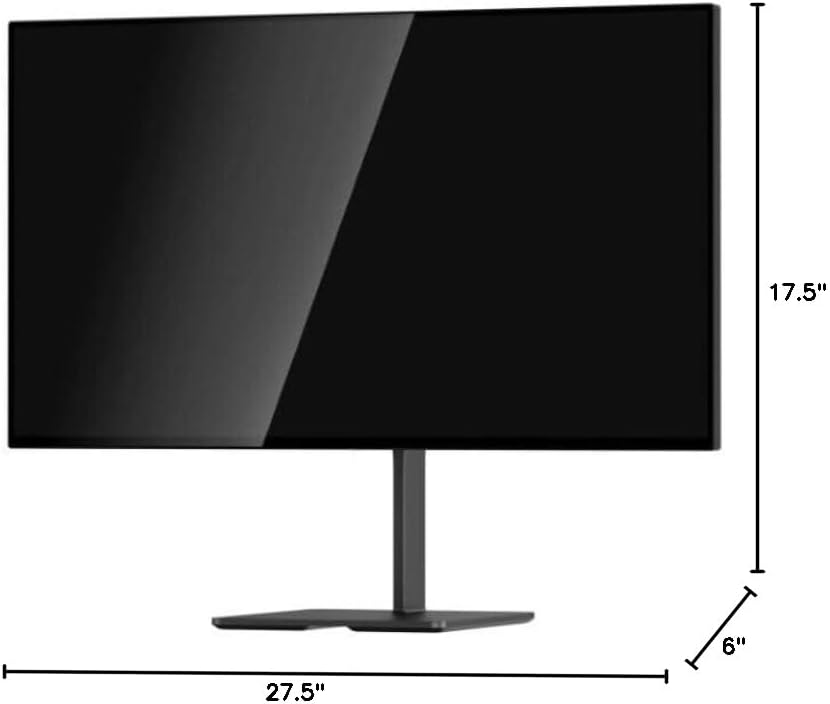
Image 8.1: Monitor dimensions.
9. Гарантія та підтримка
For warranty information and technical support, please refer to the official DOUGH webсайт або зверніться безпосередньо до служби підтримки клієнтів. Зберігайте чек про покупку як підтвердження покупки.
9.1 Coating Comparison
The DOUGH Spectrum One monitor is available in different screen finishes, including Matte, Glossy, and Gorilla Glass. Each finish offers distinct visual characteristics regarding reflections and clarity.
Video 9.1: This video demonstrates the visual differences between Matte, Glossy, and Gorilla Glass screen coatings on the Spectrum One monitor, particularly how they handle reflections from a light source.

Image 9.1: Visual comparison of Matte, Glossy, and Gorilla Glass screen coatings, illustrating how reflections appear on each surface.


