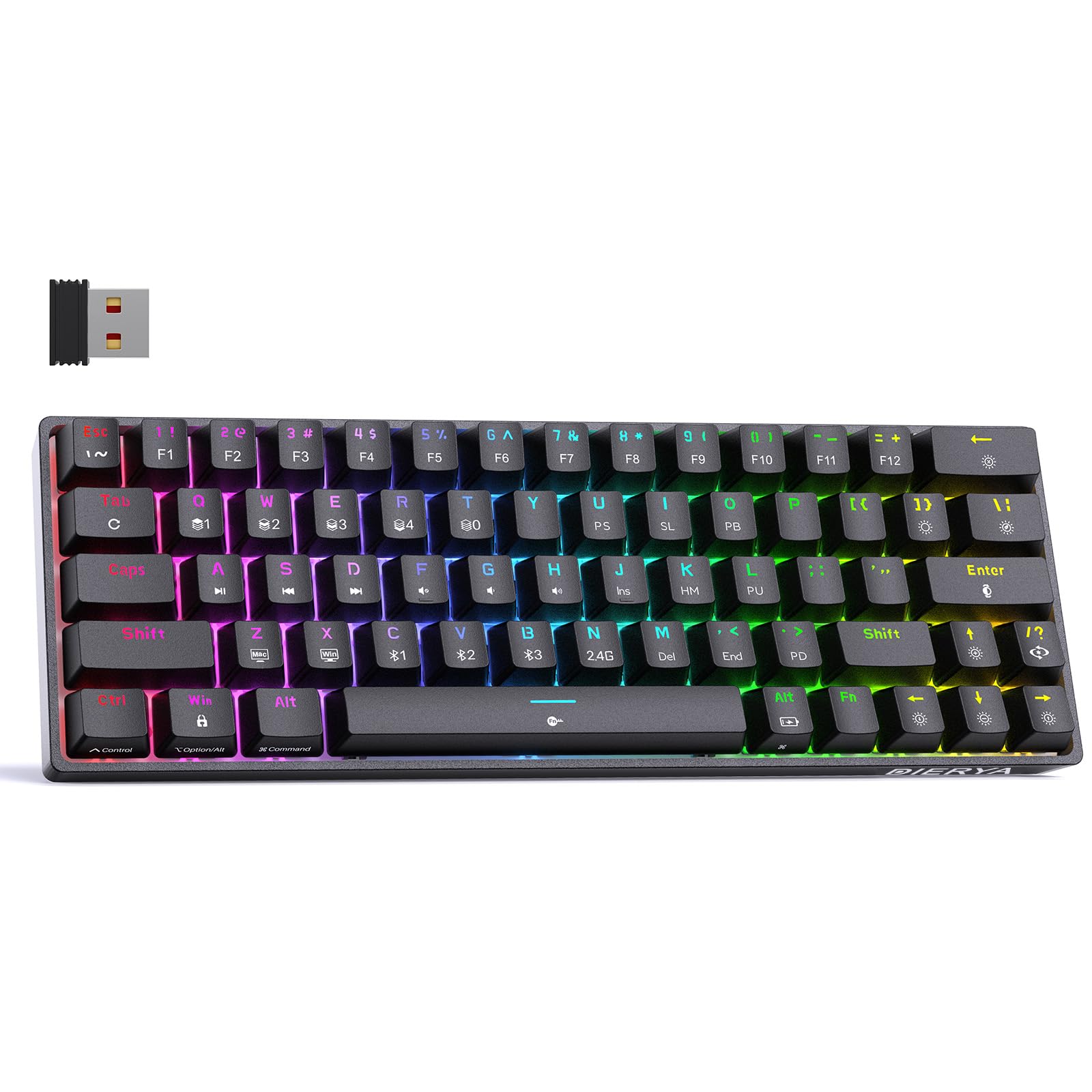
Thank you for choosing the DIERYA DK63 60% Wireless Mechanical Gaming Keyboard. This compact 63-key keyboard offers versatile connectivity options, vibrant RGB backlighting, and durable mechanical switches for an enhanced typing and gaming experience. This manual provides detailed instructions to help you set up, operate, and maintain your keyboard.
Вміст упаковки
DIERYA DK63 Wireless Mechanical Keyboard (1)
2.4G Receiver (hidden in the fuselage) (1)
Знімач ключів (1)
USB-кабель (1)
Посібник користувача (1)
Продукт закінченийview
The DIERYA DK63 is a compact 60% mechanical keyboard designed for efficiency and performance. It features 63 keys, including directional keys, and utilizes an "FN" key for full functionality, maximizing desktop space. The keyboard is equipped with Blue Switches, providing tactile feedback and a distinct click sound, ideal for typists. It supports three connection modes: 2.4G wireless, Bluetooth 5.0, and wired USB-C, allowing seamless switching between various devices. A high-capacity 3000mAh battery ensures extended usage, and the rich RGB dynamic lighting system offers 18 modes and 16.8 million customizable colors.
Image: The DIERYA DK63 keyboard showcasinзавдяки компактному 60% компонування та яскравому RGB-підсвічуванню.
Інструкції з налаштування
1. Провідне підключення
Connect the provided USB-C cable to the keyboard's USB-C port and the other end to your computer's USB port. The keyboard will automatically connect and begin charging.
Image: Close-up of the keyboard's USB-C port and the included Type-C data cable for wired connection and charging.
2. Бездротове підключення 2.4G
Locate the 2.4G USB receiver, typically stored in a compartment on the underside of the keyboard.
Підключіть приймач 2.4G до вільного USB-порту на вашому комп'ютері.
Flip the connection switch on the keyboard to the "2.4G" position.
Прес FN + N. The 2.4G indicator light will illuminate, indicating a successful connection.
Image: The underside of the keyboard showing the 2.4G dongle storage area and the connection mode switch.
Video: DIERYA DK63 Operation Guide, demonstrating 2.4G and Bluetooth connection steps, FN key usage, and RGB lighting adjustments.
3. Підключення Bluetooth
Flip the connection switch on the keyboard to the "Bluetooth" position.
На вашому пристрої (комп’ютері, планшеті, смартфоні) увімкніть Bluetooth та здійсніть пошук доступних пристроїв.
The keyboard will appear as "DIERYA DK63-1", "DIERYA DK63-2", or "DIERYA DK63-3". Select one to pair.
To switch between Bluetooth channels (BT1, BT2, BT3), press FN + C, FN + V, або FN + B відповідно.
Інструкція з експлуатації
FN Key Usage
The FN key is essential for accessing secondary functions on the compact DK63 keyboard. Hold down the FN key and press the desired key to activate its secondary function.
FN + Z/X: Switch between Mac OS and Windows system layouts.
FN + пробіл: Lock/Unlock the keyboard. The FN key will flash red when locked.
FN + Tab: Hold to reset the keyboard to factory settings (keyboard will flash to indicate reset).
Керування RGB-підсвічуванням
The DK63 keyboard features 18 dynamic RGB lighting modes and 16.8 million colors. Use the following key combinations to adjust the lighting:
FN + Backspace: Turn RGB lights On/Off.
FN + [ ]: Switch custom lighting effects (requires driver software for full customization).
FN + Enter: Change lighting color.
FN + /?: Switch between different lighting modes.
FN + стрілка вгору: Збільшення яскравості підсвічування.
FN + стрілка вниз: Зменшення яскравості підсвічування.
FN + стрілка вправо: Speed up lighting effect.
FN + стрілка вліво: Slow down lighting effect.
Image: The keyboard displaying various RGB lighting effects and key combinations for adjusting them.
Video: DIERYA DK63 Operation Guide, demonstrating 2.4G and Bluetooth connection steps, FN key usage, and RGB lighting adjustments.
Технічне обслуговування
To ensure the longevity and optimal performance of your DIERYA DK63 keyboard, follow these maintenance guidelines:
Прибирання: Злегка протріть м’якою тканиною без ворсу dampened with water or a mild cleaning solution to wipe the keycaps and keyboard surface. Avoid excessive moisture. For deeper cleaning, use the provided keycap puller to remove keycaps and clean underneath with compressed air.
Зберігання: Зберігайте клавіатуру в прохолодному, сухому місці, подалі від прямих сонячних променів та екстремальних температур.
Догляд за акумулятором: To prolong battery life, avoid fully discharging the keyboard frequently. Charge it when the battery reminder indicates low power.
Image: The DIERYA DK63 keyboard with a keycap puller, illustrating how to remove keycaps for cleaning or switch replacement.
Усунення несправностей
Випуск
Можливе рішення
Клавіатура не підключається через 2.4G.
Ensure the 2.4G receiver is securely plugged into a USB port and the keyboard switch is set to "2.4G". Press FN + N to re-establish connection.
Проблеми з підключенням Bluetooth.
Ensure the keyboard switch is set to "Bluetooth". On your device, forget the keyboard and attempt to re-pair. Try switching Bluetooth channels using FN + C/V/B. Ensure the keyboard is charged.
RGB-підсвічування не працює або зависає.
Прес FN + Backspace to toggle lights. Try switching lighting modes with FN + /?. If issues persist, perform a factory reset by holding FN + Tab.
Клавіші не реагують.
Check if the keyboard is locked (FN + пробіл). Ensure the correct system layout (Windows/Mac) is selected (FN + Z/X). Recharge the battery if in wireless mode. Try a wired connection.
Технічні характеристики
Номер моделі: T63
Макет: 60% (63-keys)
Тип перемикача: Blue Switch (Tactile & Clicky)
Підключення: 2.4GHZ Wireless, Bluetooth 5.0, USB-C Wired
Ємність батареї: 3000 мАг
RGB-підсвічування: 18 modes, 16.8 million colors
Сумісність: Windows 11/10/8/7/XP, Mac OS, Vista, Linux
Розміри продукту: 11.53 см (Д) x 3.98 см (Ш) x 1.65 см (В)
Вага товару: 1.41 фунта
Image: Visual representation of the DIERYA DK63's ultra-compact 63-key layout and dimensions.
Video: DIERYA DK63 Switch Sound Comparison, demonstrating the sound profiles of Red (linear) and Blue (clicky) switches.
Гарантія та підтримка
DIERYA is committed to your satisfaction. If you encounter any issues with your DK63 keyboard, please do not hesitate to contact us. Our customer support team is available to assist you with troubleshooting, warranty claims, and any product-related inquiries.
Щоб отримати підтримку, відвідайте DIERYA Store on Amazon або зверніться до контактної інформації, наданої під час покупки.