1. Вступ
This manual provides comprehensive instructions for the operation and maintenance of your OBSBOT Tail Series Smart Remote Controller. This device is designed to enhance your control over compatible OBSBOT Tail series cameras, including Tail 2 and Tail Air, offering precise Pan-Tilt-Zoom (PTZ) functionality and other advanced features.
2. Продукт закінчивсяview
The OBSBOT Tail Series Smart Remote Controller features an intuitive layout for seamless interaction with your camera. Below is a visual guide to its components and controls.

Малюнок 2.1: Спереду view of the OBSBOT Tail Series Smart Remote Controller.
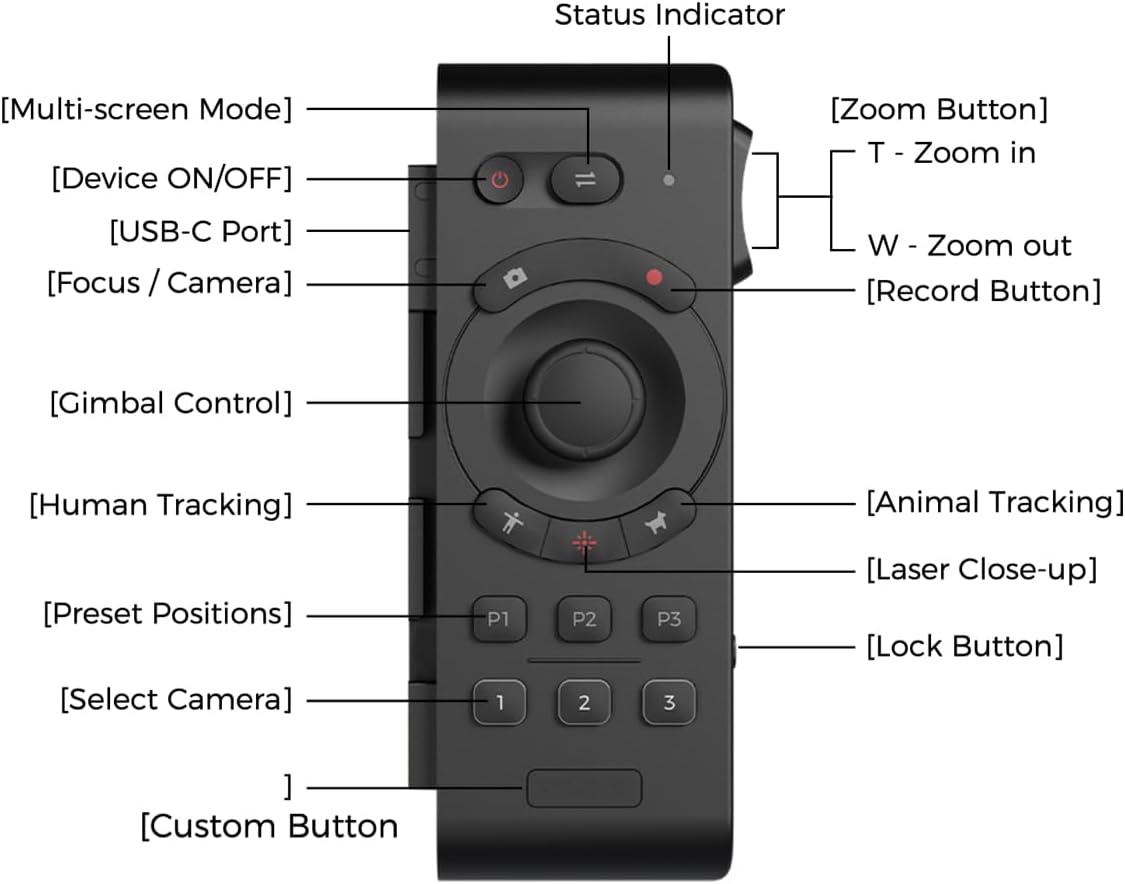
Figure 2.2: Labeled diagram of the remote controller's buttons and features.
- Кнопка УВІМК./ВИМК. пристрою: Вмикає або вимикає пульт дистанційного керування.
- Кнопка багатоекранного режиму: Перемикає між різними режимами відображення.
- Індикатор стану: Displays the current status of the remote controller.
- Кнопка фокусування / камери: Керує фокусуванням камери або перемикає режими камери.
- Кнопка запису: Починає або зупиняє відеозапис.
- Джойстик керування карданним підвісом: Provides precise control over the camera's pan, tilt, and zoom.
- Кнопка відстеження людини: Активує відстеження людини.
- Кнопка відстеження тварин: Активує відстеження тварин.
- Кнопка лазерного крупного плану: Double-press to activate the laser pointer for quick close-up tracking.
- Попередньо встановлені позиції (P1, P2, P3): Stores and recalls up to three custom camera positions.
- Виберіть камеру (1, 2, 3): Switches control between up to three paired OBSBOT Tail series devices.
- Спеціальна кнопка: A programmable button for user-defined functions.
- Кнопка масштабування (T/W): Rocker switch for zooming in (T) or out (W).
- Кнопка блокування: Запобігає випадковому натисканню кнопок.
- Порт USB-C: For charging the remote controller.
3. Налаштування та сполучення
3.1 Заряджання пульта дистанційного керування
Before initial use, ensure the remote controller is fully charged. Connect the supplied USB-A to USB-C cable to the USB-C port on the side of the remote controller and to a compatible USB power source.

Figure 3.1: USB-C charging port location on the remote controller.
3.2 Pairing with OBSBOT Tail Series Camera
The remote controller can be wirelessly connected to up to three OBSBOT Tail series devices via Bluetooth. Follow these steps to pair your remote controller with your camera:
- Ensure your OBSBOT Tail series camera (e.g., Tail 2/Air) is powered on.
- On the camera, quickly press the power button three times. The camera's indicator light will begin to flash blue, indicating it is in pairing mode.
- On the remote controller, press and hold the Human Tracking button (person icon) and the '1' button simultaneously. The remote's indicator light will also flash blue.
- Once successfully paired, both the camera and remote controller indicator lights will turn green.
- To pair additional cameras (up to three), repeat steps 2 and 3, using the '2' or '3' button on the remote controller for each subsequent camera.
Video 3.2: Official demonstration of OBSBOT Tail Air Remote Controller features, including pairing and control. This video is provided by the seller.
Note: If the remote is unresponsive, check the lock switch on the side. Slide it to the unlocked position to enable control.

Figure 3.3: Remote controller lock switch in locked (red) and unlocked positions.
4. Інструкція з експлуатації
4.1 Керування PTZ
The remote offers two methods for PTZ control:
- Управління джойстиком: Use the central joystick to pan, tilt, and zoom the camera.
- Wrist Movements (Motion Control): With the built-in gyroscope, you can control the camera's gimbal by moving your wrist while holding down the joystick.

Figure 4.1: Demonstrating joystick control for camera movement.
4.2 Функції відстеження
- Відстеження людини: Press the button with the 'person' icon to activate human subject tracking.
- Відстеження тварин: Press the button with the 'paw print' icon to activate animal subject tracking.
- Laser Close-up: Double-press the Laser Close-up button. The camera will instantly follow and zoom in on the area pointed by the remote's laser.
4.3 Попередньо встановлені позиції
The remote allows you to save and recall up to three camera positions:
- Збереження попереднього налаштування: Position the camera as desired, then press and hold one of the P1, P2, or P3 buttons until the indicator confirms the position is saved.
- Виклик попереднього налаштування: Briefly press the desired P1, P2, or P3 button to move the camera to the saved position.
4.4 Налаштовуваних кнопок
The Custom Button can be configured via the OBSBOT app to perform a specific function tailored to your needs.

Figure 4.2: Location of the customizable button.
5. Технічне обслуговування
- Прибирання: Використовуйте м’яку суху тканину для очищення пульта дистанційного керування. Уникайте використання агресивних хімікатів або абразивних матеріалів.
- Зберігання: Зберігайте пульт дистанційного керування в прохолодному, сухому місці, подалі від прямих сонячних променів та екстремальних температур.
- Догляд за акумулятором: To prolong battery life, avoid fully discharging the remote frequently. Charge it regularly, even if not in constant use.
6. Вирішення проблем
| Випуск | Можлива причина | Рішення |
|---|---|---|
| Пульт не відповідає. | Remote is locked. | Check the lock switch on the side of the remote and slide it to the unlocked position. |
| Unable to pair with camera. | Camera or remote not in pairing mode; out of range. | Ensure both devices are powered on and in pairing mode (camera indicator flashing blue, remote indicator flashing blue). Bring devices closer together. |
| PTZ control is erratic or unresponsive. | Low battery; interference; remote not properly paired. | Charge the remote. Re-pair the remote with the camera. Ensure no strong wireless interference. |
7. Технічні характеристики
| Особливість | Деталь |
|---|---|
| Розміри продукту | 7.9 x 4.8 x 6.3 дюймів |
| Вага товару | 7.4 унції |
| Номер моделі товару | OBSBOT_TAIL SERIES_REMOTE |
| Бренд | ОБСБОТ |
| Особливість | Перезаряджається |
| Колір | чорний |
| Максимальна кількість підтримуваних пристроїв | 3 |
| Сумісні пристрої | Tail Series (Tail 2/ Tail Air) |
8. Гарантія та підтримка
Щоб отримати інформацію про гарантію та технічну підтримку, зверніться до офіційного OBSBOT. webсайт або зверніться безпосередньо до служби підтримки клієнтів. Зберігайте чек про покупку для гарантійних претензій.


