1. Вступ
The DonosHome DH300 is an innovative, multi-function OBD2 code reader designed to be one of the most accurate and economical vehicle diagnostic tools available. It helps users easily determine the cause of the Check Engine Light (MIL) and provides comprehensive information on vehicle health and performance. This manual provides detailed instructions for the proper use and maintenance of your DH300 scanner.

Figure 1.1: DonosHome DH300 OBD2 Scanner and its retail packaging, highlighting key features.
2. Заходи безпеки
Please read this user manual carefully and follow the warnings and precautions below before use, to avoid the possibility of personal injury or damage to the vehicle and/or the device:
- Do not smoke, light matches, or cause sparks near the vehicle during operation.
- Do not come into contact with hot engine parts to avoid severe burns, especially when the engine is running.
- Do not use this tool while driving.
- Завжди використовуйте відповідний захист для очей під час роботи з транспортними засобами.
- Ensure the vehicle is in a well-ventilated area when running the engine.
3. Вміст упаковки
Після відкриття упаковки, будь ласка, переконайтеся, що всі перелічені нижче предмети містяться в комплекті та знаходяться в належному стані:
- 1 x DonosHome DH300 OBD2 Scanner
- 1 x Посібник користувача (цей документ)
- 1 х упаковка

Figure 3.1: The package includes the OBD2 scanner, user manual, and package box.
4. Особливості продукту
The DonosHome DH300 OBD2 scanner is equipped with a variety of features designed for comprehensive vehicle diagnostics:
- Check Engine Light (MIL) Management: Easily determine the cause, turn off the light, clear codes, and reset monitors.
- Визначення діагностичних кодів несправностей (DTC): Displays Diagnostic Trouble Code definitions directly on the screen.
- Дані стоп-кадру: View знімок стану транспортного засобу, коли було встановлено код несправності.
- Стан готовності до введення/виведення: Check monitor and I/M readiness status for emissions testing.
- Коди, що очікують на розгляд: Identify codes that have not yet triggered the MIL.
- Real-time PCM Data Stream: Read live data from the Powertrain Control Module.
- O2 Sensor Test Data: Display real-time O2 sensor test results.
- Графічне відображення даних: Visualize live data for easier analysis.
- Відтворення даних: Read, store, and playback real-time sensor data, DTC data, and freeze frame data.
- Test Modules: Perform present test modules.
- Отримання інформації про транспортний засіб: Retrieve VIN (Vehicle Identification Number), CIN (Calibration Identification Number), and CVN (Calibration Verification Number).
- Підтримка протоколу: Підтримує CAN (мережу контролера) та всі інші сучасні протоколи OBD2.
- Вбудована бібліотека DTC: Integrated OBD2 DTC lookup library for quick reference.
- Voltmeter Function: Перевірити об'єм акумулятораtagелектронна та система заряджання.
- Waveform Graphing: Starting waveform graph and real-time waveform graph.
- Багатомовна підтримка: 10 built-in languages (English, German, Spanish, French, Italian, Dutch, Finnish, Polish, Portuguese, Russian).
- Ергономічний дизайн: Color screen, plug-and-play operation, powered directly by the vehicle.
- Індикатори несправностей: Red, yellow, and green LED indicators for quick fault status.

Figure 4.1: Key diagnostic functions of the DonosHome DH300.

Figure 4.2: Innovative design with LED indicators and multilingual support.

Figure 4.3: Multilingual interface and broad vehicle compatibility.
5. Налаштування та підключення
The DH300 scanner is designed for simple plug-and-play operation. Follow these steps to connect the device to your vehicle:
- Знайдіть порт OBD2: The OBD2 port is typically located under the dashboard on the driver's side, often near the steering column. Refer to your vehicle's owner's manual if you cannot find it.
- Connect the OBD2 Plug: Firmly insert the DH300's OBD2 connector into the vehicle's OBD2 port. The device will power on automatically.
- Запустіть двигун: Turn the vehicle's ignition to the "ON" position or start the engine. The scanner will establish communication with the vehicle's ECU.
- Початок діагностики: Once connected and powered, the scanner is ready for use.
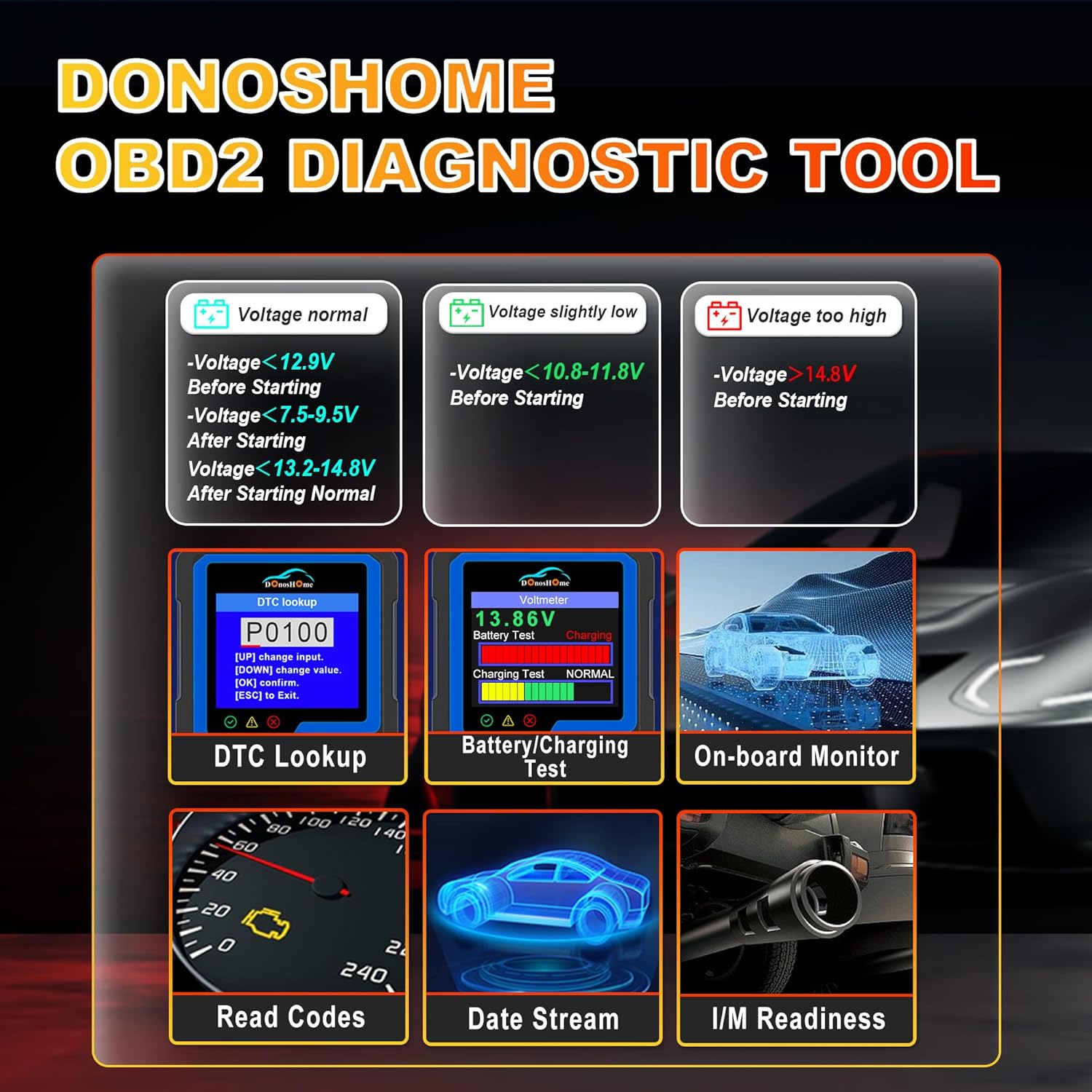
Рисунок 5.1: Простий процес підключення «підключи та працюй».
6. Інструкція з експлуатації
The DH300 features a user-friendly interface with a color screen and five buttons: Up, Down, OK, ESC, and I/M. Navigate through menus using the Up/Down buttons, confirm selections with OK, and go back with ESC. The I/M button provides quick access to readiness status.
6.1. Reading and Clearing Trouble Codes (DTCs)
To read and clear Diagnostic Trouble Codes:
- From the main menu, select "Diagnose" and press OK.
- Navigate to "Read Codes" and press OK. The scanner will display any stored, pending, or permanent codes.
- To clear codes, select "Erase Codes" from the diagnostic menu and press OK. Confirm the action when prompted. This will turn off the Check Engine Light.

Figure 6.1: DTC Lookup function and examples of error codes.
6.2. I/M Readiness Quick Start
The I/M Readiness function allows you to quickly check the status of emission-related monitors, which is crucial for smog tests.
- Натисніть виділену Я/М button on the scanner for a quick check.
- Alternatively, navigate to "I/M Readiness" from the main menu.
- The screen will display the status of various monitors (e.g., MIL, MIS, FUE, CCM, CAT, HCAT, O2S, EVAP, AIR, HRT, EGR) indicating whether they are "OK" (completed), "X" (not completed), or "N/A" (not applicable).

Figure 6.2: I/M Readiness Quick Start screen.
6.3. Voltmeter and Battery Test
The DH300 includes a voltmeter function to test your vehicle's battery and charging system.
- From the main menu, select "Voltmeter" and press OK.
- The screen will display the current battery voltage and charging status (e.g., Normal, Charging).
- Interpret the results based on the provided guidelines:
- томtage normal: >12.9V Before Starting, >13.2-14.8V After Starting.
- томtage slightly low: <12.9V Before Starting, <13.2V After Starting.
- томtage занадто низький: <10.8-11.8V Before Starting.
- томtage занадто висока: >14.8V After Starting.

Figure 6.3: Voltmeter and Battery Test interface.
6.4. Потік даних у реальному часі
View real-time sensor data from your vehicle's engine. This can help diagnose intermittent problems or verify repairs.
- From the main menu, select "Diagnose" and then "Live Data".
- The scanner will display various parameters such as engine RPM, vehicle speed, coolant temperature, O2 sensor readings, etc.
- Use the Up/Down buttons to scroll through the data. Some parameters can be graphed for better visualization.
6.5. Other Diagnostic Functions
The DH300 offers additional diagnostic capabilities:
- Випробування датчика O2: Access results of the oxygen sensor monitor tests.
- Тестування системи EVAP: Розпочніть випробування системи контролю випарних викидів.
- Тестування бортового монітора: View results of on-board diagnostic monitoring tests for specific components/systems.
- Отримати VIN-код: Get vehicle information including VIN, CIN, and CVN.
- Review історія: Access previously stored diagnostic data.
7. Технічне обслуговування
To ensure the longevity and optimal performance of your DonosHome DH300 scanner:
- Прибирання: Use a soft, dry cloth to clean the scanner's exterior. Do not use abrasive cleaners or solvents.
- Зберігання: Зберігайте пристрій у чистому, сухому місці, подалі від екстремальних температур та прямих сонячних променів.
- Догляд за кабелем: Avoid bending or crimping the OBD2 cable excessively. Always grasp the connector, not the cable, when plugging or unplugging.
- Оновлення програмного забезпечення: Перевірте виробника webперіодично перевіряйте на сайті наявність доступних оновлень програмного забезпечення, щоб забезпечити сумісність з новішими транспортними засобами та покращити функціональність.
8. Вирішення проблем
If you encounter issues while using your DH300 scanner, refer to the following common problems and solutions:
| проблема | Можлива причина | Рішення |
|---|---|---|
| Сканер не вмикається. |
|
|
| Повідомлення «Помилка з’єднання» або «Помилка зв’язку». |
|
|
| Не вдається очистити коди. |
|
|
9. Технічні характеристики
| Атрибут | Деталь |
|---|---|
| Бренд | DonosHome |
| Модель | DH-300 |
| Вага товару | 191 г |
| Розміри продукту (Д x Ш x В) | 8 х 5 х 15 см |
| Джерело живлення | Corded Electric (Vehicle OBD2 port) |
| Розмір екрана | 3.2 дюймів |
| Роздільна здатність дисплея | 320x240 |
| Підтримувані протоколи | CAN and all other current OBD2 protocols |
| Підтримувані мови | English, German, Spanish, French, Italian, Dutch, Finnish, Polish, Portuguese, Russian |
| Сумісність | American vehicles after 1996, European vehicles after 2003, Asian vehicles after 2008 |
10. Гарантія та підтримка
DonosHome provides excellent after-sales service, including a Гарантія 2 рік and professional technical support for the DH300 OBD2 Auto Diagnostic Scanner.
For technical assistance, warranty claims, or any other inquiries, please contact DonosHome customer service. Refer to the contact information provided with your purchase or on the official DonosHome webсайт.


