вступ
Thank you for choosing the HyperGear Bunny Tracks Kids Bluetooth Wireless Headphones. These headphones are designed to provide a fun and immersive audio experience for children, featuring wireless Bluetooth connectivity, LED rabbit ears, and multiple playback options. This manual provides essential information for setting up, operating, and maintaining your headphones to ensure optimal performance and longevity.

The image displays the HyperGear Bunny Tracks Kids Bluetooth Wireless Headphones in white, featuring LED rabbit ears. The product packaging is also visible, highlighting key features like Bluetooth connectivity, kid-friendly sizing, comfortable fit, and mic/volume control.
Продукт закінченийview
Ключові характеристики
- Бездротове підключення Bluetooth: Безперебійна потокова передача аудіо із сумісних пристроїв.
- LED Rabbit Ears: Fun, illuminated design element.
- Складний дизайн: Enhances portability and storage.
- Вбудований мікрофон: For hands-free calls and online communication.
- Багаторежимне відтворення: Supports Bluetooth, 3.5mm Aux, microSD card, and FM radio.
- Зручна посадка: Adjustable headband and soft over-ear cushions.
- 10 годин відтворення: Тривале прослуховування на одному заряді.
Елементи керування та порти
The headphones feature intuitive controls and versatile input options for various audio sources.

Це зображення надає детальне view of the control buttons located on the headphone ear cup. Labels indicate functions for power on/off, next track/volume up, play/pause/answer call, previous track/volume down, and mode switch.
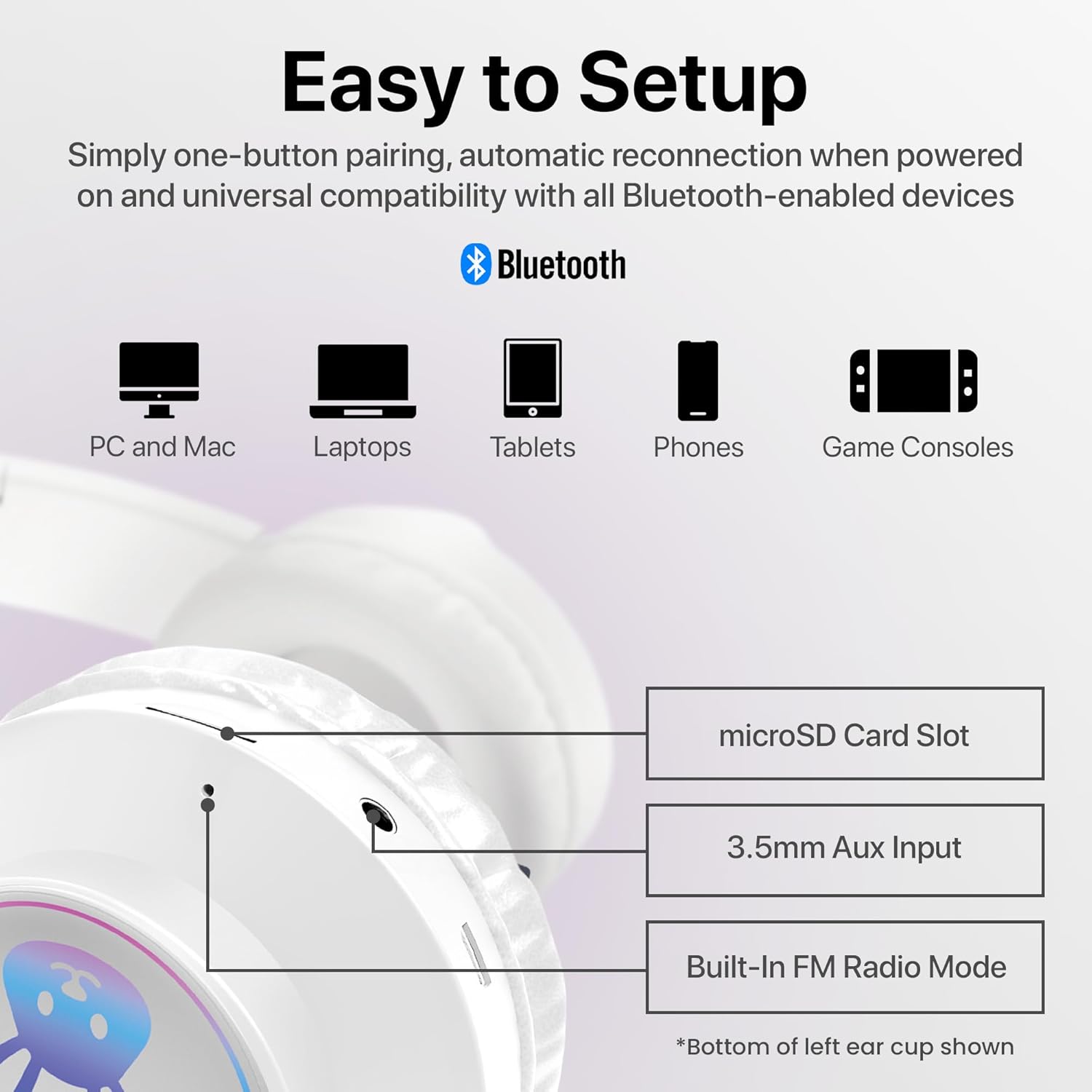
The image shows the various input ports on the bottom of the left ear cup, including a microSD card slot for direct audio playback, a 3.5mm Aux input for wired connections, and an indication of the built-in FM radio mode.
Інструкції з налаштування
1. Зарядка навушників
- Connect the included charging cable to the charging port on the headphones.
- Підключіть інший кінець зарядного кабелю до джерела живлення USB (наприклад, USB-порту комп’ютера, USB-адаптера).
- The LED indicator will illuminate during charging and turn off or change color when fully charged. A full charge takes approximately 2 hours.
2. Увімкнення/вимкнення живлення
- Щоб увімкнути: Press and hold the Power button (usually combined with Play/Pause) until the LED indicator lights up and you hear an audible prompt.
- Щоб вимкнути: Натисніть і утримуйте кнопку живлення, доки світлодіодний індикатор не згасне, і ви не почуєте звуковий сигнал.
3. Підключення Bluetooth
- Переконайтеся, що навушники повністю заряджені та вимкнені.
- Натисніть і утримуйте кнопку живлення приблизно 3-5 секунд, доки світлодіодний індикатор не почне блимати синім і червоним кольором, що вказує на режим сполучення.
- На вашому пристрої (смартфоні, планшеті, комп’ютері) увімкніть Bluetooth та знайдіть доступні пристрої.
- Select "HyperGear Bunny Tracks" from the list of found devices.
- Once paired, the LED indicator will typically show a solid blue light or flash blue slowly, and you will hear a confirmation tone.
4. Дротове підключення (режим Aux)
Щоб використовувати навушники в дротовому режимі:
- Connect one end of a 3.5mm audio cable (not always included, check packaging) to the Aux input port on the headphones.
- Підключіть інший кінець до аудіовиходу вашого пристрою.
- The headphones will automatically switch to Aux mode. Bluetooth functionality will be disabled in this mode.
5. microSD Card Playback
To play audio directly from a microSD card:
- Insert a microSD card with MP3 audio files into the microSD card slot on the headphones.
- The headphones will automatically switch to microSD mode and begin playing audio.
6. Режим FM-радіо
Щоб скористатися вбудованим FM-радіо:
- Увімкніть навушники.
- Press the 'M/EQ' button (Mode/Equalizer) to switch to FM radio mode.
- Use the Volume Up/Down buttons to scan for stations. A short press may change frequency, while a long press might auto-scan. Refer to the control image for specific button functions.

This image depicts a young girl wearing the headphones while interacting with a laptop, suggesting use for online learning or entertainment.
Інструкція з експлуатації
Basic Controls (Bluetooth/microSD Mode)
| Кнопка/Дія | функція |
|---|---|
| Кнопка живлення (коротке натискання) | Play/Pause music; Answer/End phone calls. |
| Кнопка живлення (тривале натискання) | Увімкнення / вимкнення живлення. |
| '+' Button (Short Press) | Наступний трек. |
| '+' Button (Long Press) | Збільшення гучності. |
| '-' Button (Short Press) | Попередній трек. |
| '-' Button (Long Press) | Зменшення гучності. |
| 'M/EQ' Button (Short Press) | Switch Audio Mode (Bluetooth, FM, microSD, Aux). |
| 'M/EQ' Button (Long Press) | Activate Equalizer (if available, check product specifications for details). |
Управління телефонними дзвінками
- Відповісти на дзвінок: Коротко натисніть кнопку живлення, коли надходить дзвінок.
- Завершити виклик: Короткочасно натисніть кнопку живлення під час дзвінка.
- Відхилити виклик: Довго натискайте кнопку живлення, коли надходить дзвінок.
LED Rabbit Ears
The LED rabbit ears illuminate automatically when the headphones are powered on, adding a visual element to the listening experience. There are no specific controls for the LED lights; they operate in conjunction with the headphone's power state.

A boy is shown wearing the headphones and holding a game controller, illustrating the headphones' suitability for gaming.
Технічне обслуговування
прибирання
- Протріть навушники м’якою, сухою тканиною без ворсу.
- Не використовуйте абразивні засоби для чищення, розчинники або сильні хімічні речовини.
- Уникайте потрапляння вологи в будь-які отвори.
Зберігання
- Зберігайте навушники в прохолодному, сухому місці, подалі від прямих сонячних променів та екстремальних температур.
- Utilize the foldable design for compact storage and to protect the ear cups.
Догляд за акумулятором
- Регулярно заряджайте навушники, навіть якщо вони використовуються нечасто, щоб підтримувати справність акумулятора.
- Уникайте повного розряджання акумулятора протягом тривалого часу.
Усунення несправностей
| проблема | Можливе рішення |
|---|---|
| Навушники не вмикаються. | Переконайтеся, що навушники повністю заряджені. Підключіть до джерела живлення та спробуйте ще раз. |
| Немає звуку з навушників. | Check volume levels on both the headphones and the connected device. Ensure headphones are correctly paired via Bluetooth or properly connected via Aux cable. Verify the correct audio mode is selected. |
| Не вдається підключитися через Bluetooth. | Переконайтеся, що навушники перебувають у режимі сполучення (блимає синій/червоний світлодіод). Вимкніть і ввімкніть Bluetooth на вашому пристрої. Перемістіть навушники ближче до пристрою. Видаліть попередні з’єднання Bluetooth на вашому пристрої. |
| Погана якість звуку. | Ensure the headphones are within Bluetooth range (10 meters). Check for interference from other wireless devices. Try a different audio source or file. |
| LED rabbit ears not lighting up. | Ensure the headphones are powered on. If the issue persists, contact customer support. |
Технічні характеристики
| Особливість | Деталь |
|---|---|
| Назва моделі | Bunny Tracks Headphones |
| Номер моделі товару | 15866 |
| Технологія підключення | Бездротовий (Bluetooth) |
| Технологія бездротового зв'язку | Bluetooth 4.0 |
| Діапазон Bluetooth | 10 метрів |
| Форма навушника | Надвушні |
| Тип аудіо драйвера | Dynamic Driver (40mm, inferred from image) |
| Діапазон частот | 20 Гц - 20 000 Гц |
| Термін служби батареї | До 10 годин |
| Час зарядки | Approximately 2 Hours (inferred from A+ content) |
| Тип управління | Керування медіа, сенсорне керування |
| Особливості | Adjustable Comfy Fit, Ultra-Soft Plush Memory Foam Ear Cushions, LED Light-Up Rabbit Ears, Easy One-Button Setup, Foldable & Portable, Microphone Included |
| матеріал | пластик |
| Вага товару | 7.2 унції (0.45 фунта) |
| Розміри продукту | 7.1 x 2.9 x 10.6 дюймів |
| UPC | 633755158667 |

Внутрішній view of the headphone ear cup, illustrating the 40mm dynamic driver responsible for audio output, designed for clear sound and bass.
Гарантія та підтримка
For warranty information or technical support, please refer to the official HyperGear website or contact HyperGear customer service directly. Keep your purchase receipt as proof of purchase for any warranty claims.
Виробник: ГІПЕРШЕСТІНКА