1. Вступ
Дякуємо за покупкуasing the Zenwire A10 Mini Portable Projector. This device is designed to provide a versatile and convenient projection experience, allowing you to display content from various sources, including smartphones, tablets, and computers. Please read this manual carefully before using the projector to ensure proper operation and to maximize its lifespan.
2. Важливі інструкції з техніки безпеки
- Не дивіться безпосередньо в об'єктив проектора, коли він увімкнений.amp увімкнено.
- Забезпечте належну вентиляцію навколо проектора, щоб запобігти перегріву. Не блокуйте вентиляційні отвори.
- Використовуйте лише адаптер живлення, що постачається з проектором.
- Тримайте проектор подалі від води, вологи та легкозаймистих матеріалів.
- Не намагайтеся розбирати або ремонтувати проектор самостійно. Зверніться за допомогою до кваліфікованого сервісного персоналу.
- Поставте проектор на стійку рівну поверхню.
- Від’єднуйте проектор від мережі під час грози або якщо він не використовується протягом тривалого часу.
3. Вміст упаковки
Будь ласка, перевірте вміст упаковки після розпакування. Якщо будь-які елементи відсутні або пошкоджені, зверніться до продавця.
- Zenwire A10 Mini Portable Projector
- Пульт дистанційного керування
- Адаптер живлення
- Посібник користувача
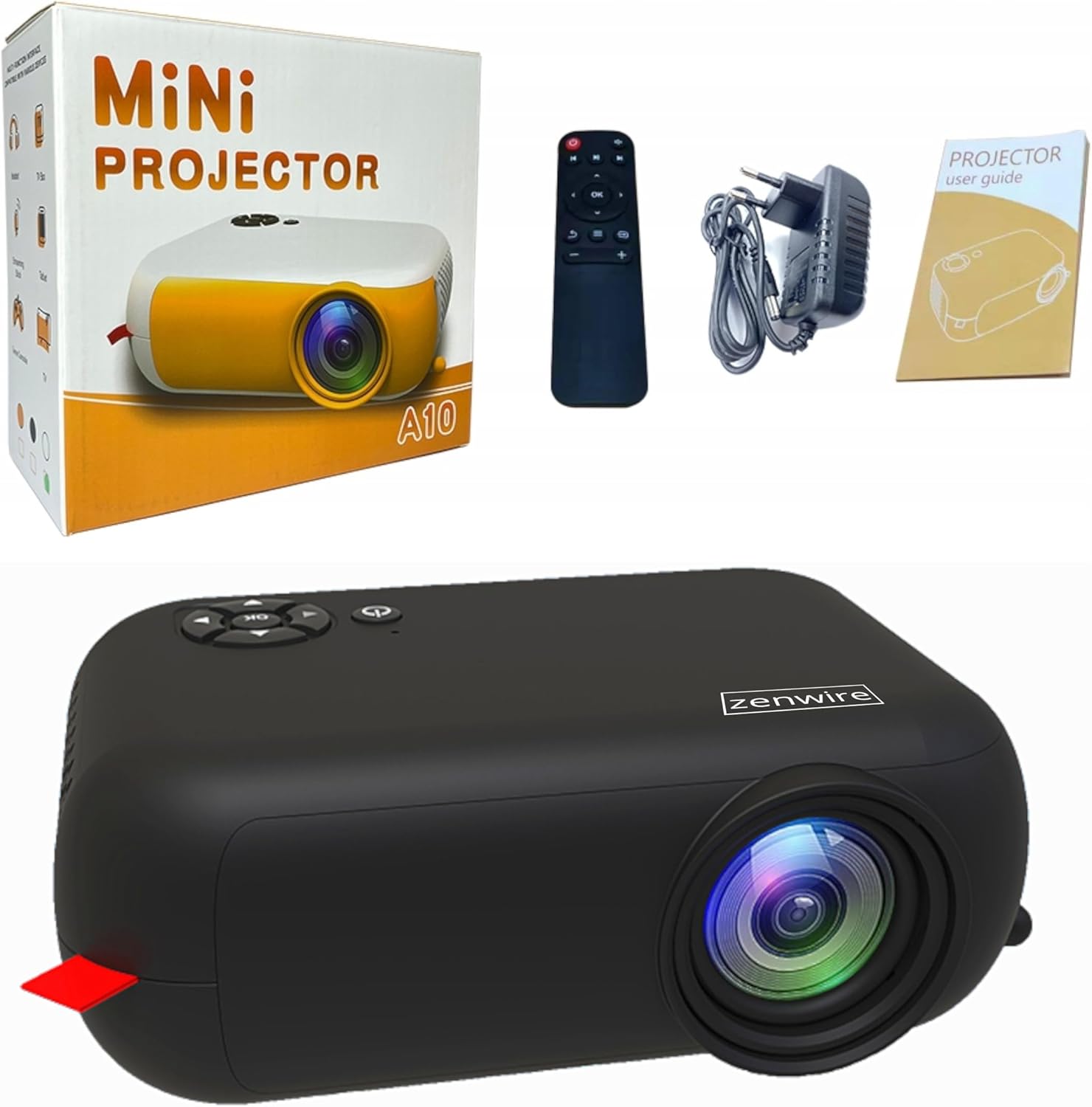
Image: Contents of the Zenwire A10 Mini Projector package, including the projector, remote control, power adapter, and user manual.
4. Продукт закінчивсяview
4.1 Projector Dimensions and Design
The Zenwire A10 is designed for portability, featuring a compact and lightweight form factor. Its dimensions are approximately 14cm x 10cm x 5.5cm, making it easy to carry and set up in various locations.

Image: The Zenwire A10 Mini Projector held in a hand, illustrating its compact size and portability.
4.2 Порти та елементи керування
The projector features a range of input and output ports for versatile connectivity, along with intuitive controls.

Image: Rear panel of the Zenwire A10 Mini Projector, showing the 5V-IN DC power input, IR receiver, USB port, 3.5mm audio jack, HDMI port, and SD card slot.
- 5V-IN DC: Вхідне живлення для проектора.
- ІЧ: Інфрачервоний приймач для пульта.
- USB: Підключіть USB-накопичувачі для відтворення медіафайлів.
- Гніздо для навушників (3.5 мм): Підключіть зовнішні динаміки або навушники.
- HDMI: Connect devices such as laptops, gaming consoles, or streaming sticks.
- SD: Insert Micro SD cards for media playback.
- Колесо фокусування: Adjust image sharpness (located on the side).
- Панель керування: Buttons on top for navigation and selection.
5. Налаштування
5.1 Підключення живлення
- Підключіть адаптер живлення, що постачається в комплекті, до 5V-IN DC порт на проекторе.
- Підключіть адаптер живлення до настінної розетки.
- Натисніть кнопку живлення на проекторі або пульті дистанційного керування, щоб увімкнути його.
5.2 Placement and Focus Adjustment
- Place the projector on a stable surface or mount it according to your preference. Ensure the projector lens is facing the projection surface (wall or screen).
- Adjust the distance between the projector and the screen to achieve your desired image size. The projector supports screen sizes up to 100 inches.
- Rotate the focus wheel (typically located near the lens) until the projected image appears clear and sharp.

Image: Diagram illustrating the Zenwire A10 Mini Projector's capability to project various screen sizes, from 13 inches up to 100 inches, depending on the projection distance.
6. Експлуатація проектора
6.1 Wireless Connection (Miracast & Airplay)
The Zenwire A10 supports wireless screen mirroring via 2.4/5GHz WiFi, compatible with Android (Miracast) and iOS (Airplay) devices.
- Переконайтеся, що ваш проектор і мобільний пристрій підключені до однієї мережі Wi-Fi.
- On the projector's main menu, select the 'Screen Mirroring' or 'Wireless Display' option.
- Для Android: On your Android phone/tablet, enable 'Wireless Display', 'Screen Mirroring', 'Smart View', or similar function (names may vary by device). Select the projector from the list of available devices.
- Для iOS: On your iPhone/iPad, open Control Center and tap 'Screen Mirroring'. Select the projector from the list of available devices.
- The content from your mobile device should now be mirrored on the projector screen.
6.2 Дротові підключення
The projector offers multiple wired input options for various devices.

Image: The Zenwire A10 Mini Projector connected to various devices such as smartphones, tablets, laptops, desktop computers, gaming consoles, and media players, highlighting its versatile connectivity.
- HDMI: Connect a laptop, PC, gaming console (e.g., Xbox, PlayStation), or streaming device (e.g., Amazon Fire TV Stick, Google Chromecast) using an HDMI cable. Select the HDMI input source on the projector.
- USB: Insert a USB flash drive or external hard drive into the USB port. The projector's media player will allow you to browse and play supported video, audio, and image files.
- Micro SD: Insert a Micro SD card into the SD card slot. Similar to USB, you can access media files through the projector's interface.
- Аудіовихід (роз'єм 3.5 мм): Connect external speakers or headphones to enhance the audio experience.
6.3 Навігація по меню
Use the remote control or the buttons on the projector to navigate through the on-screen menu. Select input sources, adjust picture settings (brightness, contrast, color), sound settings, and other system preferences.
7. Технічне обслуговування
- Очищення лінз: Використовуйте м’яку тканину без ворсу, спеціально призначену для оптичних лінз, щоб обережно протерти об’єктив проектора. Уникайте використання абразивних засобів для чищення або надмірного зусилля.
- Видалення пилу: Regularly clean the projector's exterior with a soft, dry cloth. Use a small brush or compressed air to clear dust from the ventilation openings to ensure proper airflow.
- Зберігання: Коли проектор не використовується, зберігайте його в прохолодному, сухому місці, подалі від прямих сонячних променів та екстремальних температур. Використовуйте оригінальну упаковку або захисний чохол, щоб запобігти накопиченню пилу та пошкодженню.
8. Вирішення проблем
If you encounter issues with your Zenwire A10 projector, refer to the following common problems and solutions:
| проблема | Можлива причина | Рішення |
|---|---|---|
| На екрані немає зображення | Живлення не підключено; неправильне джерело вхідного сигналу; пристрій підключено неправильно. | Check power cable; Select correct input source (HDMI, USB, etc.); Reconnect source device. |
| Зображення розмите | Фокус не налаштовано; проектор розташований занадто близько/далеко від екрана. | Adjust the focus wheel; Adjust projection distance. |
| Ні звуку | Гучність занадто низька; Звук вимкнено; Зовнішній аудіопристрій не підключено/не вибрано. | Increase volume; Unmute; Check external speaker connection or select internal speaker. |
| Проблеми з бездротовим підключенням | Not on same Wi-Fi network; Device not compatible; Interference. | Ensure both devices are on the same Wi-Fi; Verify device compatibility; Try moving closer to Wi-Fi router. |
9. Технічні характеристики
| Особливість | Деталь |
|---|---|
| Бренд | Zenwire |
| Номер моделі | A10 |
| Тип продукту | Compact and Portable Projector |
| Рідна роздільна здатність | 480 x 360p |
| Максимальна роздільна здатність дисплея | 1920 x 1080 (Full HD) |
| Яскравість | 1800lm / 60 ANSI |
| Коефіцієнт контрастності | 2000:1 |
| Тип дисплея | LED |
| Технологія підключення | Wi-Fi (2.4/5GHz), HDMI, USB, Micro SD, 3.5mm Audio Jack |
| Бездротові функції | Miracast, Airplay |
| Сумісні пристрої | Smartphones (Android, iOS), Tablets, Laptops, PCs, Gaming Consoles |
| Рекомендоване використання | Домашній кінотеатр |
| Розміри (прибл.) | 14см х 10см х 5.5см |
10. Гарантія та підтримка
The Zenwire A10 Mini Portable Projector comes with a standard manufacturer's warranty. For specific warranty terms and conditions, please refer to the documentation provided at the time of purchase or contact your retailer. For technical support or service inquiries, please reach out to Zenwire customer service through their official webсайт або контактну інформацію, надану разом із вашим продуктом.


