1. Вступ
Thank you for choosing the Verbatim 500GB USB 3.2 Gen 1 Portable External Hard Drive. This device provides a high-speed, high-capacity storage solution, ideal for expanding your computer's storage or backing up important files. Its compact 2.5-inch form factor makes it highly portable, allowing you to carry your data wherever you go. This manual will guide you through the setup, operation, and maintenance of your new hard drive.
2. Інформація про безпеку
- Не піддавайте пристрій впливу вологи, екстремальних температур або прямих сонячних променів.
- Уникайте падіння та сильних ударів пристрою.
- Не намагайтеся розбирати або ремонтувати пристрій самостійно. Зверніться до кваліфікованого сервісного персоналу.
- Забезпечте належну вентиляцію навколо пристрою під час роботи.
- Always safely eject the hard drive from your computer before disconnecting the USB cable to prevent data loss or corruption.
3. Вміст упаковки
Переконайтеся, що ваш пакет містить такі елементи:
- Verbatim 500GB Portable External Hard Drive
- USB кабель

Зображення 3.1: спереду view of the Verbatim Portable Hard Drive packaging. The packaging displays the product name, capacity (500GB), USB 3.2 Gen 1 interface, and an image of the black hard drive with a green accent band. It also highlights 'Eco Friendly Packaging' and 'Nero Backup Software'.
4. Продукт закінчивсяview
The Verbatim Portable Hard Drive is a sleek, compact device designed for easy data storage and transfer. It features a durable casing and a standard USB port for connectivity.

Зображення 4.1: Верх view of the Verbatim Portable Hard Drive. The drive is black with a textured surface and features a distinctive green band across its width.
5. Системні вимоги
To use your Verbatim Portable Hard Drive, your computer must meet the following minimum requirements:
- Операційна система: Windows (Windows 10, 8, 7) or Mac OS (Mac OS X 10.6 or higher)
- Порт USB: USB 3.2 Gen 1 (also compatible with USB 2.0 ports, but at reduced speeds)
6. Налаштування та встановлення
The Verbatim Portable Hard Drive is designed for plug-and-play operation, requiring no additional drivers for most modern operating systems.
- Locate an available USB port on your computer. For optimal performance, use a USB 3.2 Gen 1 (or USB 3.0) port.
- Connect the small end of the provided USB cable to the USB port on the Verbatim Portable Hard Drive.
- Connect the larger end of the USB cable to the USB port on your computer.
- Your operating system should automatically detect and install the necessary drivers. The drive will appear as a new storage device in 'My Computer' (Windows) or 'Finder' (Mac OS).
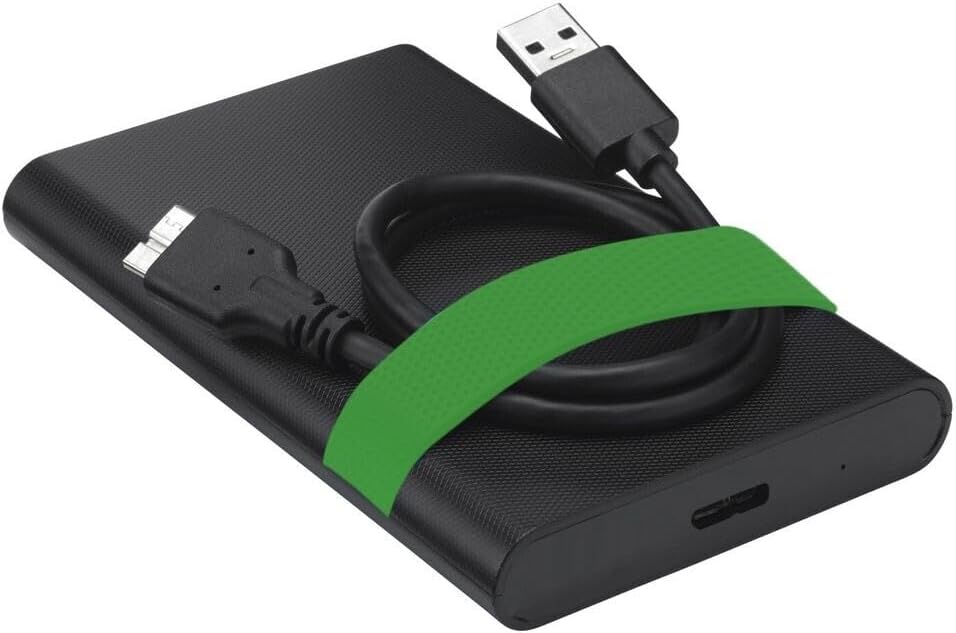
Image 6.1: The Verbatim Portable Hard Drive with its USB cable connected, illustrating the connection point on the drive.
7. Інструкція з експлуатації
7.1 Передача даних
Після підключення ви можете передавати files to and from the hard drive just like any other storage device:
- Перетягніть і опустіть: Натисніть і перетягніть files or folders from your computer to the hard drive's icon, or vice versa.
- Копіювати та вставляти: Клацніть правою кнопкою миші files/folders, select 'Copy', then navigate to the desired location on the hard drive, right-click, and select 'Paste'.
7.2 Ejecting the Drive Safely
To prevent data corruption, always safely eject the hard drive before disconnecting it.
- Windows: Click the 'Safely Remove Hardware and Eject Media' icon in the system tray, then select your Verbatim drive. Wait for the 'Safe to Remove Hardware' message.
- MacOS: Drag the hard drive icon from your desktop to the Trash, or right-click the icon and select 'Eject'.
8. Технічне обслуговування та догляд
- Keep the hard drive clean by wiping it with a soft, dry cloth. Avoid liquid cleaners.
- Store the drive in a cool, dry place away from magnetic fields.
- Regularly back up important data from the portable drive to another storage medium.
- Періодично перевіряйте стан диска за допомогою інструментів дискової утиліти вашої операційної системи.
9. Вирішення проблем
| проблема | Можливе рішення |
|---|---|
| Диск не виявлено комп'ютером. |
|
| Низька швидкість передачі даних. |
|
| Повідомлення про помилку під час file передача. |
|
10. Технічні характеристики
| Особливість | Деталь |
|---|---|
| Бренд | Дослівно |
| Номер моделі | 53111 |
| Ємність цифрового зберігання | 500 ГБ |
| Форм-фактор жорсткого диска | 2.5 дюймів |
| Тип жорсткого диска | Mechanical Hard Disk Drive (HDD) |
| Інтерфейс | USB 3.2 Gen 1 (сумісний з USB 2.0) |
| Швидкість обертання | 5400 об / хв |
| Максимальна швидкість передачі даних | 5000 Mbit/s (5 Gbit/s) |
| Технологія підключення | USB |
| Сумісні пристрої | Computers with Windows OS, Computers with Mac OS |
| Вага товару | 220 г |
11. Гарантія та підтримка
Verbatim products are designed and manufactured to the highest quality standards. For information regarding warranty coverage, technical support, or service, please refer to the official Verbatim webсайт або зверніться безпосередньо до служби підтримки клієнтів. Зберігайте чек про покупку як підтвердження покупки для гарантійних претензій.
Інтернет-підтримка: Відвідайте www.verbatim.com for FAQs, driver downloads, and contact information.


