1. Вступ
This instruction manual provides detailed information on the installation, operation, and maintenance of your Tuya Smart WiFi Wireless Lights Switch Kit. This innovative system allows you to control your lighting fixtures wirelessly, via voice commands, or through a smartphone application, offering enhanced convenience and energy management for your home or office.
The kit includes a wireless switch (transmitter) and a compact WiFi Smart Receiver, designed for seamless integration with existing electrical systems. Please read this manual thoroughly before installation and use to ensure proper functionality and safety.
2. Ключові характеристики
- Сертифікована безпека: CE/RoHS/FCC certified, with overload and overheating prevention. Made from fire-resistant PC material (V0 fireproof level) and IP66 waterproof rating.
- Легка установка: Create or move lamp switches without complex wiring. Neutral wire required for receiver.
- Голосове керування: Сумісний з Amazon Alexa та Google Home для керування без використання рук.
- Пульт дистанційного керування програмою: Control lights from anywhere using the free 'Tuya Smart' app on your smartphone or tablet.
- Функція таймера: Schedule automatic on/off times for connected devices to save energy.
- Компактний дизайн: Mini wireless switch (7.5x4.8x1.5 cm) and small receiver (3.9x2.3x2.2 cm) for easy placement and concealment.
- Універсальна сумісність: Works with most fixtures including pull-chain lights, cupboard lighting, ceiling lights, and electric fans.
- Висока місткість: Handles up to 1000W integrated power and 10A current.
- Durable & Secure Connection: Encrypted wireless signals with no interference, reaching up to 330ft indoors and 1300ft outdoors. Switch button lifespan up to 600,000 times, receiver up to 400,000 times.
- Тривалий термін служби батареї: CR2032 button lithium battery in the switch can last 6-8 years.
3. Вміст упаковки
Після відкриття упаковки переконайтеся, що всі компоненти є в наявності та не пошкоджені:
- 1x Wireless Transmitter (Switch Button)
- 1x WiFi Smart Receiver
 Figure 3.1: Tuya Smart WiFi Wireless Switch Kit Components
This image displays the two main components of the kit: the rectangular wireless switch on the left and the smaller, rectangular WiFi Smart Receiver on the right, both in white casing.
4. Технічні характеристики
| Атрибут | Значення |
|---|---|
| Розміри продукту | 4.06 x 3.11 x 1.73 дюйма; 3.53 унції |
| Акумулятори | Потрібна 1 батарея CR2032 (у комплекті) |
| Виробник | ЕВЕРСЕКУ |
| ASIN | B0CLRDRYM3 |
| Країна походження | Китай |
| Режим роботи | УВІМКНЕНО ВИМКНЕНО |
| Поточний рейтинг | 10 Amps |
| Робочий випtage | 120 вольт |
| Тип контакту | Нормально відкритий |
| Тип роз'єму | Обтиск |
| Термінал | Припій |
| Розміри предмета Д х Ш х В | 4.06 x 3.11 x 1.73 дюймів |
| Тип схеми | 1-сторонній |
| Тип приводу | Електронна кнопка |
5. Інформація про безпеку
Будь ласка, дотримуйтесь наступних запобіжних заходів, щоб запобігти травмуванню або пошкодженню пристрою:
- Вимкніть перед встановленням: Always ensure the main power supply to the circuit is turned off at the circuit breaker before attempting any installation or wiring.
- Рекомендовано професійне встановлення: Якщо ви не впевнені щодо електропроводки, зверніться до кваліфікованого електрика.
- Необхідний нейтральний дріт: The receiver unit requires a neutral wire for proper operation. Verify your electrical box has a neutral wire before installation.
- Використання в приміщенні: While the product has an IP66 waterproof rating, ensure proper protection from direct water exposure if used in damp середовищ.
- Уникайте перевантаження: Do not exceed the maximum rated load of 1000W (LED) or 10A.
- Тримайте подалі від дітей: Store the device and its components out of reach of children.
- Правильна утилізація: Утилізуйте батарейки та електронні компоненти відповідно до місцевих правил.
6. Налаштування та встановлення
The Tuya Smart WiFi Wireless Lights Switch Kit is designed for straightforward installation. Follow these steps carefully:
6.1. Встановлення ресивера
- Вимкніть живлення: Locate the circuit breaker controlling the light fixture you intend to connect and turn off the power. Verify power is off using a voltagтестер.
- Проводка доступу: Open the electrical box, light canopy, or junction box where the light fixture is wired.
- Підключення приймача: The receiver has input (IN) and output (OUT) terminals. Connect the Live (L) and Neutral (N) wires from your power source to the 'IN' terminals of the receiver. Connect the Live (L) and Neutral (N) wires leading to your light fixture to the 'OUT' terminals of the receiver. Ensure all connections are secure.
 Рисунок 6.1: Схема підключення приймача
This diagram shows the WiFi Smart Receiver with clearly labeled input (AC80-275V City power source) and output connections to an integrated load, such as a fan or LED light, illustrating the Live and Neutral wire connections.
6.2. Wireless Switch Placement
The wireless switch does not require wiring and can be placed anywhere within range of the receiver. It can be mounted on a wall using adhesive or screws (not included) or simply used as a portable remote.
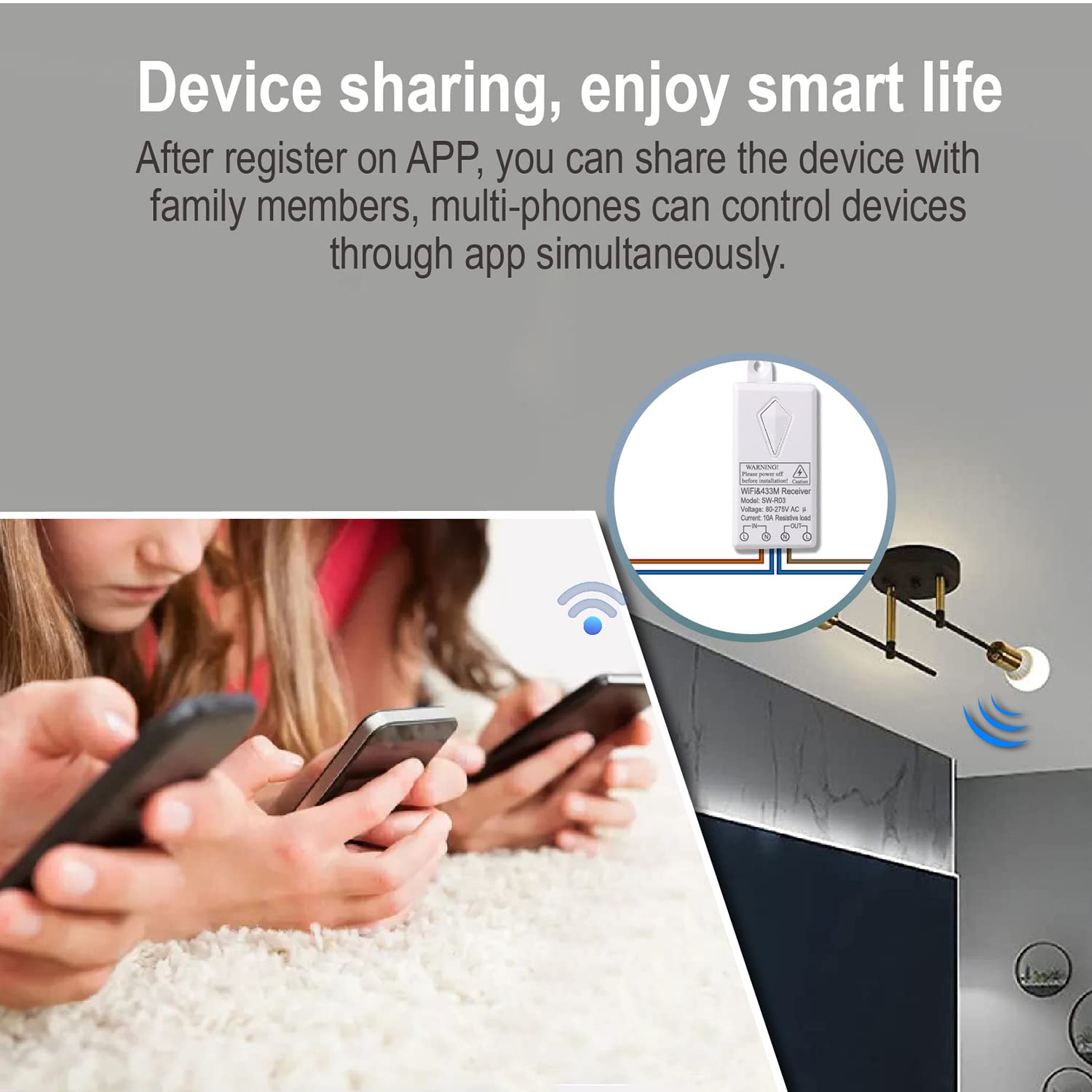 Figure 6.2: Wireless Switch Range
This image demonstrates the effective wireless range of the switch, showing a user activating the switch and the signal extending to multiple light fixtures within a large indoor space, indicating a range of 100-600 feet.
6.3. Pairing the Switch and Receiver
The switch and receiver are typically pre-paired. If re-pairing is needed or if you have multiple switches/receivers, follow the instructions provided with the product for pairing mode (usually involves pressing a button on the receiver until an indicator light flashes, then pressing the wireless switch button).
6.4. Налаштування застосунку (Tuya Smart)
- Завантажити додаток: Download the 'Tuya Smart' app from your smartphone's app store (iOS App Store or Google Play Store).
- Реєстрація/Вхід: Відкрийте застосунок і зареєструйте новий обліковий запис або увійдіть, якщо у вас вже є обліковий запис.
- Додати пристрій: In the app, tap '+' to add a new device. Follow the on-screen instructions to connect the WiFi Smart Receiver to your home Wi-Fi network (2.4GHz only).
- Перейменувати пристрій: Once connected, you can rename the device for easier identification (e.g., 'Living Room Light').
7. Операція
7.1. Wireless Switch Control
Simply press the wireless switch button to turn the connected light fixture ON or OFF. The switch provides instant control without the need for an app or voice commands.
7.2. Дистанційне керування за допомогою додатка
With the 'Tuya Smart' app, you can control your lights from anywhere with an internet connection:
- Open the 'Tuya Smart' app.
- Select the light switch device you wish to control.
- Tap the ON/OFF button within the app to toggle the light.
 Рисунок 7.1: Дистанційне керування за допомогою застосунку
This image shows a smartphone displaying the Tuya Smart app interface, with a light bulb icon and a toggle switch, indicating remote control functionality for a connected light fixture.
7.3. Голосове керування (Alexa та Google Home)
Integrate your smart switch with Amazon Alexa or Google Home for convenient voice control:
- Зв'язати облікові записи: In your Alexa or Google Home app, enable the 'Tuya Smart' skill/action and link your Tuya Smart account.
- Відкрийте для себе пристрої: Попросіть Alexa або Google Home виявити нові пристрої.
- Голосові команди: Використовуйте такі команди, як:
- «Алексо, увімкни [Ім’я світла]».
- "Hey Google, turn off [Light Name]."
 Рисунок 7.2: Сумісність голосового керування
This image depicts a user speaking to an Amazon Echo device, with a thought bubble showing 'Alexa, turn on the Living room lights.', and an 'ok' response, illustrating the seamless voice control integration with Alexa and Google Home.
7.4. Функція таймера
Set schedules for your lights to turn on or off automatically:
- In the 'Tuya Smart' app, select your device.
- Look for the 'Timer' or 'Schedule' option.
- Set desired times for the light to turn ON or OFF, and select the days of the week for the schedule to repeat.
 Figure 7.3: Timer Function Setup
This image illustrates the timer function, showing a clock face with 'AM 06.30 ON' and 'PM 20.45 OFF' indicators, alongside a smartphone screen displaying the 'Add Schedule' interface within the Tuya Smart app, allowing users to schedule device operation.
7.5. Спільний доступ до пристрою
Share control of your smart switch with family members:
- In the 'Tuya Smart' app, go to the device settings.
- Select 'Share Device' or 'Device Sharing'.
- Add family members by their Tuya Smart account or phone number. They will then be able to control the device from their own app.
 Figure 7.4: Device Sharing
This image shows multiple individuals simultaneously using their smartphones to control a single light fixture, illustrating the device sharing capability of the smart switch system.
8. Технічне обслуговування
The Tuya Smart WiFi Wireless Lights Switch Kit is designed for low maintenance. Consider the following:
- Прибирання: Wipe the wireless switch and receiver with a dry, soft cloth. Do not use harsh chemicals or abrasive cleaners.
- Заміна батареї: The wireless switch is powered by a CR2032 button lithium battery, which has a lifespan of 6-8 years. When the switch's performance degrades, replace the battery by opening the battery compartment (refer to product diagram for location).
- Довговічність: The switch button is rated for 600,000 operations, and the receiver for 400,000 operations, ensuring long-term reliability.
9. Вирішення проблем
If you encounter issues with your smart switch kit, refer to the following common problems and solutions:
- Light Not Responding to Wireless Switch:
- Ensure the receiver has power and is correctly wired.
- Check the battery in the wireless switch. Replace if necessary.
- Verify the switch and receiver are paired. If not, re-pair them according to the pairing instructions.
- Ensure the switch is within the effective wireless range of the receiver.
- Light Not Responding to App/Voice Control:
- Check your home Wi-Fi network connection. The receiver requires a stable 2.4GHz Wi-Fi signal.
- Ensure the receiver is connected to your Wi-Fi network and is online in the Tuya Smart app.
- Перевірте, чи ваш смартфон має підключення до Інтернету.
- For voice control, ensure your Tuya Smart account is correctly linked to Alexa or Google Home, and devices are discovered.
- Переривчасте підключення:
- Relocate your Wi-Fi router closer to the receiver or consider a Wi-Fi extender to improve signal strength.
- Ensure there are no major obstructions or sources of strong interference between the receiver and your Wi-Fi router.
- Anti-Surge Protection: The receiver includes 3000V anti-surge protection to resist lightning strikes and power fluctuations.
 Figure 9.1: Anti-Surge Protection
This image visually represents the 3000V anti-surge capability of the receiver, showing a lightning bolt graphic on one side and the receiver connected to a ceiling light on the other, emphasizing its resistance to electrical surges.
10. Гарантія та підтримка
Specific warranty information for this product is not provided in the available data. For warranty claims, technical support, or further assistance, please contact the manufacturer, EVERSECU, directly through their official webсайт або роздрібний продавець, у якого було придбано товар.


