вступ
The Linksys 5G AX1800 Mobile Hotspot is a portable device designed to provide high-speed 5G and WiFi 6 connectivity for multiple devices. With its ultra-thin design and long battery capacity, it allows you to stay connected on the go. This manual provides essential information for the proper setup, operation, maintenance, and troubleshooting of your mobile hotspot.
Ключові особливості:
- Portable 5G supersonic speed and bandwidth.
- WiFi 6 speeds up to 1.8 Gbps (AX1800).
- Supports connection for 15+ devices simultaneously.
- Ultra-thin and lightweight design for maximum convenience.
- Довговічний акумулятор для тривалого використання.
- Powered by leading-edge 5G technology by Qualcomm.
Малюнок 1: Спереду view of the Linksys 5G AX1800 Mobile Hotspot, showing LED indicators for battery, 5G/LTE, and Wi-Fi status.
Налаштування
1. Встановіть SIM-карту
The Linksys 5G AX1800 Mobile Hotspot requires a Nano-SIM card for 5G/LTE connectivity. Ensure the device is powered off before inserting the SIM card.
- Locate the SIM card slot cover on the side of the device.
- Обережно відкрийте кришку.
- Insert the Nano-SIM card into the slot with the gold contacts facing down and the notched corner aligned correctly.
- Щільно закрийте кришку гнізда SIM-картки.

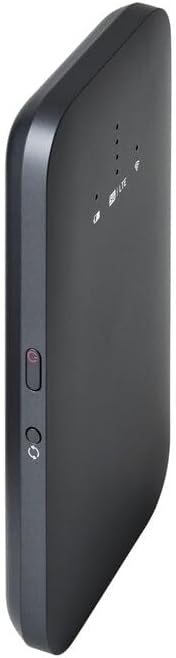
Малюнок 2: Сторона view of the mobile hotspot, highlighting the SIM card slot cover.
2. Зарядіть пристрій
Before first use, fully charge the mobile hotspot. Use the provided charging cable and a compatible USB power adapter.
- Connect one end of the USB cable to the charging port on the device.
- Підключіть інший кінець до USB-адаптера живлення або USB-порту комп’ютера.
- The battery indicator LED will show charging status. Allow several hours for a full charge.

Малюнок 3: Нижня частина view of the mobile hotspot, showing the USB-C charging port.
3. Увімкнення/вимкнення живлення
To power on the device, press and hold the power button located on the side until the LED indicators light up. To power off, press and hold the power button again until the indicators turn off.

Малюнок 4: Сторона view of the mobile hotspot, indicating the location of the power button.
Інструкція з експлуатації
1. Підключення пристроїв до Wi-Fi
Once powered on, the mobile hotspot will broadcast a Wi-Fi network. You can connect up to 15+ devices simultaneously.
- На своєму пристрої (смартфоні, ноутбуці, планшеті) відкрийте налаштування Wi-Fi.
- шукати доступні мережі Wi-Fi.
- Select the network name (SSID) of your Linksys Mobile Hotspot. The default SSID and password are usually found on a sticker inside the device or on its packaging.
- Коли буде запропоновано, введіть пароль Wi-Fi.
- Тепер ваш пристрій має бути підключений до Інтернету через мобільну точку доступу.
2. Розуміння світлодіодних індикаторів
The LED indicators on the front of the device provide important status information:
- Індикатор батареї: Показує поточний рівень заряду батареї та стан заряджання.
- 5G/LTE Indicator: Indicates the mobile network connection status (e.g., solid blue for 5G, solid green for LTE, blinking for searching).
- Індикатор Wi-Fi: Shows if the Wi-Fi network is active and broadcasting.
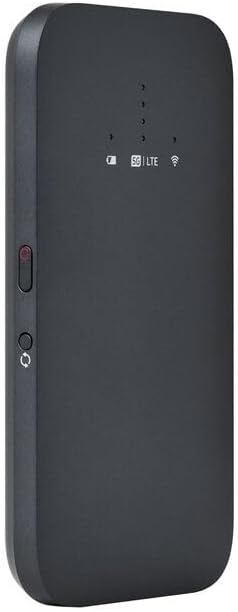
Рисунок 5: Кутова передня частина view of the mobile hotspot, clearly showing the LED indicators for battery, 5G/LTE, and Wi-Fi.
3. Доступ до Web Інтерфейс управління
For advanced settings, such as changing the Wi-Fi name or password, managing connected devices, or checking data usage, you can access the device's web інтерфейс управління.
- Ensure your device is connected to the mobile hotspot's Wi-Fi network.
- Відкрийте a web браузер (наприклад, Chrome, Firefox, Safari).
- Enter the default IP address for the hotspot (usually
192.168.1.1or192.168.0.1, refer to the device's documentation or sticker for the exact address) into the address bar and press Enter. - Log in using the default username and password (also found on the device sticker or documentation). It is highly recommended to change the default password for security.
Технічне обслуговування
1. Догляд за акумулятором
- Уникайте впливу на пристрій екстремальних температур.
- Не залишайте пристрій повністю розрядженим протягом тривалого часу.
- Використовуйте лише оригінальні або сертифіковані сумісні зарядні аксесуари.
2. прибирання
Протирайте пристрій м’якою, сухою тканиною без ворсу. Не використовуйте рідкі засоби для чищення або аерозолі безпосередньо на пристрої.
3. Оновлення мікропрограми
Periodically check for firmware updates through the web management interface. Keeping the firmware updated ensures optimal performance and security.
Усунення несправностей
Немає підключення до Інтернету
- Переконайтеся, що SIM-картка правильно вставлена та активована з тарифним планом передачі даних.
- Check the 5G/LTE indicator on the device. If it's blinking or off, the device may be searching for a network or have no signal.
- Перезавантажте мобільну точку доступу та підключений пристрій.
- Verify that your data plan has not been exhausted.
Низька швидкість Wi-Fi
- Move closer to the mobile hotspot to improve signal strength.
- Reduce the number of connected devices or data-intensive activities.
- Перевірте наявність перевантаження мережі у вашому регіоні.
Device Not Connecting to Hotspot
- Ensure the Wi-Fi indicator on the hotspot is active.
- Двічі перевірте пароль Wi-Fi.
- Перезавантажте як точку доступу, так і пристрій, до якого ви намагаєтеся підключитися.
Скидання до заводських налаштувань
If issues persist, you may perform a factory reset. This will revert all settings to their default values, including Wi-Fi name and password. Refer to the device's specific instructions for the reset procedure, usually involving a small reset button.
Технічні характеристики
| Особливість | Деталь |
|---|---|
| Бренд | Linksys |
| Назва моделі | FGHSAX1800 |
| Номер моделі товару | FGHSAX1800-AH |
| Технологія підключення | 5G |
| Стандартний Wi-Fi | Wi-Fi 6 (AX1800) |
| Швидкість передачі даних | До 1.8 гігабіт за секунду |
| Клас діапазону частот | Дводіапазонний |
| Тип антени | внутрішній |
| Особливості | Режим точки доступу |
| Включені компоненти | Слот для SIM-карти |
| томtage | 12 вольт |
| Розміри упаковки | 14 х 7.5 х 1.55 см |
| Вага товару | 185 г |
Гарантія та підтримка
For warranty information and technical support, please refer to the warranty card included with your product or visit the official Linksys support website. You can typically find FAQs, driver downloads, and contact information for customer service there.
Linksys Official Support: https://www.linksys.com/support


