1. Вступ
This manual provides essential information for the safe and efficient operation of your Ulefone Armor Pad 2 Rugged Tablet. Please read this manual thoroughly before using the device to ensure proper functionality and to prevent damage. Keep this manual for future reference.
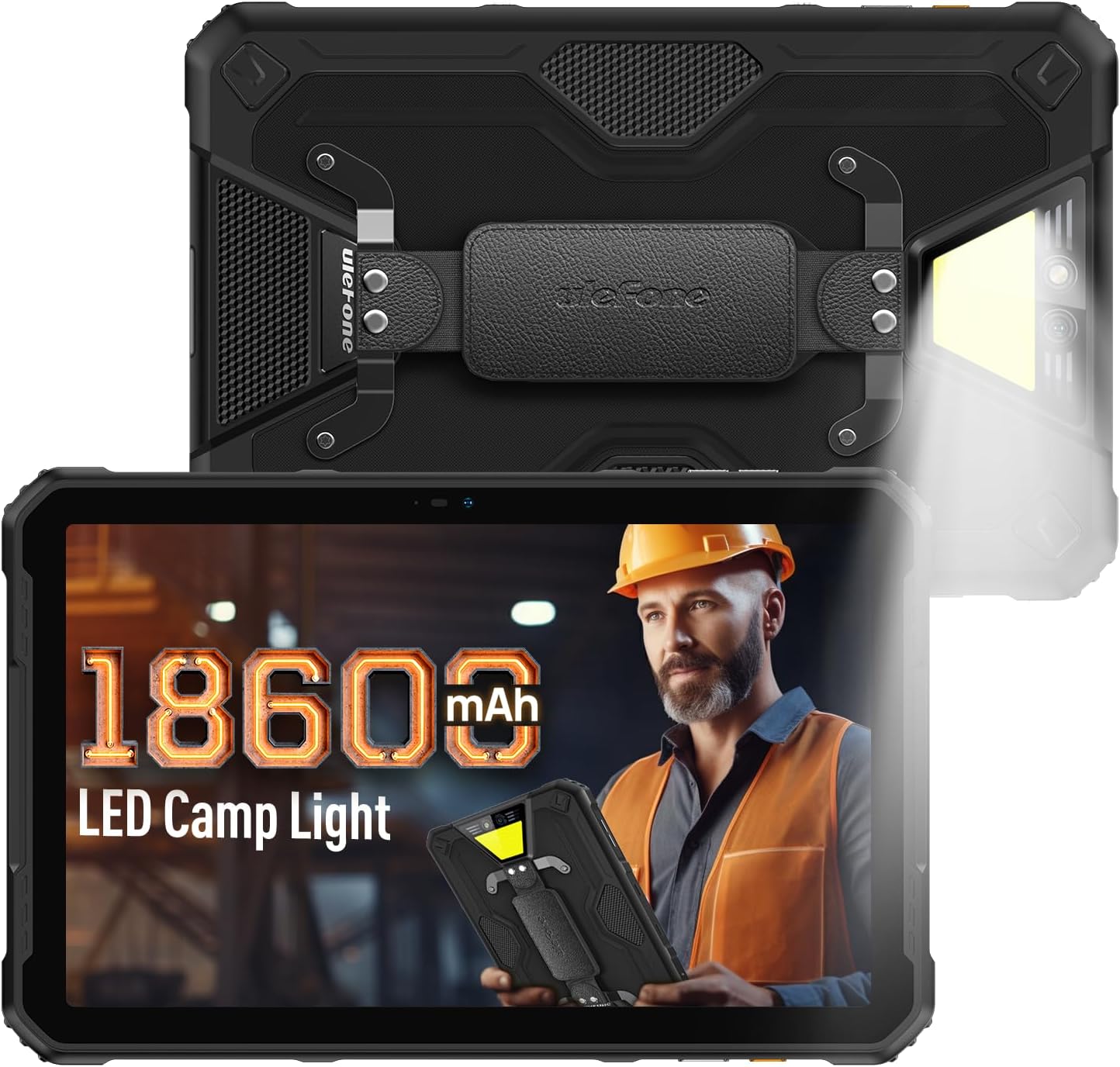
Figure 1: Ulefone Armor Pad 2 Rugged Tablet. This image displays the tablet from both front and back angles, highlighting its robust design and integrated campсвітло.
2. Вміст упаковки
Перевірте наявність усіх елементів в упаковці:
- 1 x Ulefone Armor Pad 2 Tablet
- 1 x AC Power Charger
- 1 x USB Type-C 2.0 Charging Cable
- 1 х ремінь на руку
- 1 х викрутка
- 8 x Screws (for hand strap attachment)
- 1 x захисна плівка (попередньо встановлена)
- 1 x SIM Needle
- 1 x Посібник користувача (цей документ)
Video 1: Armor Pad 2 Unboxing Video. This video demonstrates the unboxing process and shows all included accessories.
3. Схема пристрою
Familiarize yourself with the physical components and ports of your Armor Pad 2 tablet.

Малюнок 2: Закінченоview of Ulefone Armor Pad 2 features. This image highlights various components such as the camera, camping light, uSmart connector, and buttons.
- Фронтальна камера: 16 МП для відеодзвінків та селфі.
- Дисплей: 11-inch 2K display with Corning Gorilla Glass 5.
- Кнопка живлення: Located on the side, typically integrated with the fingerprint sensor.
- Кнопки гучності: Налаштуйте рівні звуку.
- Спеціальний ключ: Programmable button for quick access to functions (e.g., PTT, flashlight).
- Порт USB Type-C: Для зарядки та передачі даних.
- 3.5 мм аудіороз’єм: Для навушників.
- Слот для SIM-картки/TF: Supports dual Nano SIM cards and one TF card.
- Задня камера: 48MP main camera.
- Campсвітло: 750 lumens LED light with multiple modes.
- uSmart Expansion Connector: For connecting compatible external accessories.
- Два стереодинаміки: Front-facing for clear and balanced audio.
4. Налаштування
4.1 Початкове ввімкнення
- Press and hold the Power Button (usually on the side) until the Ulefone logo appears.
- Дотримуйтесь підказок на екрані, щоб завершити початкове налаштування, включаючи вибір мови, підключення Wi-Fi та налаштування облікового запису Google.
4.2 Встановлення SIM-/TF-картки
- Знайдіть слот для SIM-картки/TF на бічній панелі планшета.
- Use the provided SIM needle to gently eject the card tray.
- Place your Nano SIM cards and/or TF card into the tray according to the diagram on the tray. Ensure correct orientation.
- Carefully reinsert the card tray into the slot until it clicks into place.
4.3 Заряджання планшета
- Підключіть кабель USB Type-C до порту зарядки планшета.
- Connect the other end of the cable to the AC Power Charger.
- Plug the AC Power Charger into a wall outlet.
- Індикатор заряджання на екрані показуватиме стан заряджання.
- For optimal charging, use the provided Ulefone charger and cable.

Figure 3: Battery and Charging Features. This image illustrates the tablet's large 18600mAh battery capacity, 33W fast charging capability, and support for reverse charging.
5. Основна операція
5.1 Увімкнення/вимкнення живлення
- Увімкнення: Press and hold the Power Button until the device vibrates and the screen lights up.
- Вимкнення живлення: Press and hold the Power Button for a few seconds, then select "Power off" from the options on the screen.
- Перезапуск: Press and hold the Power Button for a few seconds, then select "Restart" from the options.
5.2 Жести на сенсорному екрані
Навігація планшетом за допомогою стандартних жестів Android:
- Торкніться: Виберіть елемент або активуйте функцію.
- Натисніть і утримуйте: Отримуйте доступ до контекстних меню або перетягуйте елементи.
- Проведіть пальцем: Прокручуйте екрани, списки або вміст.
- Масштабування за допомогою розведення пальців: Збільшення або зменшення масштабу зображень та web сторінки.
5.3 Custom Key Functions
The custom key on the side of the tablet can be programmed for various shortcuts:
- Access settings to assign single-click, double-click, and long-press actions.
- Common assignments include Push-to-Talk (PTT), flashlight, or quick camera launch.
5.4 Режим рукавички
Activate Glove Mode in settings to enable touchscreen responsiveness while wearing gloves, ideal for outdoor or industrial environments.
6. Ключові характеристики
6.1 Міцна конструкція
The Armor Pad 2 is built to withstand harsh conditions:
- Клас захисту IP68/IP69K: Сертифікований на водо- та пилонепроникність.
- Сертифіковано MIL-STD-810H: Meets military standards for durability against drops, shocks, and extreme temperatures.
- Corning Gorilla Glass 5: Enhanced scratch and drop resistance for the display.

Figure 4: Ruggedness features. This image demonstrates the tablet's water, dust, and drop resistance, highlighting its IP68/IP69K and MIL-STD-810H certifications.
6.2 Дисплей
Experience clear visuals on the 11-inch 2K display:
- розмір: 11-дюймовий
- роздільна здатність: 2K (2000x1200 pixels).
- Яскравість: 500 nits for visibility in various lighting conditions.

Figure 5: 11-inch 2K Display. This image showcases the vibrant display protected by Corning Gorilla Glass 5.
6.3 Продуктивність
The tablet is powered by a MediaTek Helio G99 processor, ensuring smooth operation:
- Процесор: MediaTek Helio G99 (8-core, 2.2GHz, 6nm).
- Оперативна пам'ять: Up to 16GB (8GB physical + 8GB virtual).
- Внутрішня пам'ять: 256 ГБ.
- Розширюване сховище: Up to 2TB via TF card.
- Операційна система: Android 13.

Figure 6: Performance specifications. This image details the MediaTek Helio G99 chipset, RAM, and ROM capabilities of the tablet.
6.4 Камери
Фіксуйте моменти за допомогою вбудованих камер:
- Задня камера: 48 МП.
- Фронтальна камера: 16 МП.

Figure 7: Camera capabilities. This image shows examples of photos taken with the 48MP rear and 16MP front cameras.
6.5 Підключення
Stay connected with a range of communication options:
- Стільниковий: 4G Dual SIM Dual Standby (Note: Not compatible with AT&T, Cricket).
- Wi-Fi: Wi-Fi 6 for faster wireless connections.
- Bluetooth: Bluetooth 5.2.
- Навігація: GPS + GLONASS + Galileo + BeiDou.
- NFC: Для безконтактних платежів та обміну даними.
6.6 Аудіо
Enjoy immersive sound with:
- Stereo Dual Speakers: Front-facing for clear and balanced audio.
- 3.5 мм аудіороз’єм: Для дротових навушників.
6.7 Camping світло
The integrated 750 lumens LED camping light provides versatile illumination:
- Яскравість: 750 lumens, 383 lighting beads, 5.5 watts.
- Режими: 3 lighting modes (e.g., Lighting, Sharp Light, SOS).
- Рівні яскравості: 3 adjustable levels.
- Activated via a physical button for quick access.

Figure 8: 750LM Camping Light. This image shows the tablet's powerful integrated LED light in use during a campсценарій.
Роз'єм розширення 6.8 uSmart
Ulefone's exclusive uSmart Expansion offers fast and stable connections to professional tools with plug-and-play convenience. Compatible expansion devices (e.g., endoscope, 1000x microscope) require additional purchases.
Video 2: Ulefone Armor Pad 2 Rugged Tablet Overview. This video demonstrates various features including the uSmart Expansion Connector.
7. Технічне обслуговування
- Прибирання: Використовуйте м'який, damp cloth to clean the tablet. Avoid harsh chemicals or abrasive materials. Ensure all port covers are securely closed before cleaning with liquids.
- Water/Dust Protection: Always ensure all port covers (USB, audio jack, SIM slot) are firmly sealed to maintain IP68/IP69K water and dust resistance.
- Догляд за акумулятором: Avoid exposing the tablet to extreme temperatures. For long-term storage, charge the battery to approximately 50-70%.
- Захист екрану: The tablet comes with a pre-installed protective film. For additional protection, consider using a tempered glass screen protector.
8. Вирішення проблем
| проблема | Можлива причина | Рішення |
|---|---|---|
| Планшет не вмикається. | Low battery or system crash. | Charge the tablet for at least 30 minutes. If still unresponsive, press and hold the Power Button for 10-15 seconds to force restart. |
| Сенсорний екран не реагує. | Збій програмного забезпечення або пошкодження екрана. | Restart the tablet. If the issue persists, perform a factory reset (backup data first). If physical damage is suspected, contact support. |
| Неможливо підключитися до Wi-Fi. | Incorrect password, router issue, or tablet Wi-Fi module issue. | Verify Wi-Fi password. Restart router and tablet. Try connecting to other Wi-Fi networks. |
| Погана якість зв'язку або відсутність сигналу. | Weak network signal, incorrect SIM installation, or carrier issue. | Move to an area with better signal. Reinstall SIM card. Contact your mobile carrier for network status. |
| Tablet is slow or freezes. | Занадто багато запущених програм, мало місця або застаріле програмне забезпечення. | Close unnecessary apps. Clear cache. Free up storage. Check for system updates. |
9. Технічні характеристики
| Особливість | Деталь |
|---|---|
| Модель | Ulefone Armor Pad 2 |
| Розміри | 10.94 x 7 x 0.55 дюймів |
| вага | 2.24 фунта |
| Операційна система | Android 13 |
| Процесор | MediaTek Helio G99 (8-core, 2.2GHz) |
| ОЗУ | До 16 ГБ (8 ГБ фізичної пам'яті + 8 ГБ віртуальної) |
| Внутрішня пам'ять | 256 ГБ |
| Розширюване сховище | До 2 ТБ (карта TF) |
| Дисплей | 11-inch 2K (1280 x 800 pixels, 500 nits, Corning Gorilla Glass 5) |
| Задня камера | 48 МП |
| Фронтальна камера | 16 МП |
| Ємність акумулятора | 18600 мАг |
| Зарядка | 33W Fast Charging, Reverse Charging (OTG) |
| Довговічність | Сертифіковано IP68/IP69K, MIL-STD-810H |
| Підключення | Дві SIM-картки 4G, Wi-Fi 6, Bluetooth 5.2, NFC |
| Навігація | GPS, ГЛОНАСС, Galileo, BeiDou |
| Особливості | 750LM Camping Light, uSmart Expansion Connector, Custom Key, PTT, Digital Toolbox, Fingerprint Sensor, Glove Mode, Stereo Dual Speakers |
10. Гарантія та підтримка
Ulefone products come with a standard manufacturer's warranty. For detailed warranty information, technical support, or service inquiries, please visit the official Ulefone webсайт або зверніться безпосередньо до служби підтримки клієнтів. Зберігайте чек про покупку як підтвердження покупки для гарантійних претензій.
Official Ulefone Webсайт: ulefone.com


