вступ
This manual provides essential instructions for the safe and efficient operation of your JVC 40W Portable Party Speaker, Model XS-N5223PB. Please read this manual thoroughly before using the device and retain it for future reference.
The JVC 40W Portable Party Speaker features integrated Bluetooth technology for wireless audio streaming, a built-in USB port for multimedia file playback (MP3, picture, video), TF card support, Karaoke function, and an LED light show. It delivers 40W output through two 8-inch speakers and is powered by a 4000mAh battery.
Важлива інформація з безпеки
- Не піддавайте динамік впливу води або надмірної вологи.
- Уникайте розміщення динаміка поблизу джерел тепла або під прямими сонячними променями.
- Не намагайтеся розбирати або модифікувати динамік. Звертайтеся до кваліфікованого персоналу з будь-яким обслуговуванням.
- Використовуйте лише зазначений зарядний адаптер.
- Зберігати в недоступному для дітей місці.
- Забезпечте належну вентиляцію навколо динаміка під час роботи.
Вміст упаковки
Будь ласка, перевірте наявність усіх предметів у упаковці:
- 1 x JVC 40W Portable Party Speaker (Model XS-N5223PB)
- 1 x кабель для зарядки
- 1 x Посібник користувача (цей документ)
Продукт закінченийview
Familiarize yourself with the main components and controls of your JVC Portable Party Speaker.
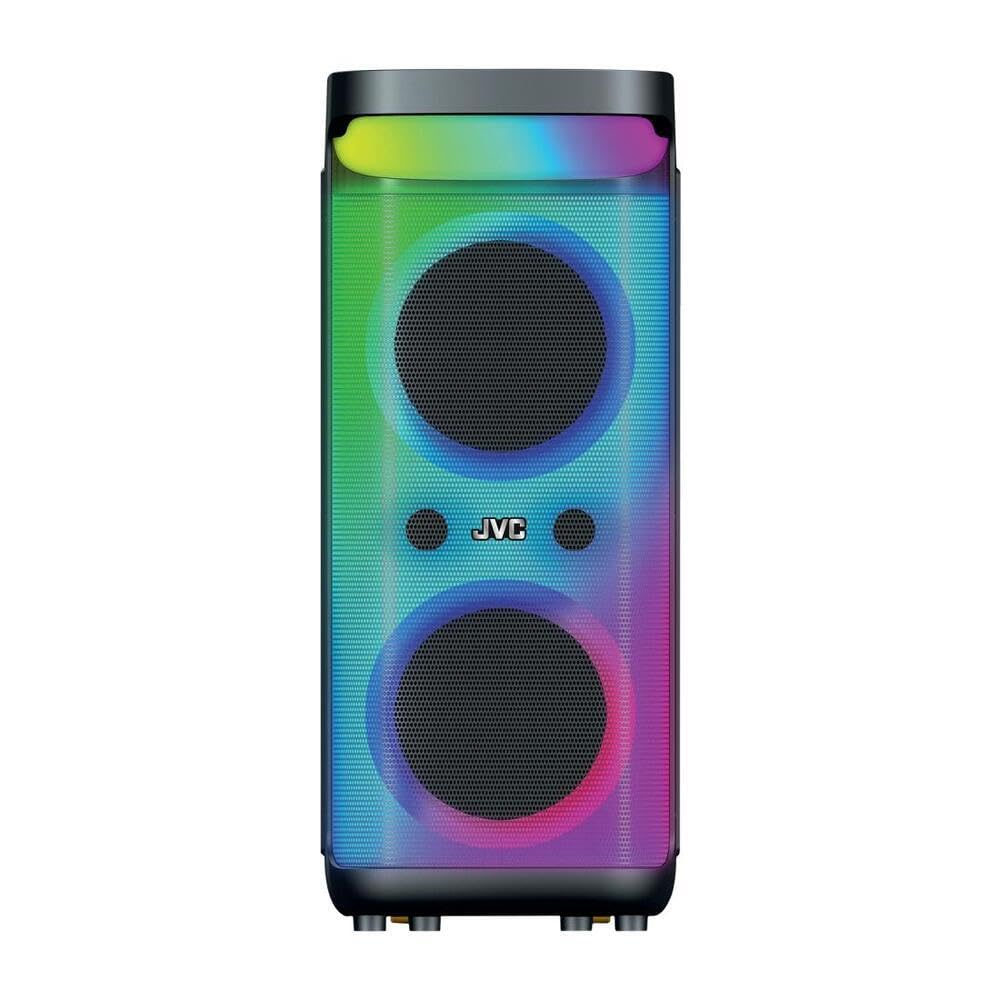
Зображення 1: Спереду і зверху view of the JVC 40W Portable Party Speaker, showing the control panel, LED lights, and speaker grille.

Зображення 2: Детальний view of the speaker's top control panel, highlighting buttons for mode selection, volume, playback, and input ports.
Функції панелі керування:
- Кнопка живлення: Вмикає/вимикає динамік.
- Кнопка режиму: Switches between Bluetooth, USB, TF Card, and AUX input modes.
- Ручки гучності: Adjusts master volume and microphone volume (if applicable).
- Кнопка відтворення/паузи: Керує відтворенням медіа.
- Кнопки попереднього/наступного треку: Навігація по треках.
- Кнопка світлодіодного підсвічування: Toggles or changes LED light show patterns.
- Порт USB: For USB drive playback of MP3, picture, and video files.
- Слот для картки TF: For TF (MicroSD) card playback of MP3, picture, and video files.
- Вхід AUX: Для підключення зовнішніх аудіопристроїв за допомогою кабелю 3.5 мм.
- Вхід мікрофона: For karaoke function.
Налаштування
Зарядка динаміка
- Підключіть зарядний кабель до зарядного порту динаміка.
- Plug the other end of the charging cable into a suitable power adapter (9 Volts input) and then into a wall outlet.
- The charging indicator light will illuminate, typically red, during charging. It will change color or turn off when fully charged.
- For first use, fully charge the speaker for approximately 4-6 hours.
Початкове розміщення
Place the speaker on a stable, flat surface. Ensure there is adequate space around the speaker for optimal sound dispersion and ventilation. The speaker is designed for floorstanding placement.
Інструкція з експлуатації
Увімкнення/вимкнення живлення
- To turn on: Press and hold the Power button until the display illuminates.
- To turn off: Press and hold the Power button again until the display turns off.
З'єднання Bluetooth
- Turn on the speaker. It will automatically enter Bluetooth pairing mode, indicated by a flashing "BLUE" on the display or an audible prompt.
- На мобільному пристрої (смартфоні, планшеті тощо) увімкніть Bluetooth та виконайте пошук доступних пристроїв.
- Select "JVC XS-N5223PB" (or similar name) from the list of devices.
- Once paired, the speaker will confirm the connection with an audible sound, and "BLUE" on the display will stop flashing.
- Тепер ви можете передавати аудіо бездротовим способом зі свого пристрою на динамік.
Відтворення з картки USB/TF
- Insert a USB flash drive or TF (MicroSD) card into the respective port/slot on the speaker.
- The speaker will automatically switch to USB or TF card mode and begin playing supported audio, picture, or video files. If it does not switch automatically, press the Mode button to select the correct input.
- Використовуйте кнопки «Відтворити/Пауза» та «Попередній/Наступний трек» для керування відтворенням.
Вхід AUX
- Підключіть один кінець аудіокабелю 3.5 мм (не входить до комплекту) до вхідного порту AUX на динаміку.
- Connect the other end of the cable to the audio output jack of your external device (e.g., MP3 player, laptop).
- Натискайте кнопку Mode на динаміку, доки не буде вибрано режим "AUX".
- Керуйте відтворенням та гучністю зі свого зовнішнього пристрою.
Функція караоке
- Connect a microphone (not included) to the Microphone Input port.
- Adjust the microphone volume using the dedicated knob on the control panel.
- Play music via Bluetooth, USB, TF card, or AUX, and sing along.
Світлодіодне світлове шоу
Press the LED Light button to cycle through different light patterns or to turn the LED lights on/off.
Функція True Wireless Stereo (TWS).
The TWS function allows you to pair two JVC XS-N5223PB speakers together for a stereo sound experience.
- Переконайтеся, що обидва динаміки увімкнені та перебувають у режимі Bluetooth, але не підключені до жодного пристрою.
- On one speaker (this will be the primary speaker), press and hold the TWS button (refer to your speaker's specific button layout if not explicitly labeled).
- Основний динамік шукатиме додатковий динамік. Після підключення обидва динаміки видаватимуть звуковий сигнал підтвердження.
- Now, connect your mobile device to the primary speaker via Bluetooth as described above. Audio will play through both speakers in stereo.
Технічне обслуговування
- Прибирання: Використовуйте м’яку суху тканину для очищення зовнішньої частини динаміка. Не використовуйте рідкі засоби для чищення або абразивні матеріали.
- Зберігання: When not in use for extended periods, store the speaker in a cool, dry place. It is recommended to charge the battery every 3-6 months to maintain its lifespan.
- Догляд за акумулятором: Avoid fully discharging the battery frequently. Charge the speaker when the low battery indicator appears.
Усунення несправностей
| проблема | Можлива причина | Рішення |
|---|---|---|
| Динамік не вмикається. | Акумулятор розряджений. | Connect the speaker to a power source and charge it. |
| Ні звуку. | Гучність занадто низька; неправильний режим введення; пристрій не підключено. | Increase volume on speaker and connected device. Ensure correct input mode is selected. Reconnect Bluetooth or check cable connections. |
| Не вдається з'єднати Bluetooth. | Гучномовець не в режимі сполучення; пристрій знаходиться занадто далеко; є перешкоди. | Ensure speaker is in Bluetooth pairing mode. Move device closer to speaker. Avoid strong electromagnetic interference. Try restarting both devices. |
| USB/TF-карта не відтворюється. | Не підтримується file формат; карта/диск вставлено неправильно; пошкоджено files. | Забезпечити files are in supported formats (e.g., MP3). Reinsert the USB drive/TF card. Try with a different USB drive/TF card or different files. |
| Світлодіодні ліхтарі не працюють. | LED lights are turned off. | Press the LED Light button to turn them on or change patterns. |
Технічні характеристики
| Номер моделі | XS-N5223PB |
| Вихідна потужність | 40 Вт |
| Розмір динаміка | 8 дюйма x 2 |
| Підключення | Bluetooth, USB, TF-карта, AUX |
| Ємність акумулятора | 4000 мАг |
| Вхідний об'ємtage | 9 вольт |
| Розміри (Д x Ш x В) | 33 см х 28.5 см х 66 см |
| матеріал | пластик |
| Тип монтажу | Підлогове покриття |
| Додаткові функції | TWS Function, Karaoke, LED Light Show |
Інформація про гарантію
This JVC Portable Party Speaker (Model XS-N5223PB) comes with a 1-річна гарантія виробника з дати покупки. Ця гарантія поширюється на виробничі дефекти матеріалів та виготовлення за умов нормального використання.
Гарантія не поширюється на:
- Пошкодження, спричинені нещасним випадком, зловживанням, неправильним використанням, повінню, пожежею, землетрусом або іншими зовнішніми причинами.
- Damage caused by operating the product outside the permitted or intended uses described by JVC.
- Пошкодження, спричинені обслуговуванням, виконаним особою, яка не є уповноваженим постачальником послуг JVC.
- Вироби або деталі, які були модифіковані для зміни функціональності чи можливостей без письмового дозволу JVC.
Зберігайте підтвердження покупки для гарантійних претензій.
Підтримка та контактна інформація
For technical support, warranty claims, or further assistance, please contact JVC customer service.
- Webсайт: www.jvc.com (Please check your regional JVC website for local support details)
- Електронна пошта: Зверніться до JVC website for specific contact email addresses.
- телефон: Зверніться до JVC webсайт для отримання конкретних контактних номерів телефонів.
When contacting support, please have your product model number (XS-N5223PB) and proof of purchase readily available.