вступ
This manual provides detailed instructions for the setup, operation, and maintenance of your Zenwire USB-C Hub 10-in-1 Adapter. Please read this manual thoroughly before using the device to ensure optimal performance and longevity.

Image: The Zenwire USB-C Hub, a compact gray device, is shown connected to various cables and accessories, including HDMI, USB, Ethernet, and SD cards, illustrating its multi-functionality.
Продукт закінченийview
The Zenwire USB-C Hub is a versatile 10-in-1 adapter designed to expand the connectivity of your USB-C enabled devices. It features a durable aluminum alloy shell for efficient heat dissipation.
Основні характеристики та порти:
- Порт HDMI 2.1: Supports resolutions up to 8K@30Hz or 4K@120Hz, with backward compatibility for lower resolutions.
- DisplayPort 1.4: Supports resolutions up to 8K@30Hz or 4K@120Hz, with backward compatibility for lower resolutions.
- USB-C Power Delivery (PD) 100W Port: Allows fast charging of your host device while using the hub, providing up to 100W power.
- 2 порти USB 3.0: Offers data transfer speeds up to 5 Gbps, 10 times faster than USB 2.0.
- Пристрій читання SD-карт: Supports SD cards up to 2TB.
- Зчитувач карт MicroSD: Supports MicroSD cards up to 2TB.
- RJ-45 Gigabit Ethernet Port: Provides a stable wired internet connection with speeds up to 1000 Mbps.
- 3.5 мм аудіороз’єм: Для підключення навушників, мікрофонів або зовнішніх динаміків.
- USB-C 3.1 / Thunderbolt 3.0 Host Connection: Connects the hub to your laptop or compatible device.

Зображення: Детальний view of the Zenwire USB-C Hub, highlighting its 10 ports including 3.5mm audio, Type-C PD100W, DP1.6, HDMI2.1, Gigabit Ethernet, USB3.0 5Gbps, SD, and MicroSD slots.

Image: A close-up of the Zenwire USB-C Hub, emphasizing its aluminum alloy shell designed for effective heat dissipation, ensuring the device remains cool during operation.
Налаштування
- Підключення до хост-пристрою: Plug the integrated USB-C cable of the Zenwire Hub into a compatible USB-C or Thunderbolt 3.0/4.0 port on your laptop, tablet, or smartphone. The hub is Plug & Play and typically requires no driver installation.
- Подача живлення (додатково): If your host device requires charging or if you are connecting power-intensive peripherals, connect your original USB-C power adapter to the USB-C PD 100W port on the hub.
- Підключення периферійних пристроїв: Connect your desired devices (monitors, USB drives, Ethernet cable, SD/MicroSD cards, audio devices) to the corresponding ports on the hub.
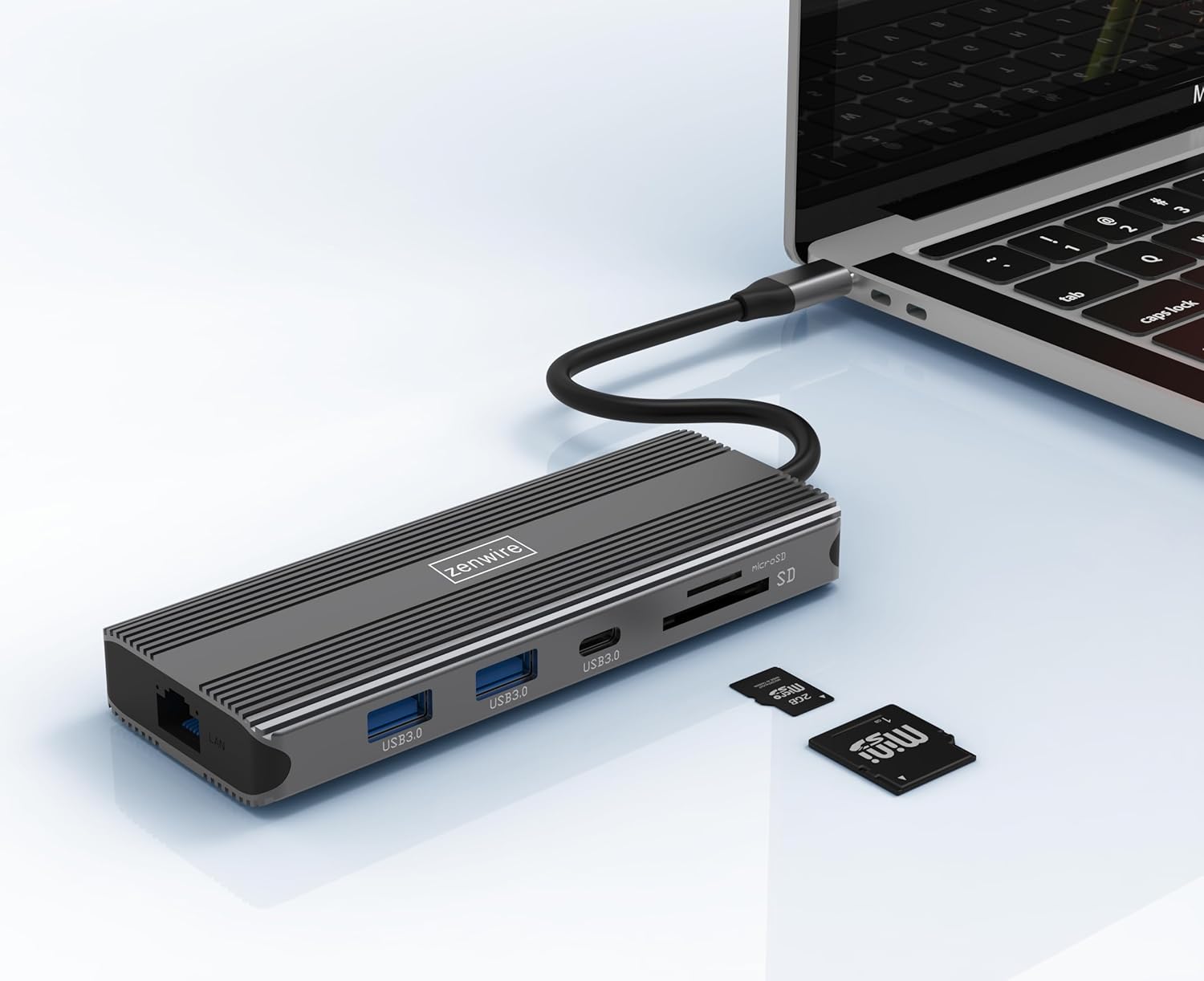
Image: The Zenwire USB-C Hub is shown connected to a laptop via its integrated USB-C cable, with SD and MicroSD cards placed nearby, illustrating a typical setup scenario.
Інструкція з експлуатації
Підключення дисплея:
The hub supports connecting up to two external monitors simultaneously via its HDMI 2.1 and DisplayPort 1.4 interfaces. Both can display video in 4K@60Hz concurrently.
- Один монітор: Connect your monitor to either the HDMI or DisplayPort.
- Dual Monitors: Connect one monitor to the HDMI port and another to the DisplayPort.

Image: A laptop is displayed connected to two larger external monitors, demonstrating the multi-display capability of the Zenwire USB-C Hub.
Multi-Display Modes (MacOS vs. Windows):
The behavior of multiple external displays can vary between operating systems.
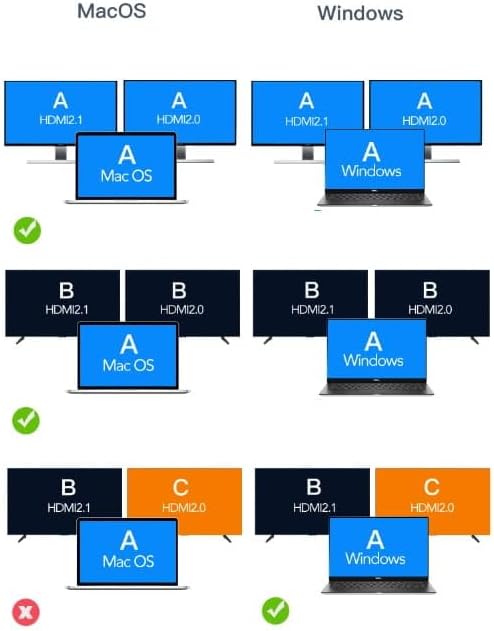
Image: A diagram illustrating different multi-display configurations for MacOS and Windows. It shows that MacOS typically supports extended desktop across two external monitors (A, B) and the laptop screen (A), while Windows can support extended desktop across three screens (A, B, C) or mirrored displays.
- MacOS: Typically supports extended desktop across two external monitors (A, B) and the laptop screen (A). Mirroring is also supported.
- Windows: Supports extended desktop across three screens (A, B, C) or mirrored displays, offering more flexibility for multi-monitor setups.
HDMI 2.1 and DisplayPort 1.4 Advanced Features:
These ports offer higher refresh rates and advanced features for an enhanced visual experience:
- High Transfer Speeds: Up to 48 Gbps for HDMI 2.1, ensuring high data throughput.
- eARC (Покращений канал зворотного аудіо): For higher audio quality and support for object-based audio formats like Dolby Atmos and DTS-X.
- VRR (змінна частота оновлення): Useful for gaming, where refresh rates are not constant.
- ALLM (режим автоматичної низької затримки): Automatically detects content like games and switches the device to a low-latency mode.
- QMS (Швидке перемикання медіа): The image on the screen changes immediately when switching between content.
- QFT (швидке транспортування кадрів): Reduces input lag further.
- Динамічний HDR: Adjusts the image parameters during content transmission for higher quality visuals. Supports HDR 10 and 10+.
Підключення аудіо:
The 3.5mm audio jack allows connection of various audio devices:
- мікрофони
- Навушники
- Headphones with integrated microphone
- Зовнішні динаміки
Технічне обслуговування
- Прибирання: Використовуйте м’яку суху тканину для очищення маточини. Уникайте рідких засобів для чищення або абразивних матеріалів.
- Зберігання: Зберігайте концентратор у прохолодному, сухому місці, подалі від прямих сонячних променів та екстремальних температур.
- Обробка: Не кидайте пристрій і не піддавайте його сильним ударам.
- Розсіювання тепла: The aluminum alloy shell is designed for effective heat dissipation. Ensure the hub is placed in a well-ventilated area during prolonged use.
Усунення несправностей
- Немає виводу на дисплей:
- Переконайтеся, що кабель USB-C від концентратора надійно підключено до вашого хост-пристрою.
- Verify that the HDMI/DisplayPort cable is firmly connected to both the hub and the monitor.
- Check your host device's display settings to ensure the external monitor is detected and configured correctly (e.g., extended, mirrored).
- Try a different HDMI/DisplayPort cable or monitor to rule out cable/monitor issues.
- Без подачі живлення:
- Переконайтеся, що ваш адаптер живлення USB-C підключено до порту PD концентратора та він працює належним чином.
- Перевірте, чи ваш хост-пристрій підтримує USB-C Power Delivery.
- USB-пристрої не розпізнані:
- Reconnect the USB device to a different USB 3.0 port on the hub.
- Ensure the USB device is functioning correctly by connecting it directly to your host device.
- Some high-power USB devices may require external power if the hub's PD port is not utilized.
- Проблеми з підключенням до Ethernet:
- Перевірте, чи кабель Ethernet надійно підключено як до концентратора, так і до маршрутизатора/модему.
- Перевірте мережеві налаштування на вашому хост-пристрої.
- Ensure your router/modem is working correctly.
- Картку SD/MicroSD не виявлено:
- Переконайтеся, що картка повністю вставлена у правильний слот.
- Check if the card is formatted correctly and readable by your operating system.
- Try a different card to rule out card issues.
Технічні характеристики
| Бренд | Zenwire |
| Модель | Zenwire USB-C Hub |
| Підключення | USB-C 3.1 / Thunderbolt 3.0 (Host) |
| Порти |
|
| Швидкість передачі даних | USB 3.0: 5 Gbps; Ethernet: 1000 Mbps |
| Електропостачання | До 100 Вт |
| матеріал | Корпус з алюмінієвого сплаву |
| Розміри (Д x Ш x В) | 118 x 48 x 15 мм |
| вага | 109 г |
| Довжина кабелю | Приблизно 15 см |
| Сумісність операційної системи | Windows 11/10/8/7, Apple macOS, Linux, Android, iPad Pro iOS (USB-C models) |

Зображення: Кутовий view of the Zenwire USB-C Hub, showcasing its compact design and the integrated USB-C host cable.
Гарантія та підтримка
Zenwire products are designed for reliability and performance. For warranty information and technical support, please refer to the official Zenwire webсайт або зверніться до продавця. Зберігайте чек про покупку для гарантійних претензій.
For the latest software updates or driver information (if applicable), please visit the Zenwire support page. This device is designed to be Plug & Play, generally not requiring additional drivers.


