Важливі інструкції з безпеки
Під час використання електроприладів слід завжди дотримуватися основних запобіжних заходів, щоб зменшити ризик пожежі, ураження електричним струмом та травмування людей. Перед використанням цього приладу уважно прочитайте всі інструкції.
- Не використовуйте піч, якщо шнур живлення або вилка пошкоджені, якщо вони не працюють належним чином, або якщо вони були пошкоджені чи впали.
- Не нагрівайте рідини або інші продукти харчування в герметичних контейнерах, оскільки вони можуть вибухнути.
- Не використовуйте в цьому приладі корозійні хімікати або пари.
- Необхідний ретельний нагляд, коли прилад використовується дітьми або поблизу них.
- Не занурюйте шнур або вилку у воду.
- Переконайтеся, що прилад належним чином заземлений.
- Використовуйте лише посуд, придатний для мікрохвильових печей.
- Не намагайтеся використовувати цю піч з відкритими дверцятами, оскільки це може призвести до шкідливого впливу мікрохвильової енергії.
- Не ставте жодних предметів між передньою поверхнею духової шафи та дверцятами та не допускайте накопичення бруду чи залишків миючого засобу на ущільнювальних поверхнях.
- Не використовуйте духовку, якщо вона пошкоджена. Особливо важливо, щоб дверцята духовки закривалися належним чином і щоб не було пошкоджень: (1) дверей (зігнутих), (2) петель і засувок (зламаних або послаблених), (3) ущільнювачів дверцят та ущільнювальних поверхонь.
- Піч не повинен налаштовуватися або ремонтуватися ніким, крім кваліфікованого обслуговуючого персоналу.
Продукт закінченийview
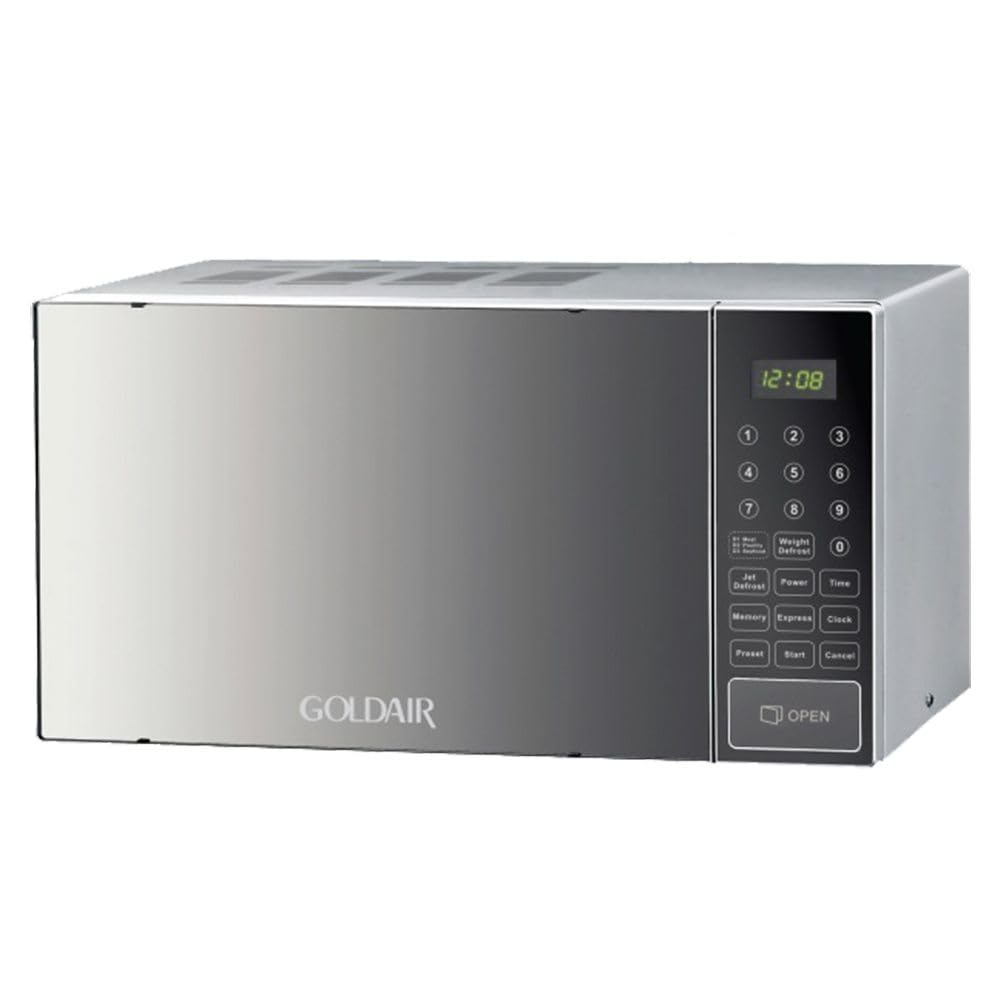
Зображення: спереду view of the Goldair Microwave Oven GMO-30E, showcasinйого сріблясте покриття та панель керування.
особливості
- Mirror finish door and control panel for a modern aesthetic.
- Defrost function by both weight and time for versatile food preparation.
- Designed as a modern and stylish appliance suitable for various kitchen decors.
- Capable of reheating, defrosting, and cooking a variety of food items.
- Equipped with an auto cook feature for convenient meal preparation.
компоненти
The Goldair Microwave Oven GMO-30E typically includes the following main components:
- Камера духовки: The interior space where food is placed for heating.
- Скляна вертушка: A rotating glass tray that ensures even heating.
- Turntable Support and Ring: Supports the glass turntable and allows it to rotate.
- Збірка дверей: Includes the door, latch system, and viewінше вікно.
- Панель керування: Features buttons and a display for setting cooking functions, time, and power levels.
- Кришка хвилеводу: A protective cover inside the oven cavity, typically on the right side, which should not be removed.
- Шнур живлення: Для підключення приладу до електричної розетки.
Налаштування
Розпакування
Carefully remove the microwave oven and all packing materials from the carton. Check the oven for any damage, such as dents or a misaligned door. Do not operate the oven if it is damaged. Retain the carton and packing materials for future use or dispose of them responsibly.
Розміщення
- Place the microwave oven on a flat, stable surface, such as a kitchen countertop, that is strong enough to support its weight (approximately 17 kg).
- Ensure there is adequate ventilation space around the oven: at least 20 cm of space above, 10 cm at the rear, and 5 cm on each side. Do not block any ventilation openings.
- Тримайте піч подалі від джерел тепла та сильних магнітних полів.
Електричне підключення
- Переконайтеся, що ваш блок живлення відповідає гучностіtage specified on the rating label of the microwave (230 Volts).
- Підключіть шнур живлення до заземленої електричної розетки. Не використовуйте подовжувачі або адаптери.
- The microwave oven operates at 900 watts. Ensure your electrical circuit can support this power requirement.
Інструкція з експлуатації
Базове приготування їжі в мікрохвильовій печі
- Покладіть їжу в посуд, придатний для використання в мікрохвильовій печі, на скляний поворотний столик.
- Надійно закрийте дверцята духовки.
- Use the control panel to set the desired cooking time and power level. Refer to the specific buttons on your control panel for "Time Cook" and "Power Level" settings.
- Натисніть кнопку «Пуск», щоб розпочати приготування.
- The oven will beep when the cooking cycle is complete. Open the door and carefully remove the food.
Функція розморожування
The Goldair GMO-30E offers defrosting by both weight and time.
- Розморожування за вагою: Place the frozen food in the oven. Select the "Defrost by Weight" function on the control panel. Enter the weight of the food using the numerical keypad. The oven will automatically calculate the defrosting time.
- Розморожування за часом: Place the frozen food in the oven. Select the "Defrost by Time" function. Enter the desired defrosting time.
During defrosting, it may be necessary to turn or separate food items to ensure even thawing.
Програми автоматичного приготування
The microwave includes pre-programmed auto cook settings for common food items. Consult your control panel for specific auto cook options (e.g., popcorn, potato, pizza). To use:
- Поставте їжу в духовку.
- Select the desired auto cook program from the control panel.
- Духовка автоматично встановить час приготування та рівень потужності.
- Натисніть кнопку «Пуск», щоб розпочати.
Технічне обслуговування та очищення
Regular cleaning and maintenance will ensure the longevity and hygienic operation of your Goldair Microwave Oven.
- Прибирання салону: After each use, wipe the inside of the oven with a damp cloth. For stubborn food splatters, place a bowl of water with lemon juice inside and microwave for a few minutes to loosen residue, then wipe clean. The design of the oven helps reduce bacteria growth and odor formation, making cleaning easier.
- Зовнішнє очищення: Clean the exterior surfaces, including the mirror finish door and control panel, with a soft, damp тканиною. Уникайте абразивних засобів для чищення або агресивних хімічних речовин, які можуть пошкодити покриття.
- Поворотний стіл та підтримка: The glass turntable and its support ring can be removed and washed in warm, soapy water or in a dishwasher. Ensure they are completely dry before placing them back in the oven.
- Дверні ущільнювачі: Регулярно перевіряйте та очищуйте ущільнювачі дверцят і ущільнювальні поверхні, щоб забезпечити належне закриття та запобігти витоку мікрохвильової енергії.
- Вимкнення живлення: Завжди відключайте мікрохвильову піч від розетки перед чищенням.
Усунення несправностей
If you encounter issues with your Goldair Microwave Oven, refer to the following common problems and solutions:
| проблема | Можлива причина | Рішення |
|---|---|---|
| Піч не запускається | Шнур живлення не підключений до мережі; Дверцята не зачинені належним чином; Перегорів запобіжник або спрацював автоматичний вимикач. | Ensure the power cord is securely plugged into a grounded outlet. Close the door firmly. Check your household fuse/circuit breaker. |
| Їжа не розігрівається | Неправильно встановлено час приготування або рівень потужності; не використано посуд, придатний для використання в мікрохвильовій печі. | Adjust cooking time and power level as needed. Use only microwave-safe cookware. |
| Дивний шум під час роботи | Turntable not correctly seated; Foreign object in the cavity; Internal component issue. | Ensure the glass turntable and its support ring are correctly positioned. Check for any loose items inside the oven. If the noise persists and is unusual, discontinue use and contact customer support. |
| Лампочка не працює | Перегоріла лампочка. | Contact qualified service personnel for replacement. Do not attempt to replace it yourself. |
Якщо проблема не зникає після спроби цих рішень, зверніться до служби підтримки клієнтів Goldair.
Технічні характеристики
| Специфікація | Деталь |
|---|---|
| Бренд | Голдейр |
| Номер моделі | GMO-30E |
| колір | Срібло |
| Ємність | 30 літра |
| Потужність / Втtage | 900 Вт |
| томtage | 230 вольт |
| матеріал | метал |
| Вага товару | 17 кг |
| Особливості | Defrost by weight and time, Auto cook |
| Тип установки | Стільниця |
| Тип контролера | Дотик |
Гарантія та підтримка
Specific warranty details for the Goldair Microwave Oven GMO-30E are not provided in the available product information. For warranty claims, technical support, or spare parts inquiries, please contact Goldair customer service directly or refer to the warranty card included with your purchase.
Please note that spare part availability information was not provided in the product data.