1. Вступ
This manual provides detailed instructions for the setup, operation, and maintenance of your Raddy WF-80C Wireless Weather Station. This device offers comprehensive monitoring of indoor and outdoor environmental conditions, including temperature, humidity, barometric pressure, and weather forecasts. It also features an atomic clock with dual alarms and moon phase tracking.

Figure 1: Raddy WF-80C Wireless Weather Station with main unit and three remote sensors.
2. Вміст упаковки
- 1 x Raddy WF-80C Main Display Unit
- 3 x Wireless Outdoor Sensors (R4 model)
- 1 х адаптер змінного струму
- 1 х посібник користувача
- Batteries (1 Lithium Metal for main unit, 6 AAA for sensors)

Figure 2: Package contents of the Raddy WF-80C Weather Station.
3. Налаштування
3.1 Живлення головного блоку
- Insert the included Lithium Metal battery into the main unit's battery compartment. This battery serves as a backup for settings during power outagес.
- Connect the AC power adapter to the main unit and plug it into a power outlet. The display will light up.
3.2 Installing Batteries in Outdoor Sensors
- Open the battery compartment on each of the three wireless outdoor sensors.
- Insert 2 new AAA batteries into each sensor, ensuring correct polarity.
- Закрийте батарейні відсіки.
3.3 Pairing Sensors with Main Unit
The sensors should automatically pair with the main unit once powered on. Allow a few minutes for the main unit to receive data from all three sensors. If a sensor does not connect, ensure it is within the 100m (330ft) transmission range and press the 'CH' button on the main unit to manually search for sensors.

Figure 3: Multi-zone monitoring with three wireless remote sensors.
3.4 Розміщення датчика
Place outdoor sensors in shaded, dry locations away from direct sunlight and rain to ensure accurate readings and prolong battery life. The sensors have a 100m (330ft) range.
3.5 Варіанти монтажу
The main unit can be placed on a tabletop using its integrated kickstand or wall-mounted using the keyhole slots on the back.

Figure 4: Main unit with table stand and wall-mounting options.
3.6 Відеопосібник з налаштування
Video 1: A visual guide demonstrating the setup process, including battery installation and initial configuration (Note: This video is for a similar model, but the setup steps are generally applicable).
4. Інструкція з експлуатації
4.1 Дисплей закінчивсяview
The 7.5" color display provides a clear overview of all measured data. It features dedicated sections for indoor temperature/humidity, outdoor temperature/humidity (for up to 3 sensors), weather forecast, moon phase, time, date, and comfort indicators.

Малюнок 5: Детально view of the 7.5" color display.
4.2 Функції кнопок
Buttons on the front/top of the unit allow for easy operation:
- ТРИВОГА: Set and activate/deactivate alarms.
- CH (канал): Switch between outdoor sensor channels (1, 2, 3) or initiate a search for sensors.
- ПОПЕРЕДЖЕННЯ: Set high/low temperature/humidity alerts.
- SNZ/LIGHT: Snooze alarm, adjust backlight brightness, or turn off backlight.
- ВНИЗ/ВГОРУ: Adjust values during settings.
- РЕЖИМ: Увійдіть у режим налаштувань часу, дати та інших параметрів.

Figure 6: Convenient front and top panel buttons for easy operation.
4.3 Налаштування часу та дати (атомний годинник)
The WF-80C features an RCC atomic timekeeping function for accurate, self-adjusting time. Upon initial setup, it will attempt to synchronize. If manual adjustment is needed:
- Press and hold the 'MODE' button to enter time setting mode.
- Use 'UP' and 'DOWN' buttons to adjust values (e.g., 12/24-hour format, hour, minute, year, month, day).
- Press 'MODE' to confirm each setting and move to the next.

Figure 7: Atomic Clock with DCF Feature for precise timekeeping.
4.4 Weather Forecast and Barometric Pressure
The station provides a 6-icon weather forecast based on barometric pressure trends. It also displays the current barometric pressure and its tendency.

Figure 8: Weather forecast icons and moon phase display.
4.5 Comfort Level and Mold Risk Indicators
The display includes comfort level indicators (Dry, Comfort, Wet) and mold risk alerts, which are determined by indoor humidity levels.

Figure 9: Comfort level and mold risk indicators for indoor environment.
4.6 Adjustable Backlight and Night Mode
The display offers five brightness levels. An automatic night mode can be configured for reduced brightness during specific hours, ideal for bedrooms.
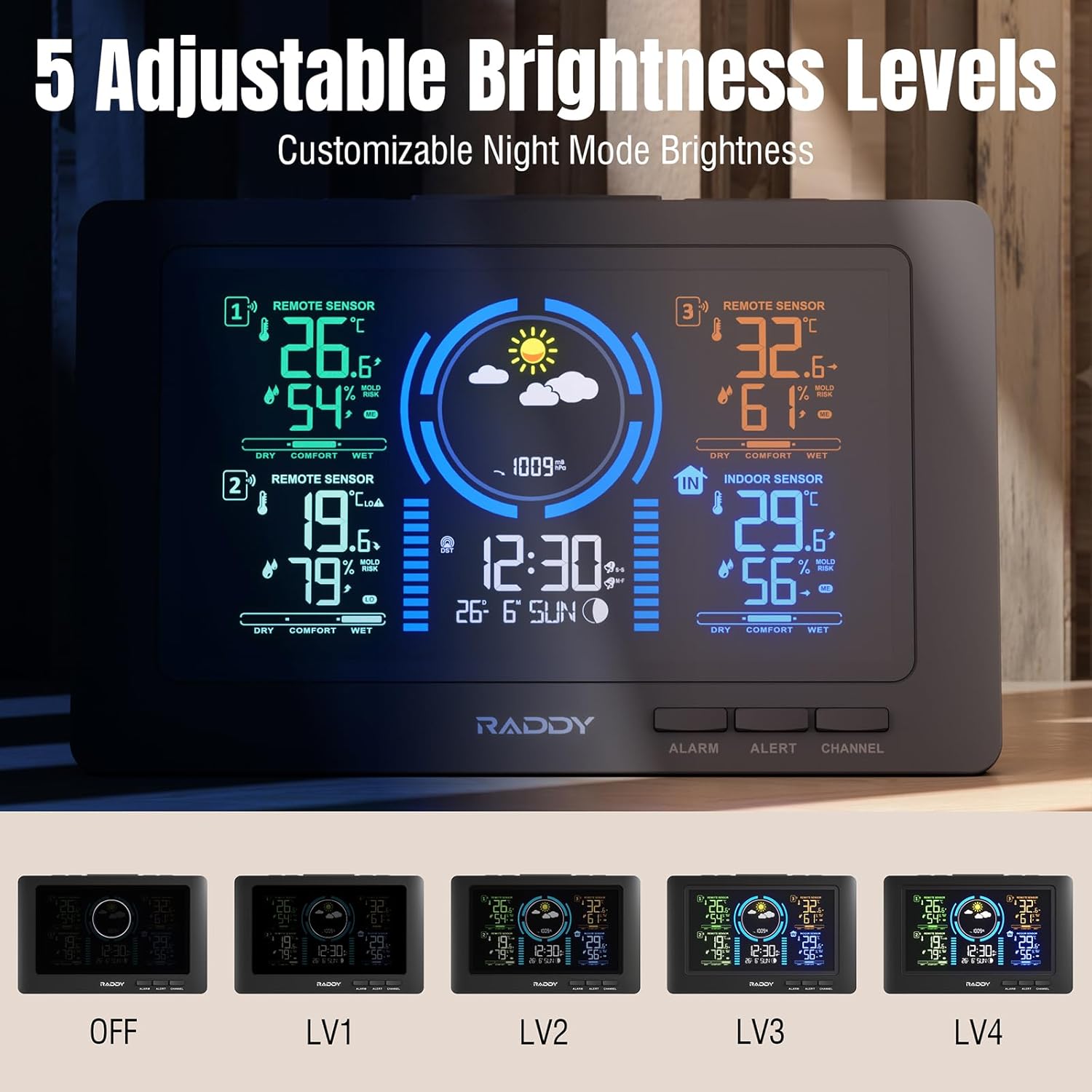
Figure 10: Five adjustable brightness levels for optimal viewінж.
4.7 Alarms and Alerts
Set dual alarms for different times (e.g., weekdays/weekends). High/low alerts can be configured for temperature and humidity to notify you when conditions exceed preset ranges.

Figure 11: High/Low Alerts for temperature and humidity.

Figure 12: Dual alarm clocks for flexible scheduling.
4.8 USB-порт для зарядки
The main unit includes a USB port for charging external devices like smartphones.
5. Технічне обслуговування
5.1 Заміна батареї
Replace batteries in the outdoor sensors annually or when the low battery indicator appears on the main unit. Ensure to use fresh AAA batteries.
5.2 Очищення
Протріть дисплей та сенсорні блоки м’якою сухою тканиною. Уникайте використання абразивних засобів для чищення або розчинників.
6. Вирішення проблем
- No outdoor sensor data: Ensure sensors have fresh batteries and are within range. Press the 'CH' button on the main unit to manually search. Avoid major obstructions between sensors and the main unit.
- Неправильний час/дата: Verify the atomic clock signal reception. If necessary, manually set the time and date via the 'MODE' button.
- Проблеми з дисплеєм: Check the power connection. Adjust backlight brightness using the 'SNZ/LIGHT' button.
- Alarm cannot be turned off: If an alarm is active and cannot be deactivated through the 'ALARM' button, try removing the backup battery and unplugging the unit for a few minutes to perform a hard reset.
7. Технічні характеристики
- Бренд: Редді
- модель: WF-80C
- Джерело живлення: Battery Powered (1 Lithium Metal included for main unit, 6 AAA for sensors)
- Розміри продукту: 4.83 x 21.59 x 13.97 см; 710 g
- Особливості: 3 Sensors, Adjustable Brightness, Alarm, Clock, Large Display, Atomic Clock, Weather Forecast, Moon Phase, Comfort Indicators, Mold Risk Alerts, USB Charging Port
- Діапазон передачі: Up to 100m (330ft) for outdoor sensors
- Виробник: Редді
- Країна походження: Китай
8. Гарантія та підтримка
For warranty information or technical support, please refer to the contact details provided in your product packaging or visit the official Raddy webсайт. Зберігайте чек про покупку для гарантійних претензій.


