вступ
This manual provides essential instructions for the installation, operation, and maintenance of your Fermax Sup Milo Digital Intercom System. Please read this manual thoroughly before installation and use to ensure proper function and safety. Keep this manual for future reference.
The Fermax Sup Milo Digital Intercom System is designed to provide clear communication and enhanced security for residential and commercial premises. It integrates advanced technology with a robust design to offer reliable access control and communication solutions.
Інформація про безпеку
Always follow basic safety precautions to reduce the risk of fire, electric shock, and injury to persons. This product should only be installed and serviced by qualified personnel.
- Перед установкою або обслуговуванням відключіть живлення.
- Не піддавайте пристрій впливу дощу або вологи.
- Переконайтеся, що всі з'єднання проводів надійні та відповідають місцевим електротехнічним нормам.
- Не намагайтеся ремонтувати пристрій самостійно. Звертайтеся до кваліфікованого сервісного персоналу для всіх робіт з обслуговування.
Вміст упаковки
Перед початком встановлення перевірте наявність усіх компонентів. Зазвичай комплект включає:
- Fermax Sup Milo Digital Intercom Unit (Aluminum Plate)
- Монтажна фурнітура
- Connection cables (may vary by kit)
- Посібник користувача (цей документ)
Note: Specific components may vary based on the purchased kit.
Налаштування та встановлення
This section outlines the general steps for installing the Fermax Sup Milo Digital Intercom System. Professional installation is recommended.
1. Підготовка сайту
- Choose a suitable mounting location, typically near an entrance, at an accessible height.
- Переконайтеся, що поверхня рівна та стійка.
- Verify access to necessary power and communication wiring.
2. Монтаж пристрою
- Carefully remove the front panel of the intercom unit to access mounting holes.
- Position the unit and mark the drilling points on the wall.
- Просвердліть отвори та за потреби вставте відповідні анкери до стіни.
- Secure the intercom unit to the wall using the provided mounting screws.
3. Підключення проводів
Refer to the wiring diagram specific to your system configuration. General connections include:
- Джерело живлення: Connect to a stable 100V power source. Ensure correct polarity.
- Communication Bus: Connect the digital bus lines to the indoor units and central control unit.
- Відкриття дверей: Connect the door release mechanism (e.g., electric strike) to the designated terminals.
- Допоміжні входи/виходи: Connect any additional devices such as external cameras or sensors as required.
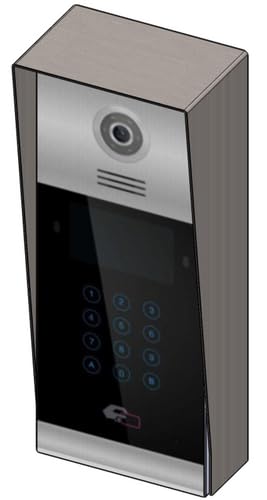 Зображення 1: спереду view of the Fermax Sup Milo Digital Intercom System, showing the aluminum plate and digital keypad. This image illustrates the exterior design of the main unit.
4. Початкове ввімкнення та налаштування
- Once all wiring is complete and secure, restore power to the system.
- The unit will perform a self-test. Observe any indicator lights or sounds.
- Follow the system's programming guide (usually provided separately or accessible via a master unit) to configure apartment numbers, access codes, and other settings.
Інструкція з експлуатації
Making a Call from the Outdoor Panel
- To call an apartment: Enter the apartment number using the digital keypad.
- Press the "Call" button (often represented by a bell icon or similar).
- The indoor unit will ring. Once answered, communication can begin.
Receiving a Call and Opening the Door (Indoor Unit)
- When the indoor unit rings, press the "Answer" button to establish communication with the visitor.
- To open the door, press the "Door Release" button on your indoor unit.
- The door will unlock for a short period.
Using Access Codes
If configured, authorized users can enter a pre-programmed access code on the outdoor digital keypad to unlock the door without needing to call an indoor unit.
- Enter your personal access code using the digital keypad.
- Press the "Enter" or "Door Release" button.
- Двері розблокуються.
Технічне обслуговування
Regular maintenance ensures the longevity and optimal performance of your Fermax intercom system.
прибирання
- Очистіть зовнішню частину пристрою м’якою, damp тканина.
- Не використовуйте абразивні засоби для чищення, розчинники або хімічні спреї, оскільки вони можуть пошкодити покриття та електронні компоненти.
- Ensure no liquid enters the unit's openings.
перевірки
- Periodically check for any visible damage to the unit or wiring.
- Ensure all mounting screws are tight.
- Test the communication and door release functions regularly.
Оновлення програмного забезпечення
If applicable, consult your installer or Fermax support for information on firmware updates that may improve performance or add new features.
Усунення несправностей
У цьому розділі розглядаються поширені проблеми, з якими ви можете зіткнутися. У разі складніших проблем зверніться до служби технічної підтримки.
| проблема | Можлива причина | Рішення |
|---|---|---|
| No communication with indoor unit. |
|
|
| Не працює відмикання дверей. |
|
|
| Клавіатура не реагує. |
|
|
Технічні характеристики
Technical specifications for the Fermax Sup Milo Digital Intercom System (Model: 8424299951713).
- модель: Fermax Sup Milo Digital Intercom System
- Номер деталі: 8424299951713
- Виробник: Фермакс
- Розміри (упаковка): Приблизно 0.1 х 0.1 х 0.1 см
- Вага (одиниця): 108 грамів
- матеріал: Metal, Plastic, Polycarbonate (Aluminum Plate)
- Джерело живлення: External Power Supply (100V)
- томtage: 100 В
- Wattage: 100 Вт
- Потрібні батареї: немає
- колір: Multicolored (referring to internal components or subtle design elements, main plate is aluminum)
Інформація про гарантію
Fermax products are manufactured to high-quality standards. For specific warranty terms and conditions, please refer to the warranty card included with your product or visit the official Fermax webсайт. Зберігайте чек про покупку для гарантійних претензій.
Typically, warranty covers manufacturing defects for a specified period from the date of purchase. Damage due to improper installation, misuse, or unauthorized repairs is generally not covered.
Підтримка клієнтів
If you require technical assistance, have questions about your product, or need to report a problem, please contact your local Fermax distributor or visit the official Fermax webсайт для ресурсів підтримки.
Webсайт: www.fermax.com
Будь ласка, підготуйте номер вашої моделі (8424299951713) та інформацію про покупку, коли звертатиметесь до служби підтримки.


