вступ
This manual provides detailed instructions for the operation and maintenance of your RadioShack Portable Bluetooth Speaker. This versatile audio device offers multiple connectivity options and features to enhance your listening experience.

Малюнок 1: Спереду view of the RadioShack Portable Bluetooth Speaker, showcasing its black fabric grille and red accent symbols.
Вміст упаковки
Before proceeding, please ensure all items are present in the package:
- RadioShack Portable Bluetooth Speaker
- Зарядний кабель USB Type-C
- Auxiliary 3.5mm Cable (Note: Some packages may not include this cable, as per customer feedback.)
- Ремінь для перенесення

Figure 2: The speaker shown with its included USB Type-C charging cable and an auxiliary cable.
Налаштування
1. Заряджання динаміка
Before first use, fully charge the speaker. The speaker is equipped with a 3000 mAh battery, providing up to 6 hours of playback on a full charge. A complete charge typically takes approximately 3 hours.
- Locate the USB Type-C charging port on the speaker. This is usually found on the top panel near the control buttons.
- Підключіть наданий кабель USB Type-C до порту заряджання динаміка.
- Підключіть інший кінець USB-кабелю до сумісного USB-адаптера живлення (не входить до комплекту) або USB-порту комп’ютера.
- Індикатор заряджання світитиметься під час заряджання та вимкнеться або змінить колір після повного заряджання.
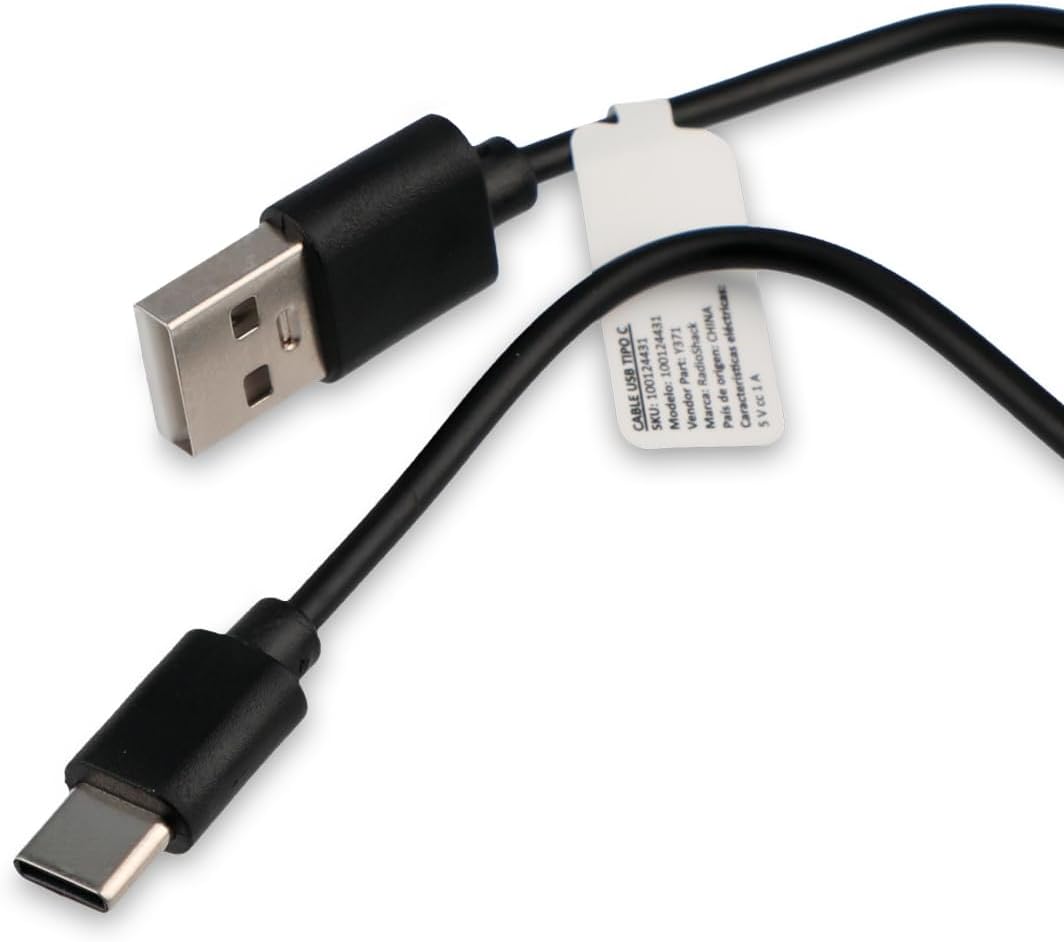
Figure 3: Close-up of the USB Type-C charging cable included with the speaker.
2. Початкове увімкнення
Press and hold the Power button (usually marked with a power symbol) on the speaker's control panel until you hear an audible prompt or see an indicator light illuminate.
Інструкція з експлуатації
Панель управління завершенаview

Figure 4: Top panel of the speaker, displaying the control buttons and various input ports (AUX, TF, USB, Type-C).
The control panel on the top of the speaker features several buttons and ports for various functions:
- Кнопка живлення: Вмикає/вимикає динамік.
- Кнопка режиму: Перемикає режими входу (Bluetooth, USB, SD, AUX, FM-радіо).
- Кнопка відтворення/паузи: Відтворює або призупиняє відтворення аудіо.
- Кнопка збільшення гучності/наступного треку: Increases volume (short press) or skips to the next track (long press).
- Кнопка зменшення гучності/попереднього треку: Decreases volume (short press) or goes to the previous track (long press).
- Кнопка режиму освітлення: Changes or turns off the RGB LED lighting effects.
- Порт AUX: For 3.5mm auxiliary cable connection.
- Гніздо для карти TF (Micro SD): Для відтворення аудіо з карти пам'яті Micro SD.
- Порт USB: Для відтворення аудіо з USB-флеш-накопичувача.
- Порт типу C: Для зарядки колонки.
1. Підключення Bluetooth
This speaker supports wireless audio streaming via Bluetooth, compatible with smartphones, tablets, and computers.
- Turn on the speaker. It will automatically enter Bluetooth pairing mode, indicated by a flashing LED light or an audible prompt.
- Увімкніть Bluetooth на своєму пристрої та знайдіть доступні пристрої.
- Select "RadioShack Speaker" (or similar name) from the list of found devices.
- Once paired, the speaker will confirm with an audible sound, and the LED indicator will become solid.
2. Відтворення через USB
Вставте USB-накопичувач із аудіо files (MP3, WAV, etc.) into the USB port. The speaker will automatically switch to USB mode and begin playback.
3. Відтворення з SD-карти
Вставте карту Micro SD (TF) з аудіо fileу гніздо для TF-карти. Динамік автоматично перейде в режим SD-карти та розпочне відтворення.
4. Допоміжне (AUX) підключення
Для пристроїв без Bluetooth використовуйте допоміжний вхід 3.5 мм.
- Connect one end of a 3.5mm audio cable (not always included) to the AUX port on the speaker.
- Підключіть інший кінець до роз'єму для навушників або аудіовиходу вашого пристрою.
- Press the Mode button on the speaker until it switches to AUX mode.
5. Функція FM-радіо
Щоб скористатися вбудованим FM-радіо:
- Press the Mode button until you hear the FM radio mode activated.
- Press the Play/Pause button to auto-scan and save available radio stations.
- Use the Volume Up/Down buttons (long press) to navigate between saved stations.
6. RGB-світлодіодне освітлення
The speaker features an RGB LED light panel that adds visual ambiance. The light panel is located on one side of the speaker.

Малюнок 5: Сторона view of the speaker, highlighting the transparent panel designed for RGB lighting effects.
Press the Light Mode button (often indicated by a sun or lightbulb icon) on the control panel to cycle through different lighting modes or to turn the lights off.
Технічне обслуговування
прибирання
Щоб зберегти зовнішній вигляд та функціональність вашого динаміка:
- Протріть зовнішню частину м’якою, сухою тканиною без ворсу.
- Не використовуйте абразивні засоби для чищення, віск або розчинники.
- Avoid getting moisture into any openings. The speaker is not waterproof.
Зберігання
When not in use for extended periods, store the speaker in a cool, dry place away from direct sunlight and extreme temperatures. It is recommended to charge the battery at least once every three months to preserve its lifespan.
Усунення несправностей
| проблема | Можлива причина | Рішення |
|---|---|---|
| Динамік не вмикається. | Акумулятор розрядився. | Заряджайте динамік за допомогою кабелю USB Type-C, що постачається в комплекті. |
| Немає звуку з динаміка. | Гучність занадто низька або вимкнена. Неправильний режим введення. | Increase volume on both speaker and connected device. Press the Mode button to select the correct input source (Bluetooth, USB, SD, AUX, FM). |
| Не вдається підключитися через Bluetooth. | Speaker is not in pairing mode. Device is too far. Interference. | Ensure speaker is in Bluetooth pairing mode (flashing LED). Move device closer to speaker (within 10 meters). Turn off other Bluetooth devices. |
| USB/SD-карта не відтворюється. | Не підтримується file формат. Картка/диск вставлено неправильно. | Забезпечити звук files are in a supported format (e.g., MP3). Reinsert the USB drive or SD card firmly. |
| FM radio static. | Слабкий сигнал. | Перемістіть динамік у місце з кращим прийомом. |
Технічні характеристики
| Особливість | Деталь |
|---|---|
| Номер моделі | 100124431 (Y371) |
| Розміри (Д x Ш x В) | 9.6 см х 22.7 см х 8.2 см |
| вага | 500 грамів |
| матеріал | Метал, силікон |
| Технологія підключення | Bluetooth, USB, SD Card, 3.5mm Auxiliary |
| Діапазон Bluetooth | До 10 метрів |
| Вихідна потужність динаміка | 10 Вт |
| АЧХ | 80 кГц |
| Ємність акумулятора | 3000 мАг літій-іонний |
| Термін служби батареї | До 6 годин |
| Час зарядки | Приблизно 3 години |
| Вхідний об'ємtage | 5 вольт |
| Особливості | Portable, RGB LED Light, FM Radio |
| Водостійкий | немає |
Інформація про гарантію
This RadioShack product comes with a limited warranty. For specific terms and conditions, including warranty duration and coverage details, please refer to the warranty card included with your product packaging or contact RadioShack customer support. Keep your purchase receipt as proof of purchase for warranty claims.
Підтримка клієнтів
For further assistance, technical support, or warranty inquiries, please contact RadioShack customer service. Contact information can typically be found on the product packaging, the official RadioShack webсайті або через точку продажу.
Будь ласка, збережіть цей посібник для використання в майбутньому.


