1. Вступ
This manual provides essential instructions for the safe and efficient operation of your eKids Disney Wish Karaoke Machine, Model WH-555. Please read this manual thoroughly before using the device and retain it for future reference.

Зображення 1.1: спереду view of the eKids Disney Wish Karaoke Machine with its wired microphone.
2. Інформація про безпеку
Щоб забезпечити безпечну роботу, будь ласка, дотримуйтесь наступних заходів безпеки:
- Не піддавайте пристрій впливу екстремальних температур, прямих сонячних променів або вологи.
- Не занурюйте пристрій у воду або інші рідини.
- Для заряджання використовуйте лише USB-кабель із комплекту постачання.
- Тримайте пристрій подалі від джерел тепла, таких як радіатори, обігрівачі, печі чи інші прилади (включаючи ampліфікатори), які виробляють тепло.
- Не намагайтеся розбирати або модифікувати пристрій. Звертайтеся до кваліфікованого сервісного персоналу для проведення будь-яких робіт з обслуговування.
- This product is intended for use by children under adult supervision.
3. Вміст упаковки
Перевірте наявність усіх елементів в упаковці:
- eKids Disney Wish Karaoke Machine (Model WH-555)
- Дротовий мікрофон
- USB-кабель для зарядки
4. Продукт закінчивсяview
Familiarize yourself with the various parts and controls of your karaoke machine.
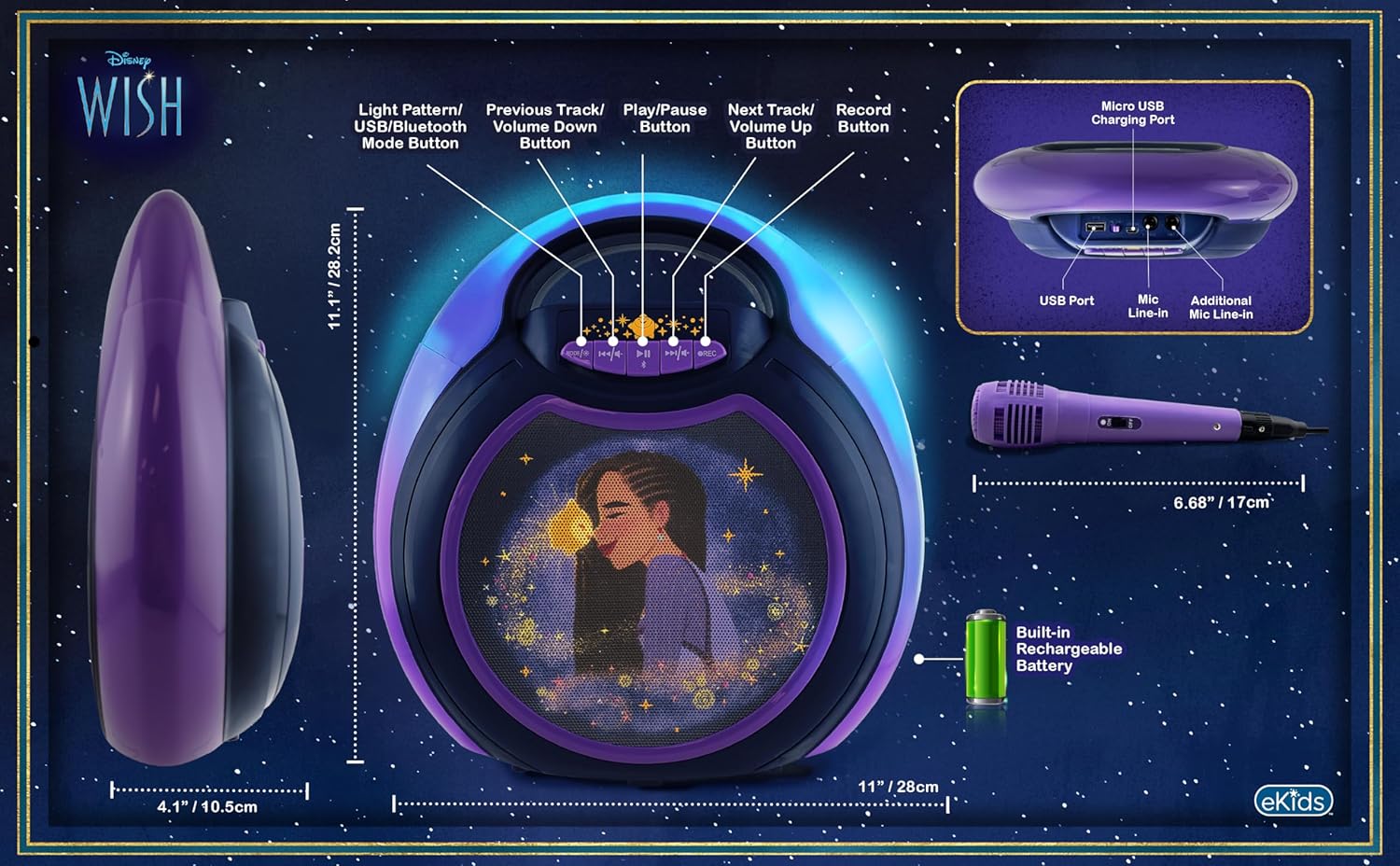
Image 4.1: Diagram of the eKids Disney Wish Karaoke Machine's controls, ports, and dimensions.
Елементи керування та порти:
- MODE / # Button: Switches between input modes (Bluetooth, USB) and adjusts light patterns.
- Кнопка попереднього треку / зменшення гучності: Navigates to the previous track or decreases volume.
- Кнопка відтворення / паузи: Відтворює або призупиняє аудіо.
- Кнопка «Наступний трек» / «Збільшення гучності»: Navigates to the next track or increases volume.
- Кнопка REC: Initiates recording (requires USB flash drive).
- Порт зарядки Micro USB: Для заряджання внутрішнього акумулятора.
- Порт USB: For connecting a USB flash drive for recording or playback.
- Mic Line-in: Primary port for the included wired microphone.
- Additional Mic Line-in: For connecting a second microphone (not included) for duets.
5. Налаштування
5.1 Зарядка пристрою
Before first use, fully charge the karaoke machine. Connect the provided USB charging cable to the Micro USB Charging Port on the unit and to a standard USB power adapter (not included) or a computer's USB port. The charging indicator will illuminate during charging and turn off when fully charged.
5.2 Підключення мікрофона
Plug the wired microphone's connector into the 'Mic Line-in' port on the karaoke machine. For duet performances, an additional microphone (not included) can be connected to the 'Additional Mic Line-in' port.

Зображення 5.1: Збоку view of the karaoke machine with the wired microphone connected.
6. Інструкція з експлуатації
6.1 Увімкнення/вимкнення
Натисніть і утримуйте MODE / # кнопку для ввімкнення або вимкнення пристрою.
6.2 Створення пари Bluetooth
When the unit is powered on, it will automatically enter Bluetooth pairing mode. The indicator light will flash. On your compatible device (smartphone, tablet, etc.), enable Bluetooth and select "eKids Wish Karaoke" from the list of available devices. A confirmation tone will sound when pairing is successful.

Image 6.1: Bluetooth compatibility with various devices.
6.3 Відтворення музики
Once paired via Bluetooth, start playing music from your connected device. Use the Відтворення / Пауза, Попередній трек / Зменшення гучності, і Наступний трек / збільшення гучності buttons on the karaoke machine to control playback.
6.4 Використання мікрофона
Ensure the microphone is connected to the 'Mic Line-in' port. Adjust the microphone's volume using the dedicated switch on the microphone itself. Sing into the microphone while music plays from the speaker.
6.5 Запис виступів
To record your singing, insert a USB flash drive (not included) into the USB Port. Press the REC button to start recording. Press it again to stop recording. Recordings will be saved to the USB flash drive. Refer to the Product Overview (Image 4.1) for the location of the USB port.
6.6 Light Show Modes
Натисніть MODE / # button repeatedly to cycle through different color-changing LED light show patterns.
6.7 Регулювання гучності
Відрегулюйте гучність основного динаміка за допомогою Попередній трек / Зменшення гучності і Наступний трек / збільшення гучності buttons. The microphone has its own volume control switch.
7. Технічне обслуговування
7.1 Очищення
Протріть пристрій м’якою сухою тканиною. Не використовуйте рідкі засоби для чищення або абразивні матеріали.
7.2 Зберігання
Коли пристрій не використовується, зберігайте його в прохолодному, сухому місці, подалі від прямих сонячних променів та екстремальних температур.
8. Вирішення проблем
- Немає живлення: Ensure the unit is charged. Connect the USB charging cable and allow it to charge for a period.
- Немає звуку: Check that the volume on both the karaoke machine and the connected Bluetooth device is turned up. Ensure the microphone is properly connected and its switch is on.
- Bluetooth не підключається: Make sure Bluetooth is enabled on your device and the karaoke machine is in pairing mode. Try unpairing and re-pairing the device. Ensure no other devices are currently connected to the karaoke machine.
- Запис не працює: Verify that a compatible USB flash drive is inserted into the USB port and has sufficient free space.
9. Технічні характеристики
| Номер моделі | WH-555 |
| Розміри | 11.07 x 4.14 x 11.11 дюймів |
| вага | 3.67 фунта |
| Джерело живлення | Живлення від батареї (перезаряджається) |
| томtage | 3 вольт |
| Підключення | Bluetooth, USB |
| Кількість спікерів | 1 |
| Особливості | Light Up Speaker, Recording Function |
10. Гарантія та підтримка
For warranty information and customer support, please refer to the documentation included with your purchase or visit the official eKids webсайт. Зберігайте чек про покупку для гарантійних претензій.


