1. Вступ
This manual provides detailed instructions for the installation, operation, and maintenance of your Shanrya 12.3-inch Car Stereo Radio Navigation GPS Player. Please read this manual thoroughly before using the product to ensure proper function and to prevent damage. This device is designed to enhance your driving experience with advanced navigation, entertainment, and connectivity features.
2. Інформація про безпеку
- Рекомендовано професійне встановлення: Due to the complexity of car electrical systems, professional installation is strongly advised to avoid damage to the unit or your vehicle.
- Безпека водіння: Не використовуйте пристрій таким чином, щоб це відволікало вас від керування автомобілем. Завжди ставте безпеку дорожнього руху на перше місце.
- Джерело живлення: Ensure the unit is connected to the correct vehicle power supply (12V DC). Incorrect voltagе може завдати шкоди.
- температура: Уникайте тривалого перебування пристрою під екстремальними температурами або прямими сонячними променями.
- вологість: Тримайте пристрій подалі від води та надмірної вологи.
- Прибирання: Використовуйте для очищення м’яку суху тканину. Не використовуйте абразивні засоби для чищення або розчинники.
3. Вміст упаковки
Перевірте наявність усіх елементів в упаковці:
- 1 x Main Head Unit (12.3-inch display)
- 1 x Air Vent Assembly
- 1 x GPS антена
- 1 х силовий джгут
- 2 кабелі USB
- 1 x зовнішній мікрофон
- 1 x Комплект кабелів RCA
- 1 x Посібник користувача (цей документ)
- Other necessary installation accessories (brackets, trim tools, etc.)
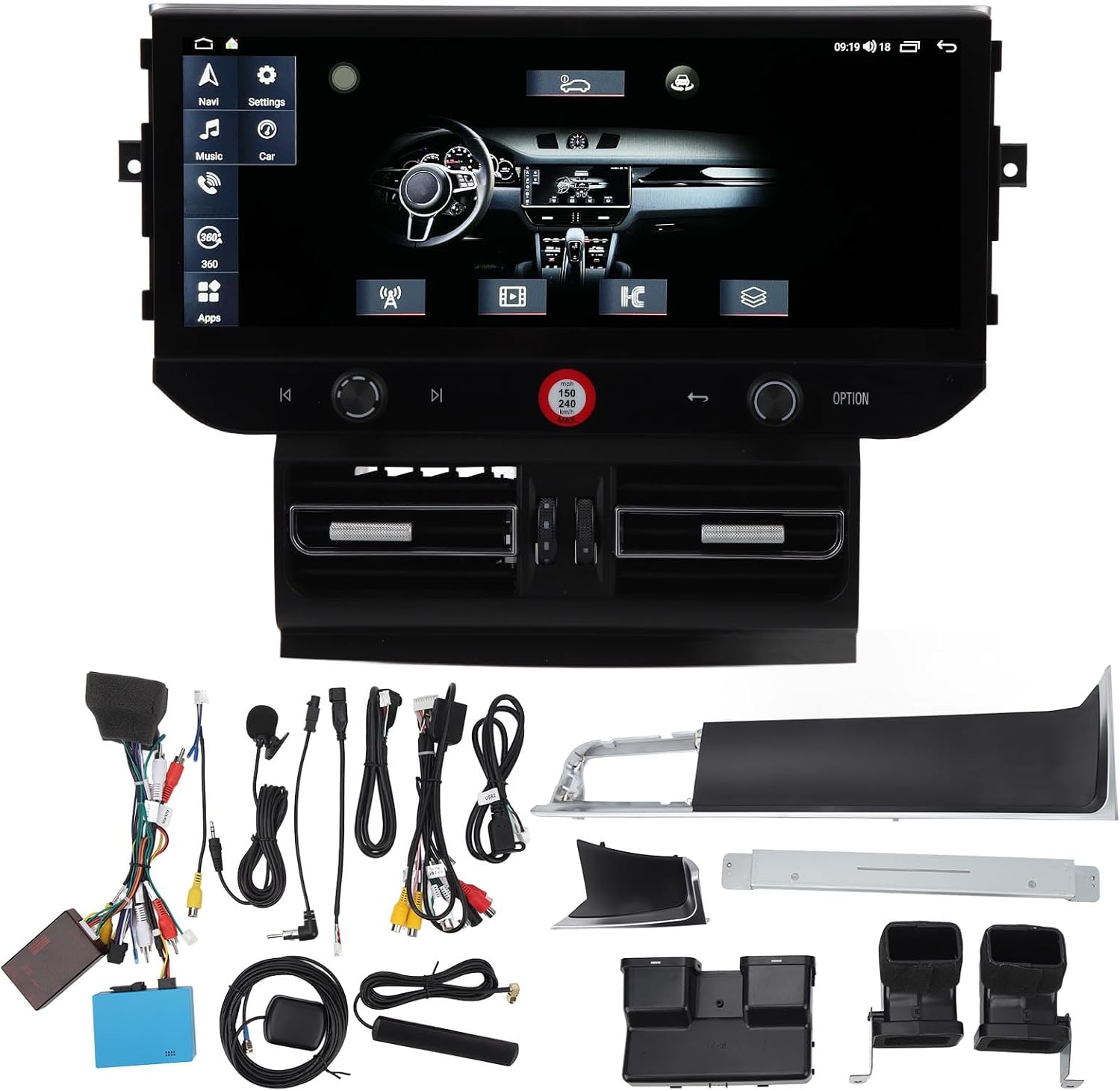
Зображення 3.1: All components of the Shanrya car stereo system, including the main head unit, wiring harnesses, GPS antenna, USB cables, and other accessories.
4. Продукт закінчивсяview
Familiarize yourself with the main components and their functions.
4.1 Main Head Unit

Зображення 4.1.1: Фронт view of the Shanrya 12.3-inch car stereo head unit, showing the large display and integrated controls.
- 12.3-дюймовий сенсорний дисплей: High-resolution display for navigation, media, and applications.
- Ручки керування: Located on the lower bezel for volume, tuning, and menu navigation.
- Фізичні кнопки: For quick access to functions like navigation, music, car settings, and apps.
4.2 Air Vent Assembly

Зображення 4.2.1: Close-up of the integrated air vents and controls located directly below the main screen.
- Integrated Air Vents: Designed to seamlessly replace the original vehicle air vents.
- Клімат-контроль: May include integrated controls for vehicle climate functions, depending on the specific vehicle model.
5. Посібник з встановлення (Налаштування)
Цей розділ містить загальний оглядview of the installation process. Due to variations in vehicle models and electrical systems, professional installation is highly recommended.
5.1 Перевірки перед інсталяцією
- Переконайтеся, що запалювання автомобіля вимкнено, а акумулятор від'єднаний.
- Confirm compatibility with your vehicle model (Macan LHD 2014-2016).
- Gather all necessary tools (trim removal tools, screwdrivers, wire cutters, etc.).
5.2 Removal of Original Unit
- Carefully remove the existing car stereo and air vent assembly using appropriate trim removal tools.
- Disconnect all wiring harnesses from the original unit.
5.3 Підключення проводів
- Connect the provided power harness to the vehicle's wiring. Ensure all connections are secure.
- Підключіть GPS-антену та направте її до місця з чітким view неба (наприклад, приладова панель).
- Connect USB cables and route them to a convenient location for external devices.
- Підключіть зовнішній мікрофон для дзвінків у режимі hands-free.
- Connect any other auxiliary inputs/outputs as required (e.g., reverse camera, external ampліфер).
5.4 Mounting the New Unit
- Integrate the new air vent assembly and main head unit into the dashboard opening.
- Закріпіть пристрій за допомогою наданих монтажних кронштейнів та гвинтів.
- Ensure all cables are neatly tucked away and not pinched.

Зображення 5.4.1: The Shanrya car stereo unit seamlessly installed in a Macan dashboard, demonstrating its fit and appearance.
5.5 Після встановлення
- Знову підключіть акумулятор автомобіля.
- Turn on the ignition and test all functions of the unit (power, audio, navigation, Bluetooth, etc.).
- За потреби відрегулюйте параметри.
6. Інструкція з експлуатації
6.1 Увімкнення/вимкнення живлення та регулювання гучності
- Увімкнення: Зазвичай пристрій вмикається автоматично разом із запалюванням автомобіля.
- Вимкнення живлення: The unit powers off with the vehicle's ignition. A long press on the power button (if available) may put it into standby.
- Регулювання гучності: Use the dedicated knob or touchscreen controls to adjust the audio volume.
6.2 Навігація
- Tap the 'Navi' icon on the main screen to access the navigation application.
- Введіть пункт призначення за допомогою екранної клавіатури.
- Дотримуйтесь голосових підказок та візуальних інструкцій для вашого маршруту.
6.3 Підключення Bluetooth 5.0
- Перейдіть до розділу «Налаштування» > «Bluetooth».
- Увімкніть Bluetooth на своєму мобільному пристрої та знайдіть доступні пристрої.
- Select the car stereo from the list and pair. Confirm the pairing code if prompted.
- Після підключення ви можете здійснювати/приймати дзвінки та транслювати аудіо.

Зображення 6.3.1: A user interacting with the car stereo's touchscreen, demonstrating the on-screen dialer for Bluetooth calls.
6.4 Бездротовий CarPlay / Android Auto
- Ensure your iPhone or Android device has CarPlay/Android Auto enabled.
- Connect your device via Bluetooth or USB (for initial setup or wired connection).
- The unit should automatically detect and launch CarPlay/Android Auto.
- Access phone contacts, navigation, music, and voice assistants directly from the car stereo screen.

Зображення 6.4.1: The car stereo display showing the CarPlay interface, allowing access to mobile phone features.
6.5 Radio and Media Playback
- радіо: Select the 'Radio' application to access FM/AM stations. Use the scan function or manual tuning.
- Music/Video: Play media from USB drives, Bluetooth streaming, or internal storage via the 'Music' or 'Video' applications.
7. Особливості та функції
- 12.3-inch High-Definition Display: Provides a clear and expansive view для всіх функцій.
- Інтегрована GPS-навігація: Supports various navigation apps for accurate routing.
- Bluetooth 5.0: For stable and fast wireless connection to mobile devices for calls and audio streaming.
- Бездротовий CarPlay та Android Auto: Seamless integration with smartphones for enhanced functionality.
- Panoramic Image Support: May refer to support for 360-degree camera systems (if installed separately).
- Відтворення мультимедіа: Supports various audio and video formats from multiple sources.
- Інтеграція керування на кермі: Сумісний з існуючими елементами керування на кермі для зручності.
8. Технічне обслуговування
- Очищення екрану: Use a soft, lint-free cloth specifically designed for electronics screens. Do not spray cleaners directly onto the screen.
- Оновлення програмного забезпечення: Periodically check for software updates from the manufacturer or seller to ensure optimal performance and access to new features. Updates are typically performed via USB.
- Загальний догляд: Avoid placing heavy objects on the unit or exposing it to sharp objects that could scratch the screen.
9. Вирішення проблем
Якщо у вас виникли проблеми, зверніться до наступних поширених проблем та способів їх вирішення:
| проблема | Можлива причина | Рішення |
|---|---|---|
| Немає живлення | Loose wiring, blown fuse, vehicle battery issue. | Перевірте всі з'єднання живлення. Перевірте запобіжники автомобіля. Переконайтеся, що акумулятор автомобіля заряджений. |
| Немає звуку | Занадто низька гучність, неправильне джерело звуку, проблема з проводкою динаміків. | Збільште гучність. Виберіть правильне джерело аудіо. Перевірте підключення динаміків. |
| GPS не працює | GPS-антена не підключена або неправильно розташована, немає супутникового сигналу. | Переконайтеся, що GPS-антена надійно підключена та має чіткий сигнал view неба. |
| Проблеми зі сполученням Bluetooth | Bluetooth not enabled, device not discoverable, incorrect pairing code. | Ensure Bluetooth is on for both devices. Make device discoverable. Re-enter pairing code. |
| Сенсорний екран не реагує | Збій програмного забезпечення, пошкодження екрану. | Restart the unit (if possible). If issue persists, contact support. |
Якщо ці рішення не вирішать проблему, зверніться до служби підтримки клієнтів.
10. Технічні характеристики
- Розмір екрана: 12.3 дюймів
- Тип дисплея: Сенсорний екран
- Підключення: Bluetooth 5.0, USB
- Навігація: Вбудований GPS
- Інтеграція зі смартфоном: Бездротовий CarPlay, Android Auto
- Сумісність: Macan LHD 2014-2016
- Джерело живлення: 12V DC (Vehicle specific)
- Пам'ять/Зберігання: (6+128G) - 6GB RAM, 128GB Internal Storage
11. Гарантія та підтримка
For warranty information and technical support, please refer to the documentation provided at the time of purchase or contact your seller directly. Keep your purchase receipt as proof of purchase.


