вступ
Welcome to the user manual for your Infinity Smartwatch, Model NX 10. This device is designed to enhance your daily life with advanced fitness tracking, communication features, and smart notifications. Featuring a vibrant 1.43" AMOLED screen and robust IP68 water resistance, your smartwatch is built for both everyday use and active lifestyles. Please read this manual carefully to ensure proper operation and maintenance of your device.

Figure 1: Infinity Smartwatch NX 10. This image shows the smartwatch from an angled perspective, highlighting its round AMOLED display, black silicone strap, and two side buttons.
Налаштування
1. Розпакування та початкова оплата
Upon unboxing, ensure all components are present: the Infinity Smartwatch NX 10 and the charging cable.
- Connect the magnetic charging cable to the charging points on the back of the smartwatch.
- Підключіть USB-кінець кабелю до стандартного USB-адаптера живлення (не входить до комплекту) або USB-порту комп’ютера.
- The watch display will show a charging indicator. Fully charge the device before first use, which typically takes approximately 2 hours.

Figure 2: Smartwatch charging. The image illustrates the smartwatch being charged magnetically, with a green lightning bolt icon on the screen indicating charging status and a "400mAh Battery Capacity" label.
2. Встановлення та сполучення програм
To unlock the full potential of your Infinity Smartwatch, download and install the companion application, Fit Cloud Pro, на вашому смартфоні.
- Scan the QR code provided in the quick start guide (if available) or search for "Fit Cloud Pro" in your smartphone's app store (Google Play Store for Android, Apple App Store for iOS).
- Встановіть програму.
- Open the Fit Cloud Pro app and follow the on-screen instructions to create an account or log in.
- Переконайтеся, що Bluetooth увімкнено на вашому смартфоні.
- In the app, navigate to the device pairing section and search for your smartwatch (e.g., "NX 10" or similar Bluetooth name).
- Select your smartwatch from the list to initiate pairing. Confirm the pairing request on both your phone and the smartwatch if prompted.
- Once paired, the app will synchronize data with your smartwatch, and you can customize settings.
Інструкція з експлуатації
1. Основна навігація
- Сенсорний екран: Swipe left/right to navigate between main screens (e.g., activity, heart rate, weather). Swipe up/down to access quick settings or notifications. Tap to select an option.
- Бічні кнопки: The top button typically acts as a power button (long press) or a back/home button (short press). The bottom button may be customizable or provide quick access to sports modes.

Figure 3: 1.43" AMOLED Screen. This image highlights the vibrant display of the smartwatch, showing a detailed watch face with various data points like time, date, steps, and heart rate.
2. Здійснення та відповідь на дзвінки
Your Infinity Smartwatch supports Bluetooth calling, allowing you to make and receive calls directly from your wrist when connected to your smartphone.
- Щоб зателефонувати: Access the dialer or contacts list on your smartwatch. You can dial a number directly or select a contact to call.
- Щоб відповісти на дзвінок: When a call comes in, the smartwatch will display the caller ID. Tap the green answer icon to accept the call or the red icon to decline.

Figure 4: Stay Connected On The Go. This image shows a user interacting with the smartwatch to make a call, illustrating the microphone, dialing, call records, and contacts features.
3. Відстеження фізичної форми та здоров'я
The smartwatch is equipped with multiple sensors to monitor your health and fitness activities.
- Крокомір: Automatically tracks your steps, distance, and calories burned throughout the day.
- Монітор серцевого ритму: Provides real-time heart rate data. Access this feature from the main menu or set up continuous monitoring in the app.
- Моніторинг артеріального тиску: Offers blood pressure readings. For accurate results, ensure the watch is worn correctly and remain still during measurement. Примітка: Ця функція призначена лише для довідки та не повинна використовуватися для медичної діагностики.
- Моніторинг сну: Відстежує ваші режими сну, включаючи глибокий сон, легкий сон та час неспання. View detailed analysis in the Fit Cloud Pro app.
- Спортивні режими: Supports over 100 sports modes, including running, cycling, swimming, and more. Select your desired activity to track specific metrics.

Figure 5: Track Every Move. This image displays the smartwatch tracking a swimming activity, with additional visuals of rock climbing and cycling, indicating its multi-sport tracking capabilities.

Figure 6: More than 110 sports modes. This image shows a variety of colorful icons representing different sports activities supported by the smartwatch, overlaid on a background of a person cycling.
4. Налаштування
Personalize your smartwatch experience through the Fit Cloud Pro app.
- Дивитися обличчя: Choose from a wide range of pre-installed watch faces or download new ones via the app. You can also create custom watch faces using your own photos.
- Сповіщення: Configure which app notifications you wish to receive on your smartwatch (e.g., calls, SMS, social media alerts).
- Будильники та нагадування: Set alarms, sedentary reminders, and hydration reminders through the app.
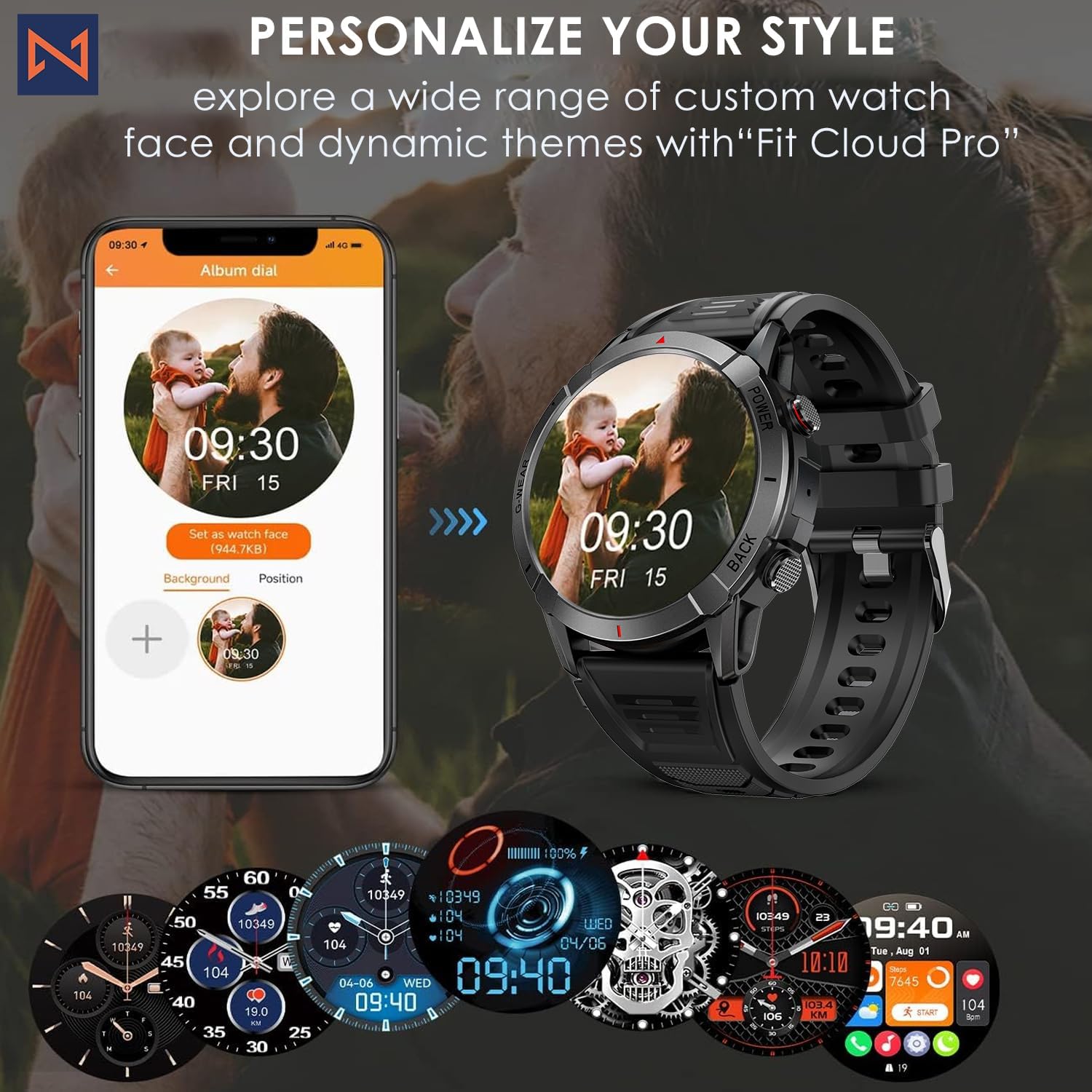
Figure 7: Personalize Your Style. This image demonstrates how to customize watch faces using the "Fit Cloud Pro" app, showing various digital and analog watch face options.
Технічне обслуговування
1. Очищення смарт-годинника
Регулярне чищення допомагає підтримувати зовнішній вигляд та функціональність вашого пристрою.
- Протріть екран і корпус м’якою тканиною без ворсу.
- Для стійких плям, dampзлегка змочіть тканину водою. Уникайте використання агресивних хімікатів або абразивних матеріалів.
- Clean the charging contacts periodically to ensure proper connection.
2. Водостійкість (IP68)
Your Infinity Smartwatch is rated IP68, meaning it is resistant to dust and can withstand immersion in water up to 1.5 meters for up to 30 minutes.
- Підходить для щоденного використання, ручного миття та невеликого дощу.
- Avoid prolonged immersion, hot water, steam, or high-pressure water jets (e.g., showering, sauna, diving).
- Якщо годинник намокне, ретельно висушіть його перед заряджанням або використанням кнопок.

Figure 8: Engineered for Adventure. This image highlights the smartwatch's durability features, including waterproof, dustproof, anti-magnetic, and shockproof capabilities, with corresponding icons.
3. Догляд за акумулятором
- Щоб продовжити термін служби батареї, уникайте екстремальних температур.
- Регулярно заряджайте годинник; уникайте повної розрядки акумулятора протягом тривалого часу.
- Використовуйте лише наданий зарядний кабель.
Усунення несправностей
| проблема | Можливе рішення |
|---|---|
| Годинник не вмикається | Переконайтеся, що годинник повністю заряджений. Підключіть його до зарядного пристрою та зачекайте кілька хвилин, перш ніж намагатися ввімкнути його. |
| Не вдається підключити пристрій до смартфона |
|
| Неточні дані про здоров'я |
|
| Сповіщення не отримано |
|
| Короткий час автономної роботи |
|
Технічні характеристики
| Особливість | Деталь |
|---|---|
| Номер моделі | NX 10 |
| Дисплей | 1.43" AMOLED Screen |
| Роздільна здатність дисплея | 466x466 HD |
| Ємність акумулятора | Літій-полімерний 400 мАг |
| Водонепроникність | IP68 |
| Підключення | Bluetooth |
| Операційна система | Android (сумісний з iOS) |
| Матеріал ремінця | 22mm Silicon Belt |
| Матеріал відображення | Цинковий сплав |
| Вага товару | 1.76 унції |
| Ємність пам'яті | 128 Мб |
Гарантія та підтримка
For warranty information and technical support, please refer to the documentation included with your purchase or visit the official Infinity webсайт.
Manufacturer: Infiniity
For further assistance, you may contact Infiniity customer service through the contact information provided on their official website or within the Fit Cloud Pro application.


