вступ
Дякуємо за покупкуasing the Kogan MX10 Pro Cordless Stick Vacuum Cleaner. This manual provides important information regarding the safe operation, maintenance, and troubleshooting of your new appliance. Please read this manual thoroughly before use and retain it for future reference.
The Kogan MX10 Pro is designed for efficient cleaning of various surfaces, featuring powerful suction, a brushless motor, and a HEPA filtration system for a cleaner home environment.
Інструкції з техніки безпеки
To reduce the risk of fire, electric shock, or injury, always observe basic safety precautions when using an electrical appliance.
- Перед використанням приладу прочитайте всі інструкції.
- Не використовуйте на вулиці або на вологих поверхнях.
- Не дозволяйте використовувати як іграшку. Необхідна пильна увага при використанні дітьми або поблизу них.
- Використовуйте лише так, як описано в цьому посібнику. Використовуйте лише рекомендовані виробником насадки.
- Не використовуйте з пошкодженим шнуром або вилкою. Якщо прилад не працює належним чином, його впустили, пошкодили, залишили на відкритому повітрі або впустили у воду, поверніть його до сервісного центру.
- Не тягніть і не носіть за шнур, не використовуйте шнур як ручку, не зачиняйте двері за шнур і не тягніть шнур навколо гострих країв або кутів. Не проводьте прилад через шнур. Тримайте шнур подалі від нагрітих поверхонь.
- Не від’єднуйте вилку, тягнучи за шнур. Щоб відключити, візьміться за вилку, а не за шнур.
- Не беріть вилку або прилад мокрими руками.
- Не кладіть предмети в отвори. Не використовуйте із заблокованими отворами; бережіть від пилу, ворсинок, волосся та всього, що може перешкоджати потоку повітря.
- Тримайте волосся, вільний одяг, пальці та всі частини тіла подалі від отворів і рухомих частин.
- Не беріть нічого, що горить або димить, наприклад сигарети, сірники чи гарячий попіл.
- Не використовуйте для збирання легкозаймистих або горючих рідин, таких як бензин, і не використовуйте в місцях, де вони можуть бути присутніми.
- Будьте особливо обережні під час чищення сходів.
- Не використовуйте без пилозбірника та/або фільтрів на місці.
- Запобігайте ненавмисному запуску. Переконайтеся, що перемикач знаходиться у вимкненому положенні, перш ніж під’єднувати пристрій до акумуляторної батареї, брати або переносити прилад.
- Заряджайте лише зарядним пристроєм, указаним виробником. Зарядний пристрій, який підходить для одного типу акумуляторної батареї, може створити ризик займання під час використання з іншим акумуляторним блоком.
- За неправильних умов з батареї може витікати рідина; уникати контакту. У разі випадкового контакту промийте водою. Якщо рідина потрапила в очі, додатково зверніться за медичною допомогою. Рідина, що витікає з акумулятора, може викликати подразнення або опіки.
Продукт закінченийview & Компоненти
Familiarize yourself with the parts of your Kogan MX10 Pro Cordless Stick Vacuum Cleaner.

Figure 1: Fully assembled Kogan MX10 Pro Cordless Stick Vacuum Cleaner, showing the main unit, extension wand, and motorized brush head.

Figure 2: Kogan MX10 Pro with icons indicating 25000Pa suction power, up to 45 minutes battery life, dust detection & adaptive suction, motorized roller brush, and touchscreen display.
Вміст упаковки:
- Main Vacuum Unit (with dust bin and motor)
- Розгинальна паличка
- Моторизована головка щітки
- Detachable Li-ion Battery (2000mAh)
- Адаптер живлення/зарядний пристрій
- Настінна док-станція
- Щілинний інструмент
- Інструмент «Пензель 2 в 1».
- Посібник користувача
Налаштування
Збірка:
- Вставте подовжувальну трубку в основний пилосос, доки вона надійно не зафіксується на місці.
- Attach the motorized brush head to the other end of the extension wand, ensuring it clicks securely.
- Insert the detachable Li-ion battery into the battery slot on the main unit until it locks.
Зарядка батареї:
- Connect the power adapter to the charging port on the battery or the wall-mounted dock.
- Plug the adapter into a power outlet. The LCD touchscreen will display the charging status.
- For first use, fully charge the battery (approximately 4-5 hours).
Wall-Mounted Dock Installation:
- Choose a suitable location near a power outlet for convenient storage and charging.
- Mark the drilling points for the dock on the wall.
- Просвердліть отвори та вставте дюбелі (за потреби).
- Secure the wall-mounted dock using screws.
- Place the vacuum cleaner onto the dock for storage and charging.
Інструкція з експлуатації
Увімкнення/вимкнення:
- Натисніть кнопку живлення на ручці, щоб увімкнути пилосос.
- Натисніть кнопку живлення ще раз, щоб вимкнути його.
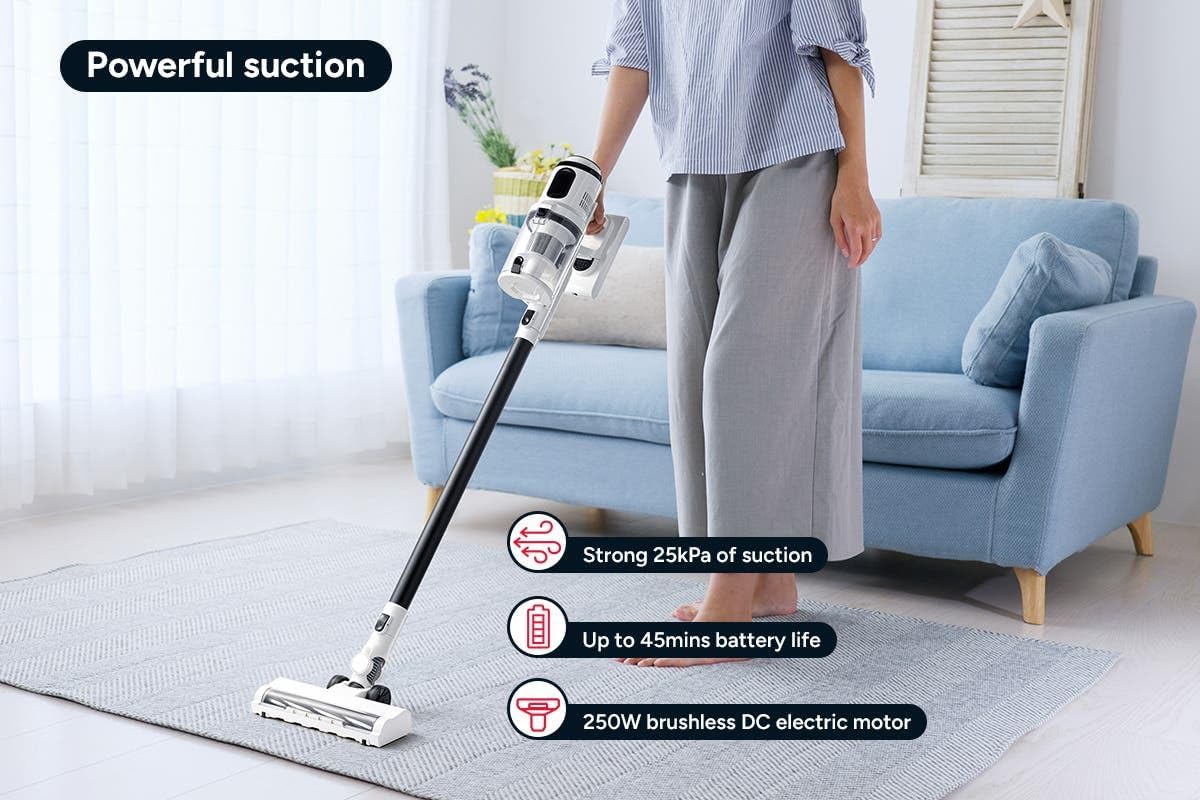
Figure 3: The Kogan MX10 Pro in use, highlighting its powerful 25kPa suction, long battery life, and efficient 250W brushless motor.
Suction Modes & LCD Touchscreen:

Figure 4: The LCD touchscreen provides real-time information on battery level, suction mode, and other operational indicators.
- The LCD touchscreen displays battery status, current suction level, and other relevant information.
- Tap the mode button on the touchscreen to switch between different suction modes (e.g., Eco, Standard, Max).
- The vacuum features dust detection, which automatically adjusts suction power based on the amount of dirt detected.

Figure 5: The brush head detecting dust on a hard floor, demonstrating the automatic suction adjustment feature.
Використання вкладень:
- Моторизована головка щітки: Ideal for carpets and hard floors, providing powerful agitation to lift dirt.
- Щілинний інструмент: Ідеально підходить для вузьких щілин, кутів та важкодоступних місць.
- Інструмент-пензель 2-в-1: Use the brush for dusting delicate surfaces or slide the brush back for upholstery and larger debris.
- To change attachments, press the release button on the current attachment and pull it off. Then, push the desired attachment onto the main unit or extension wand until it clicks.
Технічне обслуговування
Регулярне технічне обслуговування забезпечує оптимальну продуктивність та подовжує термін служби вашого пилососа.
Спорожнення контейнера для пилу:
- It is recommended to empty the dust bin after each use or when the MAX fill line is reached.
- Hold the main unit over a rubbish bin.
- Press the dust bin release button to open the bottom flap and allow debris to fall out.
- The ejection mechanism ensures dirt and dust are removed in a singular motion.

Figure 6: Demonstrating the easy bin emptying process by pressing the release button to open the dust bin flap.
Очищення фільтрів:
The Kogan MX10 Pro features a cyclone filter system and a washable HEPA filter to ensure maximum performance and trap fine dust and allergens.

Figure 7: The HEPA filter captures up to 99.97% of fine dust and allergens.
- Поверніть і потягніть, щоб вийняти фільтрувальний блок з пилозбірника.
- Separate the HEPA filter and the metal mesh filter.
- Rinse the HEPA filter and metal mesh filter under cold running water.
- Allow all filter components to air dry completely for at least 24 hours before reassembling and placing back into the vacuum. Important: Ensure all parts are completely dry before reinstallation to prevent damage.
Очищення головки щітки:
- Periodically check the brush head for tangled hair or debris.
- To remove the brush roll, locate the release tab on the side of the brush head and open it.
- Carefully pull out the brush roll.
- Використовуйте ножиці або інструмент для чищення, щоб обрізати та видалити будь-яке заплутане волосся або волокна.
- Встановіть щітковий валик на місце та закріпіть фіксатор.
Усунення несправностей
| проблема | Можлива причина | Рішення |
|---|---|---|
| Вакуум не включається | Акумулятор не заряджений; акумулятор неправильно встановлений; кнопка живлення натиснута неправильно. | Повністю зарядіть акумулятор; переконайтеся, що акумулятор надійно закріплений; міцно натисніть кнопку живлення. |
| Низька потужність всмоктування | Dust bin full; Filters clogged; Blockage in nozzle, wand, or hose; Brush roll tangled. | Empty the dust bin; Clean or replace filters; Check for and remove any blockages; Clean the brush roll. |
| Рулон щітки не обертається | Brush roll tangled with hair/debris; Brush roll not properly installed; Obstruction in brush head. | Clean the brush roll; Reinstall brush roll correctly; Remove any obstructions. |
| Акумулятор не заряджається | Charger not properly connected; Power outlet not working; Damaged charger or battery. | Ensure charger is securely plugged into battery/dock and outlet; Test outlet with another device; Contact Kogan support if charger or battery is damaged. |
Технічні характеристики
| Особливість | Деталь |
|---|---|
| Бренд | Коган |
| Модель | MX10 Pro (KAVACSTM10P) |
| Потужність всмоктування | 25 кПа |
| Мотор | Безщітковий двигун потужністю 250 Вт |
| Акумулятор | 2000mAh Detachable Li-ion |
| Рівень шуму | 80 дБ |
| Тип фільтра | HEPA (миється) |
| Особливості | Lightweight, Cordless, LCD Touchscreen, Dust Detection, Cyclone Filter System |
| Вага товару | 3.47 кг |
| Рекомендована поверхня | Тверда Підлога, Килим |
Гарантія та підтримка
For warranty information, technical support, or any inquiries regarding your Kogan MX10 Pro Cordless Stick Vacuum Cleaner, please visit the official Kogan website or contact Kogan customer support directly.
You can find more information and contact details on the Kogan store page: Офіційний магазин Kogan