1. Початок роботи
1.1 Вміст упаковки
Перш ніж почати, переконайтеся, що всі предмети присутні у вашій упаковці:
- 2 x QCY T13X Earbuds
- 1 x зарядний футляр
- 3 x Pairs of Eartips (Small, Medium - pre-installed, Large)
- 1 x USB-C зарядний кабель
- 1 х посібник користувача
1.2 Початкове заряджання
The earbuds must be fully charged before first use. Place both earbuds into the charging case. Connect the USB-C cable to the charging case and a power source. A full charge takes approximately 120 minutes. If the earbuds are not used for more than two weeks, charge them regularly to maintain battery health.
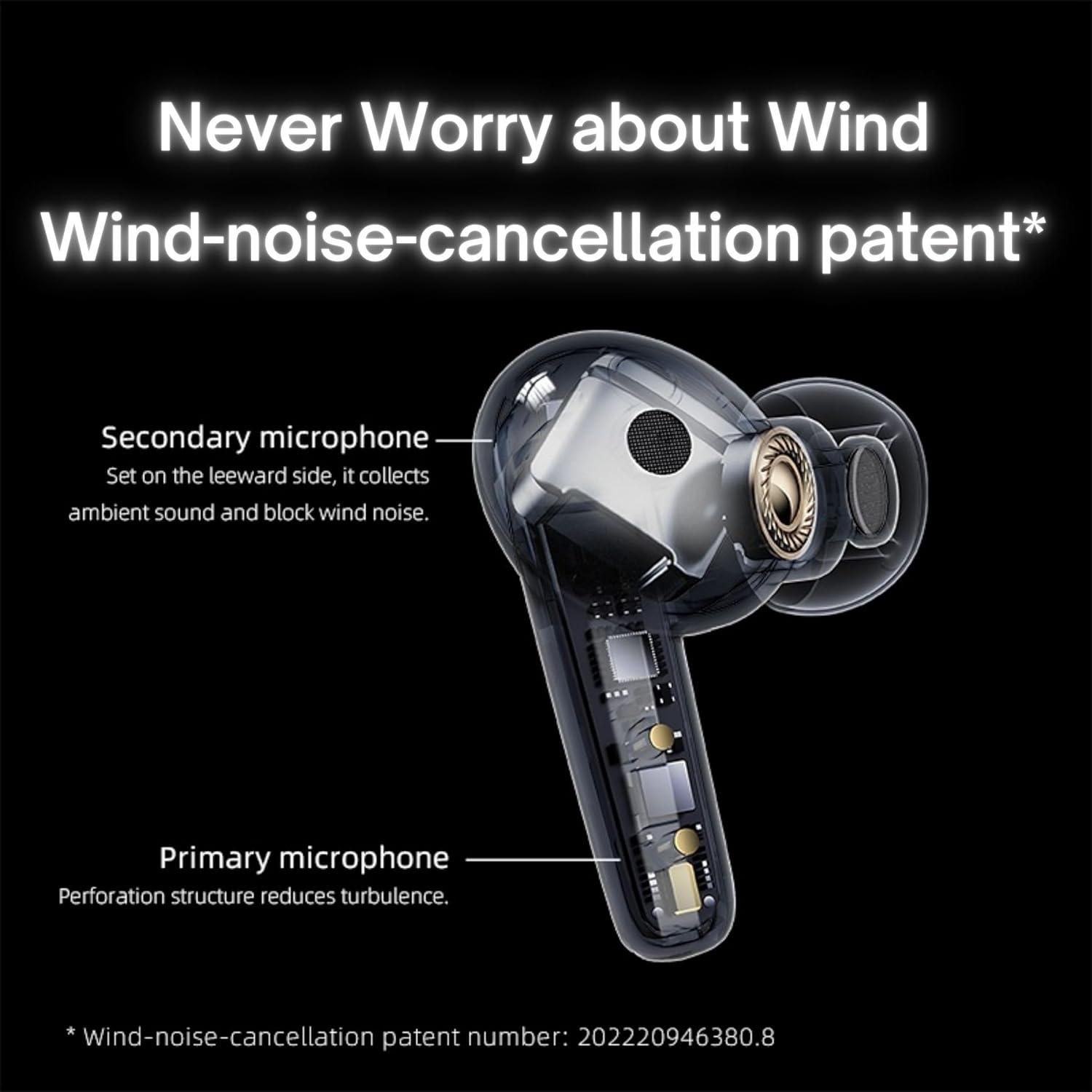
Image: QCY T13X Earbuds in their charging case, connected with a USB-C cable for charging. The image illustrates the charging process and the compact design of the case and earbuds.
1.3 Eartip Selection
For optimal sound quality and comfort, choose the eartips that best fit your ears. The package includes small, medium, and large sizes. The medium size is pre-installed. A proper seal is crucial for bass response and noise isolation.
1.4 Сполучення з вашим пристроєм
- Переконайтеся, що навушники заряджені та поміщені в зарядний футляр.
- Відкрийте кришку зарядного футляра. Навушники автоматично перейдуть у режим сполучення.
- На смартфоні або пристрої з підтримкою Bluetooth перейдіть до налаштувань Bluetooth.
- шукати available devices and select "QCY T13X" from the list.
- Після підключення ви почуєте звуковий сигнал підтвердження.

Image: QCY T13X Earbuds and their charging case, highlighting the Bluetooth 5.3 connectivity. This image demonstrates the wireless technology used for pairing.
2. Керування навушниками
2.1 Увімкнення/вимкнення живлення
- Увімкнення: Open the charging case, and the earbuds will automatically power on. Alternatively, press and hold the touch panel on both earbuds for 1-2 seconds.
- Вимкнення живлення: Place the earbuds back into the charging case and close the lid. They will automatically power off and begin charging. Alternatively, disconnect them from your device, and they will power off after a few minutes of inactivity.
2.2 Елементи керування відтворенням музики
The QCY T13X earbuds feature touch controls for easy management of your audio:
- Відтворення/пауза: Двічі торкніться сенсорної панелі на будь-якому навушнику.
- Наступний трек: Тричі торкніться правого навушника.
- Попередній трек: Тричі торкніться лівого навушника.

Image: A person wearing a QCY T13X earbud, demonstrating the discreet design and the area for touch controls. This image helps visualize how the earbuds are worn and interacted with.
2.3 Керування викликами
- Відповісти/закінчити виклик: Двічі торкніться сенсорної панелі на будь-якому навушнику.
- Відхилити виклик: Press and hold the touch panel on either earbud for 1.5 seconds.
2.4 Регулювання гучності
Volume control is managed through the QCY application on your smartphone. Download the QCY app to customize settings and adjust volume levels directly.
2.5 QCY Application
For enhanced features and customization, download the official QCY app from your device's app store. The app allows you to:
- Відрегулюйте гучність.
- Налаштуйте сенсорне керування.
- Select from various EQ presets (e.g., Pure Vocals, Boosted Original, Soft and Immersive).
- Оновлення прошивки.

Image: QCY T13X Earbuds with a graphic indicating three default EQ settings: Pure Vocals, Boosted Original, and Soft and Immersive. This highlights the sound customization options available through the app.
2.6 Підключення кількох пристроїв
The QCY T13X supports seamless switching between multiple paired devices. Once paired with several devices, the earbuds can intelligently connect to the active audio source.

Image: QCY T13X Earbuds shown connected to both a smartphone and a tablet, illustrating the multi-device connectivity feature. This image demonstrates the flexibility of using the earbuds with different devices.
3. Технічне обслуговування та догляд
3.1 Заряджання навушників та футляра
The charging case has a capacity of 350 mAh, with each earbud having a 45 mAh battery. A single charge provides up to 8 hours of playback, and the charging case extends total playback time to up to 30 hours. The earbuds support fast charging. Ensure regular charging if not used for extended periods.
3.2 Очищення
Regularly clean your earbuds and charging case to ensure optimal performance and hygiene. Use a soft, dry, lint-free cloth. For eartips, remove them and gently wipe with a damp тканиною, потім ретельно висушіть перед повторним прикріпленням.
3.3 Зберігання
Store your QCY T13X earbuds in their charging case when not in use. Avoid exposing them to extreme temperatures, such as below 10 degrees Celsius (50°F) or above 60 degrees Celsius (140°F), to prevent battery damage and ensure longevity.
4. Вирішення проблем
4.1 Скидання до заводських налаштувань
If you experience persistent connection or functionality issues, a factory reset may resolve them:
- Delete the previous connection record for "QCY T13X" from your phone's Bluetooth settings.
- Помістіть обидва навушники в зарядний футляр і переконайтеся, що вони заряджаються.
- Натисніть і утримуйте кнопку на зарядному футлярі протягом 10 секунд.
- The red and blue LED indicators will flash alternately 3 times, indicating a successful reset.
4.2 Проблеми з підключенням
- Переконайтеся, що на вашому пристрої ввімкнено Bluetooth.
- Make sure the earbuds are charged and within the 10-meter Bluetooth range.
- Спробуйте перезавантажити пристрій і навушники.
- Perform a factory reset as described above.
4.3 Проблеми зі звуком
- Check the volume levels on both your device and through the QCY app.
- Ensure the eartips provide a proper seal in your ear.
- Очистіть динаміки навушників від будь-якого сміття.
- If only one earbud is working, try placing both back in the case, closing the lid, and then reopening to re-establish the connection between them.
5. Технічні характеристики
| Особливість | Специфікація |
|---|---|
| Назва моделі | T13X (BH23QT26A) |
| Розмір драйвера | 7.2 мм динамічний драйвер |
| мікрофони | 4 (ENC Noise Reduction, Mic Amplification, Echo Cancellation) |
| Версія Bluetooth | 5.3 |
| Діапазон Bluetooth | До 10 метрів |
| Підтримувані протоколи | HFP/A2DP/AVRCP |
| Аудіокодеки | AAC, SBC |
| Ємність акумулятора навушника | 45 мАг (кожен) |
| Ємність батареї зарядного футляра | 350 мАг |
| Загальний час відтворення | До 30 годин (з зарядним футляром) |
| Час відтворення за один раз | До 8 годин |
| Час заряджання (корпус) | прибл. 120 хвилин |
| Водонепроникність | IPX5 |
| Вага (навушники) | 6.34г |
| Total Weight (Case + Earbuds) | 48.15г |
| Спосіб контролю | Дотик |
| Контроль шуму | Активне скасування шуму (ANC) |
| АЧХ | 20000 кГц |
| Чутливість | 105 дБ |
| Імпеданс | 100 Ом |

Image: An exploded diagram of a QCY T13X earbud, illustrating the internal 7.2mm dynamic driver. This image provides insight into the audio technology within the earbud.

Image: A detailed diagram of a QCY T13X earbud, highlighting the placement of its multiple microphones for Environmental Noise Cancellation (ENC) and wind noise reduction. This image explains the technology behind clear calls.
6. Гарантія та підтримка
6.1 Гарантія виробника
The QCY T13X Bluetooth Earbuds come with a 1-річна гарантія виробника. Please retain your proof of purchase for any warranty claims. The warranty covers defects in materials and workmanship under normal use.
6.2 Підтримка клієнтів
For further assistance, technical support, or warranty inquiries, please visit the official QCY website or contact their customer service. You can also refer to the QCY app for additional resources and FAQs.


