1. Важлива інформація з безпеки
Please read this manual carefully before using the Midea M9 Robot Vacuum Cleaner and retain it for future reference. Adhere to all safety warnings and instructions to prevent injury or damage.
- Цим пристроєм можуть користуватися діти віком від 8 років і особи з обмеженими фізичними, сенсорними чи розумовими здібностями або з недостатнім досвідом і знаннями, якщо вони перебувають під наглядом або отримали інструкції щодо безпечного користування пристроєм і розуміють небезпеку, пов’язану з цим. .
- Слідкуйте за дітьми, щоб переконатися, що вони не граються з пристроєм.
- Чищення та технічне обслуговування не повинні виконуватися дітьми без нагляду.
- Використовуйте лише оригінальний адаптер живлення, наданий виробником.
- Не використовуйте робот-пилосос у вологих середовищах або поблизу води.
- Ensure the charging base is placed on a level surface against a wall, with clear space around it.
- Перед початком роботи видаліть із зони очищення будь-які вільні кабелі, дрібні предмети або крихкі предмети.
2. Вміст упаковки
Verify that all items are present in the package. If any components are missing or damaged, contact customer support.
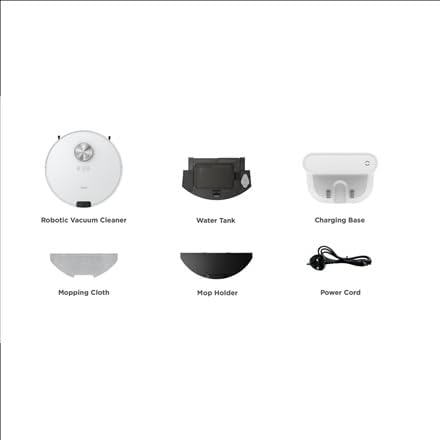
зображення: закінченоview of the Midea M9 Robot Vacuum Cleaner's package contents. This image displays the main robotic vacuum cleaner unit, a water tank, a charging base, a mopping cloth, a mop holder, and a power cord.
- Роботизований пилосос
- Резервуар для води
- Зарядна база
- Тканина для затирання
- Тримач для швабри
- Шнур живлення
3. Продукт закінчивсяview
3.1 Верх View
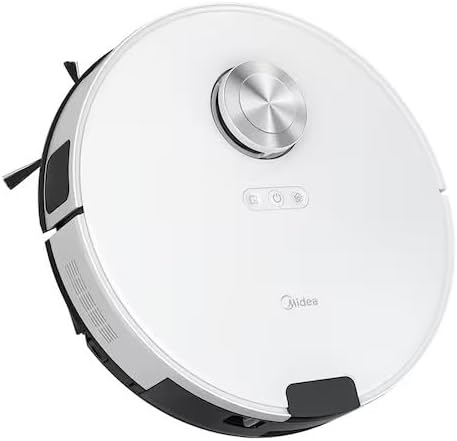
зображення: Топ view of the Midea M9 Robot Vacuum Cleaner. This image shows the circular design of the robot, with a central LiDAR navigation sensor tower, power button, and other control indicators on its surface.
The top of the Midea M9 features the LiDAR navigation sensor, which allows the robot to map your home and navigate efficiently. It also includes control buttons for starting/pausing cleaning and returning to the charging base.
3.2 Дно View

зображення: Дно view of the Midea M9 Robot Vacuum Cleaner. This image displays the two side brushes, the main rolling brush, the driving wheels, and the mopping pad attachment area.
The underside of the robot houses the main rolling brush, two side brushes for edge cleaning, driving wheels, and cliff sensors to prevent falls. The mopping pad attachment area is also visible.
4. Налаштування
4.1 Розміщення зарядної бази
- Place the charging base against a wall on a hard, level surface.
- Переконайтеся, що з обох боків зарядної бази є щонайменше 0.5 метра (1.6 фута) вільного простору та 1.5 метра (4.9 фута) перед нею.
- Connect the power cord to the charging base and plug it into a power outlet.
4.2 Початкове заряджання
- Помістіть робот-пилосос на зарядну базу, переконавшись, що зарядні контакти суміщені.
- Allow the robot to charge completely before its first use. This typically takes 4-6 hours. The indicator light on the robot will change to indicate a full charge.
4.3 Підключення до програми (необов'язково)
- Download the Midea Smart app from your mobile device's app store.
- Follow the in-app instructions to connect your Midea M9 Robot Vacuum Cleaner to your home Wi-Fi network. This enables advanced features like remote control, scheduling, and cleaning mode selection.
5. Інструкція з експлуатації
5.1 Запуск/зупинка очищення
- Починати: Press the power button on the robot or use the Midea Smart app. The robot will begin cleaning in Auto mode.
- Щоб призупинити: Press the power button again during cleaning.
- Щоб зупинитися/повернутися на базу: Press and hold the power button for a few seconds, or use the 'Return to Base' function in the app.
5.2 Режими очищення
The Midea M9 offers various cleaning modes:
- Автоматичний режим: Робот розумно орієнтується та прибирає весь ваш будинок.
- Точковий режим: Cleans a specific area more intensely. Place the robot in the center of the dirty area and activate Spot mode via the app.
- Режим Edge: The robot cleans along walls and furniture edges. Activate via the app.
5.3 Функція миття
- Fill the water tank with clean water. Do not use detergents or cleaning solutions not approved by Midea.
- Attach the mopping cloth to the mop holder, then slide the mop holder with the cloth onto the water tank.
- Insert the assembled water tank and mop holder into the robot.
- The robot will automatically switch to mopping mode or combined vacuuming and mopping.
6. Технічне обслуговування
Регулярне технічне обслуговування забезпечує оптимальну продуктивність та подовжує термін служби вашого робота-пилососа.
6.1 Очищення пилозбірника та резервуара для води
- Спорожняйте смітник після кожного використання.
- Rinse the dustbin and filter with water as needed, ensuring they are completely dry before reinstallation.
- Empty and clean the water tank after each mopping session to prevent mold and odors.
6.2 Очищення щіток
- Основна щітка: Remove the main brush cover and lift out the brush. Use the cleaning tool to remove hair and debris. Clean weekly.
- Бічні щітки: Check for tangled hair or debris. Remove and clean as needed. Replace if worn or damaged. Clean monthly.
6.3 Очищення датчика
- Wipe the cliff sensors, wall sensors, and charging contacts with a clean, dry cloth monthly to ensure proper function.
7. Вирішення проблем
Якщо у вас виникли проблеми, зверніться до наступних поширених проблем та способів їх вирішення:
| проблема | Можлива причина | Рішення |
|---|---|---|
| Робот не заряджається | Charging contacts are dirty; Power adapter not connected; Robot not properly aligned with base. | Clean charging contacts; Ensure power adapter is plugged in; Realign robot on charging base. |
| Робот часто застрягає | Loose cables or small objects on the floor; Robot stuck on high thresholds. | Clear obstacles from cleaning path; Use virtual walls or no-go zones in the app. |
| Погана ефективність очищення | Пилозбірник повний; Щітки заплуталися; Фільтр засмічений. | Спорожніть пилозбірник; Почистіть головну та бічні щітки; Почистіть або замініть фільтр. |
| Робот не може підключитися до Wi-Fi | Incorrect Wi-Fi password; Router too far; Only supports 2.4GHz Wi-Fi. | Verify password; Move robot closer to router; Ensure router is set to 2.4GHz. |
8. Технічні характеристики
| Особливість | Деталь |
|---|---|
| Бренд | Midea |
| Назва моделі | Midea M9 |
| Розміри (Д x Ш x В) | 32 х 32 х 10 см |
| вага | 4 кілограма |
| Особливості | Smart mapping, Portable |
| Рекомендація щодо поверхні | Килим |
9. Гарантія та підтримка
Щоб отримати інформацію про гарантію та технічну підтримку, зверніться до гарантійного талона, що додається до вашого продукту, або відвідайте офіційний веб-сайт Midea. webсайт. Зберігайте чек про покупку як підтвердження покупки.