вступ
This manual provides detailed instructions for the setup, operation, and maintenance of your ATTACK SHARK M71 75% TKL Wireless Mechanical Keyboard. Please read this guide thoroughly to ensure proper use and to maximize your keyboard's performance and lifespan.

Image: The ATTACK SHARK M71 keyboard showcasing its 68% layout and key features like aluminum alloy body, three-mode connection, and RGB backlight.
Вміст упаковки
Перевірте наявність усіх елементів в упаковці:
- ATTACK SHARK M71 Wireless Mechanical Keyboard
- Кабель Type-C
- Бездротовий приймач 2.4G
- Keycap Puller / Switch Puller (Two-in-one tool)
- Complimentary 61 additional PBT OEM keycaps (different color layout)
- Посібник користувача

Image: A visual representation of the items included in the ATTACK SHARK M71 keyboard package, including the keyboard, cables, and extra keycaps.
Video: Unboxing the Blueberry version of the M71 keyboard, showing the package contents and a demonstration of its typing sound.
Продукт закінченийview
The ATTACK SHARK M71 is a 75% TKL wireless mechanical keyboard featuring a full aluminum CNC chassis, multi-mode connectivity, hot-swappable switches, and RGB lighting. Its compact design and robust construction are engineered for both gaming and productivity.
Ключові характеристики:
- Full Aluminum CNC Body: Constructed from international standard 6063 aluminum alloy for durability and a premium feel.
- Трирежимне підключення: Supports Bluetooth 5.0/3.0, 2.4G wireless, and wired USB-C connections.
- Комутатори з можливістю гарячої заміни: Compatible with 3/5-pin switches, allowing for easy customization without soldering.
- Gasket Mount Structure: Incorporates anti-static IPEX switch pads, PORON sound-absorbing cotton, and PET acoustic switch pads to enhance typing feel and reduce noise.
- Світлодіодне освітлення RGB: Features customizable RGB backlighting and a side LED light strip.
- Акумулятор 4600 мАг: Забезпечує розширене використання бездротового зв'язку.
- PBT OEM Keycaps: Durable keycaps with GMK-like characters.
Компоненти:
Familiarize yourself with the main components of your keyboard:
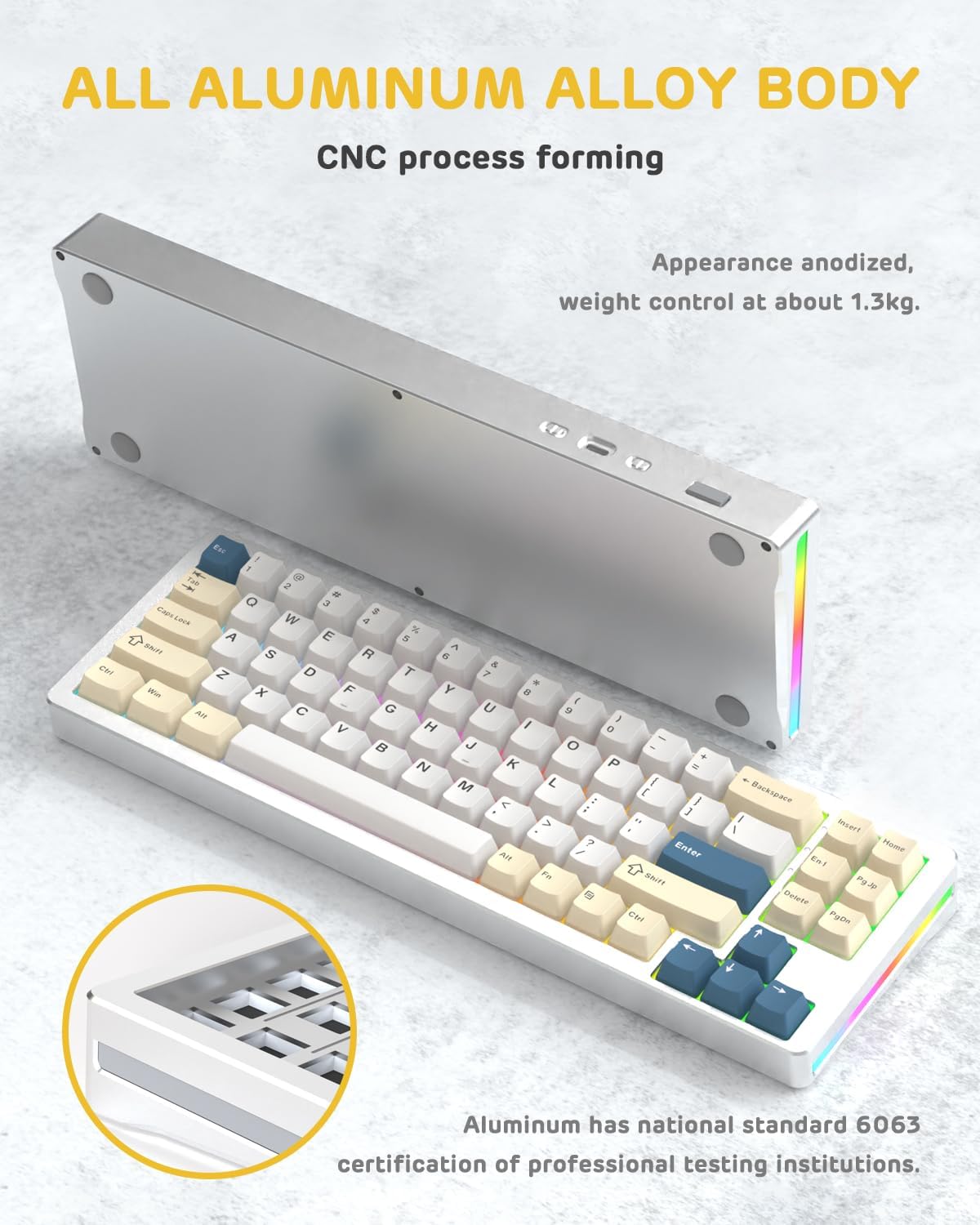
Зображення: Сторона view of the M71 keyboard highlighting its full aluminum alloy body and CNC process forming.

Зображення: Вибух view illustrating the multi-layered gasket mount structure, including the PBT keycaps, aluminum alloy upper cover, customized switch body, PC positioning board, PORON filled cotton, anti-static IPEX switch underpad, PET singing pad, PCB board, PORON shaft seat cushion, PET sound backing pad, wing light strip, and aluminum alloy base.
Налаштування
1. Connectivity Modes:
The M71 keyboard supports three connection modes: Bluetooth, 2.4G wireless, and wired USB-C.
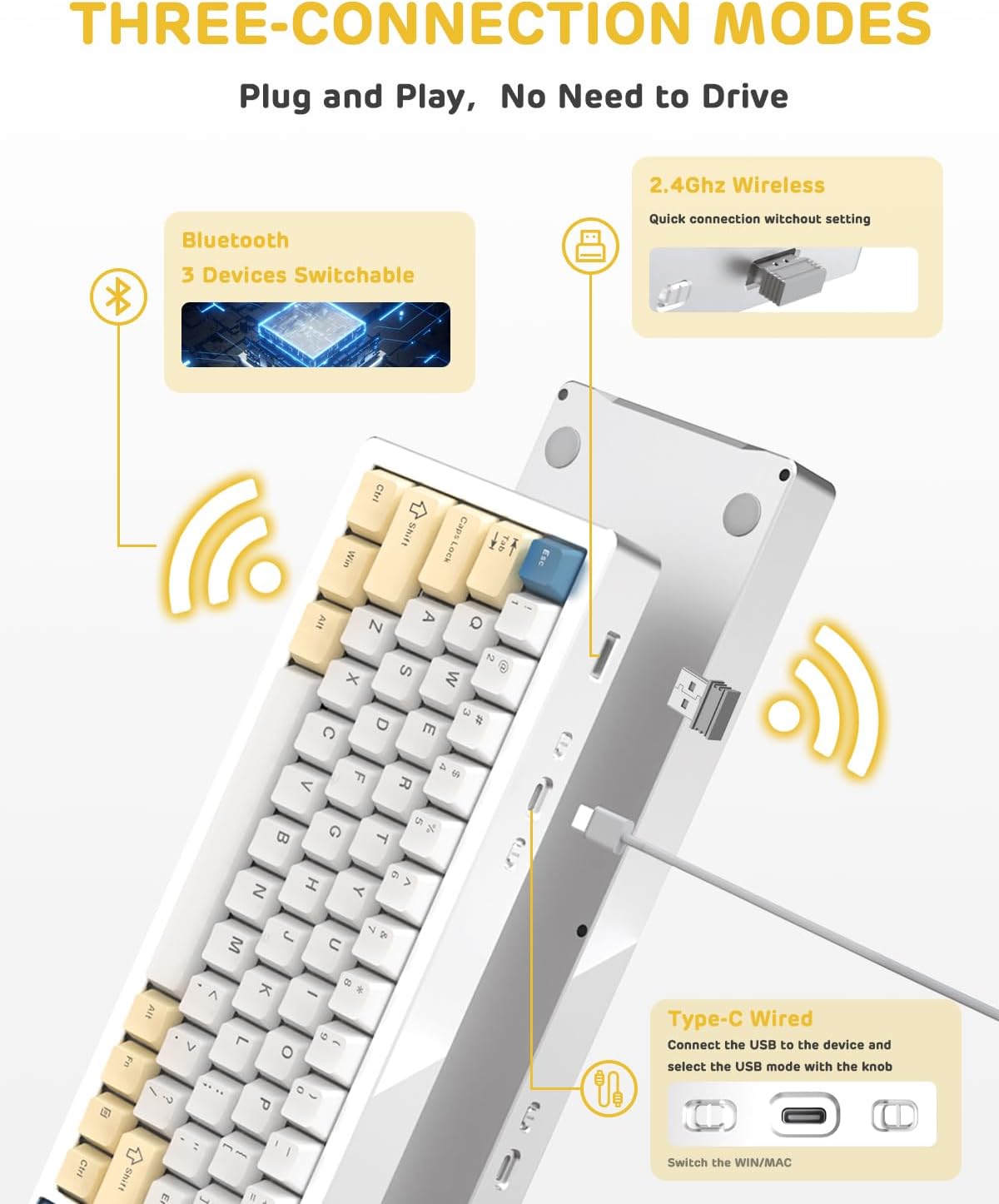
Image: A visual guide to the three connectivity options: Bluetooth for up to 3 devices, 2.4GHz wireless with a receiver, and wired Type-C connection.
Дротове підключення:
- Connect the provided Type-C cable to the keyboard's USB-C port and to your computer's USB port.
- Ensure the mode switch on the keyboard is set to the wired (USB-C) position.
- Клавіатура буде автоматично розпізнана вашою системою.
Бездротове підключення 2.4G:
- Locate the 2.4G wireless receiver (dongle) in the package.
- Підключіть приймач 2.4G до вільного USB-порту на вашому комп'ютері.
- Set the mode switch on the keyboard to the 2.4G wireless position.
- Клавіатура має підключитися автоматично.
Підключення Bluetooth:
- Set the mode switch on the keyboard to the Bluetooth position.
- На комп’ютері або пристрої відкрийте налаштування Bluetooth і знайдіть нові пристрої.
- The keyboard should appear as "ATTACK SHARK M71" or similar. Select it to pair.
- The keyboard can connect to up to 3 Bluetooth devices. Use Fn + 1/2/3 для перемикання між сполученими пристроями.
2. Battery Charging and Status:
The M71 keyboard is equipped with a 4600mAh battery. To charge, connect the keyboard via the USB-C cable to a power source (e.g., computer USB port, USB wall adapter).

Image: A diagram showing how to check the battery level using Fn+ALT(R) and the visual indicators on the keyboard's side LED strip.
- To check the battery level in wireless mode, press Fn + ALT (Right). The side LED strip will indicate the charge level.
- Battery life is approximately 1-2 weeks with lighting enabled and up to 4 weeks with lighting disabled.
Інструкція з експлуатації
1. Multimedia Keys:
The keyboard features 12 multimedia keys accessible via the Fn комбінації клавіш:
- Fn + F1-F12: Access various multimedia functions (e.g., volume control, play/pause, calculator, email).
- Fn + 1/2: Керування яскравістю екрана.
2. Керування освітленням RGB:
Customize the keyboard's RGB backlight and side LED strip:

Image: The M71 keyboard displaying its RGB backlight and side LED strip, along with a close-up of the PBT keycaps.
- Fn + Ctrl (Right): Switch between different side LED light strip modes.
- Fn + Tab: Toggle white light mode.
- Refer to the full user manual for additional lighting effect controls and customization options via the programmable software.
3. Programmable Software:
The keyboard supports a dedicated driver program for advanced customization. You can download the software from the official ATTACK SHARK website to personalize lighting effects, key assignments, and macros. The keyboard is compatible with Windows 2000/XP/Vista/7/8/10/11, Android, and iOS.
Технічне обслуговування
1. Прибирання:
- Використовуйте м’яку, суху тканину для протирання поверхні клавіатури.
- For deeper cleaning, remove keycaps using the provided keycap puller and use compressed air to clear debris from between switches.
- Уникайте використання агресивних хімікатів або абразивних матеріалів.
2. Hot-Swapping Switches:
The M71 keyboard features hot-swappable sockets, allowing you to change switches without soldering.

Зображення: Крупний план view of the hot-swappable White Jade linear switches on the M71 keyboard, demonstrating how they can be easily removed and replaced.
- Вимкніть клавіатуру або від’єднайте її від пристрою.
- Use the switch puller tool to carefully grip the switch and pull it straight up.
- Align the pins of the new switch with the holes on the PCB and press down gently until it clicks into place. Ensure pins are not bent.
- The PCB supports both 3-pin and 5-pin switches.
Video: A demonstration of the disassembly process for the M71 keyboard, showing how to remove keycaps and switches, revealing the gasket mount structure.
Усунення несправностей
| Випуск | Можливе рішення |
|---|---|
| Клавіатура не реагує в бездротовому режимі. |
|
| Клавіші не реєструються або друкуються двічі. |
|
| RGB-підсвічування не працює або працює неправильно. |
|
| Проблеми зі сполученням Bluetooth. |
|
Технічні характеристики
| Особливість | Деталь |
|---|---|
| Модель | M71 |
| Макет | 75% TKL (71 keys) |
| Підключення | Bluetooth 5.0/3.0, 2.4G Wireless, USB-C Wired |
| Перемикачі | Hot-swappable (3/5-pin compatible), Pre-lubed Linear White Jade Switch |
| Клавіатури | Ковпачки клавіш PBT OEM |
| Стиль монтажу | Кріплення прокладки |
| Матеріал шасі | Full Aluminum CNC (6063 alloy) |
| Ємність акумулятора | 4600 мАг |
| Освітлення | RGB Backlight, RGB LED Side Light Strip |
| Сумісність | Windows 2000/XP/Vista/7/8/10/11, Android, iOS, Mac |
| Розміри продукту | 13.78 см (Д) x 4.53 см (Ш) x 1.22 см (В) |
| Вага товару | 2.86 фунта |
Гарантія та підтримка
For warranty information and technical support, please refer to the official ATTACK SHARK webсайт або зверніться безпосередньо до служби підтримки клієнтів. Зберігайте чек про покупку як підтвердження покупки для будь-яких гарантійних претензій.
Виробник: АТАКА АКУЛИ
Продавець: Ajazz US
Дата першої доступності: 4 серпня 2023 р


