вступ
This manual provides essential information for the setup, operation, and maintenance of your Casio LK-S450 Premium Keyboard Pack. This pack includes the portable keyboard, a dedicated stand, an AC adapter, and headphones. The LK-S450 features 61 full-size, touch-responsive keys with Casio’s Key Lighting system, an easy-to-read LCD display, and intuitive controls designed to enhance your musical experience.
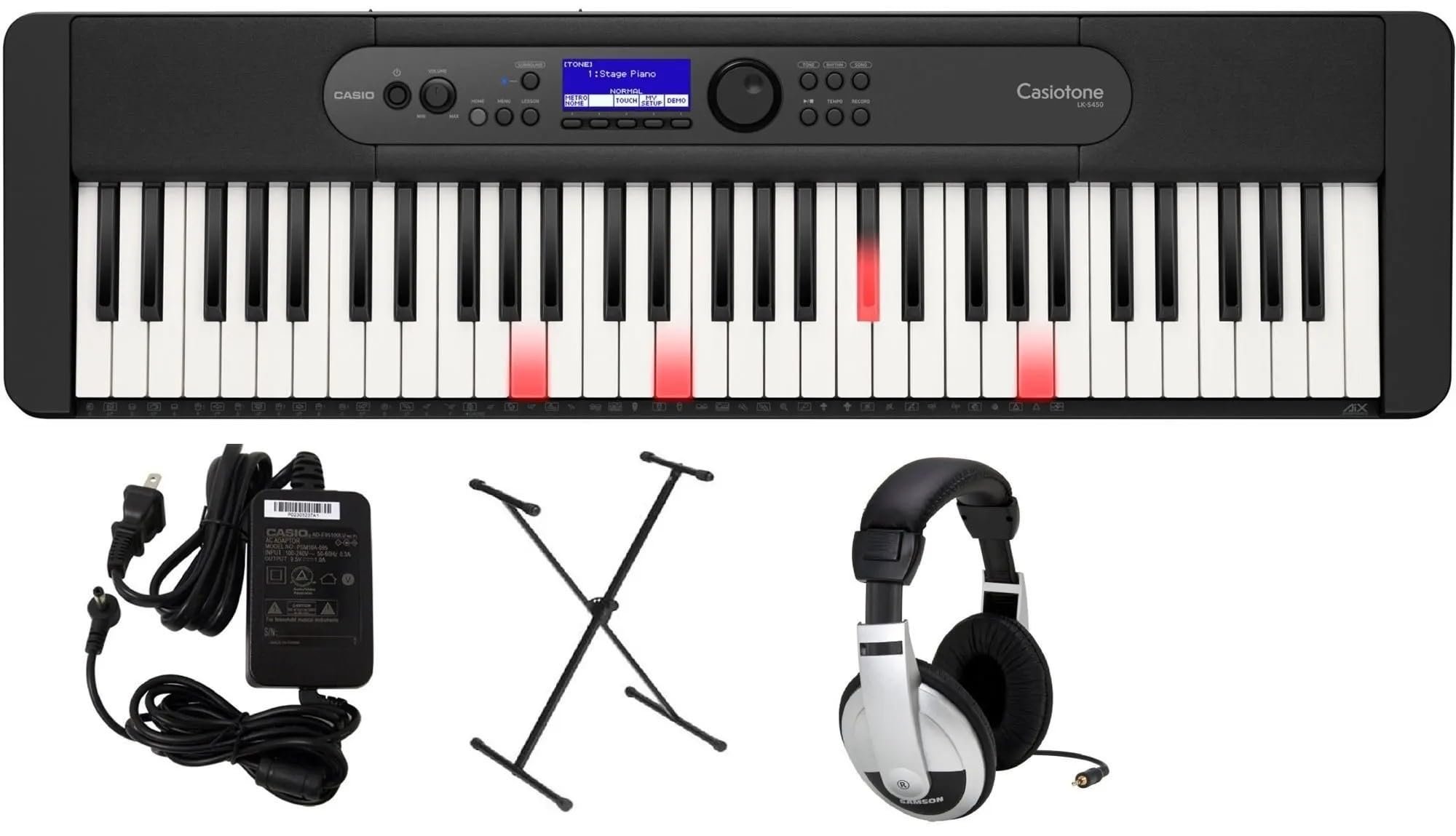
Image: Casio LK-S450 Portable Keyboard with lighted keys, showcasing the full keyboard layout and control panel.
Вміст упаковки
Перевірте, чи всі перелічені нижче предмети входять до вашої упаковки:
- Casio LK-S450 Portable Keyboard
- Підставка для клавіатури
- Адаптер змінного струму
- Навушники
- Music Rest (often included with keyboard)
Інструкції з налаштування
- Зберіть підставку для клавіатури: Follow the instructions provided with the stand to ensure it is securely assembled. Adjust the height to a comfortable playing position.
- Розмістіть клавіатуру: Carefully place the Casio LK-S450 keyboard onto the assembled stand, ensuring it is stable and centered.
- Підключіть адаптер змінного струму: Insert the AC adapter plug into the DC 9.5V jack on the rear panel of the keyboard. Plug the other end into a standard wall outlet.
- Підключення навушників (додатково): For private practice, plug the included headphones into the 3.5mm Headphones Jack located on the rear panel.
- Увімкнення: Press and hold the Power button on the keyboard's control panel until the LCD display illuminates.

Image: A black X-style keyboard stand, ready for keyboard placement.

Зображення: Задня частина view of the Casio LK-S450 keyboard, highlighting the USB ports, audio jacks, and power input.

Image: A pair of over-ear headphones with silver and black components.
Інструкція з експлуатації
Увімкнення/вимкнення живлення
To turn on the keyboard, press and hold the потужність button. To turn off, press and hold the потужність знову натисніть кнопку, доки дисплей не вимкнеться.
Регулювання гучності
Використовуйте Гучність + і Об'єм - buttons on the control panel to adjust the overall sound output level.
Вибір тонів та ритмів
The LK-S450 features a wide variety of tones and rhythms. Use the rotary dial and corresponding buttons on the control panel to browse and select different instrument sounds (tones) and accompaniment patterns (rhythms). The LCD display will show your current selection.

Зображення: Верх view of the Casio LK-S450 keyboard, highlighting the central control panel with its LCD screen, function buttons, and rotary dial for navigation.
Key Lighting System
The integrated Key Lighting system assists in learning by illuminating the keys to be played. Refer to the on-screen prompts and the user manual for specific lesson modes and how to utilize this feature effectively.
Підключення
The MicroUSB port allows you to connect your LK-S450 to a PC, Mac, iOS, or Android device. This enables MIDI communication for use with music software like Casio Music Space, without requiring additional drivers or complex installation.
Технічне обслуговування
- Прибирання: Використовуйте м’яку суху тканину для протирання поверхні клавіатури. Для стійкого бруду злегкаampПротріть тканину водою з м’яким неабразивним засобом для чищення. Уникайте надмірного зволоження.
- Зберігання: Зберігайте клавіатуру в прохолодному, сухому місці, подалі від прямих сонячних променів, екстремальних температур та високої вологості.
- Обробка: Avoid dropping the keyboard or subjecting it to strong impacts. Do not place heavy objects on the keys or control panel.
Усунення несправностей
- Немає звуку: Check if the power is on and the volume is turned up. Ensure headphones are not plugged in if you intend to use the speakers.
- Клавіші не реагують: Verify the keyboard is powered on. If specific keys are unresponsive, contact customer support.
- Проблеми з підключенням: Ensure the MicroUSB cable is securely connected to both the keyboard and your device. Check device settings and software for proper MIDI input recognition.
- Спотворений звук: Lower the volume. If using external speakers, check their connections and settings.
Технічні характеристики
- Назва моделі: LKS450
- Кількість клавіш: 61, touch-responsive
- Dimensions (Keyboard): 258 мм x 84 мм x 84 мм (Г x Ш x В)
- Вага товару: Approximately 21.9 pounds (including accessories in pack)
- Джерело живлення: Corded Electric (AC Adapter included)
- Технологія підключення: USB (MicroUSB port to host, USB Type A to device)
- Роз'єм для навушників: Роз'єм 3.5 мм
- Підтримуване програмне забезпечення: Casio Music Space
- Сумісність з операційною системою: Windows, macOS, iOS, Android
- Особливість: Key Lighting System, Portable
Гарантія та підтримка
Your Casio LK-S450 Premium Keyboard Pack comes with a manufacturer's warranty. Please refer to the warranty card included in your package for specific terms and conditions. For technical support, service, or additional information, please visit the official Casio webсайт або зверніться до їхнього відділу обслуговування клієнтів. Зберігайте чек про покупку як підтвердження покупки для гарантійних претензій.
Інтернет-підтримка: Відвідайте магазин Casio на Amazon


