вступ
This manual provides comprehensive instructions for setting up, operating, and maintaining your Geevon Digital Atomic Alarm Clock. Please read this manual thoroughly before use to ensure optimal performance and longevity of your device.
Вміст упаковки
- Geevon Digital Atomic Alarm Clock
- Адаптер змінного струму
- Посібник користувача
An official product video demonstrating the unboxing, initial setup, and alarm setting process for the Geevon Digital Atomic Alarm Clock. It shows how to navigate the menu, set time, date, time zone, and activate/deactivate the alarm.
Продукт закінченийview
The Geevon Digital Atomic Alarm Clock features a large, clear VA display with multiple indicators for time, date, indoor temperature, humidity, and moon phases. It is designed for easy readability from various angles.
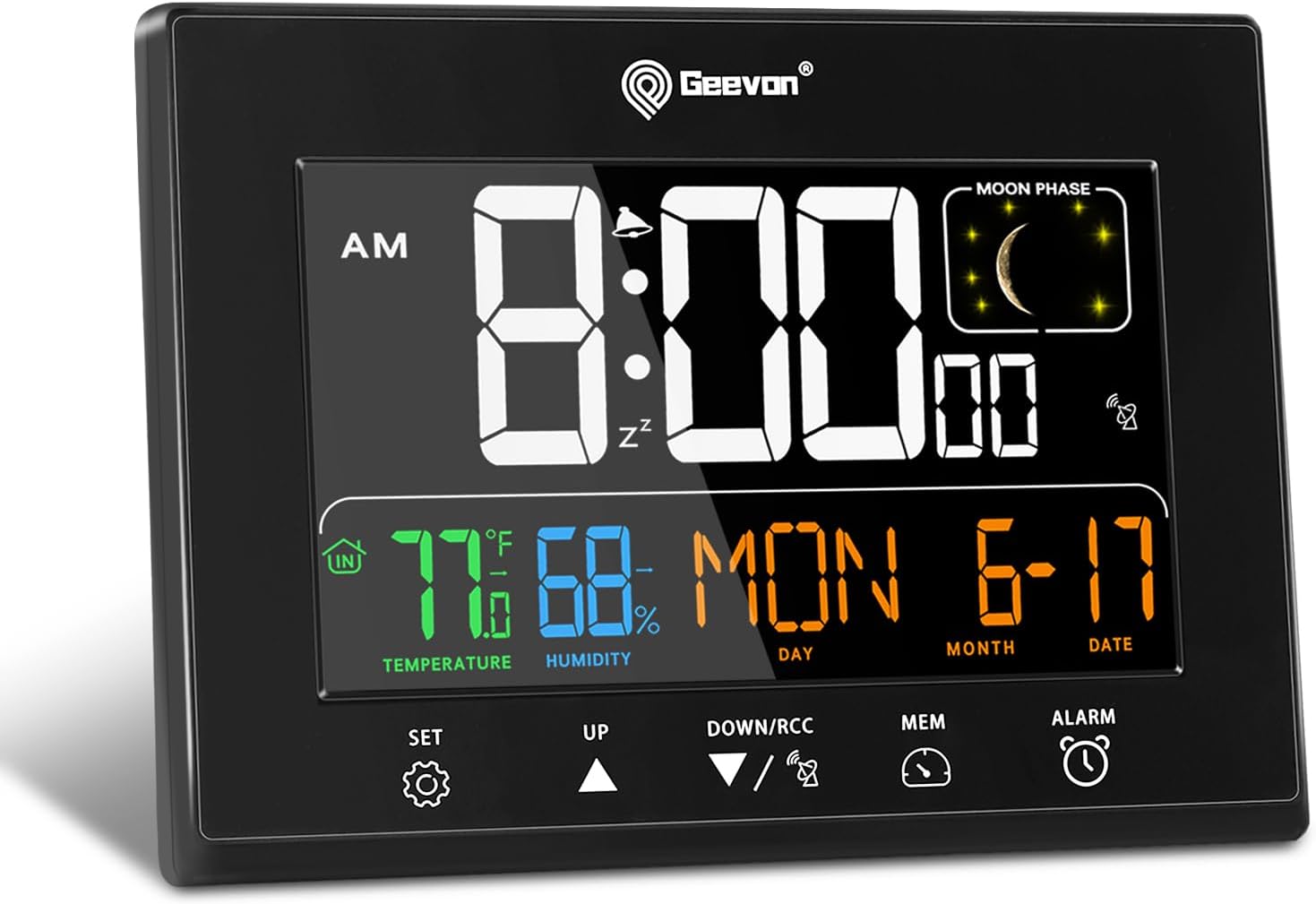
Фронт view of the Geevon Digital Atomic Alarm Clock, displaying time, temperature, humidity, date, and moon phase.

Comparison image highlighting the wide 350-degree viewing angle of the Geevon Digital Atomic Alarm Clock's HD color display, showing clear visibility from various perspectives compared to a standard clock.

Оверview of the clock's key features including HD Color Display, Alarm & Snooze, Indoor Temperature & Humidity, Max & Min Values, Date & Time, Moon Phase, 12/24H Switchable, and Adjustable Brightness. Also shows product dimensions (6.3 inches wide, 4.7 inches high, 0.78 inches thick) and indicates the need for 3 AAA batteries for backup (not included).
Налаштування
Живлення годинника
The clock is primarily powered by the included AC adapter. For uninterrupted operation during power outages and to retain settings, it is recommended to install 3 AAA batteries (not included) as a backup.
Установка резервних батарей
- Відкрийте кришку батарейного відсіку на задній панелі годинника.
- Вставте 3 нові батарейки типу AAA, дотримуючись правильної полярності (+/-).
- Надійно закрийте кришку батарейного відсіку.

Задня view of the clock showing the battery compartment, indicating where to insert 3 AAA batteries for backup power.
Initial Setup (Time, Date, Time Zone)
Upon first power-up or after a prolonged power loss without battery backup, the clock will enter setup mode.
- Натисніть і утримуйте SET/C/F button for 3 seconds to enter setup mode.
- Використовуйте UP or ВНИЗ/RCC кнопки для налаштування миготливого значення.
- Прес SET/C/F to confirm the setting and move to the next item.
- The sequence of settings is typically: Language (ENG/GER/FRE/ITA/SPA/DUT/DAN), RCC (Atomic Clock function ON/OFF), Time Zone (AST, EST, CST, MST, PST, AKST, HST), DST (Daylight Saving Time ON/OFF), Year, Month, Date, 12/24 Hour Format, Hour, Minute.
- After setting the minute, press SET/C/F to exit setup.
Atomic Time Synchronization (WWVB)
The clock automatically attempts to synchronize with the WWVB atomic clock signal overnight. Ensure the WWVB function is set to ON during initial setup. Place the clock near a window for optimal signal reception.

An illustration showing the WWVB signal coverage across the United States, indicating how the Geevon Atomic Clock automatically sets and updates time, including Daylight Saving Time, across seven time zones.
Вибір одиниці температури
Коротко натисніть SET/C/F button to switch between Celsius (°C) and Fahrenheit (°F) for temperature display.
Налаштування будильника
- Натисніть і утримуйте ТРИВОГА протягом 3 секунд. Почне блимати година будильника.
- Використовуйте UP or ВНИЗ/RCC кнопки для налаштування години будильника.
- Прес ТРИВОГА to confirm and move to the alarm minute.
- Використовуйте UP or ВНИЗ/RCC кнопки для налаштування хвилин будильника.
- Прес ТРИВОГА щоб підтвердити та вийти з налаштування будильника.
Особливості експлуатації
Регулювання яскравості дисплея
The clock offers 5 levels of adjustable brightness (100%, 60%, 30%, 5%, or off) when powered by the AC adapter. Briefly press the СНУЗ / СВІТЛО кнопку для перемикання рівнів яскравості.

Image illustrating the 5-level adjustable brightness feature of the clock, showing how the display intensity changes from 0% (off) to 100% brightness, suitable for various lighting conditions.
Функція відкладення
Коли пролунає будильник, натисніть кнопку СНУЗ / СВІТЛО button to activate the 5-minute snooze function. The alarm will sound again after 5 minutes. To turn off the alarm completely, press any other button except СНУЗ / СВІТЛО.

Image demonstrating the 5-minute snooze function. It shows a person pressing the SNZ/LIGHT button for an extra nap and how to turn off the alarm by pressing any other button.
Відображення фази Місяця
The clock displays real-time moon phases, providing a visual representation of the lunar cycle.

An illustration showing the moon phase display on the clock, alongside a diagram of the different phases of the moon.
USB-порти для зарядки
The clock is equipped with two USB charging ports (2.1A and 1A) for convenient charging of your mobile devices, tablets, and other electronics.

Image showing the Geevon clock on a bedside table with a phone charging via one of its two USB ports. An inset highlights the USB ports on the side of the clock.
Варіанти розміщення
The clock features a built-in stand bracket for tabletop placement and a hanging hole for wall mounting, offering versatile placement options for your convenience.

Image illustrating the two placement options for the clock: as a desk clock using its built-in stand, and as a wall clock using the hanging hole on its back.
Технічне обслуговування
прибирання
To clean the clock, use a soft, dry cloth. Avoid using abrasive cleaners or solvents, as they may damage the display or casing.
Заміна батареї
When the low-battery warning appears on the display, replace the 3 AAA backup batteries promptly to ensure continuous operation and setting retention during power interruptions.
Усунення несправностей
No Display / Power Issues
- Ensure the AC adapter is securely plugged into both the clock and a working power outlet.
- Перевірте справність розетки, підключивши інший пристрій.
- If using battery backup, ensure batteries are correctly inserted and not depleted. Replace if necessary.
Incorrect Time / No Atomic Synchronization
- Verify that the correct time zone is selected in the setup menu.
- Ensure the WWVB function is enabled (ON) in the setup menu.
- Place the clock near a window and away from electronic devices that may cause interference.
- Allow up to 24-48 hours for the initial atomic synchronization.
Сигналізація не звучить
- Check if the alarm is activated (alarm icon visible on display).
- Перевірте, чи правильно встановлено час будильника.
Технічні характеристики
| Особливість | Деталь |
|---|---|
| Бренд | Гевон |
| Номер моделі | 230342 |
| Тип дисплея | Digital VA Color Display |
| Розміри продукту | 6.3 см Ш x 4.9 см В x 0.7 см Г |
| Вага товару | 11.2 унції |
| Джерело живлення | Corded Electric & 3 AAA Batteries (Backup) |
| матеріал | Акрилонітрилбутадієнстирол (АБС), Метал, Пластик |
| Особливості | Adjustable Brightness, Alarm, Atomic Time, Auto Dimmable, Calendar, Indoor Temperature & Humidity, Moon Phases, 2 USB Charging Ports |
Гарантія та підтримка
Geevon offers a 12-month warranty and lifetime consulting services for this product. For any questions or support needs, please contact Geevon customer service through the official channels.
For additional information, you may refer to the official Geevon store: Geevon Store.