1. Вступ
The OWON OWM5500 is a versatile digital anemometer designed for precise measurement of various environmental parameters. This portable instrument is ideal for HVAC professionals, outdoor enthusiasts, and anyone requiring accurate data on wind speed, airflow, temperature, and humidity. It features advanced data storage capabilities and PC synchronization for comprehensive analysis.
Ключові характеристики:
- Комплексні вимірювання: Supports 7 types of measurements including wind speed, air volume, temperature, humidity, wet bulb temperature, dew point, and wind chill. Includes Beaufort scale evaluation.
- Advanced Data Storage: Built-in memory for 8000 data sets, with options for automatic or manual storage and one-click data deletion.
- Акумуляторна батарея: Integrated lithium battery, conveniently rechargeable via USB Type-C.
- Graphical Analysis & Remote Control: Features a graphical mode for trend analysis and statistics. Supports data export via PC software and remote control via a dedicated app.
- Customization & Energy Saving: Multiple gear settings for optimal customization. Automatic power-off function extends battery life.
2. Інформація про безпеку
Please read and understand all safety instructions before operating the OWON OWM5500 Digital Anemometer. Failure to follow these instructions may result in electric shock, fire, or personal injury.
- Не використовуйте пристрій у вибухонебезпечних середовищах або поблизу легкозаймистих газів.
- Уникайте впливу на пристрій екстремальних температур, прямих сонячних променів або високої вологості.
- Keep the device dry. Do not immerse it in water or other liquids.
- Використовуйте лише зазначений тип акумулятора та спосіб заряджання.
- Не намагайтеся розбирати або модифікувати пристрій. Звертайтеся до кваліфікованого персоналу для проведення будь-яких робіт з обслуговування.
- Зберігати в недоступному для дітей місці.
3. Вміст упаковки
Переконайтеся, що всі предмети є в наявності та у належному стані після відкриття упаковки:
- OWON OWM5500 Digital Anemometer
- Шнурок
- USB-кабель Type-C
- Посібник користувача

Image: Product Parameters and Accessories, showing the anemometer, lanyard, USB cable, and manual.
4. Продукт закінчивсяview
Familiarize yourself with the components of your OWON OWM5500 Digital Anemometer:

Image: Diagram of the OWON OWM5500 with numbered labels pointing to its various parts, including the impeller, LCD display, buttons, temperature sensor, humidity sensor, and USB port.
- робоче колесо: Вимірює швидкість вітру.
- Impeller Hood: Protects the impeller.
- LCD Display Area: Shows measurement readings and settings.
- Отвір для шнурка: Для кріплення шнурка, що додається.
- Область кнопки: Contains control buttons for operation.
- Датчик температури: Вимірює температуру навколишнього середовища.
- Датчик вологості: Measures relative humidity.
- Кришка акумулятора: Захищає відсік для батареї.
- Фіксований отвір: For mounting on a tripod or other fixture.
- Switch Buckle of Battery Cover: Знімає кришку батарейного відсіку.
- Isobaric Chamber: Internal component.
- Type-C Charge and Communication Port: For charging and PC connection.
5. Налаштування
5.1. Встановлення батареї
The OWM5500 uses an integrated lithium battery. Ensure the device is charged before first use.
- Знайдіть кришку батарейного відсіку на задній панелі пристрою.
- Slide the switch buckle to unlock and remove the battery cover.
- If replacing, ensure the new battery is inserted with correct polarity.
- Replace the battery cover and slide the switch buckle to lock it.
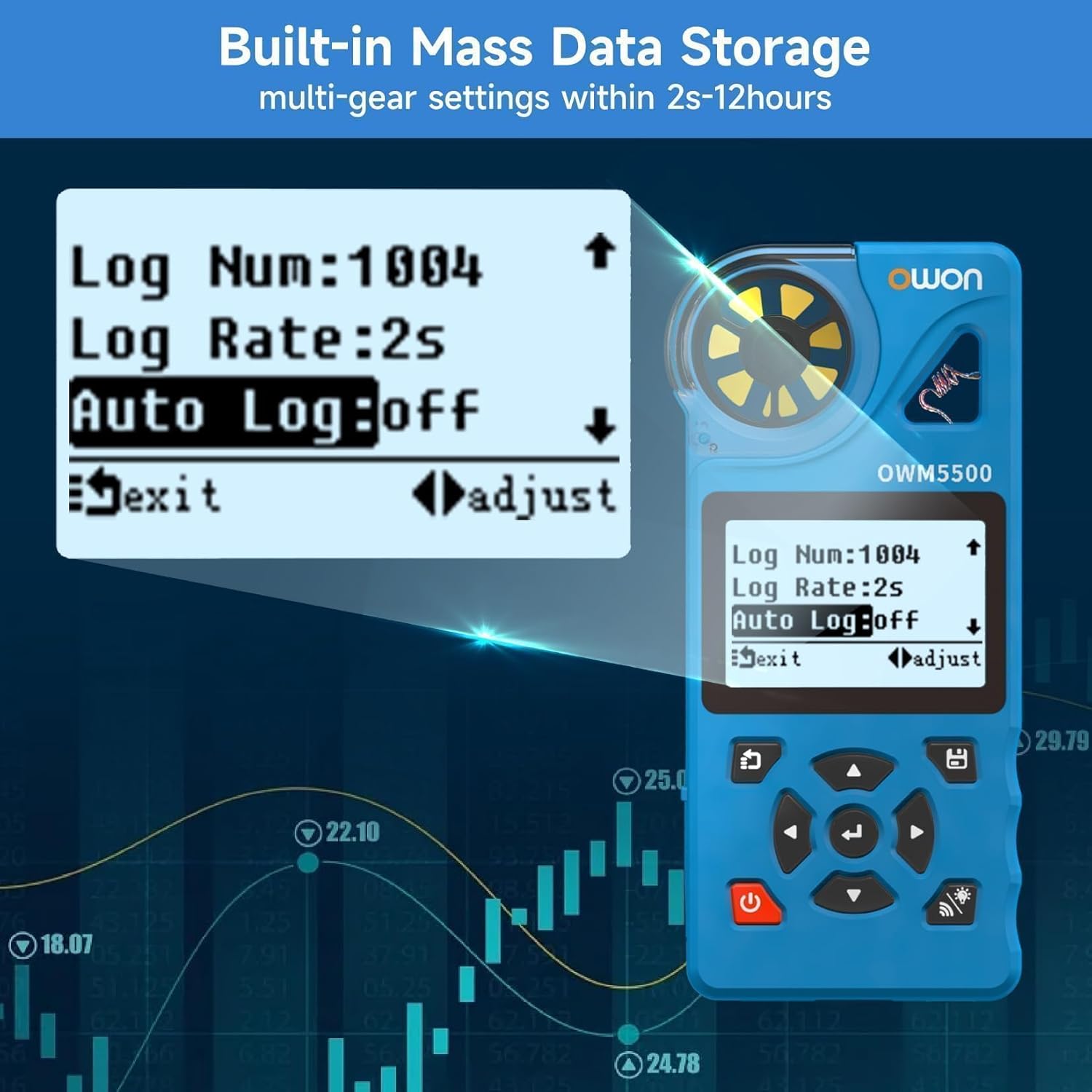
Image: A person installing AAA batteries into the battery compartment of the anemometer.
5.2. Зарядка пристрою
Connect the supplied USB Type-C cable to the charging port (12) on the device and to a standard USB power adapter (not included) or a PC USB port. The battery indicator on the display will show charging status.
5.3. Увімкнення/вимкнення живлення
Натисніть і утримуйте потужність кнопка ( ) for approximately 2 seconds to turn the device ON or OFF.
6. Інструкція з експлуатації
6.1. Основні вимірювання
Upon powering on, the device will display real-time measurements. The OWM5500 can measure:
- Wind Speed (WIND SPD)
- Air Flow (AIR FLOW)
- Температура (TEMP)
- Humidity (HUMIDITY)
- Wet Bulb Temperature (WET BULB)
- Dew Point (DEW POINT)
- Wind Chill (WIND CHILL)

Image: The anemometer display showing various measurement values like wind speed, air flow, temperature, and humidity.
6.2. Вибір одиниці
Натисніть ОДИНИЦЯ button to cycle through different wind speed units (m/s, km/h, ft/s, kts, mph). Press the ° C / ° F button to switch between Celsius and Fahrenheit for temperature readings.

Image: The anemometer display showing wind speed in different units (m/s, km/h, kts, ft/s, mph) as the 'UNIT' button is pressed.
6.3. Реєстрація та аналіз даних
The OWM5500 can store up to 8000 sets of data. Data can be stored manually or automatically at set intervals (2 seconds to 12 hours).
- Ручне зберігання: Refer to the device's on-screen prompts for manual data saving.
- Automatic Storage: Configure logging rate and auto-log settings via the device menu.
- PC Synchronization: Connect the device to a PC using the USB Type-C cable. Use the provided PC software to monitor the anemometer and export recorded data for further analysis.

Image: The anemometer display showing data logging settings and a laptop connected via USB, displaying data analysis software.
6.4. Trend Chart and Statistics
The device can display trend charts and statistical data (maximum, minimum, and average values) for wind speed measurements.
- Натисніть RANGE button to cycle through MAX, MIN, and AVG values.
- Access the trend chart mode through the device menu to visualize measurement data over time.

Image: Two anemometer displays, one showing a wind speed trend graph and the other showing statistical values (MAX, MIN, AVG) for wind speed.
6.5. Підсвічування
Натисніть Підсвічування кнопка ( ) to turn the LCD backlight ON or OFF for improved visibility in low-light conditions.
7. Технічне обслуговування
7.1. прибирання
Щоб очистити пристрій, протріть його м’якою, damp cloth. Do not use abrasive cleaners, solvents, or harsh chemicals. Ensure the impeller is free from dust and debris for accurate readings.
7.2. Зберігання
When not in use for extended periods, store the anemometer in a cool, dry place, away from direct sunlight and extreme temperatures. If storing for a long time, ensure the battery is partially charged (around 50%) to prolong its lifespan.
8. Вирішення проблем
If you encounter issues with your OWON OWM5500, refer to the following common problems and solutions:
- Пристрій не вмикається: Check battery charge level. Ensure the battery is properly installed.
- Неточні показники: Ensure the impeller is clean and rotates freely. Verify that the device is held correctly in the airflow. Check for environmental factors affecting sensors.
- Дисплей тьмяний або нечитабельний: Activate the backlight. Check battery level.
- Cannot connect to PC/App: Ensure the USB cable is securely connected. Verify that Bluetooth is enabled on your mobile device and the app is correctly installed.
If the problem persists, contact OWON customer support for assistance.
9. Технічні характеристики
Detailed technical specifications for the OWON OWM5500 Digital Anemometer:
| Тип вимірювання | одиниця | Діапазон | роздільна здатність | Точність | Час відгуку |
|---|---|---|---|---|---|
| Швидкість вітру | m/s, km/h, ft/s, kt, mph | 0.6 - 40 м/с | 0.1 м/с | ±3% + 0.1 | 0.5с |
| температура | °C, °F | -10 - 50 °C | 0.1 °C | ±1.0 °C | 0.5с |
| Вологість | %RH | 5 - 95 %RH | 0.1 % відносної вологості | ±5.0 % RH | 0.5с |
| Точка роси | °C, °F | -40 - 50 °C | 0.1 °C | ±2.0 °C | 0.5с |
| Температура мокрої колби | °C, °F | -40 - 50 °C | 0.1 °C | ±2.0 °C | 0.5с |
| Wind Chill | °C, °F | -40 - 50 °C | 0.1 °C | ±2.0 °C | 0.5с |
| Об'єм повітря | CMS, CFS | 0.001 - 300.0 CMS | 0.001 CMS | N/A | 0.5с |
Розміри (Д x Ш x В): 136.5 мм x 30 мм x 64.5 мм
Weight (without package): 0.2 кг
матеріал: PC
10. Гарантія та підтримка
OWON products are manufactured to the highest quality standards. This product is covered by a limited warranty against defects in materials and workmanship. For detailed warranty terms and conditions, please refer to the warranty card included with your product or visit the official OWON webсайт.
For technical support, troubleshooting assistance, or service inquiries, please contact OWON customer support through their official channels. Provide your product model (OWM5500) and purchase details when contacting support.


