1. Вступ
This manual provides essential information for setting up, operating, and maintaining your HUAWEI Watch FIT Special Edition. Please read this manual thoroughly to ensure proper use and to maximize the device's features. Keep this manual for future reference.
2. Що в коробці
- HUAWEI Watch FIT Special Edition (with strap)
- Підставка для зарядки
- Зарядний кабель
- Короткий посібник
- Інформація про безпеку
3. Початкове налаштування
3.1 Зарядка пристрою
Before first use, fully charge your HUAWEI Watch FIT Special Edition. Connect the charging cradle to a power adapter using the provided charging cable, then place the watch onto the cradle, ensuring the charging contacts align. The watch screen will indicate charging status.

Зображення: спереду view of the HUAWEI Watch FIT Special Edition, showing the display and strap. This image represents the device during initial setup or general use.
3.2 Завантаження та встановлення програми HUAWEI Health
The HUAWEI Health app is required to manage your watch and access all its features. Scan the QR code provided in the Quick Start Guide or search for "HUAWEI Health" in your smartphone's app store (compatible with Android and iOS). Download and install the application.
3.3 Сполучення зі смартфоном
Open the HUAWEI Health app on your smartphone. Navigate to 'Devices' > 'Add' > 'Smartwatch' and select your HUAWEI Watch FIT Special Edition from the list of available devices. Follow the on-screen instructions to complete the pairing process.

Image: Visual guide for setting up the HUAWEI Health App, showing steps for downloading, pairing, and updating the device.
3.4 Оновлення мікропрограми
After pairing, it is recommended to check for and install any available firmware updates. In the HUAWEI Health app, go to 'Personal' > 'Check for updates'. This ensures your watch has the latest features and performance improvements.
4. Інструкція з експлуатації
4.1 Основна навігація
- Сенсорний екран: Проведіть пальцем вгору, вниз, ліворуч або праворуч, щоб переходити між меню та сповіщеннями. Торкніться, щоб вибрати елементи.
- Бічна кнопка: Press to wake the screen, return to the home screen, or open the app list. Press and hold to power on/off or restart the device.
4.2 Зміна циферблатів годинника
You can customize your watch face directly on the device or through the HUAWEI Health app. On the watch, press and hold the current watch face, then swipe left or right to browse available options. Tap to select a new watch face.

Image: A HUAWEI Watch FIT Special Edition on a wrist, showcasing a unique watch face design.
5. Функції моніторингу стану здоров'я
The HUAWEI Watch FIT Special Edition offers comprehensive health tracking capabilities:
- Монітор серцевого ритму: Utilizes HUAWEI TruSeen™ 5.0 technology for continuous and accurate heart rate tracking.
- Моніторинг SpO2: Вимірює рівень насичення крові киснем.
- Відстеження сну: HUAWEI TruSleep™ provides detailed analysis of sleep stagта якість.
- Моніторинг стресу: Tracks stress levels and offers breathing exercises to help manage stress.
- Відстеження активності: Records steps, distance, calories burned, and supports multiple sports modes.

Image: The watch display showing various personal health metrics, including SpO2, heart rate, and stress levels.
6. Функціональність GPS
The integrated GPS allows for precise tracking of your outdoor activities, such as running or cycling, without needing to carry your smartphone. The watch records your route, speed, and distance, which can be viewed in detail on the HUAWEI Health app.
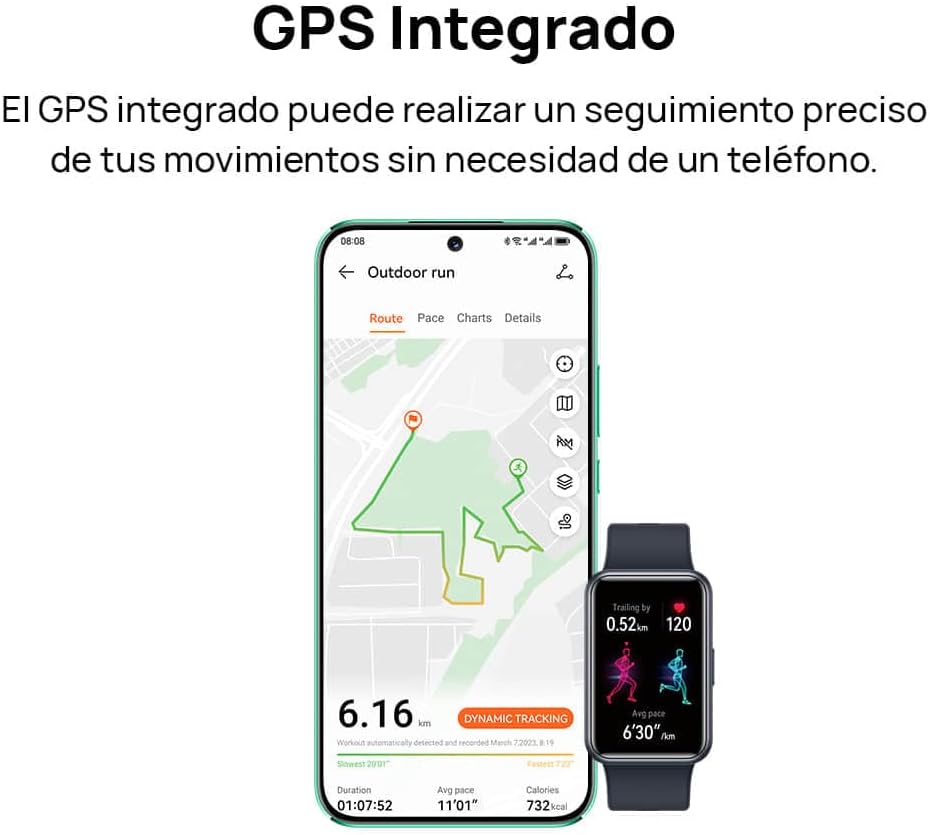
Image: A smartphone screen displaying a tracked outdoor run route, alongside the HUAWEI Watch FIT Special Edition showing activity data.
7. Notifications and Connectivity
Stay connected with your HUAWEI Watch FIT Special Edition. It supports incoming call notifications and quick message replies directly from your wrist. The watch connects to your smartphone via Bluetooth and is compatible with both Android and iOS devices.

Image: Two HUAWEI Watch FIT Special Edition devices showing an incoming call notification and a quick message reply interface.

Image: A smartphone displaying the HUAWEI Health app interface, illustrating the watch's compatibility with both Android and iOS operating systems.
8. Термін служби батареї та заряджання
The HUAWEI Watch FIT Special Edition is designed for extended battery life. Actual battery performance may vary based on usage patterns and settings. To charge, use the provided charging cradle and cable. Ensure the watch is placed correctly on the cradle for optimal charging.
9. Технічне обслуговування
9.1 Очищення годинника
Regularly clean your watch and strap to prevent skin irritation and maintain functionality. Use a soft, damp cloth to wipe the watch body and strap. Avoid using harsh chemicals or abrasive materials. Ensure the charging contacts are clean and dry before charging.
9.2 Водонепроникність
The HUAWEI Watch FIT Special Edition has a water resistance rating. Refer to the product specifications for details on its water resistance capabilities. Avoid using the watch in hot water, saunas, or steam rooms, as this may compromise its water resistance.

Image: The back of the HUAWEI Watch FIT Special Edition, showing the optical heart rate sensors and regulatory markings.
10. Вирішення проблем
If you encounter issues with your HUAWEI Watch FIT Special Edition, try the following steps:
- Годинник не вмикається: Переконайтеся, що годинник повністю заряджений. Підключіть його до зарядного пристрою щонайменше на 10 хвилин.
- Не вдається підключитися до телефону: Ensure Bluetooth is enabled on your phone and the watch. Restart both devices and try pairing again. Check if the HUAWEI Health app is updated to the latest version.
- Неточні дані про стан здоров'я: Переконайтеся, що годинник щільно прилягає до зап'ястя, не надто туго і не надто вільно. Почистіть датчики на задній панелі годинника.
- Не отримано сповіщень: Check notification settings in the HUAWEI Health app and your phone's system settings to ensure permissions are granted.
- Екран не реагує: Restart the watch by pressing and holding the side button until the restart option appears, then confirm. If unresponsive, force restart by holding the button for a longer duration (e.g., 10-15 seconds).
11. Технічні характеристики
| Особливість | Специфікація |
|---|---|
| Бренд | HUAWEI |
| Номер моделі | 55020BEE-ES |
| Операційна система | HUAWEI LiteOS |
| Розмір екрана | 1.64 дюймів |
| Підключення | Bluetooth |
| Особливості | Professional health management, multiple sports modes |
| Сумісні пристрої | Смартфон (Android та iOS) |
| Склад батареї | Літій-іонний |
| Акумуляторна батарея | так |
| GPS | Вбудований GPS |
| Форма | Прямокутний |
| Ємність пам'яті | 4 ГБ |
| Ємність акумулятора | 900 міліampере-година (мАг) |
12. Гарантія та підтримка
Щоб отримати інформацію про гарантію, зверніться до гарантійного талона, що додається до вашого продукту, або відвідайте офіційний веб-сайт HUAWEI website. For technical support, troubleshooting assistance, or service inquiries, please contact HUAWEI customer support through their official channels.


