1. Вступ
This manual provides detailed instructions for the setup, operation, maintenance, and troubleshooting of your Xprinter XP-233B Thermal Barcode Printer. The XP-233B is designed for efficient thermal printing of barcodes and labels, utilizing heat-sensitive paper without the need for ink or ribbons.
2. Техніка безпеки
- Ensure the printer is connected to a power source with the correct voltagяк зазначено на адаптері живлення.
- Не піддавайте принтер впливу води або надмірної вологості.
- Уникайте розміщення принтера під прямими сонячними променями або поблизу джерел тепла.
- Keep the printer away from dust and debris to prevent damage to internal components.
- Не намагайтеся розбирати або ремонтувати принтер самостійно. Зверніться за допомогою до кваліфікованого сервісного персоналу.
- Use only recommended thermal label rolls to ensure optimal print quality and printer longevity.
3. Вміст упаковки
Перевірте наявність усіх елементів в упаковці:
- Xprinter XP-233B Thermal Barcode Printer
- Адаптер живлення
- USB кабель
- Короткий посібник користувача (якщо включено)
- Driver CD (if included, drivers can also be downloaded online)
4. Продукт закінчивсяview
Familiarize yourself with the main components of the XP-233B printer.

малюнок 4.1: Лицьова сторона view of the Xprinter XP-233B, showing the power switch, control panel, and label output slot.

малюнок 4.2: Задня view of the Xprinter XP-233B, highlighting the USB, Ethernet, and power input ports.
Функції панелі керування:
- Кнопка FEED: Press to feed a blank label. Hold to perform a self-test print.
- Кнопка ПАУЗА: Призупиняє або відновлює друк.
- Кнопка СКАСУВАТИ: Скасовує поточне завдання друку.
- Світлодіодні індикатори: Display printer status (e.g., Power, Error, Paper Out). Refer to troubleshooting for specific light patterns.
5. Налаштування
5.1 Підключення принтера
- Connect the power adapter to the printer's power input port and then plug it into a wall outlet.
- Connect the USB cable from the printer to your computer. For Ethernet connectivity, connect an Ethernet cable from the printer to your network router or switch.
- Turn on the printer using the power switch located on the side.
5.2 Завантаження етикеток
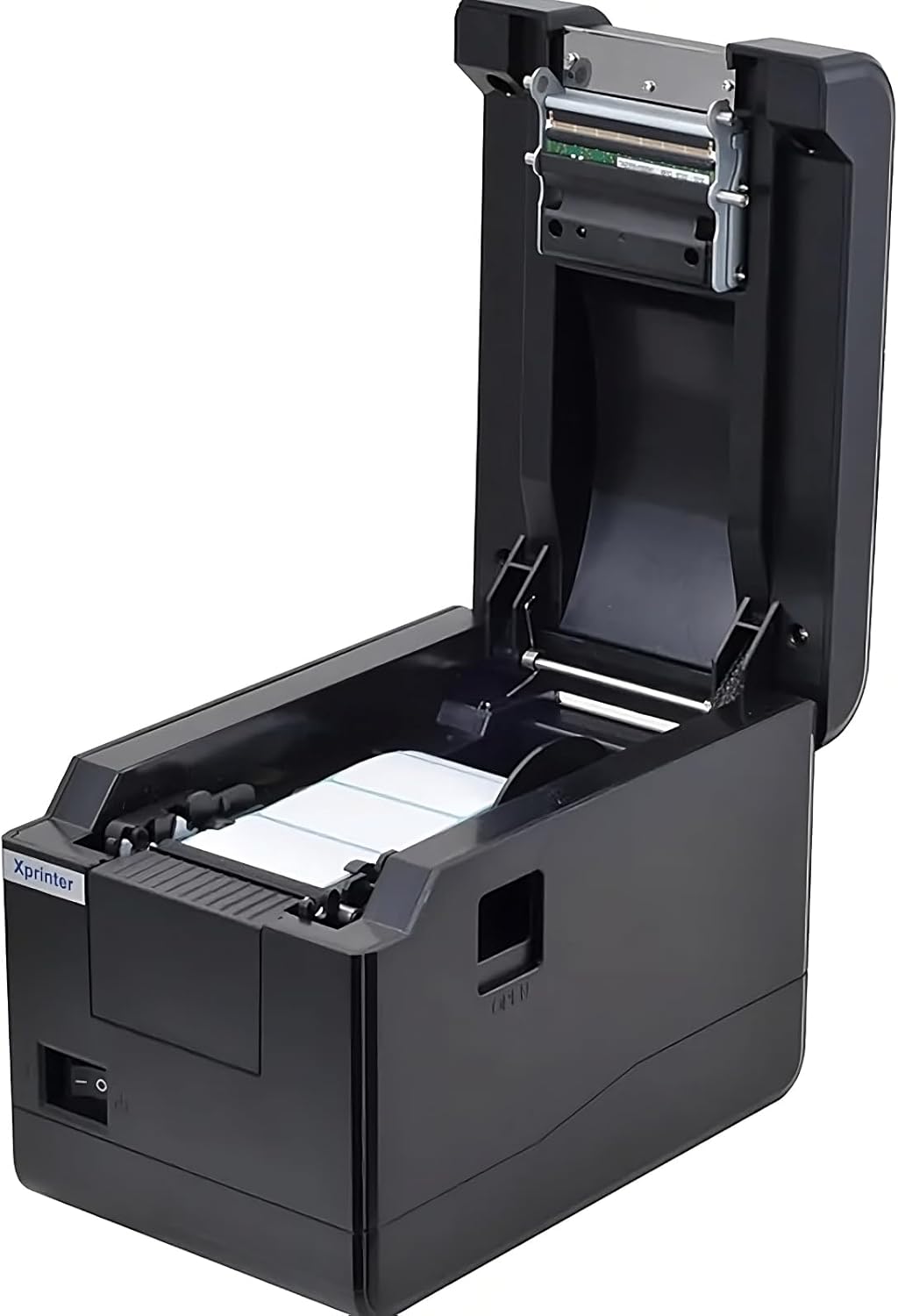
малюнок 5.1: З верху до низу view of the Xprinter XP-233B with the cover open, illustrating the label loading area.
- Press the 'OPEN' button on the side of the printer to open the top cover.
- Place the thermal label roll into the label compartment, ensuring the labels feed from the bottom of the roll and the printable side faces upwards.
- Adjust the movable label guides to fit the width of your label roll snugly, without pinching the labels.
- Pull a few labels past the print head and out through the front slot.
- Щільно закрийте верхню кришку, доки вона не зафіксується почутим клацанням.
- The printer will automatically calibrate and feed a few labels to detect the label gap.
5.3 Встановлення драйвера
Install the printer drivers on your computer. Drivers can typically be found on the included CD or downloaded from the official Xprinter webсайт. Дотримуйтесь інструкцій на екрані для встановлення.
6. Експлуатація принтера
6.1 Базовий друк
Once the printer is set up and drivers are installed, you can print labels from your application (e.g., label design software, shipping software). Ensure the correct printer model (Xprinter XP-233B) is selected in your application's print settings.
6.2 Self-Test Print
To perform a self-test print:
- Ensure the printer is powered on and labels are loaded.
- Натисніть і утримуйте ПОДАВАТИ button for approximately 3-5 seconds until the printer starts printing.
- The self-test print will display printer information and a test pattern, confirming basic functionality.
7. Технічне обслуговування
7.1 Очищення друкуючої головки
Regular cleaning of the print head ensures optimal print quality and extends the printer's lifespan. Clean the print head when print quality degrades or after every few rolls of labels.
- Вимкніть принтер і від’єднайте шнур живлення.
- Відкрийте верхню кришку.
- Gently wipe the print head surface with a cotton swab lightly dampened with isopropyl alcohol (70% or higher).
- Allow the print head to dry completely (approximately 2-3 minutes) before closing the cover and turning on the printer.
7.2 Очищення зовнішньої частини
Протріть зовнішню частину принтера м’якою,amp тканина. Не використовуйте агресивні хімікати або абразивні засоби для чищення.
8. Вирішення проблем
| проблема | Можлива причина | Рішення |
|---|---|---|
| Принтер не вмикається | Power cord loose; power outlet faulty; power adapter damaged. | Check power connections; try a different outlet; replace power adapter if necessary. |
| No labels feeding | Labels incorrectly loaded; paper out; label guides too tight. | Reload labels correctly; replace label roll; adjust label guides. |
| Poor print quality (faded, lines) | Print head dirty; low-quality labels; print head damaged. | Clean print head (refer to Section 7.1); use recommended thermal labels; contact support if print head is damaged. |
| Printer not responding to print commands | Incorrect driver installed; USB/Ethernet cable loose; printer paused. | Reinstall drivers; check cable connections; press ПАУЗА для відновлення. |
| Labels skipping or misaligning | Incorrect label sensor calibration; label guides not set correctly. | Perform a self-test print to recalibrate; adjust label guides. |
9. Технічні характеристики
| Особливість | Специфікація |
|---|---|
| Назва моделі | Xprinter - Thermal barcode printer |
| Номер моделі товару | XP-233B |
| Технологія принтера | Теплові |
| Технологія підключення | Ethernet, USB |
| Вихід на принтер | Монохромний |
| Друковані ЗМІ | етикетки |
| Максимальна місткість аркушів | 100 (typical for roll capacity, actual sheet capacity depends on label size) |
| Розміри продукту (Д x Ш x В) | 26.8 х 18 х 17.2 см |
| Вага товару | 1.2 кг |
| Колір | чорний |
10. Інформація про гарантію
Xprinter products typically come with a limited manufacturer's warranty. Please refer to the warranty card included with your product or visit the official Xprinter website for specific warranty terms and conditions, including coverage duration and service procedures. Keep your purchase receipt as proof of purchase for warranty claims.
11. Підтримка клієнтів
For technical assistance, driver downloads, or further inquiries regarding your Xprinter XP-233B, please visit the official Xprinter support website or contact their customer service department. Contact information can usually be found on the Xprinter webсайті або в документації, що додається до вашого принтера.


