1. Вступ
Welcome to the instruction manual for your new Sunstech CELT23 flip phone. This phone is specifically designed for ease of use, featuring large keys, a clear display, and essential functions like an SOS button for emergencies. Please read this manual carefully to understand how to operate your device safely and efficiently.
2. Продукт закінчивсяview
The Sunstech CELT23 is a clamshell-style mobile phone, offering simplicity and security. Its design prioritizes user comfort and accessibility.
Ключові характеристики:
- Дизайн відкидного вікна: Protects the screen and keypad when closed.
- Великі клавіші: Oversized buttons for easy dialing and texting.
- Кнопка SOS: Located on the back for emergency calls and SMS.
- 2.4-дюймовий дисплей: Чіткий екран для зручності viewінж.
- Швидкий набір: Assign contacts to speed dial keys.
- Loud Sound: Enhanced audio for calls and ringtones.
- FM-радіо: Built-in radio for entertainment.
- Акумулятор 1100 мАг: Provides reliable battery life.
Phone Components:
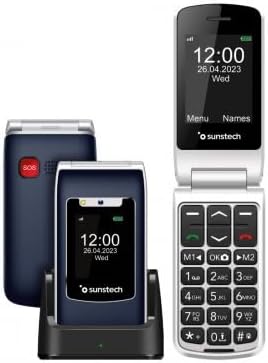
Опис зображення: This image displays the Sunstech CELT23 flip phone in two states: open, showing the screen and large keypad, and closed, resting in its charging dock. The back of the closed phone, featuring the red SOS button, is also visible. This illustrates the phone's compact design and user-friendly interface.

Опис зображення: This image shows the Sunstech CELT23 flip phone in its charging dock, with the phone in a closed position. The prominent red SOS button on the back of the phone is clearly visible, highlighting a key safety feature. The phone's external display is also visible, showing the time and date.

Опис зображення: This image presents a collection of Sunstech CELT23 flip phones, showcasing different color options (blue and black) and configurations. Some phones are open, displaying their keypads and screens, while others are closed and placed in their charging docks. This provides a comprehensive view of the product's design and available variations.
3. Налаштування
3.1. Встановлення SIM-картки та акумулятора
- Open the Phone: Обережно відкрийте задню кришку телефону.
- Вставте SIM-карту: Locate the SIM card slot. Carefully insert your activated SIM card into the designated slot, ensuring the gold contacts face downwards and the cut corner aligns correctly.
- Вставте батарею: Place the provided Lithium-ion battery into the battery compartment, aligning the contacts.
- Закрити обкладинку: Встановіть задню кришку на місце, доки вона надійно не зафіксується почувши клацання.
3.2. Зарядка телефону
- Використання зарядної док-станції: Place the phone into the charging dock, ensuring it sits firmly and the charging indicator light (if present) illuminates.
- Пряме заряджання через USB: Alternatively, connect the USB Type C cable to the phone's charging port and the other end to a compatible power adapter.
- Перший заряд: For optimal battery performance, fully charge the phone before its first use.
3.3. Увімкнення/вимкнення живлення
- Щоб увімкнути: Натисніть і утримуйте кнопку живлення/завершення виклику (зазвичай червону), доки екран не засвітиться.
- Щоб вимкнути: Натисніть і утримуйте кнопку живлення/завершення виклику, доки не з’являться опції вимкнення живлення, потім виберіть «Вимкнути живлення».
4. Інструкція з експлуатації
4.1. Здійснення та отримання дзвінків
- Щоб зателефонувати:
- Open the phone.
- Dial the number using the large keypad.
- Натисніть зелену кнопку виклику, щоб розпочати дзвінок.
- Щоб прийняти дзвінок:
- When the phone rings, open the flip or press the Green Call button.
- Щоб завершити дзвінок, натисніть червону кнопку завершення дзвінка.
4.2. Надсилання SMS-повідомлень
- У головному меню перейдіть до розділу «Повідомлення».
- Select "Write Message" or "New SMS".
- Введіть номер одержувача або виберіть його з контактів.
- Введіть повідомлення за допомогою клавіатури.
- Натисніть «Надіслати».
4.3. Функція екстреного виклику SOS
The SOS button is designed for emergencies. When pressed, it will activate an audible warning signal and automatically dial up to 5 pre-set emergency contacts. It will also send a customizable emergency SMS message to these contacts.
- Налаштування екстрених контактів:
- Go to "Settings" > "SOS Settings".
- Додайте до 5 номерів контактів для екстрених випадків.
- Customize the emergency SMS message if desired.
- Використання кнопки SOS:
- In an emergency, press and hold the red SOS button on the back of the phone for a few seconds.
- The phone will emit an alarm and begin dialing your emergency contacts sequentially until one answers.
- An emergency SMS will also be sent to all pre-set contacts.
4.4. Швидкий набір
Призначте часто використовувані номери певним клавішам для швидкого набору.
- Go to "Contacts" or "Settings" > "Speed Dial".
- Select an available key (e.g., M1, M2, or number keys 2-9).
- Assign a contact from your phonebook or enter a new number.
- To use, simply press and hold the assigned speed dial key.
4.5. FM-радіо
To listen to the FM radio, ensure headphones are connected (they act as an antenna).
- Connect 3.5mm headphones to the phone's audio jack.
- Navigate to "Multimedia" or "Tools" > "FM Radio".
- Використовуйте навігаційні клавіші для пошуку станцій або налаштування вручну.
5. Технічне обслуговування
- Прибирання: Use a soft, dry cloth to clean the phone's screen and body. Avoid liquid cleaners.
- Догляд за акумулятором:
- Уникайте екстремальних температур.
- Не залишайте акумулятор повністю розрядженим протягом тривалого часу.
- Використовуйте тільки оригінальний зарядний пристрій і акумулятор.
- Зберігання: Зберігайте телефон у прохолодному, сухому місці, подалі від прямих сонячних променів та вологи.
6. Вирішення проблем
| проблема | Можлива причина / рішення |
|---|---|
| Телефон не включається. | Battery is discharged. Charge the phone. Battery not inserted correctly. Reinsert the battery. |
| Не вдається здійснювати або приймати дзвінки. | No SIM card inserted or SIM card not activated. Check SIM card. Out of network coverage. Move to an area with better signal. |
| Немає звуку під час дзвінків. | Volume is too low. Adjust the call volume using the side keys. Speaker/earpiece might be blocked. Clean gently. |
| Кнопка SOS не працює. | SOS contacts not set up. Configure emergency contacts in SOS settings. |
7. Технічні характеристики
- Бренд: Sunstech
- модель: КЕЛЬТ23
- Тип продукту: Розкидний телефон
- Операційна система: ОСРВ
- Розмір екрана: 2.4 дюймів
- роздільна здатність: 240 х 320
- Підключення: USB Type C, 3.5 mm Jack
- Особливості: SOS Button, FM Radio
- Склад батареї: Літій-іонний
- Ємність батареї: 1100 mAh (inferred from product description)
- Розмір оперативної пам'яті: 48 Мб
- Ємність зберігання: 128 GB (Note: This capacity is typically for external memory card support in basic phones)
- Швидкість ЦП: 800 МГц
- Виробник: SUNSTECH
- Країна походження: Китай
8. Гарантія та підтримка
This product is manufactured by SUNSTECH. For specific warranty details, please refer to the warranty card included with your purchase or contact Sunstech customer support.
- Наявність запасних частин: 10 Years (as per manufacturer information).
- Оновлення програмного забезпечення: Інформація недоступна.
For further assistance, please visit the official Sunstech webсайту або зв’яжіться зі своїм відділом обслуговування клієнтів.


