
1. Продукт закінчивсяview
The SCULPFUN S30 Ultra 11W is a high-precision laser engraving and cutting machine designed for various materials including wood, metal, and acrylic. It features a large working area, smart air assist, and advanced safety mechanisms to ensure efficient and safe operation.
Ключові характеристики:
- 11W Laser Power: Utilizes two enhanced 6W diodes for superior cutting and engraving capabilities.
- Велика робоча зона: An expansive 600x600mm (23.6"x23.6") work area, offering increased space for larger projects.
- Висока точність: 0.08mm ultra-fine compression spot for delicate and clear engraving.
- Висока швидкість: Engraving speeds up to 400mm/s for improved efficiency.
- Smart Air Assist: Automatic air assist control for cleaner cuts and engravings, activating for cutting and deactivating for engraving.
- Покращена безпека: Equipped with an emergency stop button, key lock, and limit switches for safe operation.
- Міцний дизайн: Features an interchangeable lens design for extended laser module service life.
2. Налаштування та складання
This section guides you through the initial setup and assembly of your SCULPFUN S30 Ultra 11W laser engraver. Please follow the steps carefully to ensure proper functionality and safety.
2.1 Розпакування та перевірка компонентів
Carefully unpack all components and verify against the packing list. Ensure all parts are present and undamaged.
2.2 Механічна збірка
The engraver comes unassembled. Follow the detailed instructions provided in the physical manual for step-by-step assembly. The parts are individually wrapped and labeled to assist with this process.

Оверview of the SCULPFUN S30 Ultra's main components and features, including the laser module, linear rail, and control panel.
2.3 Програмне забезпечення та підключення
The SCULPFUN S30 Ultra series is compatible with various software, including LightBurn and LaserGRBL. It supports multiple connection methods for flexible operation.
- Встановлення програмного забезпечення: Install your preferred laser control software (e.g., LightBurn, LaserGRBL) on your computer. Refer to the software's documentation for installation guides.
- Бездротове підключення Bluetooth: Connect your engraver to your computer wirelessly via Bluetooth for convenient control.
- Підключення кабелю USB: For a stable wired connection, use the provided USB cable to connect the engraver to your computer.
- SD-карта: Transfer design files directly to the engraver using an SD card for offline operation.

Illustration of the versatile connection options available for the SCULPFUN S30 Ultra, including Bluetooth, SD card, and USB cable.
2.4 Фокусування лазера
Proper focusing is crucial for optimal engraving and cutting results. Use the focusing column to set the correct distance between the laser module and the material surface.
- Place the focusing column on the material surface.
- Lower the laser module until it rests gently on the focusing column.
- Tighten the laser module's locking screw.
- Remove the focusing column.
3. Інструкція з експлуатації
This section provides guidance on operating your SCULPFUN S30 Ultra 11W for various tasks.
3.1 Powering On and Safety Features
Before starting any operation, ensure all safety measures are in place.
- Insert the key into the key lock and turn it to the ON position.
- Натисніть кнопку живлення, щоб увімкнути машину.
- In case of emergency, press the red emergency stop button immediately.

Details of the upgraded safety features, including the emergency stop switch, key lock, and limit switches.
3.2 Гравіювання та різання
The S30 Ultra 11W is capable of both precise engraving and powerful cutting.
- Розміщення матеріалу: Place your material within the 600x600mm working area. For cutting, consider using a honeycomb workbed (sold separately) for optimal smoke exhaust and clean edges.
- Design Import: Import your design into the laser control software.
- Параметри параметрів: Adjust laser power, speed, and passes according to the material type and desired outcome.
- Почати операцію: Initiate the engraving or cutting process from the software.

Visual representation of the large 600x600mm working area, demonstrating its capacity for various projects.
3.3 Smart Air Assist Functionality
The integrated smart air assist system automatically optimizes airflow for different operations.
- Гравірування: Air assist automatically turns off to prevent material scorching and ensure fine detail.
- Різання: Air assist automatically turns on to blow away debris, resulting in cleaner and faster cuts.
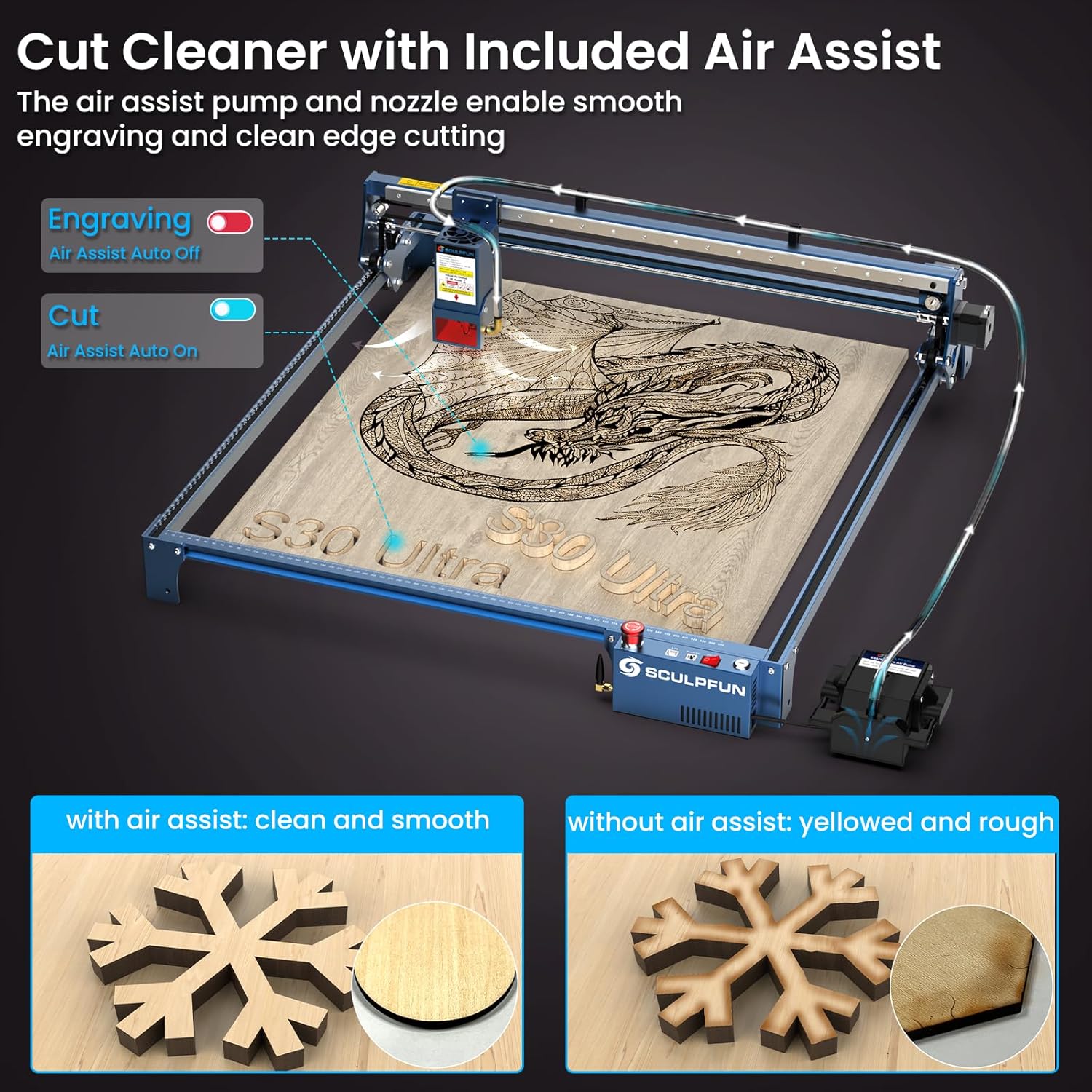
Demonstration of the smart air assist system, showing the difference in cut quality with and without air assist.

An illustration detailing the intelligent air assist system, including its 32-bit mainboard and high airflow.
3.4 Можливості продуктивності
- Cutting Power: Capable of cutting 10mm wood, 5mm acrylic, and 0.05mm steel in a single pass.
- Точність гравірування: 0.08mm ultra-fine compression spot ensures high detail.
- швидкість: Engraving at 400mm/s, significantly faster than previous models.

Visual representation of the 11W laser's cutting capabilities on various materials like wood, acrylic, and steel.

Detailed explanation of the 11W laser output, showing how two 6W beams combine for stronger, faster, and higher cutting ability.

Крупним планом view demonstrating the highest accuracy engraving with the 0.08*0.1mm compressed laser spot.

Comparison of engraving and cutting speeds, highlighting the S30 Ultra's enhanced productivity.

Examples of engraving tasks and their completion times, showcasing the 200-250% enhancement in productivity.
3.5 Офіційні відео про продукт
4. Технічне обслуговування
Регулярне технічне обслуговування забезпечує довговічність та оптимальну продуктивність вашого лазерного граверу.
4.1 Laser Module Lens Maintenance
The S30 Ultra features an interchangeable lens design, allowing you to restore laser power and extend the module's service life.
- Regularly inspect the lens for dust or debris.
- Clean the lens gently with a soft, lint-free cloth and appropriate lens cleaning solution.
- If the lens is damaged or its performance degrades, replace it with a spare lens from the repair kit.

Explanation of the replaceable lens feature, which helps maintain stable cutting performance and extends the laser's lifespan.
4.2 Air Nozzle Cleaning
Keep the air nozzle clean to ensure efficient air assist and prevent smoke accumulation.
- Use the provided air nozzle brush to clear any blockages or residue from the nozzle.
- Perform this cleaning regularly, especially after cutting operations that produce significant debris.
5. Вирішення проблем
This section addresses common issues you might encounter with your SCULPFUN S30 Ultra 11W.
5.1 Лазер не працює або має слабкий вихідний сигнал
- Check if the laser module is properly connected and powered.
- Ensure the key lock is in the ON position and the emergency stop button is not engaged.
- Перевірте налаштування потужності лазера у вашому програмному забезпеченні.
- Inspect and clean the laser lens. Replace if damaged.
5.2 Inaccurate Engraving/Cutting
- Переконайтеся, що матеріал рівно та надійно розміщений на робочій поверхні.
- Verify the laser is correctly focused.
- Check for any loose belts or mechanical components that might affect movement.
- Confirm software settings (speed, power, steps per mm) are appropriate for the material.
5.3 Air Assist Malfunction
- Check if the air pump is connected and powered.
- Ensure the air hose is not kinked or blocked.
- Clean the air nozzle for any obstructions.
5.4 Проблеми з підключенням
- For USB connection, try a different USB port or cable.
- For Bluetooth, ensure the device's Bluetooth is enabled and paired correctly.
- Restart both the engraver and your computer.
6. Технічні характеристики
| Особливість | Специфікація |
|---|---|
| Модель | S30 Ultra 11W |
| Вихідна потужність лазера | 11 Вт |
| Робоча зона | 600 x 600 мм (23.6 x 23.6 дюймів) |
| Точність гравірування | 0.08 мм |
| Швидкість гравіювання | До 400 мм/с |
| Лазерний клас | 4 |
| Вага товару | 20.8 фунта |
| Розміри продукту | 28 x 28 x 2.8 дюймів |
| Виробник | SCULPFUN |
| Air Assist | Automatic (32-bit air assist motherboard) |
| Функції безпеки | Emergency Stop Button, Key Lock, Limit Switches |
| Підключення | Bluetooth, SD Card, USB Cable |
| Мотор | Upgraded 4.2KG.CM Stepper Motor |
| Laser Module Life | 10x longer with interchangeable lens design |
7. Гарантія та підтримка
SCULPFUN is committed to providing excellent customer service and product support.
- Гарантія: SCULPFUN provides a 2-year free warranty service for the S30 Ultra 11W laser engraver.
- Звернутися в службу підтримки: If you have any questions, encounter issues, or require assistance, please contact SCULPFUN customer service. They are dedicated to providing satisfactory solutions.


