1. Вступ
This manual provides essential information for the safe and effective operation of the KAIWEETS HT206D Smart Digital Clamp Глюкометр. Будь ласка, уважно прочитайте цей посібник перед використанням та збережіть його для подальшого використання.
2. Інформація про безпеку
Always adhere to local and national safety codes. Use appropriate personal protective equipment (PPE) when working with electrical circuits. This device is designed for professional use and requires a basic understanding of electrical principles.
- Не перевищуйте максимальні вхідні значення, зазначені для кожного діапазону вимірювання.
- Будьте гранично обережні під час роботи з електричними колами під напругою.
- Перевіряйте вимірювальні дроти на наявність пошкоджень перед кожним використанням. Негайно замінюйте пошкоджені дроти.
- Do not operate the meter if it appears damaged or is not functioning correctly.
- Перед початком роботи переконайтеся, що кришка батарейного відсіку щільно закрита.
- Уникайте використання глюкометра в середовищах з високою вологістю, екстремальними температурами або вибухонебезпечними газами.
3. Продукт закінчивсяview
The KAIWEETS HT206D is a smart digital clamp meter designed for accurate electrical measurements. It features a D-shaped jaw for easy clamping and a clear display for readings.

Image 3.1: KAIWEETS HT206D Smart Digital Clamp Meter highlighting key features like 6000 Counts T-RMS, Auto Shutdown, CAT.IV 600V safety rating, and Auto-ranging capability.
Ключові особливості:
- Спритний режим: Автоматично визначає гучність AC/DCtage/current, resistance, and continuity.
- Справжнє середньоквадратичне значення: Provides accurate measurements for non-linear loads.
- Дисплей 6000 відліків: Цифровий дисплей високої роздільної здатності.
- D-Shaped Jaws: Designed for secure clamping and holding test leads.
- Безконтактний випtagВиявлення e (NCV): Detects electrical status without direct contact.
- Фільтр низьких частот (LPF): For accurate measurements on variable frequency drives.
- Додаткові функції: MAX/MIN, Data Hold, Flashlight, Auto-Off.

Зображення 3.2: закінченоview of the KAIWEETS HT206D's multi-functional capabilities, showing icons for AC/DC voltage, resistance, continuity, frequency, temperature, NCV, and inrush current measurements.
4. Налаштування
4.1. Встановлення батареї
The meter requires batteries for operation. To install or replace batteries:
- Переконайтеся, що лічильник вимкнено.
- Знайдіть відсік для батарейок на задній панелі глюкометра.
- За допомогою викрутки відкрийте кришку батарейного відсіку.
- Вставте нові батарейки, дотримуючись правильної полярності.
- Надійно закрийте кришку відсіку для акумулятора.
4.2. Початкове увімкнення
Press the power button to turn on the meter. The default intelligent mode will activate, automatically identifying common measurement signals.
5. Інструкція з експлуатації
5.1. Smart Mode
When the meter is powered on, it defaults to Smart Mode. In this mode, the meter automatically detects and measures AC/DC voltage, AC/DC current, resistance, and continuity, simplifying operation.
5.2. Вибір функції
Rotate the rotary dial to select specific measurement functions as needed. Press the SEL/FUNC button to cycle through sub-functions within a selected range (e.g., AC/DC voltagд).
5.3. AC/DC Voltage Вимірювання
Щоб виміряти обtage:
- Insert the red test lead into the "VΩHz" input jack and the black test lead into the "COM" input jack.
- Виберіть томtage measurement function using the rotary dial.
- Підключіть вимірювальні щупи паралельно до кола або компонента, що тестується.
- Прочитайте томtage значення на дисплеї.

Image 5.1: Demonstrations of AC/DC Voltage Test (top) and AC/DC Current Test (bottom) using the KAIWEETS HT206D clamp метр.
5.4. Вимірювання змінного/постійного струму
Щоб виміряти струм:
- Select the current measurement function (A~) or (A=) using the rotary dial.
- Відкрийте клamp jaws and enclose only one conductor of the circuit. Ensure the jaws are fully closed.
- Зчитайте поточне значення на дисплеї.
5.5. Вимірювання опору та цілісності ланцюжка
Щоб виміряти опір або перевірити цілісність ланцюга:
- Insert the red test lead into the "VΩHz" input jack and the black test lead into the "COM" input jack.
- Select the resistance/continuity function using the rotary dial.
- Connect the test leads across the component. For continuity, a beep indicates a continuous circuit.
5.6. Безконтактний Voltage (NCV) Виявлення
Функція NCV дозволяє виявляти об'єм змінного струмуtage без прямого контакту.
- Натисніть NCV button on the right side of the meter.
- Move the meter's NCV sensor close to the conductor.
- Лічильник показуватиме наявність об'єму змінного струмуtage through audible beeps and visual indicators (Low Voltage 'L' or High Voltage 'H').

Image 5.2: Non-contact Voltage Test demonstrating the meter's ability to detect both low and high voltage без фізичного контакту.
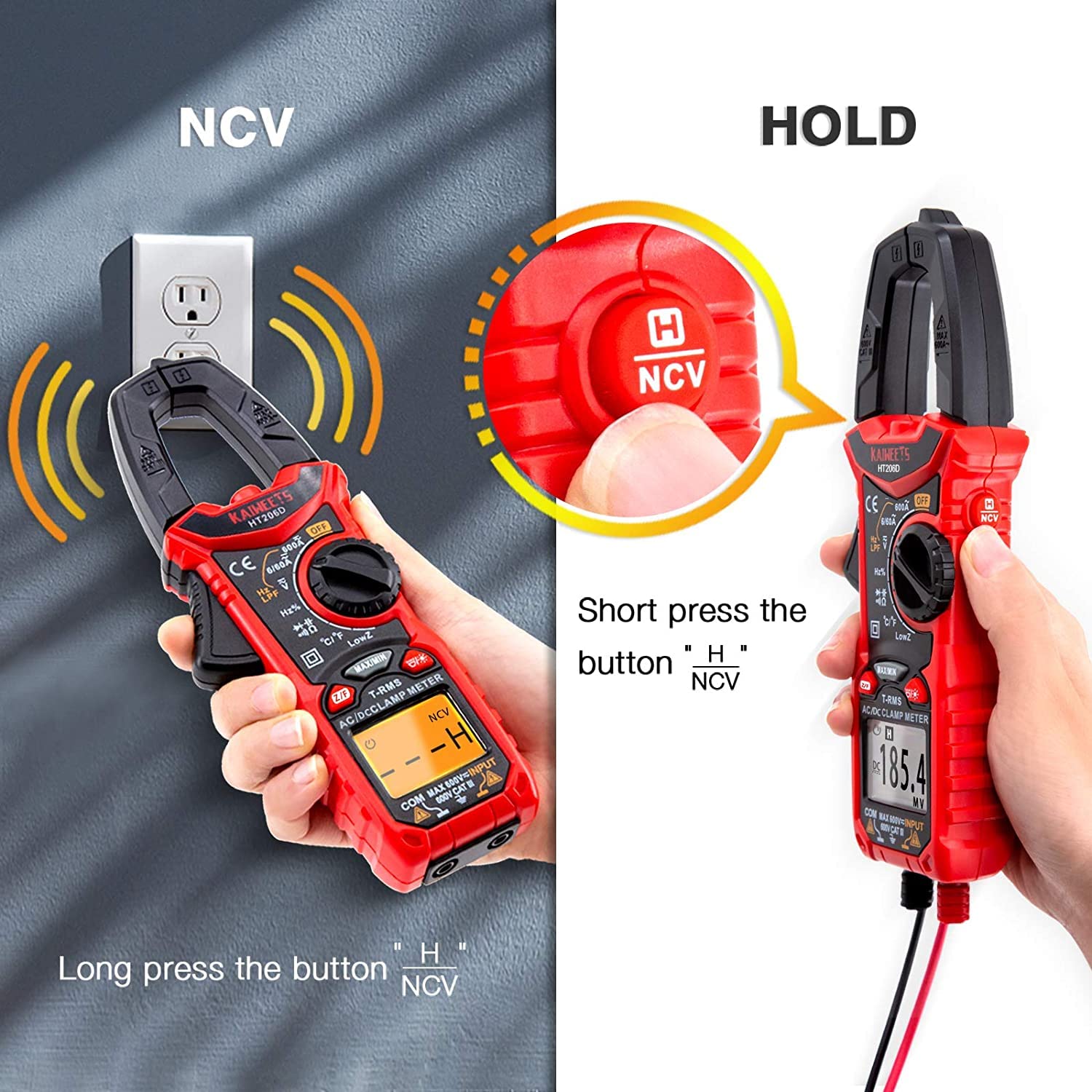
Image 5.3: Illustration of activating the NCV function with a long press and the Data Hold function with a short press of the NCV/HOLD button.
5.7. Low Pass Filter (LPF)
The LPF function is used for accurate voltage measurements on variable frequency drives (VFDs) or other noisy circuits. It filters out high-frequency interference.
- Виберіть AC voltage функція.
- Натисніть ФНЧ button to activate the Low Pass Filter.
- Proceed with AC voltage measurement as usual.

Image 5.4: Explanation of the Low Pass Filter (LPF) function, illustrating its effect on measurement accuracy for motor drive outputs.
5.8. Вимірювання пускового струму
The Inrush function measures the initial surge current when a device is powered on.
- Select the Inrush current function using the rotary dial.
- Відкрийте клamp jaws and enclose one conductor of the device to be tested.
- Power on the device. The meter will capture and display the peak inrush current.

Image 5.5: Inrush Current Test in progress, demonstrating the meter's capability to measure the initial current surge with a range of 5-600A.
5.9. Утримання даних (HOLD)
Натисніть ТРИМАТИ button (short press the NCV button) to freeze the current reading on the display. Press it again to release the hold function.
5.10. Вимірювання МАКС/МІН
Натисніть МАКС/МІН button to record the maximum and minimum values during a measurement session. Press again to cycle between MAX, MIN, and current readings.
5.11. Ліхтарик
Press the flashlight button to illuminate the measurement area. Press again to turn it off.
5.12. Функція автоматичного вимкнення
The meter will automatically power off after approximately 15 minutes of inactivity to conserve battery life. Press any button or rotate the dial to reactivate it.
6. Технічне обслуговування
6.1. прибирання
Протріть скло лічильникаasing з оголошеннямamp тканиною та м’яким миючим засобом. Не використовуйте абразивні засоби або розчинники. Перед зберіганням або використанням переконайтеся, що глюкометр сухий.
6.2. Заміна батареї
Замініть батарейки, коли на дисплеї з’явиться індикатор низького заряду батарейок. Інструкції щодо встановлення батарейок дивіться у розділі 4.1.
6.3. Зберігання
Якщо глюкометр не використовуватиметься протягом тривалого часу, вийміть батарейки, щоб запобігти витіканню. Зберігайте глюкометр у прохолодному, сухому місці, подалі від прямих сонячних променів та екстремальних температур.
7. Вирішення проблем
| проблема | Можлива причина | Рішення |
|---|---|---|
| Лічильник не вмикається. | Розряджені або неправильно встановлені батареї. | Замініть батарейки, дотримуючись правильної полярності. |
| Неточні показання. | Incorrect function selected, damaged test leads, or external interference. | Verify function selection, inspect/replace test leads, move away from strong electromagnetic fields. |
| Немає звукового сигналу безперервності. | Розрив ланцюга або високий опір. | Check the circuit for breaks or high resistance points. |
| NCV не виявляє об'ємtage. | Немає AC voltage present, or sensor not close enough to the conductor. | Переконайтеся, що гучність кондиціонераtage is present. Move the NCV sensor closer to the live conductor. |
8. Технічні характеристики
The KAIWEETS HT206D Smart Digital Clamp Meter offers the following general specifications:

Image 8.1: Key specifications of the KAIWEETS HT206D, including measurement ranges for current, voltage, capacitance, and display count, along with special features.
- Дисплей: 6000 графів
- Змінний/постійний струм: До 600А
- AC/DC Voltage: До 600В
- Ємність: До 100 мФ
- температура: Цельсій/Фаренгейт
- Тип вимірювання: Справжня RMS
- Рейтинг безпеки: CAT.IV 600V
- Джерело живлення: Працює від батареї
- Особливості: Smart Mode, NCV, LPF, LowZ, Inrush Current, Data Hold, MAX/MIN, Flashlight, Auto-Off
9. Гарантія та підтримка
KAIWEETS offers a 3-year after-sales service for the HT206D Smart Digital Clamp Meter, along with lifetime technical assistance.
For any questions, technical support, or warranty claims, please contact KAIWEETS customer service through their official channels or the retailer where the product was purchased.