вступ
This manual provides essential information for the safe and efficient operation of your TECNO Pova 5 Pro 5G smartphone. Please read it thoroughly before using your device to ensure optimal performance and longevity.

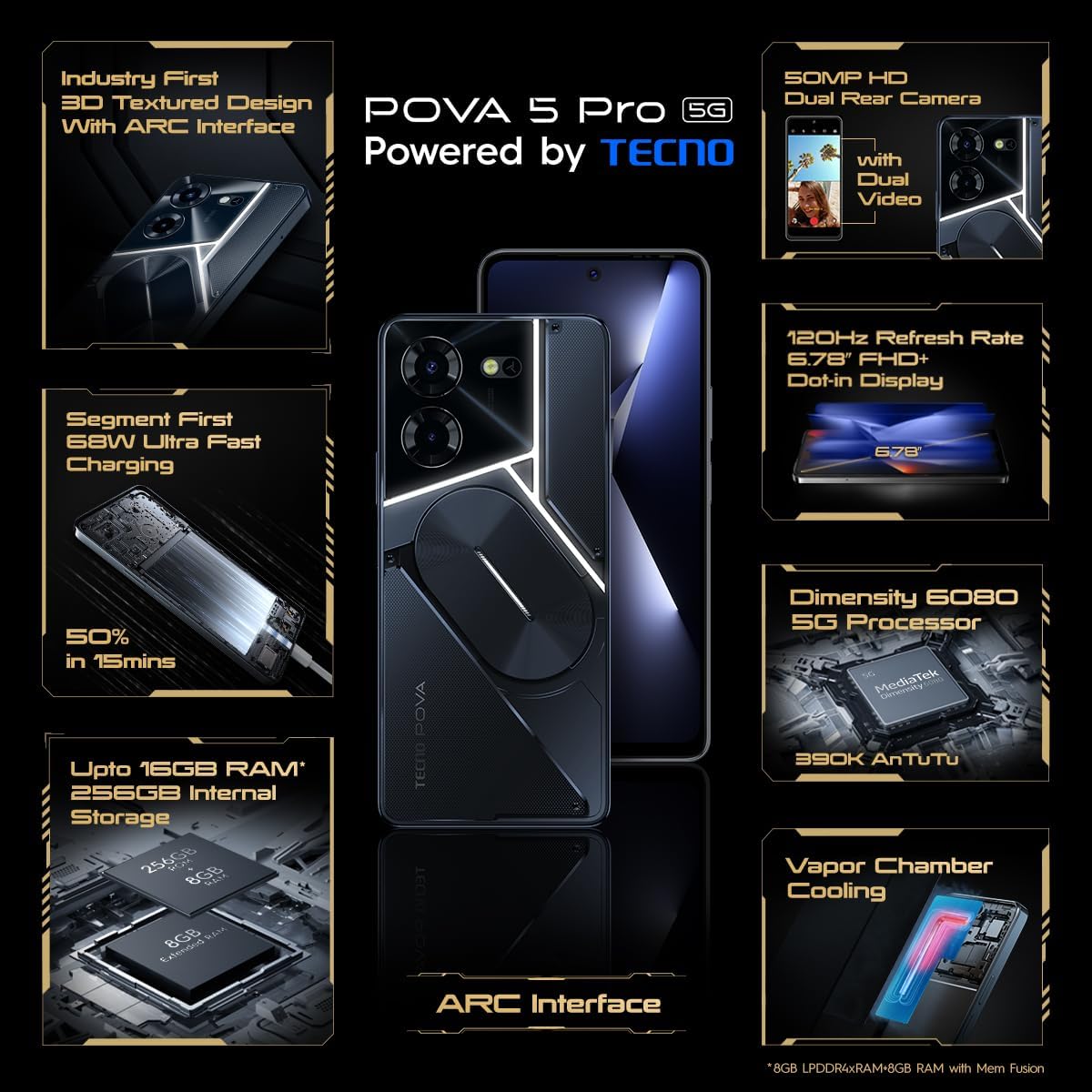
Image: The TECNO Pova 5 Pro 5G smartphone, showcasing its design and key feature of 68W Ultra Fast Charging.
Що в коробці
Перевірте наявність усіх елементів в упаковці:
- Смартфон
- Адаптер живлення 68 Вт
- Кабель Type-C
- Чохол з ТПУ
- Інструмент для витягування SIM-карти

Image: A flat lay of the TECNO Pova 5 Pro 5G packaging contents, showing the smartphone, 68W power adapter, USB-C cable, TPU protective cover, and the SIM ejector tool.
Налаштування
Початкове налаштування
- Вставте SIM-картку/SD-картку: Locate the SIM tray on the side of the device. Use the provided SIM ejector tool to open the tray. Insert your Nano-SIM card(s) and/or microSD card into the designated slots. Ensure the tray is fully reinserted.
- Увімкнення: Press and hold the Power button (located on the right side) until the TECNO logo appears.
- Дотримуйтесь підказок на екрані: The device will guide you through initial setup, including language selection, Wi-Fi connection, Google account setup, and security settings.
Зарядка пристрою
The TECNO Pova 5 Pro 5G supports 68W Ultra Fast Charging.
- Підключіть кабель Type-C до зарядного порту в нижній частині телефону.
- Підключіть інший кінець кабелю до адаптера живлення потужністю 68 Вт.
- Підключіть адаптер живлення до настінної розетки.
- A full charge typically takes approximately 45 minutes, with 50% charge achievable in about 15 minutes.
Зображення: Чіткий фронт view of the TECNO Pova 5 Pro 5G smartphone, highlighting its display and front camera.
Експлуатація пристрою
Основна навігація
- Сенсорний екран: Торкніться, щоб вибрати, проведіть пальцем, щоб прокрутити, розведіть пальці, щоб збільшити.
- Кнопка живлення: Натисніть, щоб увімкнути/вимкнути екран. Натисніть і утримуйте, щоб вимкнути або перезавантажити живлення.
- Кнопки гучності: Налаштуйте гучність медіа, гучність дзвінка або гучність мелодії дзвінка.
Використання камери
The device features a 50MP AI Dual Rear Camera and a 16MP Selfie Camera.
- Відкрийте програму «Камера» на головному екрані або в панелі програм.
- Виберіть потрібний режим (Фото, Відео, Портрет тощо).
- Натисніть кнопку спуску затвора, щоб зробити фотографії або розпочати/зупинити відеозапис.
- Utilize AI enhancements for optimized scene recognition and image quality.
ARC Interface and Notifications
The TECNO Pova 5 Pro 5G features a unique multi-color ARC interface with backlighting.
- The ARC interface provides customizable light effects for notifications, incoming calls, gaming, and music playback.
- Access settings to personalize the light patterns and colors for different alerts.

Зображення: Задня частина view of the TECNO Pova 5 Pro 5G, showcasing its distinctive 3D textured design and the illuminated ARC interface.

Зображення: Детальний view of the TECNO Pova 5 Pro 5G's ARC interface, illustrating the multi-color backlighting feature.
Технічне обслуговування
- Догляд за акумулятором: To prolong battery life, avoid exposing the device to extreme temperatures. Do not fully discharge the battery regularly.
- Прибирання: Використовуйте м’яку тканину без ворсу для очищення екрана та корпусу. Уникайте використання агресивних хімікатів або абразивних матеріалів.
- Оновлення програмного забезпечення: Регулярно перевіряйте наявність та встановлюйте оновлення системи, щоб забезпечити оптимальну продуктивність, безпеку та доступ до нових функцій. Перейдіть до Налаштування > Система > Оновлення системи.
- Управління сховищем: Періодично очищайте від непотрібного fileта програми для підтримки достатнього місця для зберігання та швидкості пристрою.
Усунення несправностей
- Пристрій не вмикається: Ensure the battery is charged. Connect the device to the charger for at least 15 minutes before attempting to power on again. If the issue persists, perform a forced restart by holding the Power button for 10-15 seconds.
- Проблеми із зарядкою: Verify that the charging cable and adapter are securely connected and undamaged. Try using a different outlet.
- Збій/зависання програми: Close the problematic app and reopen it. If the issue continues, clear the app's cache and data in Settings > Apps. As a last resort, uninstall and reinstall the app.
- Погане мережеве з’єднання: Check if Airplane Mode is off. Restart the device. If using mobile data, ensure your SIM card is properly inserted and your data plan is active.
- Перегрів: Avoid using the device in direct sunlight or during intensive tasks for extended periods. Close background applications.
Технічні характеристики
| Особливість | Специфікація |
|---|---|
| Назва моделі | Pova 5 Pro 5G |
| Операційна система | Android 13.0 |
| Процесор | Dimensity 6080 (2.4 GHz Octa-Core) |
| ОЗУ | 8 GB (expandable up to 16 GB with Memory Fusion) |
| Внутрішня пам'ять | 256 GB (UMCP) |
| Дисплей | 6.78-inch FHD+ Dot-in Display |
| Частота оновлення | 120 Гц |
| Задня камера | 50-мегапіксельна подвійна камера зі штучним інтелектом |
| Фронтальна камера | 16-мегапіксельна селфі-камера |
| Акумулятор | 5000 мАг літій-полімерний |
| Зарядка | 68W Ultra Fast Charging |
| Розміри | 16.9 х 7.7 х 16.9 см |
| вага | 214 грами |
| Підключення | 5G (10 bands supported), NFC, Bluetooth 5.1 |

Image: An internal diagram or view of the TECNO Pova 5 Pro 5G, illustrating its vapor chamber cooling system for efficient heat dissipation.
Гарантія та підтримка
Your TECNO Pova 5 Pro 5G comes with a manufacturer's warranty. Please refer to the warranty card included in your product packaging for specific terms and conditions.
For technical support, service, or warranty claims, please contact TECNO customer service. TECNO maintains a large service network with over 1200 service centers in India.
You can find more information and support resources by visiting the official Tecno store on Amazon: Tecno Store


