вступ
This manual provides comprehensive instructions for the setup, operation, maintenance, and troubleshooting of your ENDORFY Krux Qara 60% Mechanical Keyboard. Please read this manual thoroughly before using the product to ensure proper functionality and longevity.
Продукт закінченийview
The ENDORFY Krux Qara 60% is a compact mechanical gaming keyboard designed for performance and portability. It features Outemu Red Mechanical Switches, zone RGB backlighting, and a durable construction.
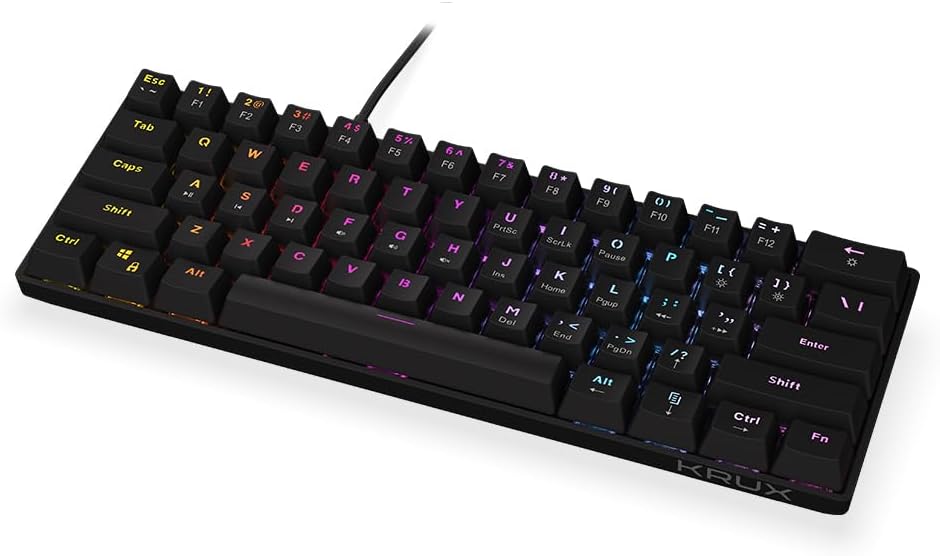
малюнок 1: Фронт view of the ENDORFY Krux Qara 60% Mechanical Keyboard, showcasing its compact 60% layout and vibrant RGB zone backlighting. The keyboard features black keycaps with white legends.

малюнок 2: Top-down perspective of the keyboard, highlighting the keycap layout and the integrated USB-A cable connection point at the top center.

малюнок 3: Задня view of the keyboard, showing the product label with model information (KRX0137) and certification marks. The two adjustable feet are visible in their folded position.
Вміст упаковки
Перш ніж продовжувати налаштування, переконайтеся, що всі елементи присутні:
- ENDORFY Krux Qara 60% Mechanical Keyboard
- USB cable (integrated)
- Посібник користувача (цей документ)
Налаштування
- Розпакування: Обережно вийміть клавіатуру та її аксесуари з упаковки.
- Підключення: Connect the integrated USB-A cable from the keyboard to an available USB port on your computer (PC, Linux, Mac).
- Встановлення драйвера: The keyboard is plug-and-play and typically does not require additional drivers for basic functionality. Your operating system should automatically recognize the device.
- Розміщення: Place the keyboard on a stable, flat surface. You may adjust the keyboard height using the foldable feet located on the underside for ergonomic comfort.

малюнок 4: сторона view illustrating the keyboard's profile and the adjustable feet in their extended position, providing an elevated typing angle.
Інструкція з експлуатації
Основні функціональні можливості
The keyboard functions as a standard QWERTY input device. All alphanumeric keys, symbols, and basic modifiers (Shift, Ctrl, Alt) operate as expected.
Function Key Combinations (Fn Layer)
Due to its 60% compact layout, many standard keyboard functions are accessed via the Fn key in combination with other keys. The secondary functions are typically printed on the front or side of the keycaps.
- Fn + Number Row (F1-F12): Accesses F1 through F12 functions. For example, Fn + 1 for F1.
- Fn + P, [, ]: Multimedia controls (Play/Pause, Previous Track, Next Track).
- Fn + ;, ', /: Volume controls (Mute, Volume Down, Volume Up).
- Fn + правий Shift: Arrow keys (Up, Down, Left, Right).
- Fn + M, <, >: Home, End, PgUp, PgDn.
- Fn + I, K, L: Insert, Home, Page Up.
- Fn + U, J, H: Print Screen, Scroll Lock, Pause Break.
Керування підсвічуванням
The keyboard features zone RGB backlighting. Use the following combinations to control the lighting:
- Fn + \|: Перемикання режимів підсвічування.
- Fn + Enter: Відрегулюйте яскравість підсвічування.
- Fn + Right Ctrl: Змінити колір підсвічування.
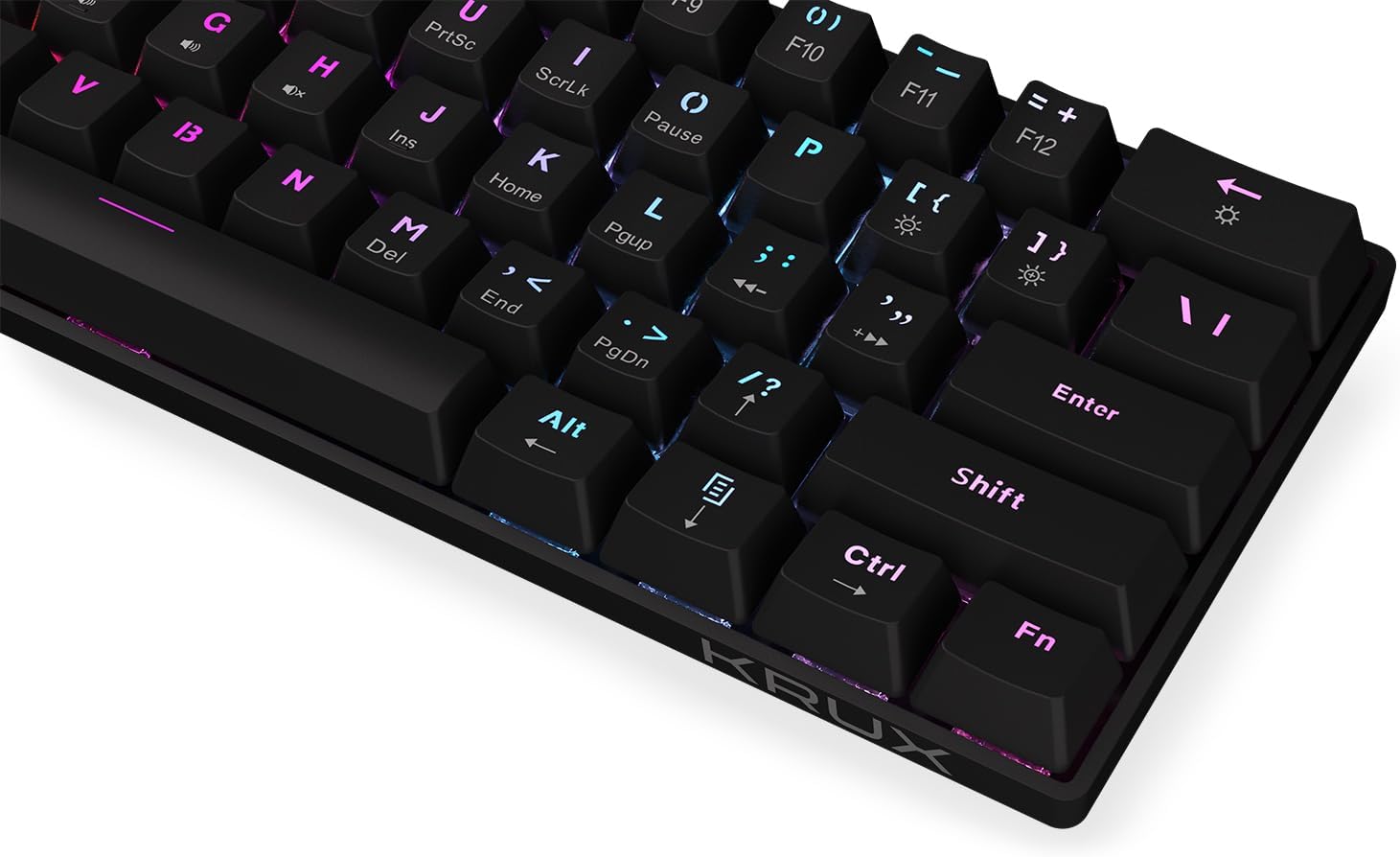
малюнок 5: Крупний план view of the keycaps, demonstrating the RGB backlighting effect and the secondary functions printed on the front of some keys.
Технічне обслуговування
Regular maintenance helps prolong the life of your keyboard:
- Прибирання: Use a soft, dry cloth to wipe the surface of the keyboard. For dust and debris between keycaps, use compressed air. Avoid liquid cleaners directly on the keyboard.
- Розливи: In case of liquid spills, immediately disconnect the keyboard from your computer. Turn it upside down to drain liquid and allow it to dry completely before reconnecting. Do not use a hairdryer as excessive heat can damage components.
- Зберігання: Зберігайте клавіатуру в прохолодному, сухому місці, подалі від прямих сонячних променів та екстремальних температур.
Усунення несправностей
| проблема | Можлива причина | Рішення |
|---|---|---|
| Клавіатура не відповідає | Нещільне USB-з'єднання, несправний USB-порт, системна помилка. | Переконайтеся, що USB-кабель надійно підключено. Спробуйте інший USB-порт. Перезавантажте комп’ютер. |
| Клавіші не реєструються або друкуються двічі | Dust/debris under keycap, switch malfunction. | Use compressed air to clean around the affected key. If problem persists, contact support. |
| Підсвічування не працює або працює нестабільно | Backlight setting, software glitch. | Прес Fn + Enter to adjust brightness. Cycle through modes with Fn + \|. Restart computer. |
| Комбінації клавіш Fn не працюють | Incorrect key combination, software conflict. | Refer to the "Operating Instructions" section for correct combinations. Ensure no conflicting software is running. |
Технічні характеристики
- модель: 0137 KRX
- Тип клавіатури: 60% Mechanical Gaming Keyboard
- Перемикачі: Механічні перемикачі Outemu Red
- Підсвічування: Zone RGB
- Підключення: Дротовий USB-A
- Розміри: 29.1 x 10.1 x 3.9 см (11.46 x 3.98 x 1.54 дюйма)
- вага: 506 г (1.11 фунта)
- Сумісні операційні системи: Windows 10, Mac OS X 10.12 Sierra, Linux
- Включені компоненти: USB cable (integrated)
Гарантія та підтримка
For warranty information and technical support, please refer to the official KRUX webсайт або зверніться до місцевого продавця. Зберігайте чек про покупку для гарантійних випадків.
Виробник: Krux
Webсайт: www.krux.tech (Note: This is a placeholder link, please refer to the official manufacturer's website for accurate support information.)