1. Вступ
Thank you for choosing the iFFALCON 43-inch 4K Ultra HD Smart QLED Google TV, model iFF43Q73. This manual provides essential information for the safe and efficient use of your television. Please read it thoroughly before operating the device and retain it for future reference.
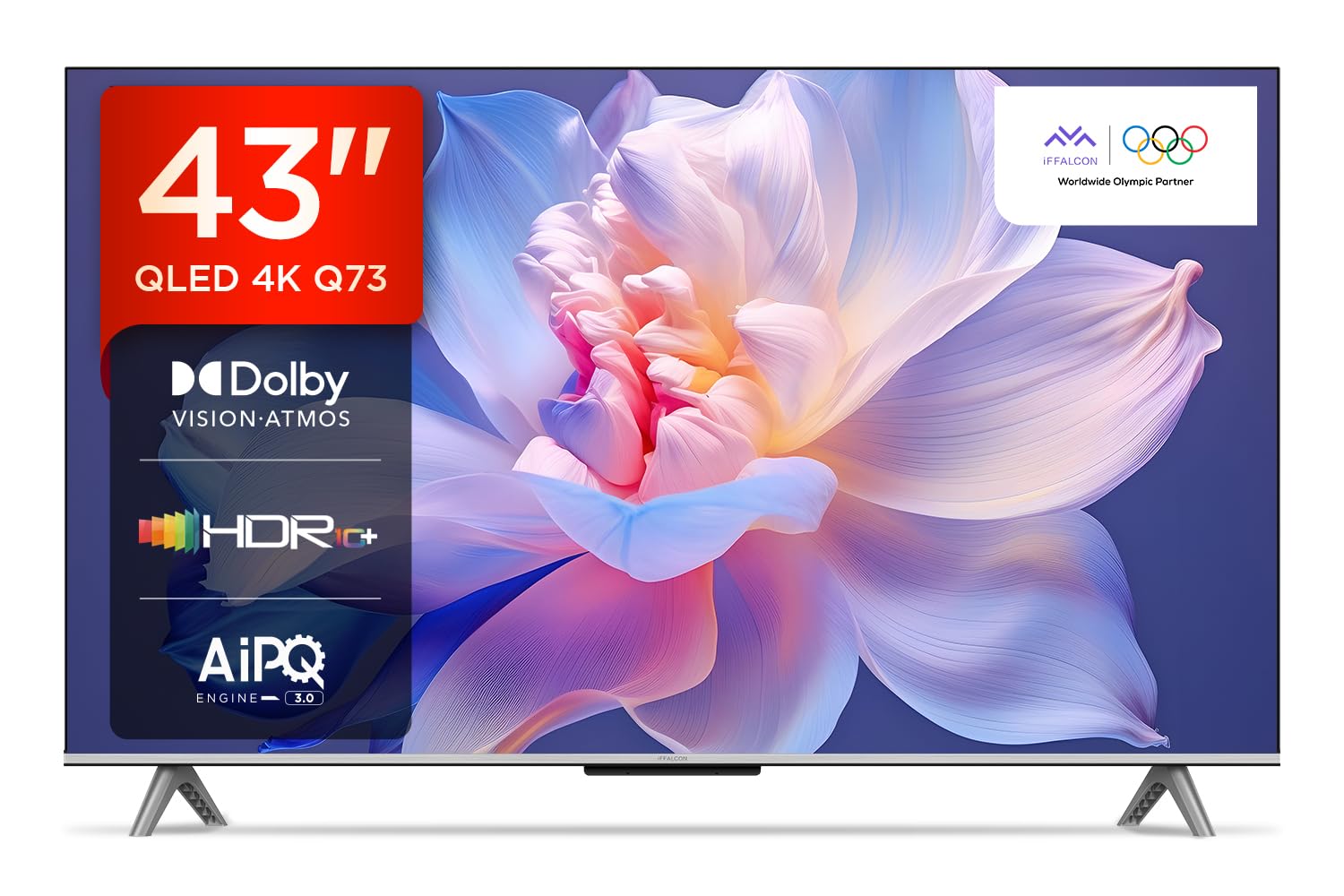
Зображення: спереду view of the iFFALCON 43-inch 4K Ultra HD Smart QLED Google TV.
2. Інформація про безпеку
Завжди дотримуйтесь наступних правил безпеки, щоб запобігти ураженню електричним струмом, пожежі або пошкодженню телевізора:
- Не піддавайте телевізор дії дощу або вологи.
- Забезпечте належну вентиляцію; не блокуйте вентиляційні отвори.
- Використовуйте лише насадки/аксесуари, зазначені виробником.
- Від’єднуйте телевізор від мережі під час грози або якщо він не використовується протягом тривалого часу.
- Звертайтеся до кваліфікованого сервісного персоналу.
3. Що в коробці
Після розпакування перевірте наявність усіх предметів:
- 1N Світлодіодний телевізор
- Аудіокабель 1N
- 1N Підставка (для кріплення на стіл)
- 1N Посібник користувача
- Пульт дистанційного керування 1N
- Гарантійний талон 1N
- 2N батарейки типу AAA (для пульта дистанційного керування)
4. Налаштування
4.1 Фізичне встановлення
Your iFFALCON TV can be installed on a table stand or wall-mounted. Ensure the installation surface is stable and can support the TV's weight.

Image: The iFFALCON TV placed on a media console, illustrating a typical table-top setup.
Монтаж на столі:
- Обережно покладіть телевізор екраном донизу на м’яку, рівну поверхню.
- Attach the provided stand legs to the designated slots on the bottom of the TV using the screws included.
- Ensure the stand is securely fastened before carefully lifting the TV to its upright position.
Настінне кріплення:
For wall mounting, a compatible VESA wall mount kit (not included) is required. Follow the instructions provided with your wall mount kit. Professional installation is recommended.

Image: The iFFALCON TV displayed as wall-mounted in a modern living room setting.
4.2 Початкове ввімкнення та налаштування
- Підключіть шнур живлення до телевізора, а потім до розетки.
- Вставте батарейки типу AAA, що додаються, у пульт дистанційного керування.
- Натисніть кнопку живлення на пульті дистанційного керування або телевізорі, щоб увімкнути його.
- Дотримуйтесь інструкцій на екрані, щоб завершити початкове налаштування, зокрема вибір мови, підключення до мережі (Wi-Fi або Ethernet) та вхід до облікового запису Google.
5. Керування телевізором
5.1 Пульт дистанційного керування
The smart remote control provides quick access to various functions and streaming services.

Image: The iFFALCON smart remote control, highlighting dedicated buttons for Netflix, Prime Video, YouTube, and TCL Channel, along with Google Assistant functionality.
5.2 Інтерфейс Google TV
Your TV runs on Google TV, offering a personalized experience with content recommendations and easy access to apps.

Image: The Google TV home screen displaying various streaming apps and content recommendations.

Image: A visual representation of the Google TV platform, emphasizing its user-friendly interface.
Ключові характеристики:
- Голосове керування в режимі Hands-Free: Use "Ok Google" to search for content, control smart home devices, and get information.
- Google Watchlist: Add movies and TV shows to a unified watchlist from various services.
- Google Kids: Access curated content suitable for children.
- Google Meet: Conduct video calls directly from your TV (requires compatible camera, not included).

Image: A user interacting with the TV using the "Ok Google" voice command to check the weather.

Image: The Google Watchlist feature shown across both a mobile device and the TV screen.

Image: The Google Kids interface, displaying child-friendly content and shows.

Image: A video call in progress using Google Meet on the iFFALCON TV.
6. Підключення
The iFFALCON iFF43Q73 offers multiple connectivity options for external devices and networks.

Зображення: Детальний view of the TV's side panel, illustrating the various input and output ports.
- Порти HDMI (3): Connect set-top boxes, Blu-ray players, and gaming consoles. HDMI 3 supports eARC/ARC for enhanced audio return.
- USB-порт (1): Для підключення USB-накопичувачів для відтворення медіафайлів.
- Локальна мережа (Ethernet): Для дротового підключення до Інтернету.
- Вихід для навушників: Для підключення навушників або зовнішніх динаміків.
- Цифровий аудіовихід (оптичний): Для підключення до саундбарів або систем домашнього кінотеатру.
- Вхід антени/кабелю: Для підключення антени або сигналу кабельного телебачення.
- AV In Adapter: Для підключення старіших пристроїв, що використовують композитне відео та стереоаудіо.
- Wi-Fi: Built-in for wireless internet access.
- Bluetooth: Для підключення бездротових аксесуарів, таких як навушники або ігрові контролери.

Image: An illustration of an HDMI 2.1 cable connecting to the TV, highlighting its advanced capabilities.

Image: A laptop screen being cast to the iFFALCON TV, demonstrating low latency casting functionality.
7. Функції дисплея
Experience stunning visuals with advanced display technologies.

Зображення: Оверview of the iFFALCON TV's key display and audio features, including QLED, Dolby Vision Atmos, HDR10+, MEMC, High Brightness, DTS:X, Gaming in Dolby Vision, Game Master, and Edgeless Design.
- QLED-дисплей: Quantum Dot technology delivers vibrant colors and improved brightness.
- 4K Ultra HD (3840 x 2160): Provides four times the resolution of Full HD for incredible detail.
- Dolby Vision та HDR10+: Advanced HDR formats for enhanced contrast, brightness, and color accuracy.
- 4K HDR Pro: Optimizes HDR content for a superior viewнабутий досвід.
- AIPQ 3.0 Engine: AI-powered picture quality engine for intelligent optimization of color, contrast, and clarity.
- MEMC (Оцінка руху, Компенсація руху): Reduces motion blur and makes fast-moving scenes smoother.
- High Brightness (300 nits): Ensures clear visibility even in well-lit rooms.
- 178 градусів широкий Viewкут нахилу: Consistent picture quality from various viewпозиції.

Image: An illustration demonstrating the layers and technology behind a QLED display.

Image: The Dolby Vision logo displayed over a vibrant, colorful abstract image, representing enhanced visual quality.

Image: The HDR10+ logo positioned next to an image of a colorful, explosive visual effect, symbolizing dynamic range.

Image: A split image demonstrating the difference between standard and high brightness, showing a more vivid landscape on the right.

Image: A comparison showing a skier with motion blur (Without MEMC) versus a clear image (With MEMC), illustrating the motion compensation technology.
8. Аудіофункції
Immersive sound experience with integrated speaker boxes.
- Вихідна потужність 30 Вт: Powerful audio for clear sound.
- MS12Z with Dolby Atmos: Delivers multi-dimensional sound that moves around you.
- DTS Virtual:X: Creates an immersive audio experience without the need for additional speakers.
- Integrated Speaker Boxes (Bottom Side): Optimized speaker placement for enhanced sound delivery.

Image: An illustration of the Dolby Atmos sound experience, showing sound waves emanating from the TV and surrounding the viewер.

Image: A visual representation of Dolby Atmos audio filling a living room, with sound waves surrounding the TV.

Image: The DTS:X logo with an illustration of dolphins jumping out of water, depicting immersive sound.

Image: A visual representation of DTS:X audio, showing sound waves emanating from the TV and surrounding a viewer on a couch.
9. Ігрові функції
Покращте свій ігровий досвід за допомогою спеціальних функцій.
- Майстер гри: A suite of features designed for gamers.
- Gaming in Dolby Vision: Experience games with enhanced visuals and dynamic range.
- ALLM (режим автоматичної низької затримки): Automatically switches the TV to a low-latency mode when a game console is detected, reducing input lag.
- Ігрова панель: Quick access to game-related settings and information during gameplay.

Image: The Game Master feature displayed on the TV screen, showing icons for Game Bar, ALLM, and Aiming Aid.

Image: A gaming scene displayed on the TV with the 'Gaming in Dolby Vision' logo, indicating enhanced visual quality for games.

Image: The Game Master logo with icons for Game Bar, ALLM, and Aiming Aid, illustrating the gaming optimization features.

Image: The Game Bar interface displayed at the bottom of the TV screen during gameplay, showing options like HGIG, StatsBar, Boost, and Toolbox.

Image: A split screen comparison of a racing game with ALLM Mode OFF (left) and ALLM Mode ON (right), demonstrating reduced input lag.
10. Технічне обслуговування
Правильний догляд забезпечить довговічність та продуктивність вашого телевізора.
- Очищення екрану: Використовуйте м’яку тканину без ворсу, спеціально призначену для електроніки. Не використовуйте абразивні засоби для чищення або розчинники.
- Очищення рами: Wipe with a soft, dry cloth. For stubborn marks, a slightly damp можна використовувати тканину, а потім суху тканину.
- Вентиляція: Ensure the TV's ventilation openings are clear of dust and obstructions.
- Шнур живлення: Регулярно перевіряйте шнур живлення на наявність будь-яких пошкоджень.
11. Вирішення проблем
Зверніться до цього розділу, щоб дізнатися про поширені проблеми та їх вирішення.
| проблема | Можлива причина | Рішення |
|---|---|---|
| Немає живлення | Power cord disconnected, no power from outlet. | Перевірте підключення шнура живлення. Перевірте розетку з іншим пристроєм. |
| Немає зображення, але звук є | Неправильне джерело вхідного сигналу, несправний кабель. | Перевірте правильність джерела вхідного сигналу. Перевірте підключення кабелю HDMI/AV. |
| Звуку немає, але зображення є | Volume muted, external audio device issue. | Unmute volume. Check audio settings. Ensure external audio devices are connected correctly. |
| Пульт не працює | Розряджені батарейки, перешкода, пульт не підключений. | Замініть батарейки. Усуньте перешкоди. За потреби повторно підключіть пульт дистанційного керування Bluetooth. |
| Проблеми з підключенням Wi-Fi | Неправильний пароль, проблема з маршрутизатором, перешкоди сигналу. | Re-enter Wi-Fi password. Restart router. Move TV closer to router or reduce interference. |
12. Технічні характеристики
Detailed technical specifications for the iFFALCON 43-inch 4K Ultra HD Smart QLED Google TV.

Image: A diagram illustrating the dimensions and weight of the iFFALCON 43-inch TV, both with and without the stand.
| Особливість | Деталь |
|---|---|
| Модель | iFF43Q73 |
| Розмір екрана | 43 дюймів (108 см) |
| Технологія дисплея | QLED |
| роздільна здатність | 4K Ultra HD (3840 x 2160) |
| Частота оновлення | 60 Гц |
| Операційна система | Google TV |
| Процесор | 64-бітний чотириядерний процесор |
| ОЗУ | 2 ГБ |
| Зберігання | 16 ГБ |
| Аудіовихід | 30 Вт |
| Звукові технології | Dolby Atmos, DTS Virtual:X |
| Підключення | 3 HDMI Ports, 1 USB Port, Wi-Fi, Bluetooth, Ethernet |
| Споживання енергії (увімкнено) | 130 Вт |
| Розміри виробу (з підставкою) | 8 х 95.7 х 60.3 см |
| Вага виробу (з підставкою) | 6.7 кг |
13. Гарантія та підтримка
Ваш телевізор iFFALCON постачається з Гарантія 2 рік provided by the manufacturer from the date of purchase. For warranty claims, please use your Amazon e-invoice as proof of purchase.
For technical support or service inquiries, please refer to the contact information provided on the warranty card or visit the official iFFALCON support webсайт.


