1. Вступ
Welcome to the user manual for your Hoppstar Expert Digital Camera. This manual provides essential information on how to set up, operate, and maintain your camera, ensuring a fun and creative experience for young photographers. Please read this manual carefully before using the camera and keep it for future reference.
The Hoppstar Expert is designed specifically for children, offering a user-friendly interface, durable construction with interchangeable silicone covers, and a range of exciting features including a selfie camera, video recording, picture frames, photo filters, and face detection.
2. Інформація про безпеку
- Цей продукт призначений для дітей віком від 3 років. Рекомендується використовувати під наглядом дорослих.
- Не піддавайте камеру впливу води або надмірної вологи.
- Avoid dropping the camera or subjecting it to strong impacts, even with the protective silicone cover.
- Keep small parts, such as memory cards, out of reach of very young children to prevent choking hazards.
- Use only the charging cable provided or a compatible USB charger.
- Не намагайтеся розбирати або ремонтувати камеру самостійно. Зверніться до служби підтримки клієнтів, якщо виникнуть проблеми.
3. Вміст упаковки
Будь ласка, поставте позначку у відповідному полі для наступних пунктів:
- Hoppstar Expert Digital Camera
- Інструкція з експлуатації
- USB-кабель для зарядки
- Ремінець/шнурок
- Перехідник USB-C на USB-A
- USB-C to Micro-USB Adapter
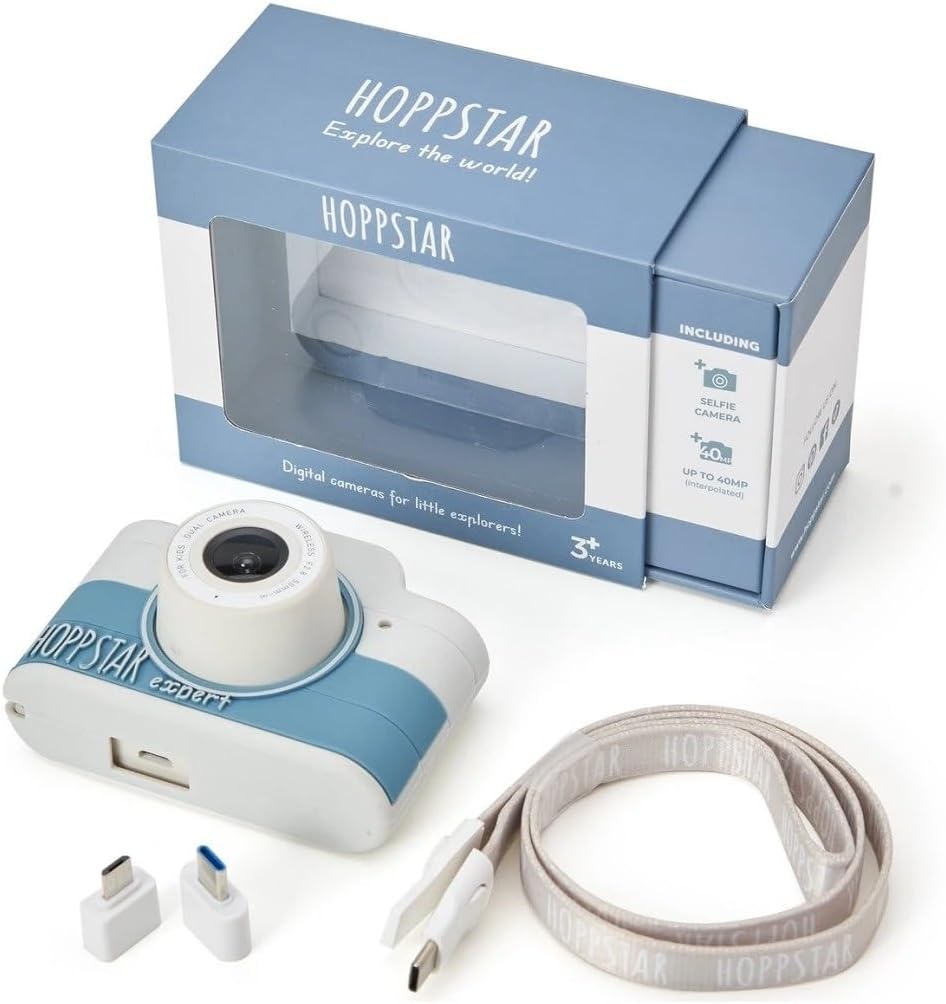
Image: Hoppstar Expert camera shown with its retail packaging, USB charging cable, lanyard, and two USB adapters.
4. Продукт закінчивсяview
Фронт View

Image: The front of the Hoppstar Expert camera, featuring the main lens, flash, and the 'Hoppstar Expert' branding on the blue and white body.
- Основний об'єктив: For taking standard photos and videos.
- Flash/Light: Забезпечує підсвічування в умовах низької освітленості.
- Мікрофон: Захоплює звук під час запису відео.
Задня View

Image: The back of the Hoppstar Expert camera, displaying the LCD screen and the control buttons on either side.
- РК-екран: Displays menus, live view, and playback.
- Селфі-камера: Located above the screen for self-portraits.
- Кнопки управління: Navigation, OK, Menu, and other function buttons.
5. Налаштування
5.1 Заряджання камери
Before first use, fully charge the camera's internal battery. Connect the provided USB charging cable to the camera's USB port and to a USB power source (e.g., computer, wall adapter). The charging indicator light will show the charging status and turn off when fully charged.
5.2 Вставлення карти пам'яті
The Hoppstar Expert comes with 16 GB of internal storage. If you wish to expand storage, locate the memory card slot (usually on the side or bottom) and insert a compatible microSD card (not included) until it clicks into place. Ensure the camera is powered off before inserting or removing the card.
5.3 Увімкнення/вимкнення
Press and hold the Power button (usually located on the top or side) for a few seconds to turn the camera on or off.
6. Інструкція з експлуатації
6.1 Основні елементи керування
- Кнопка ОК: Підтверджує вибір у меню, робить фотографії або починає/зупиняє відеозапис.
- Кнопки навігації: Used to move through menu options (Up, Down, Left, Right).
- Кнопка меню: Accesses the camera's settings and feature options.
- Кнопка режиму: Перемикається між режимами фото, відео та відтворення.
6.2 Фотографування
In photo mode, frame your shot using the LCD screen. Press the OK button to capture a photo. The camera supports both front and selfie cameras. To switch between cameras, navigate to the camera settings in the menu or use a dedicated button if available.
6.3 Запис відео
Switch to video mode. Press the OK button once to start recording and press it again to stop. Videos are saved to the internal memory or inserted memory card.
6.4 Використання творчих функцій
The Hoppstar Expert includes several creative features:
- Picture Frames: Apply fun borders to your photos. Access this feature through the camera's menu.
- Photo Filters: Change the look and feel of your photos with various color and effect filters.
- Розпізнавання обличчя: The camera can automatically detect faces in the frame, assisting with focus.
Explore these options within the camera's menu settings to enhance your photos and videos.
7. Технічне обслуговування
- Прибирання: Use a soft, dry cloth to clean the camera body and screen. For the lens, use a specialized lens cleaning cloth. Do not use liquid cleaners.
- Силіконовий чохол: The interchangeable silicone cover can be removed and cleaned with mild soap and water if necessary. Ensure it is completely dry before reattaching.
- Догляд за акумулятором: Щоб подовжити термін служби акумулятора, уникайте частого повного розряджання акумулятора. Регулярно заряджайте камеру, навіть якщо вона не використовується протягом тривалого часу.
- Зберігання: Зберігайте камеру в прохолодному, сухому місці, подалі від прямих сонячних променів та екстремальних температур.
8. Вирішення проблем
Камера не вмикається
- Переконайтеся, що акумулятор заряджений. Підключіть камеру до джерела живлення та спробуйте ще раз.
- Натисніть і утримуйте кнопку живлення протягом тривалого часу (5-10 секунд).
Погана якість зображення/відео
- Переконайтеся, що об'єктив чистий і не має плям або пилу.
- Check lighting conditions. Optimal results are achieved in well-lit environments.
- Ensure the camera is held steady during capture.
Камера зависає/не реагує
- Try resetting the camera by pressing the reset button (if available, often a small pinhole) or by holding the Power button until it turns off and then restarting.
Не вдається зберегти фотографії/відео
- Check if the internal memory or inserted memory card is full. Delete unnecessary fileабо вставте нову картку.
- Ensure the memory card is properly inserted and not corrupted.
If you encounter issues not listed here or if troubleshooting steps do not resolve the problem, please contact Hoppstar customer support.
9. Технічні характеристики
| Особливість | Специфікація |
|---|---|
| Торгова марка | Хопстар |
| Назва моделі | Hoppstar Expert Yale |
| Номер моделі | 76893 |
| Колір | Єль |
| Розміри упаковки | 14.3 х 8.7 х 5.1 см |
| Швидкість безперервної зйомки | 30 кадрів/с |
| Вбудовані компоненти | Camera + Instruction Manual |
| Рік моделі | 2023 |
| Кольоровий фільм | Колір |
| Тип контролю експозиції | Автоматичний |
| Тип затвора | електронні |
10. Гарантія та підтримка
The Hoppstar Expert Digital Camera comes with a standard manufacturer's warranty. Please refer to the warranty information provided with your purchase or visit the official Hoppstar webсайт для отримання детальної інформації щодо гарантійних умов.
For technical support, product inquiries, or warranty claims, please contact Hoppstar customer service through their official webсайт або контактну інформацію, зазначену у вашій документації щодо придбання.


