1. Вступ
This manual provides comprehensive instructions for the installation, operation, maintenance, and troubleshooting of the Vivotek FE9391-EHV-V2 12MP Outdoor Fisheye IR Illumination Camera. Please read this manual thoroughly before using the product to ensure proper setup and functionality. Retain this manual for future reference.
2. Продукт закінчивсяview
2.1 Основні характеристики
- 12 Megapixel Effective Still Resolution for high-quality imaging.
- Fisheye Lens with 1.2mm focal length for wide-area surveillance.
- Integrated IR Illumination for clear night vision up to 20 meters.
- WDR Pro technology for optimal image visibility in high contrast lighting.
- H.265/H.264/MJPEG compression for efficient video streaming.
- IP66-rated weather-resistant enclosure for outdoor use.
- Motion-only alert type for event detection.
- Wi-Fi Connectivity Protocol for flexible network integration.
2.2 Вміст упаковки
Перевірте наявність усіх елементів в упаковці:
- Vivotek FE9391-EHV-V2 Camera Unit
- Монтажний комплект (гвинти, анкери)
- Водонепроникний роз'єм
- Посібник із швидкого встановлення
- Software CD (or download link information)
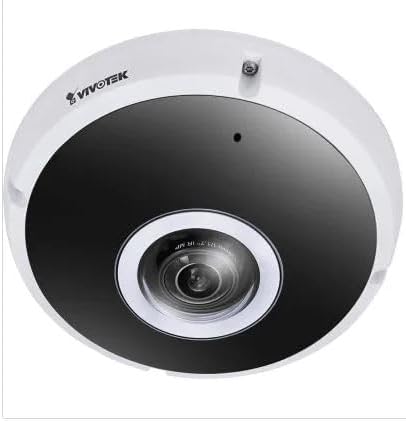
Малюнок 2.1: Спереду view of the Vivotek FE9391-EHV-V2 12MP Outdoor Fisheye IR Illumination Camera, showing the lens and IR illuminators.
3. Інформація про безпеку
- Уважно прочитайте всі інструкції перед установкою та експлуатацією.
- Ensure the power source matches the camera's requirements (Corded Electric).
- Не намагайтеся розбирати або модифікувати камеру. Це призведе до анулювання гарантії.
- Avoid pointing the camera directly at strong light sources for extended periods.
- Встановлення має виконуватися кваліфікованим персоналом відповідно до місцевих електротехнічних норм.
- Protect cables from being walked on or pinched.
4. Налаштування та встановлення
4.1 Місце монтажу
Select a suitable outdoor location for mounting. Consider the desired surveillance area, proximity to power, and network connectivity (Wi-Fi or wired Ethernet). The camera is IP66 rated for outdoor use.

Figure 4.1: Dimensional drawing of the Vivotek FE9391-EHV-V2 camera, showing a diameter of 150mm and height of 68.2mm.
4.2 Фізичне встановлення
- Підготуйте монтажну поверхню: Use the provided mounting template (if included) to mark drill holes.
- Свердлити отвори: Просвердліть початкові отвори та за потреби вставте анкери в стіну.
- Захистіть камеру: Attach the camera base securely to the mounting surface using the provided screws.
- Підключіть кабелі:
- Потужність: Підключіть кабель живлення до відповідного джерела живлення.
- Мережа: Connect an Ethernet cable for wired network access, or ensure Wi-Fi signal strength is adequate for wireless connection. Use the waterproof connector for outdoor Ethernet connections.
- Відрегулюйте кут камери: Loosen the adjustment screws (if applicable) to position the fisheye lens for optimal coverage. Tighten screws once adjusted.

Figure 4.2: An Ethernet cable with an RJ45 connector, used for wired network connectivity.
4.3 Початкова конфігурація мережі
After physical installation and power-up, the camera needs to be configured on your network.
- Відкрийте для себе камеру: Use the Vivotek IP Utility software (available on the manufacturer's webсайт), щоб знайти камеру у вашій мережі.
- Призначити IP-адресу: Assign a static IP address or ensure it obtains an IP address via DHCP.
- Доступ Web Інтерфейс: Відкрийте a web браузер і введіть IP-адресу камери, щоб отримати доступ до неї web-на основі інтерфейсу конфігурації.
- Логін: Enter the default username and password (refer to the Quick Installation Guide for defaults). Change the default password immediately for security.
- Wi-Fi Setup (if applicable): Navigate to the network settings and configure the Wi-Fi connection if you are using wireless connectivity.
5. Інструкція з експлуатації
5.1 Живий View
Once configured, you can access the live video feed through the web interface or compatible Vivotek surveillance software.
- Web Браузер: Увійдіть до камери web interface and navigate to the "Live Viewрозділ ".
- Surveillance Software: Add the camera to your Vivotek NVR or VMS (Video Management Software) for centralized monitoring.
- Мобільний додаток: Download the Vivotek mobile app and add your camera for remote viewінж.

Малюнок 5.1: Впрample of surveillance footage from multiple cameras displayed on a tablet device, demonstrating remote monitoring capabilities.

Figure 5.2: A monitor displaying a split-screen view of four camera feeds, labeled CAM1 through CAM4, illustrating a typical surveillance setup.
5.2 Запис і зберігання
Камера підтримує різні варіанти запису:
- Локальна пам'ять: Insert a microSD card (not included) into the camera's slot for edge recording. Configure recording schedules and event triggers (e.g., motion detection).
- Мережевий відеореєстратор (NVR): Connect the camera to a compatible NVR for continuous or event-based recording.
- Хмарне сховище: Some Vivotek models or third-party services may offer cloud storage integration. Refer to the camera's web interface for specific options.
5.3 Виявлення руху та сповіщення
Configure motion detection zones and sensitivity settings in the camera's web interface. When motion is detected, the camera can trigger actions such as:
- Recording video to local storage or NVR.
- Sending email notifications with snapshots.
- Uploading footage to an FTP server.
6. Технічне обслуговування
- Очищення лінз: Gently wipe the camera lens with a soft, clean cloth. For stubborn dirt, use a lens cleaning solution designed for optical surfaces. Do not use abrasive cleaners.
- Прибирання житла: Очистіть корпус камери за допомогою рекламиamp тканиною. Уникайте використання сильних мийних засобів або розчинників.
- Оновлення прошивки: Regularly check the Vivotek webсайт для оновлень прошивки. Оновлення прошивки може покращити продуктивність, додати нові функції та підвищити безпеку.
- Перевірка кабелю: Періодично перевіряйте всі кабелі на наявність ознак зносу або пошкоджень, особливо для зовнішніх прокладок.
- Екологічна перевірка: Переконайтеся, що робоче середовище камери залишається в межах заданих діапазонів температури та вологості.
7. Вирішення проблем
7.1 Немає відеопотоку
- Перевірте живлення: Ensure the camera is receiving power. Verify power adapter and cable connections.
- Підключення до мережі: Confirm the Ethernet cable is securely connected or that the Wi-Fi signal is strong and the camera is connected to the correct network.
- IP-адреса: Verify the camera's IP address and ensure it is not conflicting with another device on the network.
- Брандмауер: Check if any firewall settings on your network or computer are blocking access to the camera.
7.2 Погана якість зображення
- Чистий об'єктив: Переконайтеся, що об'єктив камери чистий і не містить пилу чи плям.
- Умови освітлення: Adjust camera settings for optimal exposure in varying light conditions. Ensure IR illuminators are functioning at night.
- Параметри роздільної здатності: Verify that the video resolution and quality settings are configured appropriately in the camera's web інтерфейс.
- Пропускна здатність мережі: Insufficient network bandwidth can lead to choppy or low-quality video. Check network load.
7.3 Виявлення руху не працює
- Увімкнути виявлення руху: Ensure motion detection is enabled in the camera's settings.
- Sensitivity and Zones: Adjust motion detection sensitivity and define detection zones correctly.
- Розклад запису: Verify that the recording schedule is active for motion-triggered events.
8. Технічні характеристики
| Особливість | Деталь |
|---|---|
| Номер моделі | FE9391-EHV-V2 |
| Ефективне вирішення проблеми | 12 Мп |
| Об'єктив | 1.2mm Fisheye Lens |
| Діапазон ІЧ-підсвічування | 20м |
| Технологія WDR | WDR Pro |
| Стиснення відео | H.265 / H.264 / MJPEG |
| Протокол підключення | Wi-Fi |
| Міжнародний захист рейтингу | IP66 |
| Джерело живлення | Провідний електричний |
| Розміри продукту (Д x Ш x В) | 5.9 x 5.9 x 2.68 дюйма (150 x 150 x 68.2 мм) |
| Виробник | Vivotek Inc. |
| Рекомендоване використання | Охорона на вулиці |
9. Гарантія та підтримка
For warranty information, technical support, and additional resources, please visit the official Vivotek webсайту або зв’яжіться зі своїм відділом обслуговування клієнтів.
- Виробник: Vivotek Inc.
- Webсайт: www.vivotek.com (Вихampпосилання, фактичне посилання може відрізнятися)
- Контакти: Зверніться до webсайт для отримання контактної інформації регіональної підтримки.
Please have your model number (FE9391-EHV-V2) and purchase date available when contacting support.


