вступ
Welcome to the user manual for your new FERMAX Duox Plus Veo 4.3" Monitor. This manual provides essential information for the proper installation, operation, and maintenance of your device. Please read this manual thoroughly before using the product to ensure safe and efficient operation.
Важлива інформація з безпеки
- Електрична безпека: Ensure all electrical connections are made by a qualified professional and comply with local electrical codes. Disconnect power before installation or maintenance.
- Умови навколишнього середовища: Do not expose the monitor to extreme temperatures, humidity, or direct sunlight. Install in a dry, well-ventilated area.
- Обробка: Handle the monitor with care to avoid damage to the screen or internal components.
- Прибирання: Використовуйте для очищення м’яку суху тканину. Не використовуйте абразивні засоби для чищення або розчинники.
- Утилізація: Dispose of the product and its components according to local electronic waste regulations.
Вміст упаковки
Будь ласка, перевірте, чи всі перелічені нижче предмети входять до вашої упаковки:
- FERMAX Duox Plus Veo 4.3" Monitor Unit
- Монтажний кронштейн
- Connection Cables (if applicable)
- Гвинти та настінні заглушки
- Посібник користувача (цей документ)
Особливості продукту
The FERMAX Duox Plus Veo 4.3" Monitor offers advanced features for your intercom system:
- 4.3-inch color display for clear video communication.
- Hands-free audio communication.
- Intuitive button interface for call answer, door release, and additional functions.
- Sleek, compact design suitable for modern interiors.
- Compatible with Duox Plus digital systems.
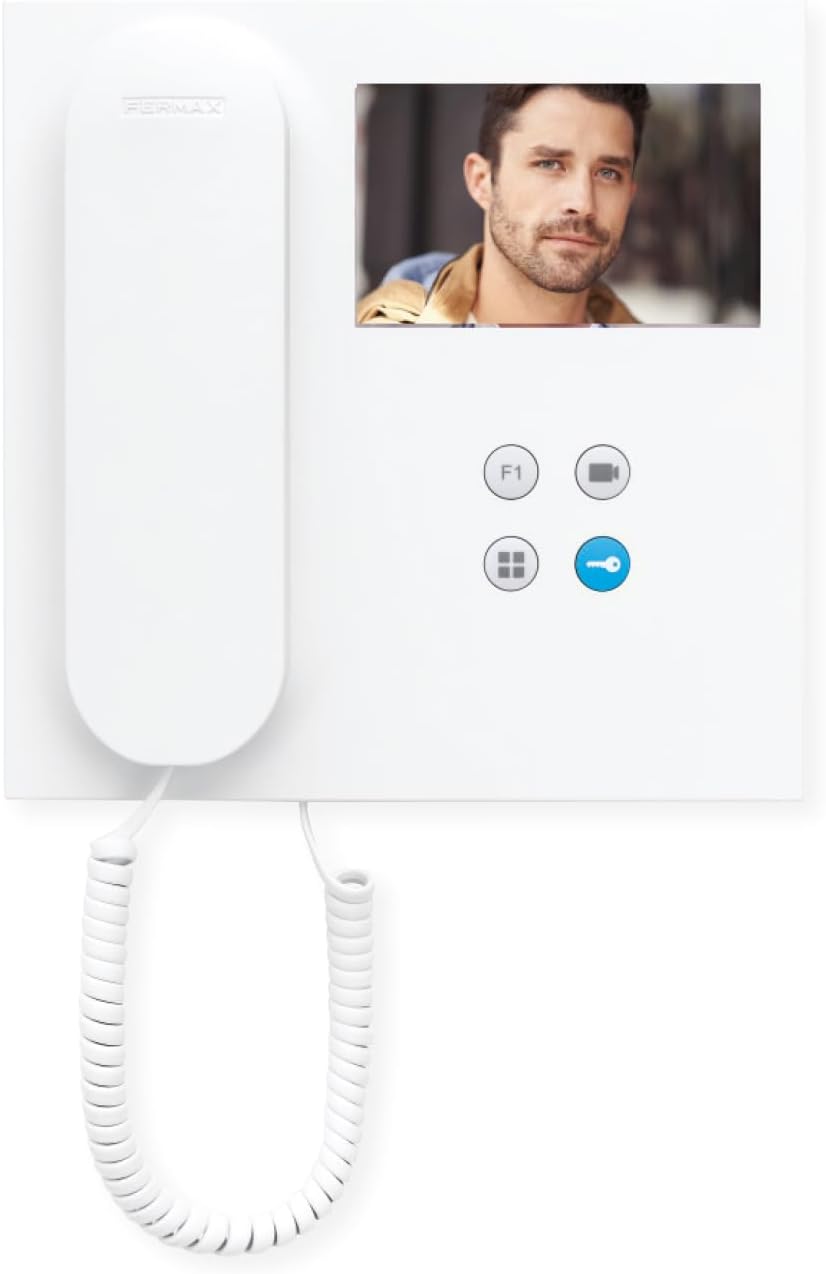
Зображення: спереду view of the FERMAX Duox Plus Veo 4.3" Monitor, showing the display, handset, and control buttons.
Налаштування та встановлення
1. Монтаж монітора
- Виберіть місце: Select a suitable indoor location, away from direct heat sources or moisture.
- Позначте точки буріння: Використовуйте монтажний кронштейн як шаблон, щоб позначити точки свердління на стіні.
- Свердлити отвори: Просвердліть отвори у позначених точках та вставте дюбелі.
- Надійний кронштейн: Прикріпіть монтажний кронштейн до стіни за допомогою наданих гвинтів.
2. Підключення проводів
УВАГА: Ensure power is disconnected before making any electrical connections. Refer to your system's wiring diagram for specific connections.
- Connect the Duox Plus bus wires (data and power) to the designated terminals on the monitor.
- Connect any additional wires for auxiliary functions (e.g., second door release, panic button) as per your system's requirements.
- Переконайтеся, що всі з’єднання надійні та належним чином ізольовані.
3. Підключення монітора
- Carefully align the monitor with the mounting bracket.
- Slide the monitor onto the bracket until it clicks securely into place.
- Відновіть живлення системи.
Інструкція з експлуатації
Отримання дзвінка
- When a visitor calls from the outdoor panel, the monitor will ring and display the visitor's image.
- Щоб відповісти на дзвінок, натисніть Кнопка відповіді (typically indicated by a phone icon).
- Щоб завершити дзвінок, натисніть Кнопка завершення виклику (often the same button or a distinct hang-up icon).
Відкриття дверей
- During a call, or when monitoring the outdoor panel, press the Кнопка відкриття дверей (typically indicated by a key icon) to open the main entrance door.
Monitoring the Outdoor Panel
- до view the outdoor panel camera without an incoming call, press the Кнопка монітора (often indicated by a camera icon). The display will show the live feed.
Налаштування параметрів
- обсяг: Use the volume controls (if present, or via menu) to adjust the ringtone and conversation volume.
- Яскравість/Контрастність: Access the monitor's menu (refer to specific button layout) to adjust display settings.
Технічне обслуговування
- Прибирання: Використовуйте м’яку тканину без ворсу, щоб обережно протерти екран іasing. Do not use liquid cleaners, aerosols, or abrasive materials.
- Огляд: Періодично перевіряйте всі кабелі та з'єднання на наявність будь-яких ознак зносу або пошкоджень.
- Оновлення програмного забезпечення: If applicable, check the manufacturer's website for any firmware updates for your Duox Plus system.
Усунення несправностей
| проблема | Можлива причина | Рішення |
|---|---|---|
| Немає зображення на екрані. | No power; loose connection; camera issue. | Check power supply. Ensure all cables are securely connected. Verify outdoor panel camera is functioning. |
| Немає звуку під час дзвінка. | Volume too low; faulty connection; microphone/speaker issue. | Increase volume. Check audio cable connections. Contact support if issue persists. |
| Не працює відмикання дверей. | Incorrect wiring; faulty lock mechanism; system error. | Verify wiring to the door strike. Test the lock mechanism independently. Consult system installer. |
| Monitor not ringing. | Ringtone volume off; system not registered; faulty outdoor panel button. | Check ringtone volume. Ensure monitor is properly registered to the system. Test outdoor panel button. |
If the problem persists after attempting these solutions, please contact FERMAX technical support or your installer.
Технічні характеристики
| Особливість | Деталь |
|---|---|
| Модель | 90b61eff-c290-484c-aba5-73e26c52e3da |
| Розмір екрана | 4.3 дюймів |
| роздільна здатність | 800 х 600 |
| Співвідношення сторін | 4:3 |
| Співвідношення контрастності зображення | 2000:1 |
| Поверхня екрана | Глянцевий |
| Виробник | ФЕРМАКС |
| Розміри упаковки | 8.74 x 8.15 x 2.01 дюймів |
Гарантія та підтримка
FERMAX products are designed for durability and reliability. For information regarding warranty terms and conditions, please refer to the warranty card included with your product or visit the official FERMAX webсайт.
For technical support, installation assistance, or service inquiries, please contact your local FERMAX distributor or visit the support section of the FERMAX webсайт:

Image: FERMAX brand logo with the slogan "Connectivity for All".


