1. Вступ
This manual provides detailed instructions for the installation, operation, and maintenance of the Turing TP-MFD4A28 Smart Series 4MP IR Dome IP Camera. This camera features 4-megapixel resolution, TwilightVision technology for optimal low-light performance, Smart IR up to 30 meters (98 feet), and robust IP67 and IK10 ratings for outdoor and vandal-resistant use. It supports Power over Ethernet (PoE) and a 256GB MicroSD card for local storage.
Ключові особливості:
- Max. 4MP (2688x1520) resolution at 30/25fps
- 2.8 мм фіксований об'єктив
- TwilightVision for optimal image clarity in low light
- Smart IR up to 30m (98ft) night vision
- IP67 weather resistance and IK10 vandal resistance
- Широкий динамічний діапазон (WDR)
- Підтримка Power over Ethernet (PoE).
- Support for 256GB MicroSD card
- People and Vehicle Search capabilities when used with Turing Smart Series NVR and Turing Vision Cloud
2. Інформація про безпеку
Please read these safety instructions carefully before using the product to prevent damage or injury.
- Джерело живлення: Use only the specified power adapter (12V DC) or a compliant Power over Ethernet (PoE) switch/injector. Incorrect voltagце може пошкодити камеру.
- Установка: Ensure the camera is securely mounted to prevent it from falling. Professional installation is recommended for outdoor or high-altitude mounting.
- Середовище: Do not expose the camera to extreme temperatures, humidity, or corrosive environments beyond its IP67 rating. Avoid direct sunlight for prolonged periods.
- Прибирання: Disconnect power before cleaning. Use a soft, dry cloth. Do not use strong detergents or solvents.
- Розбирання: Не намагайтеся розбирати або модифікувати камеру. Це призведе до анулювання гарантії та може призвести до пошкодження.
- Кабелі: Protect network and power cables from being walked on or pinched, especially at plugs and the point where they exit the camera.
3. Вміст упаковки
Переконайтеся, що всі предмети є в наявності та у належному стані після розпакування:
- Turing TP-MFD4A28 IP Dome Camera
- Монтажні гвинти та дюбелі
- Водонепроникний роз'єм для кабелю Ethernet
- Quick Start Guide / Instruction Manual (this document)
- Drill Template (may be included)
Note: A power adapter (12V DC) is not always included as the camera supports PoE. A PoE switch or injector is required for PoE power.
4. Продукт закінчивсяview
The Turing TP-MFD4A28 is a compact dome-style IP camera designed for discreet surveillance. Its robust housing provides protection against weather and vandalism.
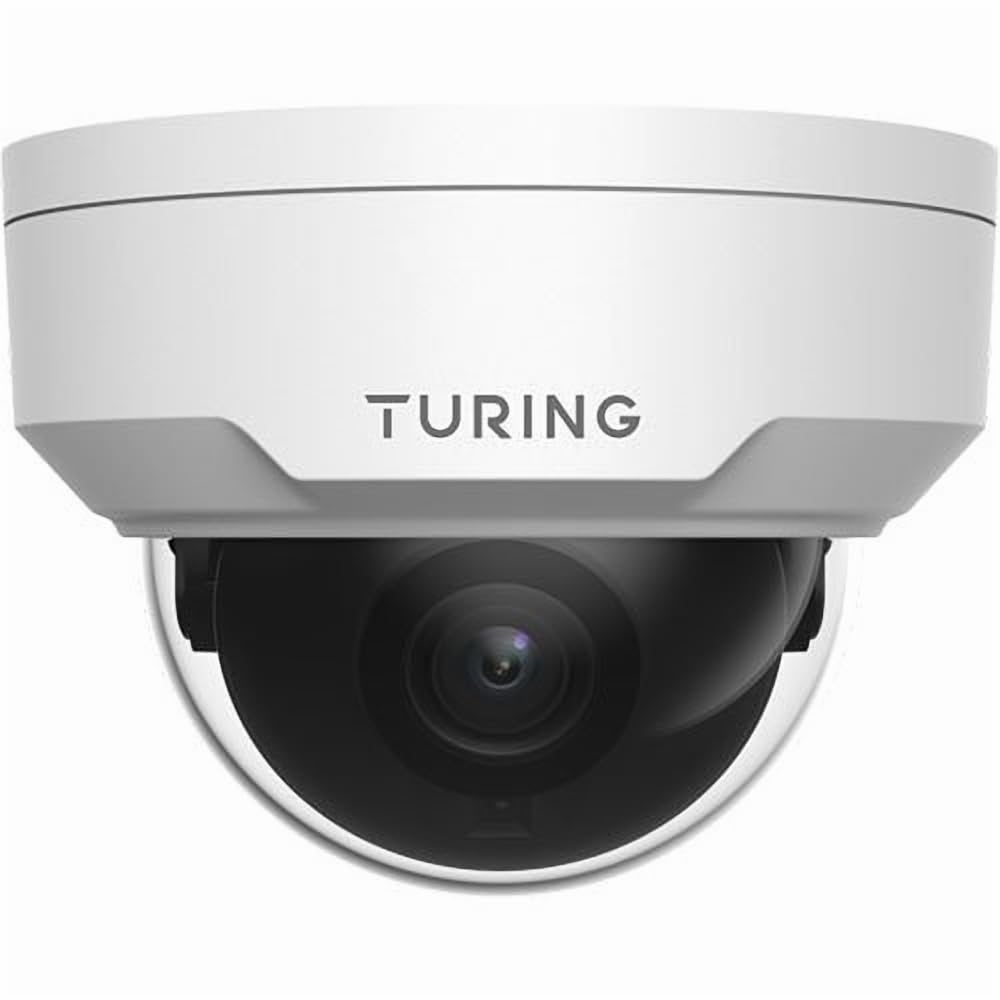
малюнок 4.1: Фронт view of the Turing TP-MFD4A28 4MP IR Dome IP Camera, showing its white dome design and lens.
Ключові компоненти:
- Кришка купола: Protective cover for the lens and IR LEDs.
- Об'єктив: 2.8mm fixed lens for a wide field of view.
- ІЧ-світлодіоди: Infrared illuminators for night vision.
- Слот для карт MicroSD: Located internally, accessible by removing the dome cover.
- Кнопка скидання: Located internally, used for factory reset.
- Порт Ethernet (RJ45): For network connection and Power over Ethernet (PoE).
- Вхідне живлення (12 В постійного струму): Optional power input if PoE is not used.
5. Налаштування
5.1 Physical Installation (Wall Mount)
- Виберіть місце розташування: Select a suitable wall-mount location that provides the desired viewing angle and is within range of your network cable.
- Підготуйте поверхню: Use the provided drill template (if available) to mark the screw holes on the wall. Drill pilot holes.
- Mount the Camera Base: Secure the camera's mounting base to the wall using the provided screws and wall plugs.
- Прокладка кабелів: Pass the Ethernet cable through the cable entry point on the mounting base.
5.2 Живлення та підключення до мережі
- Підключення Ethernet: Connect an Ethernet cable from your PoE switch/injector or network router to the camera's RJ45 port. Use the waterproof connector for outdoor installations.
- Потужність (опціонально): Якщо не використовується PoE, підключіть адаптер живлення 12 В постійного струму (не входить до комплекту) до входу живлення камери.
- Перевірити потужність: The camera's indicator light (if present) should illuminate, indicating power.
5.3 Встановлення карти MicroSD
The camera supports up to a 256GB MicroSD card for local storage.
- Відключити живлення: Ensure the camera is powered off before installing or removing the MicroSD card.
- Зняти кришку купола: Carefully twist or unclip the outer dome cover to access the internal components.
- Вставте картку MicroSD: Locate the MicroSD card slot and insert the card with the contacts facing down until it clicks into place.
- Replace Dome Cover: Securely reattach the dome cover, ensuring a watertight seal for IP67 protection.
- Формат картки: After powering on, format the MicroSD card via the camera's web interface or connected NVR for proper operation.
5.4 Початкова конфігурація
For initial setup and advanced configuration, access the camera via its web interface or connect it to a Turing Smart Series NVR or Turing Vision Cloud.
- Знайти IP-адресу: Use a network scanner tool or your NVR to discover the camera's IP address on your local network.
- Доступ Web Інтерфейс: Відкрийте a web браузер і введіть IP-адресу камери. Увійдіть, використовуючи облікові дані за замовчуванням (див. короткий посібник користувача для отримання інформації про ім’я користувача/пароль за замовчуванням).
- Змінити пароль за замовчуванням: Для безпеки негайно змініть пароль за замовчуванням під час першого входу в систему.
- Налаштування мережі: Configure network settings (e.g., static IP, DNS) if required by your network environment.
- Параметри часу: Set the correct date and time for accurate recording timestamps.
6. Операційна
6.1 Живий View і Запис
Access the live video feed through your NVR, Turing Vision Cloud, or the camera's web interface. You can initiate manual recordings or configure scheduled/motion-triggered recordings.
- роздільна здатність: The camera supports up to 4MP (2688x1520) resolution. Adjust settings as needed for bandwidth and storage.
- Частота кадрів: Records at 30/25 frames per second for smooth video.
6.2 Night Vision (Smart IR)
The camera automatically switches to night vision mode in low-light conditions, utilizing its Smart IR LEDs to provide clear black-and-white video up to 30 meters (98 feet). TwilightVision technology enhances low-light performance before IR activation.
6.3 Широкий динамічний діапазон (WDR)
WDR technology helps balance areas of high contrast in the image, ensuring details are visible in both bright and dark regions simultaneously. This is particularly useful in scenes with strong backlighting.
6.4 Motion Detection and Analytics
Configure motion detection zones and sensitivity via the camera's web interface or NVR. When integrated with a Turing Smart Series NVR or Turing Vision Cloud, the camera supports advanced analytics like People and Vehicle Search.
- Тип сповіщення: Motion Only alerts are supported.
- Конфігурація: Set up email notifications or NVR alarms for detected events.
7. Технічне обслуговування
7.1 Очищення камери
Regular cleaning helps maintain optimal image quality.
- Gently wipe the dome cover and lens with a soft, lint-free cloth.
- Для стійкого бруду використовуйте злегка протерту тканинуampзмийте водою. Уникайте абразивних мийних засобів.
- Ensure no moisture enters the camera housing.
7.2 оновлень мікропрограми
Periodically check the Turing website or your NVR system for available firmware updates. Firmware updates can improve performance, add new features, and enhance security. Follow the provided instructions carefully when performing updates.
7.3 Керування картками MicroSD
If using a MicroSD card for recording, it is recommended to format it periodically (e.g., monthly) to maintain performance and prevent data corruption. Back up any important recordings before formatting.
8. Вирішення проблем
| проблема | Можлива причина | Рішення |
|---|---|---|
| Немає живлення / Камера не вмикається |
|
|
| Немає відео |
|
|
| Погана якість зображення |
|
|
| MicroSD Card Not Recording |
|
|
9. Технічні характеристики
| Номер моделі | TP-MFD4A28 |
| Ефективне вирішення проблеми | 4 МП (2688x1520) |
| Об'єктив | 2.8мм фіксований об'єктив |
| Частота кадрів | 30 кадрів/с |
| Діапазон нічного бачення | Up to 30m (98.43 Feet) with Smart IR |
| Технологія низького освітлення | TwilightVision |
| Міжнародний захист рейтингу | IP67 (захищений від атмосферних впливів) |
| Опір вандалам | IK10 |
| Широкий динамічний діапазон (WDR) | так |
| Джерело живлення | PoE (живлення через Ethernet) або 12 В постійного струму |
| Технологія підключення | Дротовий (Ethernet) |
| Підтримка карт MicroSD | До 256 Гб |
| Тип монтажу | Настінне кріплення |
| Форм-фактор | Купол |
| Розміри (Д x Ш x В) | 4.3 x 4.3 x 3.2 дюймів |
| Вага товару | 14.9 унції (0.93 фунта) |
| Колір | Білий |
| Тип сповіщення | Лише рух |
| Технологія фотосенсора | CMOS |
10. Гарантія та підтримка
Turing products are covered by a manufacturer's warranty. Please refer to the official Turing webна сайті або в документації щодо придбання, щоб дізнатися про конкретні гарантійні умови.
For technical support, troubleshooting assistance, or warranty claims, please contact Turing customer service through their official webабо контактну інформацію, надану під час покупки.
Інтернет-ресурси:
- Official Turing Webсайт: www.turing.com
- Support Portal: (Check Turing webсайт для отримання конкретних посилань на підтримку)


