вступ
The J5create JCC157 USB-C to HDMI 2.1 8K Cable is designed to provide high-quality video and audio transmission from your USB-C enabled device to an HDMI display. Supporting resolutions up to 8K, this cable is ideal for gaming, professional presentations, and high-definition media consumption. It features a unique RGB indicator light, enhancing your setup's aesthetics and providing visual feedback.

малюнок 1: The J5create JCC157 USB-C to HDMI 2.1 8K Cable, showcasing its sleek design and RGB indicator.
особливості
- Підтримка роздільної здатності 8K: Experience stunning visuals with support for resolutions up to 8K, ensuring crisp and clear images.
- USB-C to HDMI 2.1: Connects modern USB-C devices to HDMI 2.1 compatible displays for high-bandwidth video and audio.
- Широка сумісність: Fully compatible with Windows, MacOS, and Chrome OS operating systems.
- Індикатор RGB: Features an integrated RGB light, providing visual flair and status indication, especially suited for gaming setups.
- Plug and Play: No drivers required for most operating systems, allowing for easy setup and immediate use.
- Універсальні режими відображення: Supports both Extended and Mirror display modes for various productivity and entertainment needs.

малюнок 2: The RGB indicator light on the JCC157 cable, capable of displaying various colors.
Інструкції з налаштування
- Підключення кінця USB-C: Insert the USB-C connector of the JCC157 cable into a compatible USB-C port on your source device (e.g., laptop, computer). Ensure the port supports video output (DisplayPort Alternate Mode).
- Підключення кінця HDMI: Insert the HDMI connector of the JCC157 cable into an available HDMI input port on your display device (e.g., monitor, TV, projector).
- Пристрої, що вмикаються: Переконайтеся, що і ваш вихідний пристрій, і пристрій відображення увімкнені.
- Виберіть вхід: On your display device, select the correct HDMI input source that the cable is connected to.
- Перевірте підключення: The RGB indicator light on the cable will illuminate, indicating a successful connection and active signal. Your display should show the output from your source device.

малюнок 3: Крупний план view of the JCC157 cable's connectors and the illuminated RGB indicator, demonstrating a ready state.
Інструкція з експлуатації
Once connected, your operating system will typically detect the external display automatically. You can configure the display settings to suit your needs.
- Розширений режим: This mode allows you to extend your desktop across multiple screens, providing more workspace. To enable, go to your operating system's display settings and select "Extend these displays."
- Mirror Mode (Duplicate Mode): This mode duplicates your primary display onto the external monitor, showing the same content on both screens. To enable, go to your operating system's display settings and select "Duplicate these displays."

малюнок 4: Visual representation of Extended Mode (left) and Mirror Mode (right) display configurations, illustrating how the JCC157 cable facilitates both.
The RGB indicator light will remain illuminated when a signal is active. Its color may vary based on the device's status or specific J5create software settings, if applicable.
Технічне обслуговування
To ensure the longevity and optimal performance of your J5create JCC157 cable, follow these maintenance guidelines:
- Обережно поводьтеся: Avoid bending the cable sharply or pulling it by the cord. Always grasp the connector ends when plugging or unplugging.
- Тримати в чистоті: Використовуйте м’яку суху тканину, щоб обережно протерти кабель і роз’єми. Не використовуйте рідкі засоби для чищення або абразивні матеріали.
- Зберігайте належним чином: Коли кабель не використовується, згорніть його вільно та зберігайте в прохолодному, сухому місці, подалі від прямих сонячних променів та екстремальних температур.
- Уникайте вологи: Do not expose the cable to water or high humidity, as this can damage the internal components.
Усунення несправностей
| проблема | Можлива причина | Рішення |
|---|---|---|
| Немає зображення на моніторі. |
|
|
| Low resolution or flickering display. |
|
|
| RGB indicator not lighting up. |
|
|
Технічні характеристики
| Особливість | Деталь |
|---|---|
| Номер моделі | JCC157-1N |
| Тип роз'єму | USB-C Male to HDMI 2.1 Male |
| Підтримка максимальної роздільної здатності | До 8K (7680x4320) |
| Довжина кабелю | 1.8 метрів (6 фути) |
| Сумісні операційні системи | Windows, MacOS, Chrome OS |
| Особливості | Світловий індикатор RGB |
| Сумісні пристрої | Computer, Laptop |
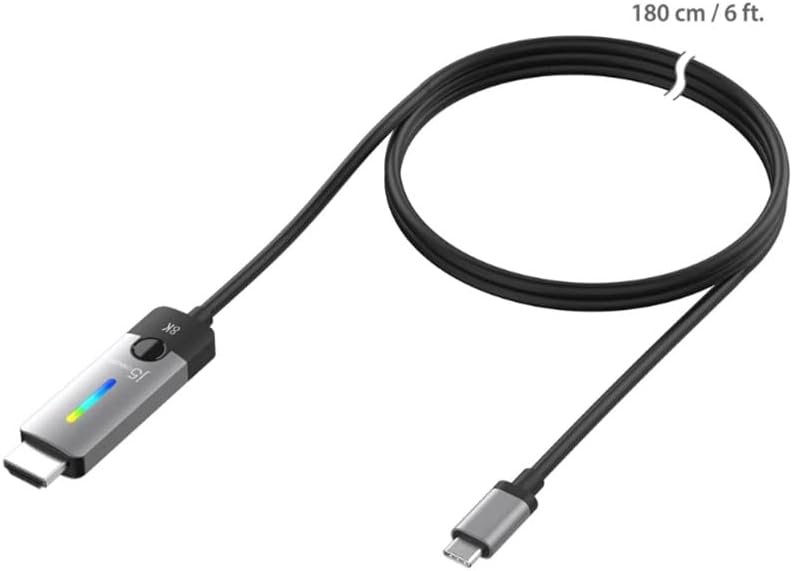
малюнок 5: The JCC157 cable, illustrating its 180 cm (6 ft) length.
Гарантія та підтримка
For warranty information and technical support, please refer to the documentation included with your purchase or visit the official j5create webсайт. Гарантійні умови можуть відрізнятися залежно від регіону та продавця.
Виробник: J5CREATE


