1. Інформація про безпеку
УВАГА!
- The device may only be used with the supplied power adapter.
- The device is powered by electricity. Caution is advised. Improper use carries the risk of fire, electric shock, and even death.
- Failure to follow instructions can lead to incorrect installation, damaging the device or endangering the user's life.
- The desk frame must not be modified or rebuilt in any way.
- Disconnect the desk from the power supply before performing maintenance.
- Do not use the product before assembly is complete.
- Не використовуйте гострі предмети, такі як ніж або ножиці, під час розпакування.
- Assembly should be performed at a safe distance from furniture and other obstacles.
- Assembly should be performed out of reach of children, as some parts have sharp edges or may pose a choking hazard.
- Не використовуйте стіл для цілей, відмінних від тих, що були спочатку зазначені виробником.
- Виріб призначений для використання на рівній та стійкій поверхні.
- To prevent damage to the product and risk of injury, check the maximum load capacity of the product (70 kg) and do not exceed it.
- Do not place your entire body weight on the tabletop. The product is intended for use by one person.
- Do not place flammable materials near the device, as there is a risk of fire.
- To prevent damage, keep the product away from direct sunlight.
- It is recommended that the user retighten screws if they become loose.
- Do not disassemble any parts beyond the original installation procedures.
- For general cleaning and maintenance of the desk, use a soft cloth with a mild cleaning agent.
2. Налаштування та складання
The MARK ADLER Leader 7.0 desk is designed for straightforward assembly. Please follow the detailed instructions provided in the separate assembly guide included with your product packaging.
2.1 Розпакування
- Carefully remove all components from the packaging. Avoid using sharp objects like knives or scissors directly on the packaging to prevent scratching or damaging the desk parts.
- Verify that all parts listed in the assembly guide are present and undamaged.
2.2 Розміщення
- Choose a flat, stable, and level surface for the desk. Uneven surfaces can affect the desk's stability and electric mechanism.
- Ensure there is sufficient space around the desk for safe operation, especially when adjusting height, to avoid collisions with walls or other furniture.
- Keep the desk away from direct sunlight and sources of heat or moisture to prevent material damage.
2.3 Етапи складання
- Refer to the dedicated assembly manual for step-by-step instructions.
- Ensure all connections are secure and screws are tightened appropriately.
- Do not connect the desk to power until assembly is fully completed and verified.

Figure 1: Desk Dimensions and Height Range

Figure 2: Desk in Sitting and Standing Positions
3. Інструкція з експлуатації
The MARK ADLER Leader 7.0 desk features an intuitive control panel for easy height adjustment and memory functions.
3.1 Панель керування надview

Рисунок 3: Панель керування
Панель керування зазвичай включає:
- Цифровий дисплей: Показує поточну висоту столу в сантиметрах.
- Up (A) and Down (V) Buttons: Used to manually adjust the desk height.
- Кнопки пам'яті (1, 2, 3): Зберігайте та викликайте бажані налаштування висоти.
- Set (S) Button: Used to save a height setting to a memory button.
3.2 Регулювання висоти
- Натисніть і утримуйте Вгору (А) кнопку, щоб підняти стіл.
- Натисніть і утримуйте Вниз (V) кнопку, щоб опустити стіл.
- Release the button when the desired height is reached. The desk will move smoothly and quietly.
3.3 Налаштування пресетів пам'яті
To save a specific height setting:
- Adjust the desk to your desired height using the Up (A) or Down (V) buttons.
- Натисніть Набір (S) button. The display may flash or show 'S'.
- Within a few seconds, press one of the memory buttons (1, 2 або 3) to save the current height to that position. The display may confirm the setting.
3.4 Використання пресетів пам'яті
Щоб відновити збережене налаштування висоти:
- Simply press the desired memory button (1, 2 або 3). Стіл автоматично переміститься на збережену висоту.
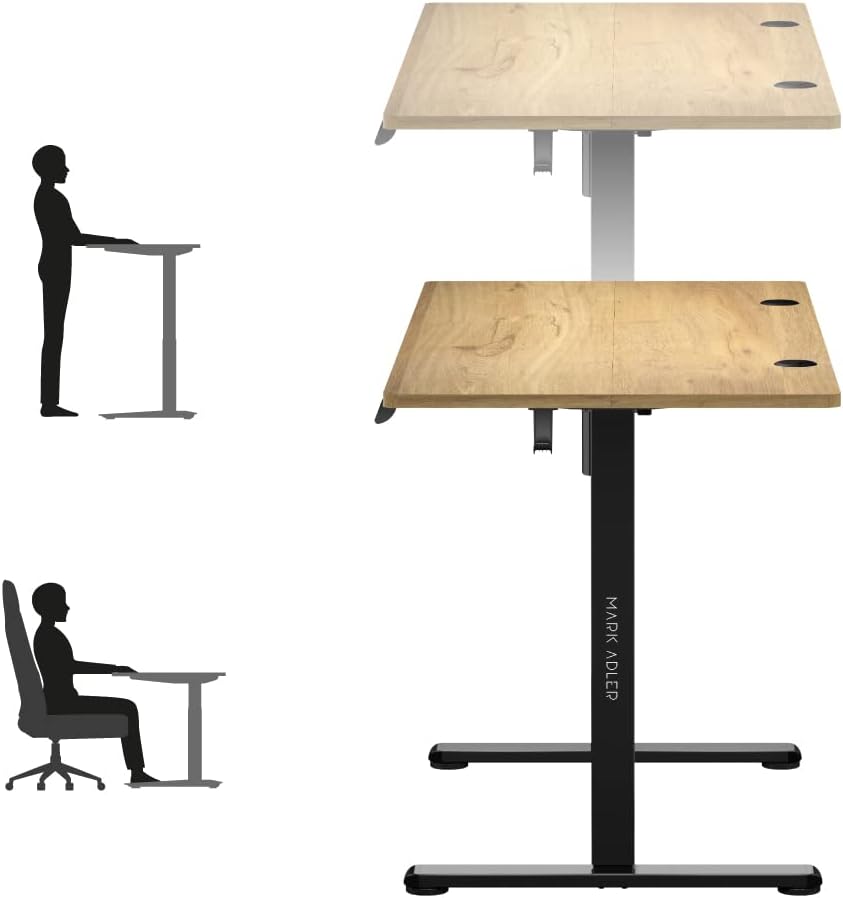
Figure 4: Ergonomic Use - Sitting and Standing
3.5 Організація кабелів
The desk includes integrated cable entries to help organize your workspace.

Figure 5: Cable Grommet
3.6 Кріплення для навушників
A convenient hook is provided for hanging headphones or other accessories.

Figure 6: Headphone Hook
4. Технічне обслуговування
Proper maintenance ensures the longevity and safe operation of your MARK ADLER Leader 7.0 desk.
- Прибирання: Для загального прибирання використовуйте м’яку тканину dampened with a mild cleaning agent. Avoid abrasive cleaners or harsh chemicals that could damage the surface.
- Відключення живлення: Always disconnect the desk from the power supply before performing any cleaning or maintenance tasks.
- Затягування гвинтів: Periodically check all screws and connections. If any feel loose, gently retighten them to ensure stability.
- Турбота про навколишнє середовище: Keep the desk away from direct sunlight, extreme temperatures, and high humidity to prevent material degradation.
- Без змін: Do not attempt to modify or disassemble any parts of the desk frame or electric mechanism beyond the original installation procedures. Unauthorized modifications can void your warranty and pose safety risks.
5. Вирішення проблем
If you encounter any issues with your MARK ADLER Leader 7.0 desk, please refer to the following common troubleshooting steps:
5.1 Desk Not Moving
- Перевірте підключення живлення: Переконайтеся, що кабель живлення надійно підключено як до столу, так і до робочої розетки.
- Перевірте адаптер живлення: Verify that the power adapter is the one supplied with the desk and is functioning correctly.
- Механізм скидання: Some electric desks have a reset function. Consult your assembly guide or contact support for specific reset procedures if available.
5.2 Uneven Movement or Noise
- Перевірте наявність перешкод: Ensure there are no objects obstructing the desk's movement path, either above or below the tabletop.
- Розподіл ваги: Make sure the weight on the desk is evenly distributed and does not exceed the maximum load capacity of 70 kg.
- Ослаблені гвинти: Check and tighten any loose screws on the frame or tabletop connections.
5.3 Панель керування не відповідає
- Цикл живлення: Disconnect the power for 30 seconds, then reconnect it.
- Кабельне підключення: Ensure the control panel cable is securely connected to the desk's motor unit.
Якщо ці кроки не вирішать проблему, зверніться до служби підтримки клієнтів для отримання додаткової допомоги.
6. Технічні характеристики
| Особливість | Деталь |
|---|---|
| Бренд | МАРК АДЛЕР |
| Номер моделі | Ведучий 7.0 |
| Колір | Oak (top), Black (frame) |
| Розміри продукту (Д x Ш x В) | 120 х 60 х 72-118 см |
| матеріал | Oak wood, Alloy steel, Metal |
| Особливість | Electric height adjustment |
| Вага товару | 20.7 кілограма |
| Максимальна вантажопідйомність | 70 кг |
| Діапазон регулювання висоти | 72 см до 118 см |
| Панель керування | Digital display, 3 memory presets |
| Проведення кабелів | 2 integrated cable entries |
7. Гарантія та підтримка
7.1 Інформація про гарантію
For detailed information regarding the product warranty, please refer to the warranty card included with your purchase or contact the retailer/manufacturer directly. Warranty terms typically cover manufacturing defects under normal use.
7.2 Підтримка клієнтів
If you have any questions, require technical assistance, or need to report an issue that cannot be resolved using the troubleshooting guide, please contact MARK ADLER customer service or your point of purchase. Have your product model number (Leader 7.0) and purchase date ready when contacting support.


