1. Вступ
This manual provides detailed instructions for the installation, operation, and maintenance of your Jennov Security Camera, model IJ1-P23WJ35-3-FAS. This device is designed to provide reliable surveillance for indoor environments, offering features such as high-definition video, night vision, and motion detection. Please read this manual thoroughly before using the product to ensure proper functionality and safety.
2. Продукт закінчивсяview
The Jennov Security Camera is a compact, dome-shaped device designed for discreet monitoring. It integrates seamlessly into standard light bulb sockets for easy power and installation.
Ключові характеристики:
- Відео високої чіткості: Захоплює прозору їжуtage з роздільною здатністю 1080p.
- Нічне бачення: Equipped with infrared LEDs for visibility up to 30 meters in low-light conditions.
- Виявлення руху: Sends notifications upon detecting movement within its field of view.
- Двостороннє аудіо: Дозволяє здійснювати зв'язок через камеру.
- Бездротове підключення: Operates via Wi-Fi for remote access.
- Гнучке зберігання: Supports Micro SD card (up to 128GB) and cloud storage options.
- Інтеграція розумного будинку: Compatible with Amazon Alexa and Android devices.
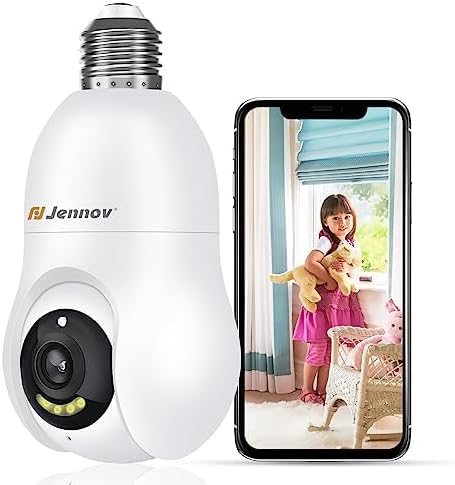
Figure 2.1: The Jennov Security Camera shown alongside a smartphone displaying live footage of a child.
3. Налаштування
3.1 Вміст упаковки
Переконайтеся, що ваш пакет містить такі елементи:
- 1 x Jennov Security Camera (Model: IJ1-P23WJ35-3-FAS)
- 1 x Посібник користувача (цей документ)
3.2 Встановлення
The Jennov Security Camera is designed for easy installation into a standard light bulb socket.
- Вимкнення живлення: Ensure the power to the light socket is turned off at the circuit breaker before installation.
- Вкручування: Carefully screw the camera into a standard E27/E26 light bulb socket. Ensure it is securely fastened but do not overtighten.
- Увімкнення: Відновіть живлення розетки освітлювача. Камера увімкнеться та розпочне послідовність запуску.

Figure 3.1: The camera is designed for quick installation by screwing it into an ordinary bulb base.
3.3 Завантаження програми та підключення
To operate the camera, you will need to download the companion mobile application.
- Завантажити додаток: шукати the official Jennov security camera app in your device's app store (e.g., Google Play Store for Android, Apple App Store for iOS).
- Створити акаунт: Відкрийте програму та дотримуйтесь інструкцій на екрані, щоб створити новий обліковий запис користувача або увійти, якщо у вас вже є обліковий запис.
- Додати пристрій: Select the option to 'Add Device' or 'Add Camera' within the app.
- Підключіться до Wi-Fi: Дотримуйтесь підказок програми, щоб підключити камеру до мережі Wi-Fi 2.4 ГГц. Переконайтеся, що ваш пароль Wi-Fi правильний.
- Сполучення: The app will guide you through the pairing process, which may involve scanning a QR code displayed on your phone with the camera, or listening for an audible prompt.
- Конфігурація: Після підключення ви можете назвати свою камеру та налаштувати початкові параметри.
4. Інструкція з експлуатації
4.1 Живий View і якість відео
Access the live feed of your camera through the mobile application. The camera provides 1080p Full HD resolution for clear monitoring.

Figure 4.1: Visual comparison demonstrating the enhanced clarity of 2K Ultra HD resolution provided by the Jennov camera compared to standard 1080p.
4.2 Виявлення руху та автоматичне відстеження
The camera features intelligent motion detection and auto-tracking capabilities.
- Увімкнути виявлення руху: In the app settings, activate motion detection and customize sensitivity levels.
- Отримувати сповіщення: When motion is detected, you will receive push notifications on your smartphone.
- Автоматичне відстеження: The camera can automatically track detected movement within its field of view, ensuring the subject remains in frame.
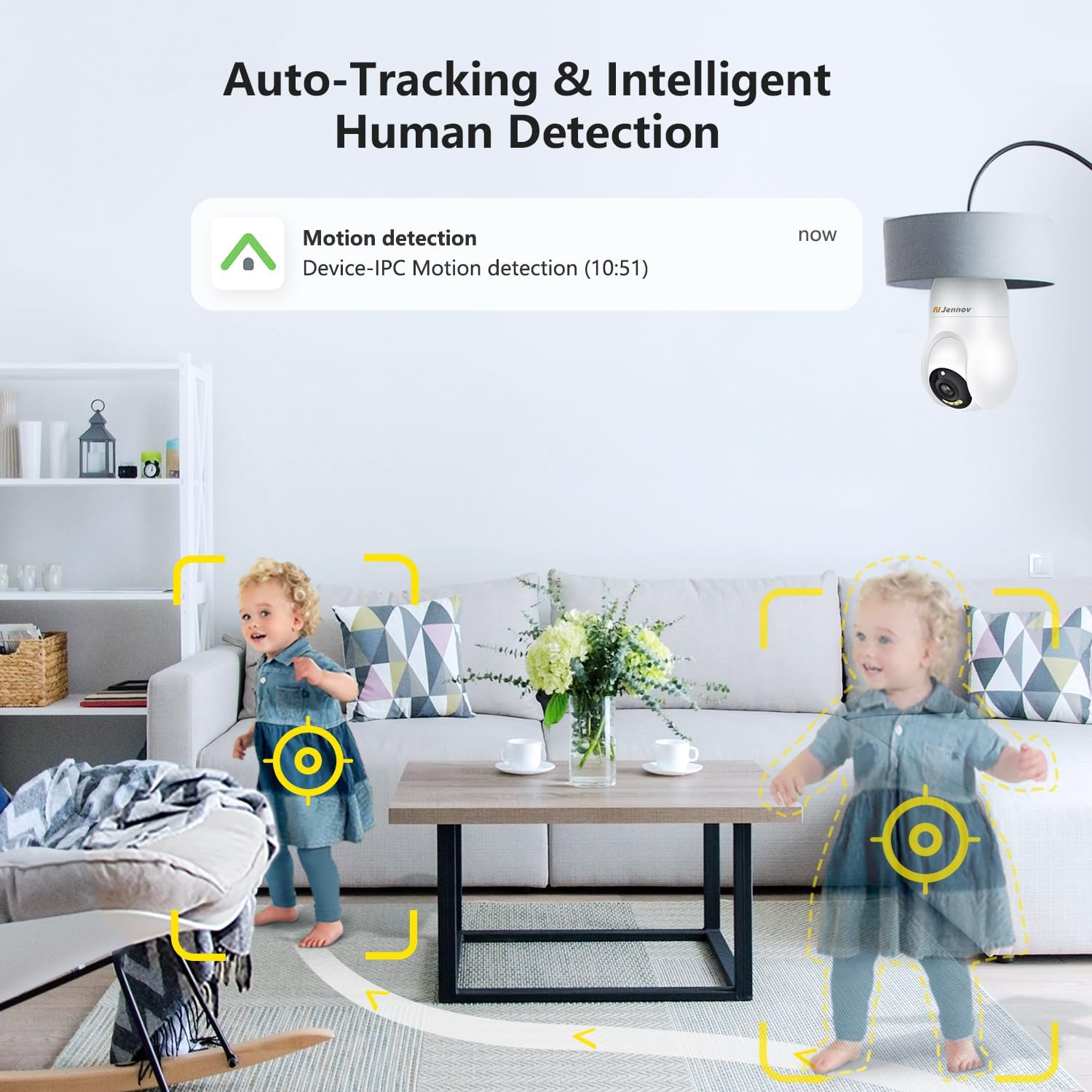
Figure 4.2: The camera's auto-tracking and intelligent human detection feature, showing a motion detection alert.
4.3 Нічне бачення
The camera is equipped with infrared LEDs to provide clear vision in low-light or no-light conditions.
- Автоматична активація: Night vision typically activates automatically when ambient light levels drop.
- діапазон: Effective night vision range is up to 30 feet (approximately 9 meters).
- Нічне бачення кольору зоряного світла: In certain low-light conditions, the camera may provide enhanced color night vision.

Figure 4.3: A visual comparison illustrating the clarity and color retention of Starlight Color Night Vision compared to traditional night vision.
4.4 Двосторонній аудіозв'язок
Utilize the camera's built-in microphone and speaker for two-way communication.
- говорити: Натисніть значок мікрофона в прямому ефірі view interface of the app to speak through the camera.
- Слухай: The camera's microphone captures audio from its surroundings, which can be heard through the app.

Figure 4.4: Demonstration of the two-way audio feature, showing a child speaking through the camera and a parent responding via smartphone.
4.5 Зберігання відео
The camera supports two primary methods for video storage:
- Micro SD Card: Вставте карту Micro SD (до 128 ГБ, не входить до комплекту) у відповідний слот на камері для локального зберігання записів.
- Хмарне сховище: The camera offers optional cloud storage services, which may require a subscription. Refer to the app for details on available plans.

Figure 4.5: The camera supports both cloud storage and local storage via a Micro SD card (up to 128GB).
4.6 Інтеграція з розумним будинком
The Jennov Security Camera is compatible with certain smart home platforms.
- Amazon Alexa: Link your camera to Amazon Alexa through the Alexa app to view live feeds on compatible Echo Show devices or use voice commands.
- Пристрої Android: The camera app is compatible with Android smartphones and tablets.

Figure 4.6: The camera's compatibility with Amazon Alexa, allowing users to view camera feeds on smart displays.
5. Технічне обслуговування
5.1 Очищення камери
To ensure optimal performance, keep the camera lens and body clean.
- Вимкнення живлення: Disconnect the camera from its power source before cleaning.
- Об'єктив: Gently wipe the camera lens with a soft, lint-free cloth. For stubborn smudges, use a lens cleaning solution designed for optics.
- Тіло: Протріть корпус камери сухою або злегка змоченою серветкоюamp тканина. Уникайте використання агресивних хімікатів або абразивних матеріалів.
5.2 оновлень мікропрограми
Periodically check the mobile application for available firmware updates. Updates can improve performance, add new features, and enhance security.
- Перевірте наявність оновлень: Navigate to the camera settings within the app to check for and install any available firmware updates.
- Стабільне з'єднання: Ensure the camera has a stable Wi-Fi connection and sufficient power during the update process. Do not interrupt the update.
6. Вирішення проблем
If you encounter issues with your Jennov Security Camera, refer to the following common problems and solutions:
- Камера не вмикається:
- Ensure the light socket has power and the camera is securely screwed in.
- Test the socket with a working light bulb to confirm power supply.
- Не вдається підключитися до Wi-Fi:
- Перевірте, чи ваша мережа Wi-Fi працює на частоті 2.4 ГГц. Камера не підтримує мережі 5 ГГц.
- Переконайтеся, що пароль Wi-Fi введено правильно в додатку.
- Перемістіть камеру ближче до вашого Wi-Fi роутера, щоб покращити силу сигналу.
- Перезавантажте роутер і камеру.
- Немає сповіщень про виявлення руху:
- Check if motion detection is enabled in the app settings.
- Налаштуйте чутливість виявлення руху.
- Переконайтеся, що сповіщення додатків увімкнено на вашому смартфоні.
- Погана якість відео:
- Перевірте силу сигналу Wi-Fi; слабкий сигнал може вплинути на якість потокового відео.
- Clean the camera lens for any dust or smudges.
- Забезпечте достатнє освітлення для оптимального денного відеозйомки.
- Двосторонній аудіозв'язок не працює:
- Ensure microphone and speaker permissions are granted to the app on your smartphone.
- Перевірте налаштування гучності як на телефоні, так і в додатку камери.
7. Технічні характеристики
| Номер моделі | IJ1-P23WJ35-3-FAS |
| Тип монтажу | Light socket (Screw In) |
| Роздільна здатність захоплення відео | 1080p |
| Бездротовий зв'язок | Wi-Fi (лише 2.4 ГГц) |
| Форм-фактор | Купол |
| матеріал | пластик |
| томtage | 220 вольт (перемінний струм) |
| Wattage | 3 Вт |
| Розміри (Д x Ш x В) | 7.62 х 7.62 х 17.02 см |
| Вага товару | 177 г |
| Особливості | Нічне бачення, Виявлення руху, Двосторонній аудіозв'язок |
| Параметри зберігання | Micro SD card (Max 128GB), Cloud Storage |
| Використання в приміщенні/зовні | закритий |
| Сумісні пристрої | Ноутбук, смартфон, планшет |
| Тип контролера | Amazon Alexa, Android |
8. Інформація про гарантію
The Jennov Security Camera (Model: IJ1-P23WJ35-3-FAS) comes with a 1 рік обмеженої гарантії з дати покупки. Ця гарантія поширюється на виробничі дефекти та несправності за умов нормального використання. Вона не поширюється на пошкодження, спричинені неправильним використанням, нещасними випадками, несанкціонованими модифікаціями або неправильним встановленням.
Please retain your proof of purchase for warranty claims. For detailed warranty terms and conditions, refer to the official Jennov webсайту або зв’яжіться зі службою підтримки клієнтів.
9. Підтримка клієнтів
For further assistance, technical support, or inquiries regarding your Jennov Security Camera, please refer to the following resources:
- Інтернет-підтримка: Visit the official Jennov website for FAQs, troubleshooting guides, and product information.
- Контактна адреса електронної пошти: Refer to the product packaging or the Jennov website for customer service contact email.
When contacting support, please have your product model number (IJ1-P23WJ35-3-FAS) and purchase information readily available.


