1. Вступ
Thank you for choosing the OMOTON KB515 Bluetooth Keyboard. This full-size wireless keyboard is specifically designed for Mac OS devices, offering a comfortable typing experience with multi-device connectivity. Please read this manual carefully to ensure proper setup and operation.

The OMOTON KB515 Bluetooth Keyboard integrated into a multi-device Mac OS workspace.
2. Вміст упаковки
- Bluetooth-клавіатура OMOTON KB515
- Знімач ключів
- Посібник користувача
Примітка: Для роботи потрібні 2 батарейки типу ААА, вони не входять до комплекту.
3. Налаштування та сполучення
3.1 Встановлення батареї
- Locate the battery compartment on the back of the keyboard.
- Відкрийте кришку батарейного відсіку.
- Вставте дві (2) батарейки типу AAA, дотримуючись правильної полярності (+/-).
- Закрийте кришку батарейного відсіку.
3.2 Увімкнення/вимкнення живлення
Slide the power switch, located on the top edge of the keyboard, to the "ON" position to power on the keyboard. Slide it to "OFF" to power off.
3.3 Bluetooth Pairing Instructions
The OMOTON KB515 keyboard supports connection to up to three devices simultaneously via Bluetooth. Ensure Bluetooth is enabled on your Mac OS device before proceeding.
- Увімкніть клавіатуру за допомогою перемикача ON/OFF.
- Натисніть і утримуйте Fn клавіша та одна з клавіш каналу Bluetooth (BT1, BT2, або BT3) for 3-5 seconds until the corresponding LED indicator (blue light) blinks. This activates pairing mode for the selected channel.
- На вашому пристрої Mac OS перейдіть до Налаштування системи (або Системні налаштування) > Bluetooth.
- In the list of available devices, select "Клавіатура OMOTON".
- Follow any on-screen prompts to complete the pairing process. The blue indicator light will turn off once successfully connected.
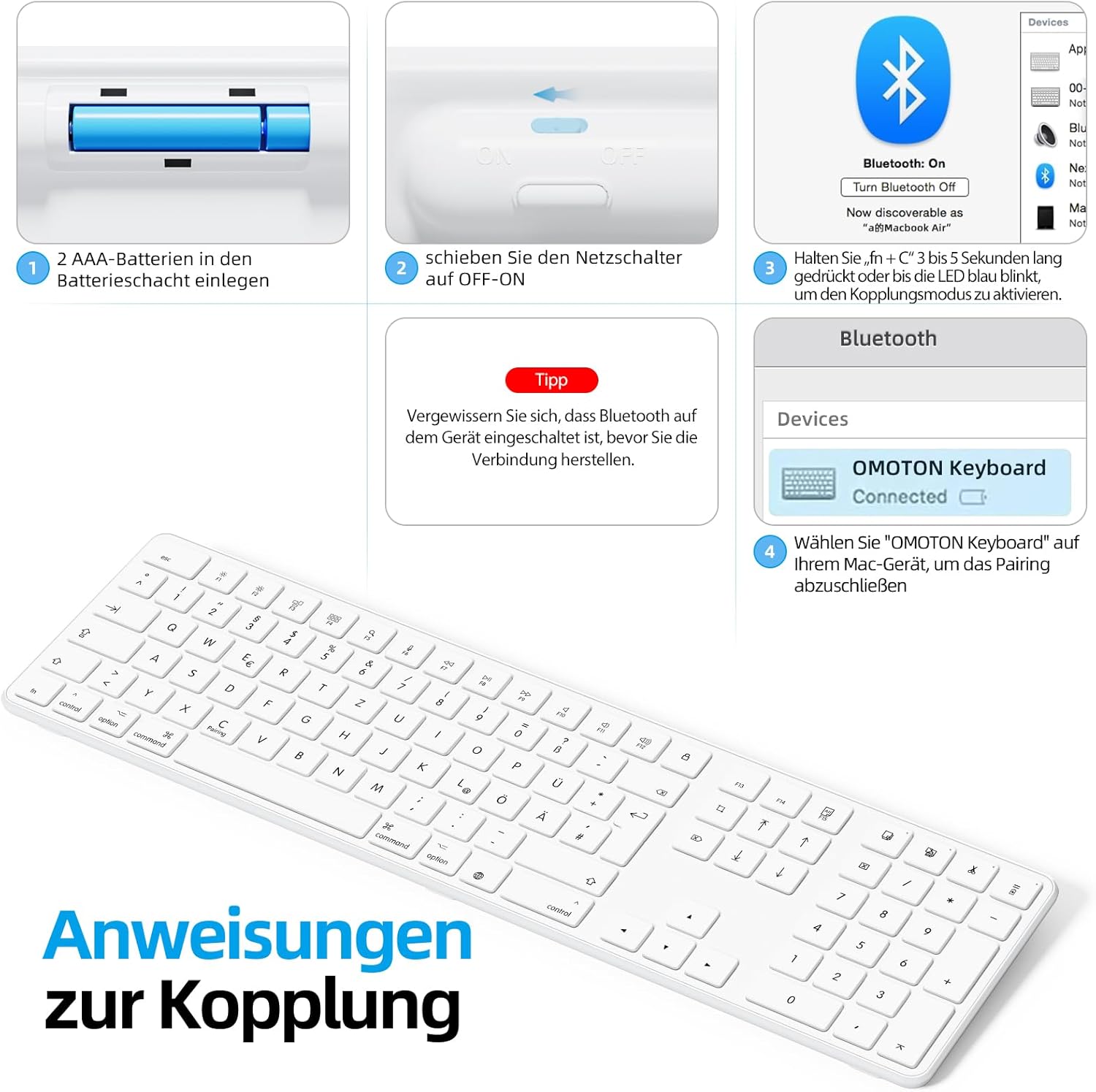
Visual guide for battery insertion and Bluetooth pairing steps.
Порада: To pair with additional devices, repeat step 2 using a different Bluetooth channel (BT2 or BT3).
4. Робота з клавіатурою
4.1 Перемикання між сполученими пристроями
To switch between your paired devices, simply press the Fn клавішу разом із відповідною клавішею каналу Bluetooth (BT1, BT2, або BT3) that your desired device is paired to. A short press is sufficient for switching.
4.2 Мультимедійні та функціональні клавіші
The OMOTON KB515 keyboard features 12 dedicated multimedia shortcut keys optimized for Mac OS, providing quick access to various functions.

The keyboard layout highlighting the optimized multimedia keys for Mac OS.
- F1-F2: Регулювання яскравості екрана
- F3: Контроль місії
- F4: Стартова панель
- F7-F9: Media Playback Controls (Previous, Play/Pause, Next)
- F10-F12: Volume Controls (Mute, Volume Down, Volume Up)
4.3 Режим енергозбереження
To conserve battery life, the keyboard will automatically enter sleep mode after 10 minutes of inactivity. To wake it up, simply press any key. The keyboard will reconnect to the last active device.
5. Технічне обслуговування
- Підтримуйте чистоту клавіатури, протираючи її м’якою сухою тканиною.
- Avoid exposing the keyboard to liquids or excessive moisture.
- Do not disassemble the keyboard, as this will void the warranty.
- When not in use for extended periods, turn off the keyboard to save battery life.
- Use the included keycap puller to carefully remove and clean individual keycaps if necessary.
6. Вирішення проблем
6.1 Клавіатура не підключається/не сполучається
- Ensure the keyboard is powered on and has fresh batteries.
- Make sure Bluetooth is enabled on your Mac OS device.
- Verify that the keyboard is in pairing mode (blue LED blinking) for the selected channel.
- Спробуйте розірвати та повторно підключити клавіатуру в налаштуваннях Bluetooth вашого пристрою.
- Restart your Mac OS device and try pairing again.
- Ensure the keyboard is within the effective Bluetooth range (typically up to 10 meters).
6.2 Клавіші не реагують
- Перевірте рівень батареї та замініть її, якщо необхідно.
- Ensure the keyboard is properly connected to your device. Try switching Bluetooth channels.
- Clean any debris that might be under the keys.
6.3 Lag or Disconnections
- Move the keyboard closer to your Mac OS device to reduce interference.
- Переконайтеся, що немає інших потужних бездротових сигналів або пристроїв, які перешкоджають з’єднанню Bluetooth.
- Check for any available software updates for your Mac OS.
7. Технічні характеристики
| Номер моделі | KB515 |
| Бренд | ОМОТОН |
| Технологія підключення | Bluetooth |
| Джерело живлення | 2 батареї AAA (не входять в комплект) |
| Розкладка клавіатури | КВЕРЦ (німецька) |
| Сумісність | Mac OS X 10.10 and above (MacBook Air, MacBook Pro, iMac, iPad, etc.) |
| Особливості | Wireless Connection, Numeric Keypad, Multimedia Keys, Ergonomic Design |
| матеріал | Rubber (keypad cushioning) |
| Колір | Білий |

Keyboard dimensions and key features like ON/OFF switch and battery slot.
8. Гарантія та підтримка
For warranty information or technical support, please refer to the documentation provided with your purchase or contact OMOTON customer service directly through their official website or the retailer where you purchased the product. Please have your model number (KB515) and proof of purchase ready.


