вступ
Thank you for choosing the Technics EAH-AZ60M2 Wireless in-Ear Noise-Cancelling Headphones. This manual provides essential information for the proper setup, operation, and maintenance of your new headphones. Please read this manual thoroughly before use to ensure optimal performance and longevity of the product.

Image: The Technics EAH-AZ60M2 wireless in-ear headphones, shown alongside their compact black charging case.
Що в коробці
Upon opening the packaging, please verify that all the following components are included:
- Technics EAH-AZ60M2 Wireless In-Ear Noise-Cancelling Headphones (Left and Right earbuds)
- Зарядний футляр
- Зарядний кабель USB-C
- Multiple sizes of Earpieces (7 pairs)
- Посібник користувача (цей документ)
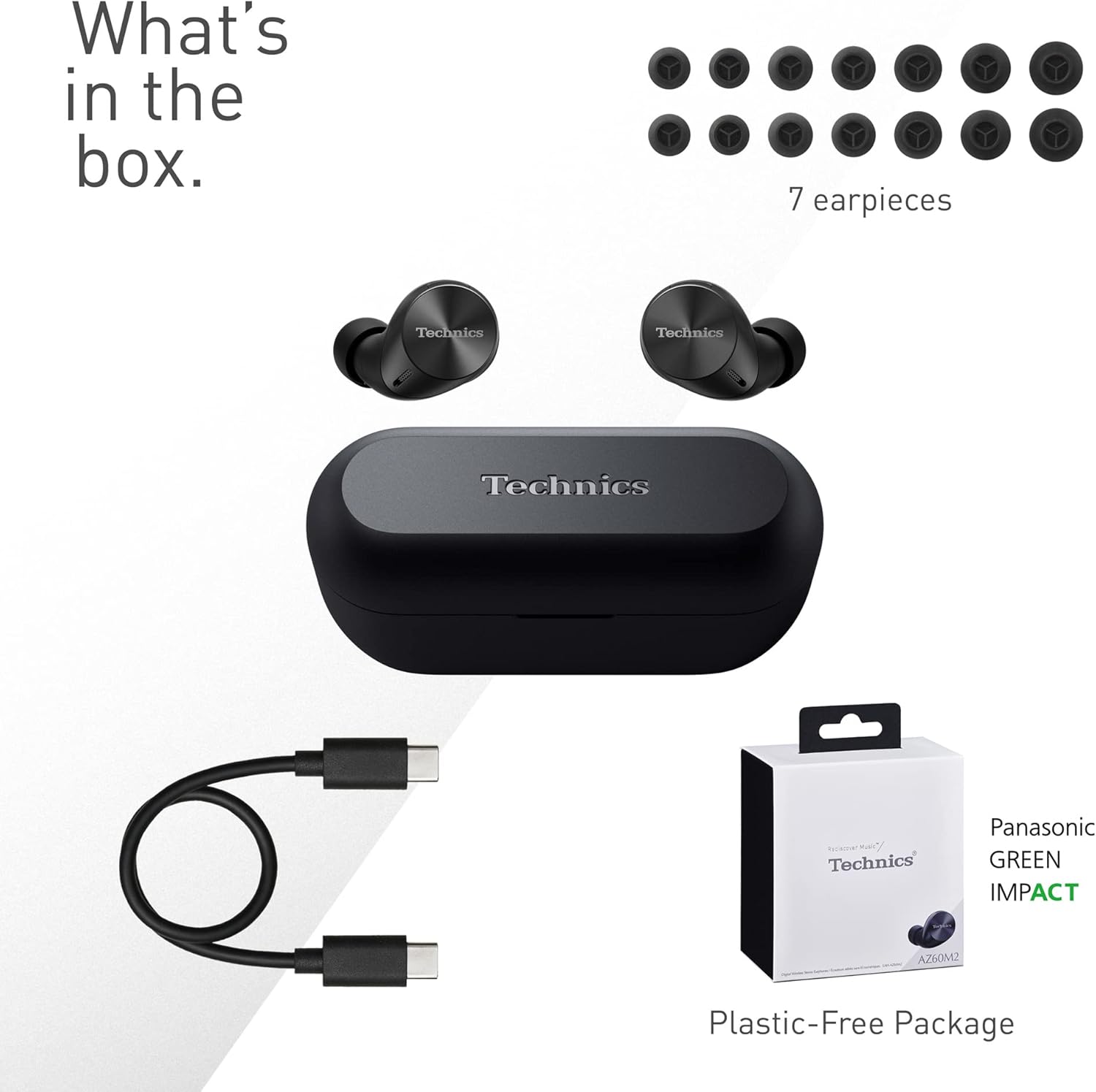
Image: A visual representation of the items included in the product packaging: the two earbuds, the charging case, a USB-C charging cable, and a selection of seven different earpiece sizes.
Налаштування
Початкова зарядка
Перед першим використанням повністю зарядіть навушники та зарядний футляр.
- Вставте обидва навушники в зарядний чохол.
- Connect the USB-C charging cable to the charging port on the case and to a USB power source.
- The indicator lights on the case will show charging status. A full charge typically takes approximately 2.5 hours for the case and earbuds.
Сполучення з пристроєм
The EAH-AZ60M2 headphones use Bluetooth for wireless connection.
- Відкрийте зарядний футляр із навушниками всередині. Навушники автоматично перейдуть у режим сполучення.
- На вашому пристрої (смартфоні, планшеті, ПК) увімкніть Bluetooth та знайдіть доступні пристрої.
- Select "EAH-AZ60M2" from the list of found devices.
- Once connected, a confirmation sound will play from the headphones.
Додаток Technics Audio Connect
For enhanced control and customization, download the "Technics Audio Connect" app from your device's app store (Google Play for Android 6.0+ or App Store for iOS 12+). The app allows you to:
- Перевірте рівень заряду батареї.
- Select EQ sound modes.
- Adjust noise cancelling levels.
- Customize touch sensor functions.
- Виконайте оновлення прошивки.
Інструкція з експлуатації
Носіння навушників
Select the earpieces that provide the most comfortable and secure fit for optimal sound quality and noise cancellation. The app can assist in finding the best fit. Insert the earbuds gently into your ears and rotate them slightly to ensure a snug seal.

Image: A person wearing the Technics EAH-AZ60M2 headphones, illustrating their comfortable, low-profile design. The image also displays the wide range of eartip sizes available for a customized fit.
Сенсорне керування
The headphones feature touch-sensitive panels on each earbud for controlling playback, calls, and noise modes. Functions can be customized via the Technics Audio Connect App.
| Дія | Лівий навушник | Правий навушник |
|---|---|---|
| Один дотик | Відтворення/пауза, відповідь на дзвінок | Відтворення/пауза, відповідь на дзвінок |
| Двічі торкніться | Пропустити трек вперед | Збільшення гучності |
| Потрійний дотик | Пропустити трек назад | Зменшення гучності |
| Тривале натискання | Toggle Noise Cancelling/Ambient Mode | Голосовий помічник |
Режими контролю шуму
The EAH-AZ60M2 features Dual Hybrid Active Noise Cancelling for immersive listening and Ambient Sound Modes for situational awareness.
- Активне шумозаглушення (ANC): Зменшує зовнішній шум для зосередженого прослуховування.
- Natural Ambient Mode: Allows you to hear surrounding sounds naturally.
- Attention Mode: Focuses on human voices, making it easier to hear announcements or conversations without removing the headphones.
Toggle between these modes by long-pressing the left earbud's touch sensor, or adjust settings precisely using the Technics Audio Connect App.

Image: A close-up of a single Technics EAH-AZ60M2 earbud, highlighting its key audio features including Hi-Res Audio Wireless support, LDAC compatibility, 8mm drivers, and Noise Cancelling capabilities.
Багатоточкове підключення
The headphones support multipoint connection, allowing simultaneous pairing with up to three devices (e.g., a smartphone, tablet, and PC). This enables seamless switching between audio sources without re-pairing.
- To switch audio, simply play content on the desired device. The headphones will automatically connect to the active audio source.
- Note: LDAC playback is not possible when connected to three devices simultaneously.

Image: A person sitting at a desk, demonstrating the smart 3-device switching feature of the Technics EAH-AZ60M2 headphones, with connection lines illustrating simultaneous pairing to a smartphone, tablet, and laptop.
Making and Receiving Calls (JustMyVoice Technology)
The EAH-AZ60M2 incorporates JustMyVoice Technology, utilizing 8 separate microphones and advanced wind noise reduction to isolate and amplify your speech while minimizing background noise during calls.
- Відповісти на дзвінок: Одне торкнення будь-якого навушника.
- Завершити виклик: Одне торкнення будь-якого навушника під час розмови.
- Відхилити виклик: Тривале натискання будь-якого навушника.
- Single Earphone Use: You can use one earbud independently while the other is charging or stored.

Image: A person outdoors, demonstrating the JustMyVoice Technology feature of the Technics EAH-AZ60M2 headphones, with visual cues indicating sound pickup and voice isolation.
Зарядка та термін служби батареї
The EAH-AZ60M2 headphones offer extended listening times with the included charging case.
- Термін служби батареї навушників: Up to 7 hours of playback with Active Noise Cancelling (ANC) enabled.
- Загальне відтворення з футляром: Up to 24 hours of total playback time with multiple charges from the case.
- Швидка зарядка: Швидка 15-хвилинна зарядка забезпечує приблизно 70 хвилин відтворення.
Бездротова зарядка Qi
The charging case supports Qi wireless charging. Simply place the case on a compatible Qi wireless charger (sold separately) to charge.

Image: An illustration depicting the battery life of the Technics EAH-AZ60M2 headphones, showing 7 hours of listening time for the earbuds and an additional 24 hours of backup with the charging case.
Технічне обслуговування
прибирання
- Regularly clean the earbuds, especially the earpieces and mesh grilles, with a soft, dry, lint-free cloth.
- Remove earpieces and clean them with mild soap and water if necessary, ensuring they are completely dry before reattaching.
- Очистіть зарядні контакти на обох навушниках та всередині футляра сухим ватним тампоном.
- Не використовуйте абразивні засоби для чищення, спирт або розчинники.
Водонепроникність
The EAH-AZ60M2 earbuds are IPX4 water resistant, meaning they are protected against splashing water from any direction. This makes them suitable for light rain or intensive workouts.
- Чохол для зарядки не є водостійким.
- Не занурюйте навушники у воду.
- Переконайтеся, що навушники сухі, перш ніж поміщати їх назад у зарядний футляр.
Зберігання
Коли навушники не використовуються, зберігайте їх у зарядному футлярі для захисту та заряджання. Зберігайте у прохолодному, сухому місці, подалі від прямих сонячних променів та екстремальних температур.
Усунення несправностей
| проблема | Можлива причина | Рішення |
|---|---|---|
| Немає звуку з навушників. | Headphones not paired or connected. Low battery. Volume too low. | Ensure headphones are paired and connected to your device. Charge headphones. Increase volume on both headphones and device. |
| Не вдається підключити навушники. | Headphones not in pairing mode. Device Bluetooth off. Interference. | Ensure earbuds are in the case and lid is open to enter pairing mode. Turn device Bluetooth off and on. Move closer to device. Forget device and re-pair. |
| Шумоподавлення неефективне. | Poor earbud fit. ANC mode not active. | Try different earpiece sizes for a better seal. Ensure ANC is enabled via touch control or app. |
| Якість дзвінків погана. | Environmental noise. Single earbud use. | Ensure both earbuds are used for optimal call quality. Move to a quieter environment. |
| Навушники не заряджаються. | Poor contact. Faulty cable/charger. | Ensure earbuds are correctly seated in the case. Clean charging contacts. Try a different USB-C cable or power source. |
For further assistance, refer to the Technics Audio Connect App or visit the official Technics support webсайт.
Технічні характеристики
| Особливість | Деталь |
|---|---|
| Назва моделі | EAH-AZ60M2 |
| Номер моделі товару | EAH-AZ60M2EK |
| Бренд | Техніка |
| Колір | чорний |
| Технологія підключення | Бездротовий (Bluetooth) |
| Форм-фактор | Вкладиші |
| Контроль шуму | Активне шумозаглушення (подвійне гібридне) |
| Розмір драйвера | 8 мм |
| мікрофони | 8 (for JustMyVoice Technology) |
| Багатоточкове підключення | До 3 XNUMX пристроїв |
| Водонепроникність | IPX4 (тільки для навушників) |
| Earbud Battery Life (ANC On) | До 7 годин |
| Загальний час роботи від батареї з футляром | До 24 годин |
| Акумулятор зарядного пристрою | 24 Hours average life |
| Зарядка | USB-C, бездротова зарядка Qi |
| Вага виробу (навушники) | 7 грамів (приблизно 0.247 унції) |
| Вага кейса | 28 грамів |
| Розміри продукту | 1.1 x 0.91 x 1.02 дюйма (навушник) |
Гарантія та підтримка
For information regarding warranty coverage, terms, and conditions, please refer to the warranty card included with your product or visit the official Technics webсайт.
For technical support, product registration, or frequently asked questions, please visit the Technics support page or contact their customer service.
- Technics Official Webсайт: www.technics.com
- Додаток Technics Audio Connect: Доступно в Google Play Store і Apple App Store.


