вступ
This manual provides detailed instructions for the setup, operation, and maintenance of your ATTACK SHARK Wireless Bluetooth/USB Wired Gaming Mechanical Keyboard. This compact 100-key keyboard features RGB backlighting, hot-swappable switches, and multiple connectivity options for versatile use across various devices.

Image: The ATTACK SHARK Wireless Mechanical Keyboard, showcasing its 100-key layout, RGB backlighting, orange coiled USB-C cable, and a cloud-shaped wrist rest.
Вміст упаковки
Перевірте наявність усіх предметів у вашій упаковці:
- ATTACK SHARK Wireless Mechanical Keyboard
- Cloud Keyboard Wrist Rest
- USB-C to USB-A Data Cable (Coiled)
- Клавіша та знімач перемикача
- 2.4-ГГц USB-приймач
- Additional Switches (Red Switch type)
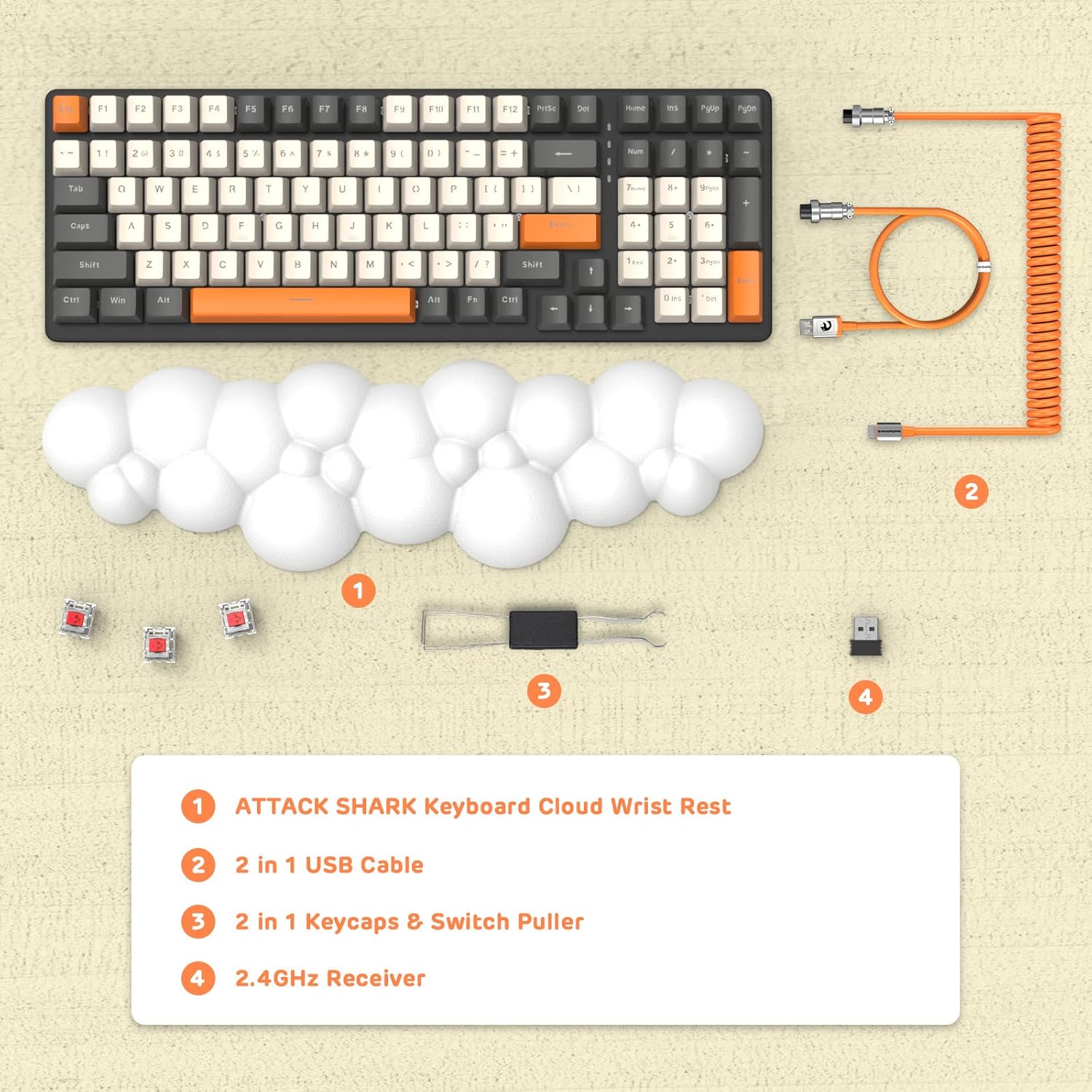
Зображення: Вид зверху view displaying the keyboard, cloud wrist rest, coiled USB cable, keycap and switch puller, and 2.4GHz USB receiver, along with spare switches.
Налаштування
The keyboard supports three connection modes: Bluetooth 5.0, 2.4GHz Wireless, and USB-C Wired.
1. Дротове підключення (USB-C)
- Connect the USB-C end of the provided coiled cable to the keyboard's USB-C port.
- Підключіть кінець кабелю USB-A до вільного порту USB на вашому комп’ютері.
- The keyboard will automatically switch to wired mode (indicated by FN+5).

Image: A visual representation of the keyboard connecting to various devices (laptop, tablet, desktop, smartphone) via wired USB, 2.4GHz wireless, and Bluetooth.
2. Бездротове з'єднання 2.4 ГГц
- Locate the 2.4GHz USB receiver.
- Підключіть USB-приймач у вільний USB-порт на комп’ютері.
- Прес fn+4 on the keyboard to activate 2.4GHz wireless mode. The indicator light will show the connection status.
3. Підключення Bluetooth
The keyboard can store up to three Bluetooth devices.
- Натисніть і утримуйте fn+1, fn+2, або fn+3 for 3-5 seconds to enter Bluetooth pairing mode for the desired channel. The indicator light will flash rapidly.
- On your device (e.g., laptop, tablet, smartphone), navigate to Bluetooth settings and search for available devices.
- Select "ATTACK SHARK Keyboard" (or similar name) from the list to pair.
- Після з’єднання індикатор перестане блимати та залишиться постійним.
- Щоб перемикатися між сполученими пристроями Bluetooth, просто натисніть fn+1, fn+2, або fn+3.
Інструкція з експлуатації
Керування RGB-підсвічуванням
Клавіатура оснащена налаштовуваним RGB-підсвічуванням з кількома режимами.
- Перемикання режиму підсвічування: Прес FN + INS щоб перемикатися між різними ефектами RGB-підсвічування.
- Налаштувати яскравість: Прес FN + ↑ (Стрілка вгору) для збільшення яскравості, FN + ↓ (Стрілка вниз), щоб зменшити яскравість.
- Налаштувати швидкість: Прес FN + ← (Left Arrow) to decrease effect speed, FN + → (Стрілка вправо), щоб збільшити швидкість ефекту.

Image: The keyboard displaying various RGB lighting patterns, with key combinations for switching modes and adjusting brightness/speed.
Перемикачі з можливістю гарячої заміни
The keyboard's PCB supports 3-pin mechanical switches, allowing for easy replacement without soldering. This feature enables customization of typing feel and extends the keyboard's lifespan.
- Використовуйте наданий знімач ковпачків клавіш, щоб обережно зняти потрібний ковпачок.
- Use the switch puller to gently grasp and remove the switch from the PCB.
- Зіставте контакти нового 3-контактного перемикача з отворами на друкованій платі та міцно натисніть, доки він не зафіксується на місці.
- Замініть ковпачок клавіші.

Зображення: Детальний view of the keyboard's PCB with a switch removed, demonstrating the hot-swappable feature. Spare red switches are also shown.
Акумулятор і зарядка
The keyboard is equipped with a 4000mAh lithium battery.
- Термін служби батареї: Up to 200 hours of use with the backlight turned off.
- Зарядка: Connect the keyboard via the USB-C cable to a power source. The charging indicator light will show the charging status.
- Низька гучністьtage Індикатор: The keyboard features a low voltage indicator to alert you when charging is required.

Image: The keyboard shown from the side, emphasizing its 4000mAh lithium battery capacity.
Технічне обслуговування
To ensure the longevity and optimal performance of your keyboard:
- Прибирання: Use a soft, dry cloth to wipe the keyboard surface. For deeper cleaning, remove keycaps using the provided puller and use compressed air to clear debris from between switches.
- Підставка для зап'ястя: The PU material of the wrist rest is durable and washable. Clean with a damp тканину та м’яке мило, якщо необхідно.
- Зберігання: Зберігайте клавіатуру в прохолодному, сухому місці, подалі від прямих сонячних променів та екстремальних температур.
- Уникайте рідин: Do not expose the keyboard to liquids. In case of spills, immediately disconnect power and allow it to dry completely before use.
Усунення несправностей
| Випуск | Можлива причина | Рішення |
|---|---|---|
| Клавіатура не реагує в бездротовому режимі. | Low battery, incorrect mode selected, receiver not connected, or Bluetooth not paired. | Charge the keyboard. Ensure correct mode (FN+4 for 2.4G, FN+1/2/3 for Bluetooth) is selected. Verify 2.4G receiver is securely plugged in. Re-pair Bluetooth if necessary. |
| Keys are "sticking" or registering multiple inputs. | Debris under keycap/switch, faulty switch. | Remove keycap and switch, clean thoroughly with compressed air. If issue persists, replace the switch using the hot-swappable feature. |
| RGB-підсвічування не працює або яскраве. | Backlight turned off, brightness set too low, or low battery. | Press FN+INS to cycle modes. Adjust brightness with FN+↑ / FN+↓. Charge the keyboard. |
| Keyboard not recognized by device. | Driver issue, incorrect connection mode, or device compatibility. | Ensure correct connection mode is active. Try a different USB port or device. For wired mode, ensure the cable is fully inserted. Check device's operating system for necessary drivers (usually plug-and-play). |
Технічні характеристики
- модель: 3b5c1fdb-29da-409c-b4b7-12e9e72fb741
- Підключення: Bluetooth 5.0, 2.4GHz Wireless (RF), USB-C Wired
- Макет: Compact 100 Keys (98% layout)
- Перемикачі: Hot-Swappable 3-pin Mechanical (Red Switch variant)
- Підсвічування: RGB Backlit (9 modes)
- Батарея: Літієва батарея 4000mAh
- Сумісні пристрої: Laptop, PC, Tablet (Mac/Win Supported)
- матеріал: Polyurethane (PU) for wrist rest
- Розміри: 16.97 x 6.42 x 2.52 дюйма (упаковка)
- Вага товару: 2.94 фунта
- Особливості: Ergonomic design, Custom Coiled Aviator Keyboard Cable, Keycap and Switch Puller included.
Гарантія та підтримка
For warranty information and technical support, please refer to the documentation provided with your purchase or visit the official ATTACK SHARK webсайт. Зберігайте чек про покупку для будь-яких гарантійних претензій.
Виробник: АТАКА АКУЛИ
Дата першої доступності: 8 травня 2023 р


