вступ
The bopmen Star10 Wireless Bluetooth Karaoke Microphone is a versatile 4-in-1 device designed for singing, acting as a portable handheld microphone, speaker, and featuring an integrated disco light. It offers high-resolution audio quality and extensive compatibility, making it suitable for various entertainment settings including car travel, home parties, and general use for adults and children.

Image: The Star10 Wireless Bluetooth Karaoke Microphone in Rose Gold, showcasing its sleek design and integrated disco ball.
Інформація про безпеку
- Не піддавайте пристрій дії екстремальних температур або вологості.
- Уникайте падіння та сильних ударів пристрою.
- Зберігати у недоступному для маленьких дітей місці, щоб запобігти небезпеці задухи дрібними деталями.
- Use only the provided USB C-A cable for charging.
- Не намагайтеся розібрати чи модифікувати пристрій.
- Протирайте пристрій м’якою сухою тканиною. Уникайте використання агресивних хімікатів або абразивних засобів для чищення.
Вміст упаковки
Будь ласка, поставте позначку у відповідному полі для наступних пунктів:
- 1 x Karaoke microphone (Star10)
- 1 x USB C-A charging cable
- 1 х посібник користувача
Продукт закінченийview
Familiarize yourself with the main controls and ports of your Star10 microphone.

Image: Detailed diagram illustrating the main control panel and bottom ports of the Star10 microphone, including Microphone Volume, On/Off/Play/Pause, Reverb On/Off, Volume Up/Down, Next/Previous Song, Tone Mode, Disco Light Control, USB Port, 3.5mm Earphone Jack, and TF Card slot.
Основні елементи керування:
- Microphone Volume / Accompaniment Mode On/Off: Adjusts microphone volume or toggles accompaniment.
- On/Off, Play/Pause: Powers the device on/off and controls music playback.
- Reverb On/Off / Bluetooth & TF Card Mode: Toggles reverb effect and switches between input modes.
- Збільшення/зменшення гучності: Adjusts overall speaker volume.
- Попередня/наступна пісня: Навігація по треках.
- Режим звуку: Cycles through different voice effects.
- Disco Light Control / Twins Pairing: Controls the disco light and initiates Twins Mode pairing.
Bottom Ports:
- Світловий індикатор: Shows device status (e.g., charging, connected).
- 3.5 mm Earphone Jack / Re-Set button inside: For private listening or resetting the device.
- Порт USB: Для заряджання мікрофона.
- Слот для картки TF: For playing music directly from a micro TF card (up to 32GB, not included).
Налаштування
Зарядка мікрофона:
- Connect the provided USB C-A cable to the USB port on the bottom of the microphone.
- Підключіть інший кінець кабелю до сумісного USB-адаптера живлення (не входить до комплекту) або USB-порту комп’ютера.
- The indicator light will show charging status. A full charge provides up to 10 hours of use (minimum 5 hours).
Увімкнення/вимкнення живлення:
- Натисніть і утримуйте Увімк./Вимк./Відтворення/Пауза button for a few seconds to power on the microphone. You will hear an audible prompt.
- To power off, press and hold the same button until you hear the power-off prompt.
Інструкція з експлуатації
Підключення Bluetooth:
The Star10 microphone uses Bluetooth 5.2 for seamless connection to your devices.
- Power on the microphone. It will automatically enter Bluetooth pairing mode.
- On your smartphone, tablet, or other Bluetooth-enabled device, open the Bluetooth settings.
- шукати "STAR 10" in the list of available devices and select it to pair.
- Once connected, you will hear a confirmation prompt. You can now play music from your device through the microphone's speaker and sing along.

Image: The Star10 microphone demonstrating its wide compatibility, connecting wirelessly to smartphones, tablets, and laptops via Bluetooth.
Режим картки TF:
Play music directly from a micro TF card.
- Insert a micro TF card (up to 32GB, not included) with your music files into the TF Card slot on the bottom of the microphone.
- The microphone will automatically switch to TF Card mode. If not, press the Reverb On/Off / Bluetooth & TF Card Mode button to cycle modes.
- Використовуйте Попередня / наступна пісня кнопки для навігації по треках та Відтворення/Пауза для керування відтворенням.
Disco Light Control:
Enhance your karaoke experience with the built-in disco light.
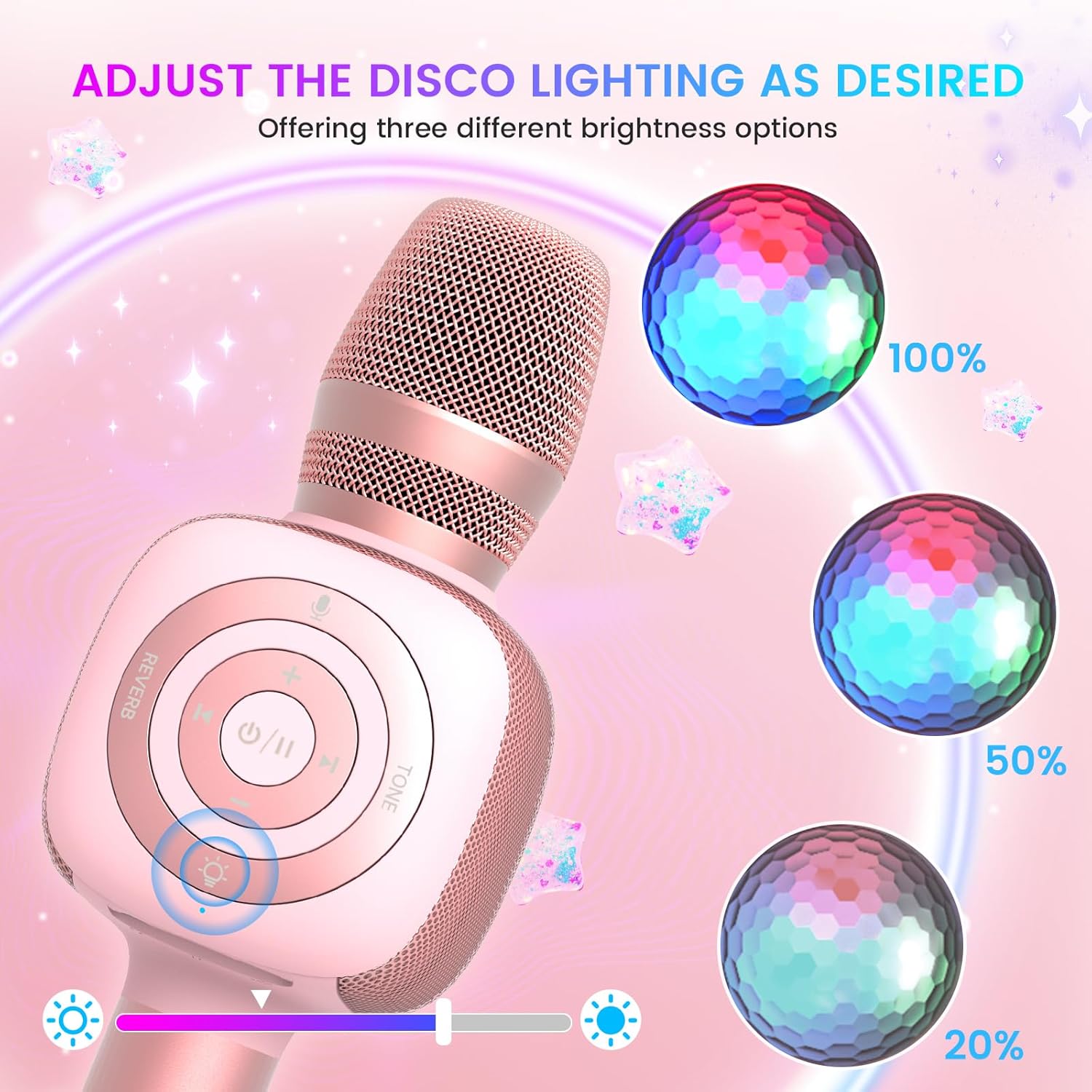
Image: The Star10 microphone's disco light feature, illustrating three adjustable brightness levels (100%, 50%, 20%) to suit different ambiance needs.
- Натисніть Disco Light Control button (light bulb icon) to cycle through three RGB color modes and brightness levels.
- Press again to turn the disco light off.
Tone Modes (Magic Mode):
Experiment with different voice effects for added fun.

Image: The Star10 microphone's "Magic Mode" feature, depicting icons for Male Voice, Female Voice, Cartoon Voice, and Monster Sound effects.
- Натисніть Режим звуку button to cycle through various voice effects such as Male Voice, Female Voice, Cartoon Voice, and Monster Sound.
- Continue pressing to return to the original tone.
Twins Mode (Duet Mode):
Pair two Star10 microphones for a duet experience.

Image: Two individuals enjoying a duet, each holding a Star10 microphone, illustrating the "Twins Mode" functionality for shared singing experiences.
- Ensure both Star10 microphones are powered on.
- On one microphone, press and hold the Disco Light Control button for 2 seconds until a prompt tone "LINK CONNECTED" is heard. This microphone is now in Twins Mode pairing.
- On your cellphone/device, perform Bluetooth pairing selection and choose either of the two microphones. Both microphones will now be connected and output audio.
- To exit Twins Mode, press and hold the Disco Light Control button on the paired microphone for 2 seconds.
Технічне обслуговування
- Прибирання: Wipe the microphone with a soft, dry cloth. Do not use liquid cleaners or aerosols.
- Зберігання: Зберігайте мікрофон у прохолодному, сухому місці, подалі від прямих сонячних променів та екстремальних температур.
- Догляд за акумулятором: For optimal battery life, charge the microphone regularly, even if not in frequent use. Avoid fully discharging the battery for extended periods.
Усунення несправностей
| проблема | Можлива причина | Рішення |
|---|---|---|
| Мікрофон не вмикається. | Низький заряд батареї; кнопка живлення утримувалася недостатньо довго. | Charge the microphone fully; Press and hold the power button for 3-5 seconds. |
| Не вдається підключитися через Bluetooth. | Microphone not in pairing mode; Device Bluetooth off; Interference. | Ensure microphone is on and in pairing mode; Enable Bluetooth on your device; Move closer to the microphone; Restart both devices. |
| Немає звуку з динаміка. | Volume too low; Device volume too low; Incorrect mode. | Increase microphone volume; Increase device volume; Ensure correct mode (Bluetooth/TF Card). |
| Voice effects not working. | Неправильне натискання кнопки. | Press the 'Tone Mode' button repeatedly to cycle through effects. |
| Disco light not working. | Light turned off. | Press the 'Disco Light Control' button to turn on/cycle modes. |
Технічні характеристики
- модель: ЗІРКА 10
- Бренд: бопмен
- Форм-фактор мікрофона: Портативний
- Технологія підключення: Bluetooth 5.2
- Джерело живлення: Живлення від батареї (2 літій-іонні батареї в комплекті)
- Термін служби батареї: Up to 10 hours (minimum 5 hours)
- Розміри продукту: 18.7 x 16.54 x 12.2 дюймів
- Вага товару: 1.19 фунта (540 грам)
- Коефіцієнт сигнал-шум: 52 дБ
- АЧХ: 10 кГц
- Сумісні пристрої: Personal Computer, Smartphone, Karaoke Machine
- Особливість: Mute Function, Disco Light, Voice Changer, Twins Mode
- колір: Рожеве золото
- Рекомендоване використання: В приміщенні/на вулиці
Гарантія та підтримка
Your bopmen Star10 Karaoke Microphone comes with a standard manufacturer's warranty. For detailed warranty information, please refer to the warranty card included in your package or visit the official bopmen webсайт.
If you encounter any issues or have questions regarding your product, please do not hesitate to contact our professional customer service team. We are committed to providing support and assistance within 24 hours to ensure your satisfaction.
Контактна інформація: Please refer to the contact details provided in your product packaging or on the official bopmen support page for the most up-to-date information.


