1. Вступ
The MOBAPAD ChiTu PRO-HD is a versatile wireless controller designed for an enhanced gaming experience across multiple platforms. It features advanced technology such as Hall-effect joysticks, ALPS linear motors, and comprehensive customization options. This manual provides essential information for setting up, operating, maintaining, and troubleshooting your controller.

Figure 1: MOBAPAD ChiTu PRO-HD Wireless Controller connected to a Nintendo Switch.
2. Вміст упаковки
Переконайтеся, що всі предмети присутні в упаковці:
- MOBAPAD ChiTu PRO-HD Wireless Controller
- USB-A to USB-C Cable (1m / 39.37in)
- Інструкція з експлуатації
- Additional Cross-style D-Pad for swapping

Figure 2: Included items in the MOBAPAD ChiTu PRO-HD package.
3. Налаштування
3.1 Заряджання контролера
Connect the controller to a power source using the provided USB-A to USB-C cable. The controller features a built-in 1000mAh lithium battery, providing approximately 30 hours of usage on a full charge.

Figure 3: USB-C charging port and programmable back paddles.
3.2 Сполучення з Nintendo Switch
- На вашому Nintendo Switch перейдіть до меню HOME.
- Виберіть «Контролери» > «Змінити хват/порядок».
- On the MOBAPAD ChiTu PRO-HD controller, press and hold the small pairing button located on the back of the controller (between the M1 and M2 buttons) until the LED indicators begin to flash.
- Once the controller is detected by the Switch, the LED indicators will stabilize, and the controller will be paired.
Відео 1: Оверview of the MOBAPAD ChiTu PRO-HD controller's features and pairing process.
3.3 Detachable D-Pad and Joysticks
The controller supports detachable joysticks and a replaceable D-pad. To swap the D-pad, gently pull the existing D-pad off and align the new D-pad with the slots, then press firmly until it clicks into place. This allows for customization based on game genres and player preferences.
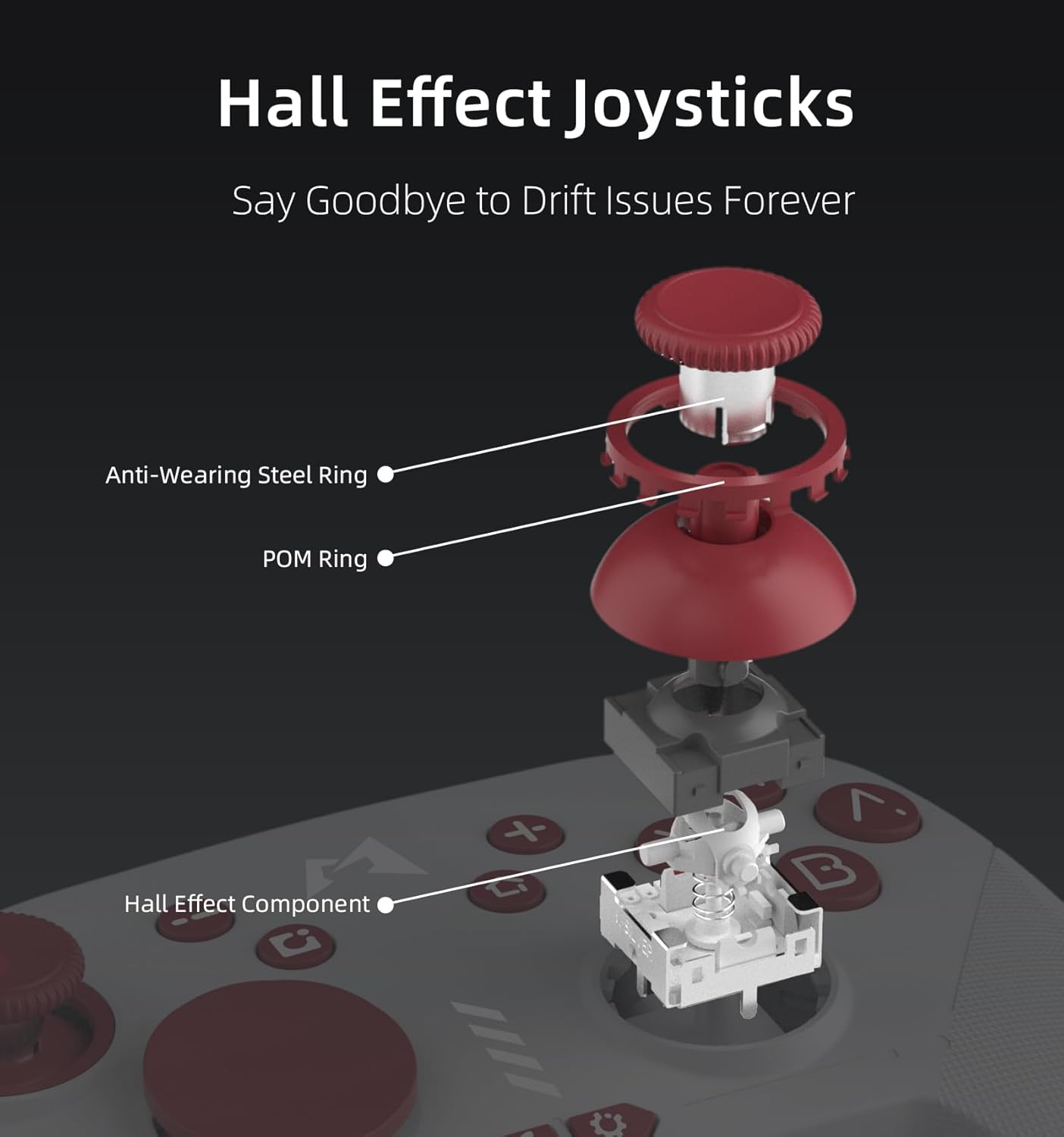
Малюнок 4: Розібраний view of Hall Effect Joysticks, highlighting components designed to prevent drift.
4. Інструкція з експлуатації
4.1 Основні елементи керування
- Аналогові стіки: Для точного руху та керування камерою.
- Кнопки A/B/X/Y: Стандартні кнопки дій.
- Кнопки +/-: Plus and Minus buttons for in-game menus.
- Кнопка знімка екрана: Capture screenshots during gameplay.
- Кнопка "Додому: Повернення до головного меню.
- Плечові ґудзики (L/R, ZL/ZR): Для різних дій у грі.
4.2 Шестиосьове датчик руху
The controller supports six-axis motion sensing, allowing for intuitive control in compatible games. This feature is particularly useful for aiming, steering, and solving puzzles that require tilting or motion input.

Figure 5: Demonstrating 6-Axis Gyroscope motion sensing.
4.3 Функціональність NFC
The controller includes NFC functionality, enabling you to scan Amiibo figures for in-game bonuses and content. Simply place your Amiibo on the MOBAPAD logo area on the controller to activate.

Figure 6: Amiibo scanning via NFC on the controller.
5. Ключові характеристики
- Hall-Effect Joysticks: Equipped with Control Silver's custom JH16 Hall-effect joysticks, ensuring precise input, low power consumption, resistance to interference, and prevention of metal magnetization, effectively eliminating stick drift.
- HD-гуркіт: Features an original ALPS linear motor with 320Hz high-frequency drive and dual-axis space, providing a lifelike and immersive vibration experience.
- Механічні кнопки: The face buttons offer a tactile and responsive feel, similar to mechanical switches, ensuring accurate and satisfying feedback with each press.
- Довговічність: Designed for longevity with 5 million mechanical button presses and 5 million Hall-effect joystick cycles.
- Integrated Mechanical Structure: The joystick's mechanical design uses an integrated structure to resolve issues like metal magnetization and magnetic interference, enhancing electrical performance and consistent quality.
6. Налаштування
6.1 Функція Турбо
The controller includes an independent Turbo button for rapid-fire actions. To activate, press and hold the Turbo button, then press the desired action button (e.g., A, B, X, Y). The button will now repeatedly register presses as long as it's held down. There are three different turbo intensities, starting at medium. Repeat the process to deactivate.

Figure 7: Independent Turbo Button for rapid-fire actions.
6.2 Програмування макросів
The controller supports macro programming for complex command sequences. To record a macro:
- Press and hold the 'Settings' button (gear icon) for a few seconds until the controller vibrates and the logo turns purple, indicating it's ready to record.
- Perform the desired button inputs for your macro.
- To save the macro, press either the M1 or M2 back paddle. The recorded sequence will be assigned to that paddle.
6.3 Software-Based Customization
Utilize the dedicated mobile application for advanced customization, including joystick dead zone adjustment, key remapping for macro programming, and RGB lighting control for the logo.

Figure 8: Companion app for advanced customization.
7. Технічне обслуговування
To ensure the longevity and optimal performance of your MOBAPAD ChiTu PRO-HD controller, follow these maintenance guidelines:
- Прибирання: Використовуйте м’яку суху тканину для протирання контролера. Для стійкого бруду злегкаampПротріть тканину водою або м’яким миючим розчином. Уникайте агресивних хімікатів або абразивних матеріалів.
- Зберігання: Зберігайте контролер у прохолодному, сухому місці, подалі від прямих сонячних променів та екстремальних температур.
- Обробка: Уникайте падіння контролера або сильних ударів, оскільки це може пошкодити внутрішні компоненти.
8. Вирішення проблем
Якщо у вас виникли проблеми з контролером, спробуйте виконати такі дії:
- Controller Not Pairing: Ensure the controller is charged. Press and hold the pairing button on the back of the controller until the LEDs flash, then re-attempt pairing via the Nintendo Switch 'Change Grip/Order' menu.
- Затримка вхідного сигналу або обриви з'єднання: Ensure the controller is within range of the console. Avoid obstructions between the controller and the console. If issues persist, try resetting the controller using the small reset hole on the back.
- Дрейф палиці: The Hall-effect joysticks are designed to prevent drift. If you experience any unusual stick behavior, try recalibrating the joysticks via the companion app or the Switch system settings.
- Проблеми із зарядкою: Verify that the USB-C cable is securely connected to both the controller and the power source. Try using a different USB-C cable or power adapter.
9. Технічні характеристики
| Особливість | Деталь |
|---|---|
| Номер моделі | PRO-HD |
| Розміри | 5.99 x 4.13 x 2.42 дюймів |
| Вага товару | 12.52 унції |
| Акумулятор | 1000mAh Lithium (included) |
| Термін служби батареї | прибл. 30 години |
| Підключення | Wireless (Bluetooth), USB-C |
| Тип джойстика | Hall-Effect (JH16) |
| вібрація | ALPS Linear Motor (HD Rumble) |
| Контроль руху | 6-осьовий гіроскоп |
| Підтримка NFC | Yes (Amiibo) |
| Виробник | Dongguan Heng xun Energy Technology CO., Ltd. |
10. Гарантія та підтримка
For warranty information or technical support, please refer to the documentation included with your purchase or contact MOBAPAD customer service directly. Keep your proof of purchase for any warranty claims.


