вступ
This manual provides detailed instructions for the installation, operation, and maintenance of your Strong SRT 7040 Digital Satellite HD Receiver. Please read this manual carefully before using the device to ensure proper functionality and to prevent damage.

Image: The Strong SRT 7040 DTT Tuner and its retail packaging.
The Strong SRT 7040 is a Full HD digital satellite receiver designed for Free-To-Air (FTA) channels. It features a USB port for multimedia playback and software updates, and supports Dolby Audio for enhanced sound quality.
1. Налаштування
1.1 Розпакування
Обережно вийміть усі компоненти з упаковки. Переконайтеся, що є такі предмети:
- Strong SRT 7040 DTT Tuner
- Пульт дистанційного керування (з 2 батарейками типу AAA)
- Адаптер живлення
- Посібник користувача
1.2 Підключення пристрою
Follow these steps to connect your SRT 7040 receiver:
- Супутниковий вхід: Connect your satellite dish cable to the СИБІВ порт на задній панелі приймача.
- Відеовихід (HDMI): Підключіть кабель HDMI від HDMI порт на ресивері до входу HDMI на вашому телевізорі.
- Video Output (SCART): Alternatively, for older televisions, connect a SCART cable from the Телевізор SCART порт на ресивері до входу SCART на вашому телевізорі.
- Audio Output (Digital): Для цифрового аудіо підключіть коаксіальний кабель від COAXIAL S/PDIF port to your digital audio ampліфірник.
- Audio Output (Analog): Для аналогового аудіо підключіть кабелі RCA від AUDIO R/L ports to your audio Hi-Fi ampліфірник.
- USB-пристрій: If desired, connect a USB storage device to the USB port for multimedia playback or software updates.
- Потужність: Підключіть адаптер живлення до 12В === 1.5А input on the receiver, then plug the adapter into a wall outlet.

Image: Rear panel connections of the Strong SRT 7040 DTT Tuner, showing SAT IN, HDMI, TV SCART, COAXIAL S/PDIF, AUDIO R/L, USB, and Power input.
1.3 Перше встановлення та сканування каналів
Upon first power-on, the receiver will guide you through an initial setup wizard. Follow the on-screen prompts to select your language, country, and perform an automatic channel scan. This process will detect and store all available satellite channels.
2. Інструкція з експлуатації
2.1 Дистанційне керуванняview
The included remote control allows you to access all functions of the SRT 7040. Insert the two AAA batteries into the remote control, ensuring correct polarity.

Image: The remote control for the Strong SRT 7040 DTT Tuner, showing buttons for power, numbers, volume, channel, menu, and special functions.
2.2 Основні функції
- Потужність: Натисніть ПОТУЖНІСТЬ button to turn the receiver on or off (standby mode).
- Вибір каналу: Використовуйте CH+ / CH- buttons to change channels sequentially, or use the numeric keypad to enter a channel number directly.
- Регулювання гучності: Використовуйте ГУЧНІСТЬ+ / VOL- кнопки для регулювання гучності звуку.
- Вимкнути звук: Натисніть ВИМКНЕНО кнопку, щоб тимчасово вимкнути звук.
2.3 Навігація по меню
Натисніть МЕНЮ кнопку для доступу до головного меню. Використовуйте клавіші зі стрілками (UP, ВНИЗ, ВЛІВО, ПРАВИЛЬНО) для навігації між опціями та OK щоб підтвердити вибір. Натисніть EXIT щоб повернутися до попереднього екрана або прямого ефіру.
2.4 Особливості
- Таймери: The receiver supports programming timers for recording or switching to specific channels at scheduled times. Access this feature via the menu.
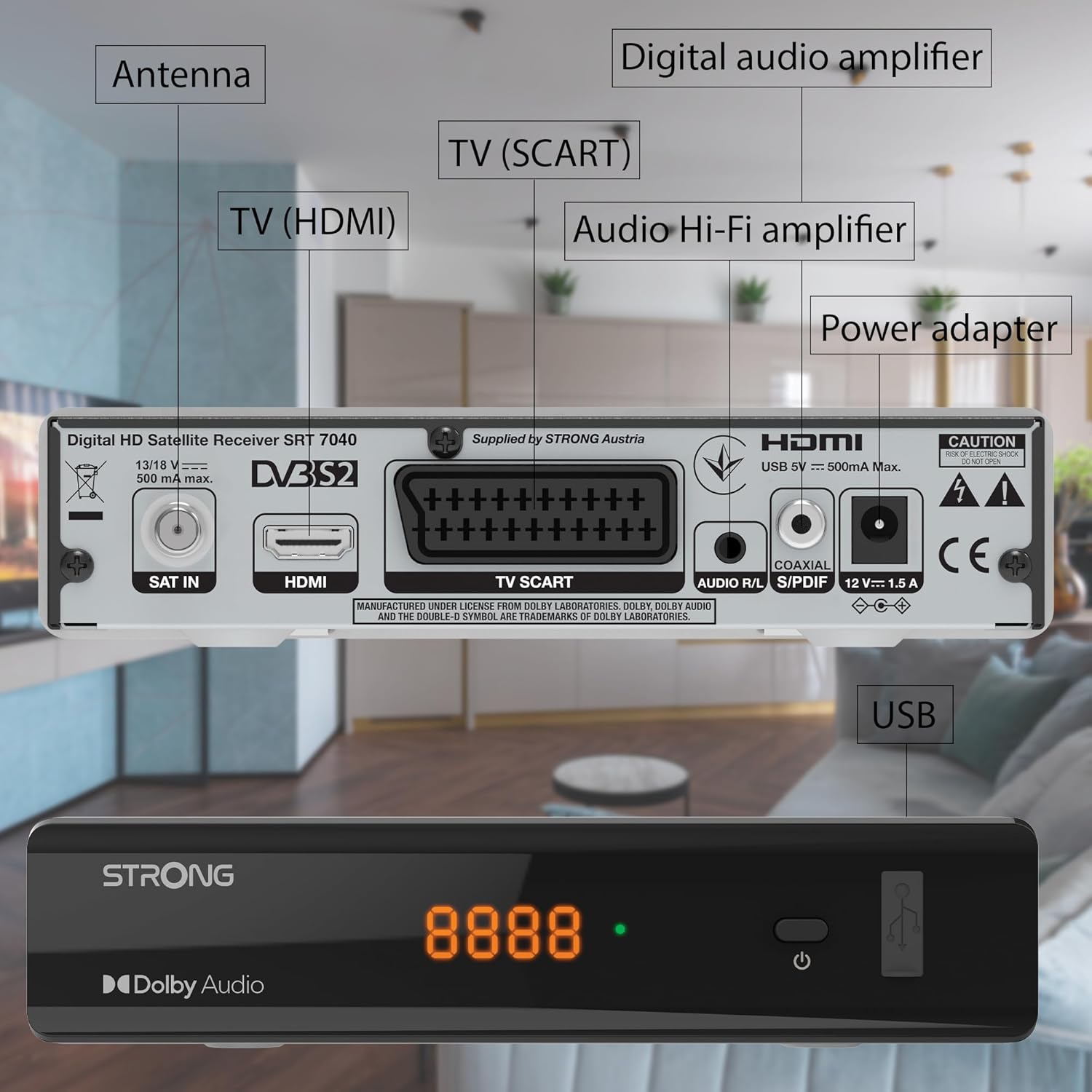
Image: The Strong SRT 7040 DTT Tuner displaying a timer icon, indicating its scheduling capabilities.
- Списки улюблених: Create customized lists of your preferred channels for quick access.
- Субтитри: Enable or disable subtitles for compatible broadcasts using the SUB кнопку на пульті.
- Електронний телегід (EPG): Натисніть EPG кнопку до view інформація про програму майбутніх трансляцій.
- Dolby Audio: The receiver supports Dolby Audio for a high-quality sound experience.

Image: The Strong SRT 7040 DTT Tuner with the Dolby Audio logo, illustrating its sound processing capability.
3. Технічне обслуговування
3.1 Очищення
To clean the receiver, disconnect it from the power supply. Use a soft, dry cloth to wipe the exterior. Do not use liquid cleaners, aerosols, or abrasive materials, as these can damage the finish or internal components.
3.2 Оновлення програмного забезпечення
Періодично перевіряйте дані виробника website for available software updates. Updates can improve performance, add new features, or resolve issues. Software updates are typically performed via the USB port following specific instructions provided with the update file.
3.3 Інформація про безпеку
- Не відкривайте приймач casing. Усередині немає деталей, які може обслуговувати користувач. Звертайтеся до кваліфікованого персоналу з будь-яким обслуговуванням.
- Тримайте приймач подалі від прямих сонячних променів, джерел тепла та вологи.
- Забезпечте належну вентиляцію навколо пристрою, щоб запобігти перегріву.
- Використовуйте лише наданий адаптер живлення.
4. Вирішення проблем
If you encounter problems with your SRT 7040, consult the following table before contacting support.
| проблема | Можлива причина | Рішення |
|---|---|---|
| Немає живлення | Адаптер живлення не підключено; розетка несправна | Check power adapter connection; Try a different power outlet |
| Немає сигналу / Чорний екран | Satellite cable loose or disconnected; Incorrect input selected on TV; Satellite dish alignment issue | Check SAT IN cable connection; Ensure TV is on correct HDMI/SCART input; Perform a channel scan; Consult a professional for dish alignment if necessary |
| Пульт не працює | Batteries depleted or incorrectly inserted; Obstruction between remote and receiver | Replace batteries; Ensure correct polarity; Remove any obstructions; Point remote directly at receiver |
| Погана якість зображення | Weak satellite signal; Incorrect display settings | Check satellite signal strength in menu; Adjust TV display settings; Ensure Full HD content is being broadcast |
5. Технічні характеристики
The following are the technical specifications for the Strong SRT 7040 Digital Satellite HD Receiver:
- модель: SRT 7040 (SAT FTA Full HD)
- Бренд: Сильний
- Розміри: 3.39 x 6.46 x 1.38 дюйми (8.6 x 16.4 x 3.5 см)
- Вага товару: 9.2 унції (260 грама)
- колір: чорний
- Технологія підключення: USB
- томtage: 100 - 240 В
- Частота: 50 - 60 Гц
- Споживана потужність: 18 kWh (operational, typical)
- Діапазон робочих температур: від 0ºC до 40ºC
- Відносна вологість: 10% - 95%
- Акумулятори: 2 батарейки типу AAA (в комплекті для пульта дистанційного керування)
- Специфікація виконана: DVB-S2
- У комплекті: Wally Receiver
6. Гарантія та підтримка
For warranty information and technical support, please refer to the warranty card included in your product packaging or visit the official Strong webсайт. Зберігайте чек про покупку як підтвердження покупки для гарантійних претензій.
For further assistance, you may contact Strong customer service through the contact details provided on their official webсайт.


